Energy performance · NTA 8800

Open Energy Studio

Open source calculation of BENG and the energy label

The energy performance of dwellings and utility buildings under NTA 8800, with a calculation kernel you can check for yourself. From new builds with BENG 1, 2 and 3 and TOjuli to existing buildings with a survey, tailored advice and relabelling. On the desktop and in the browser.

  • NTA 8800:2025+C1
  • Dwellings and utility buildings
  • Windows · macOS · Linux · Web
  • Free · LGPL-3.0
  • Preview release
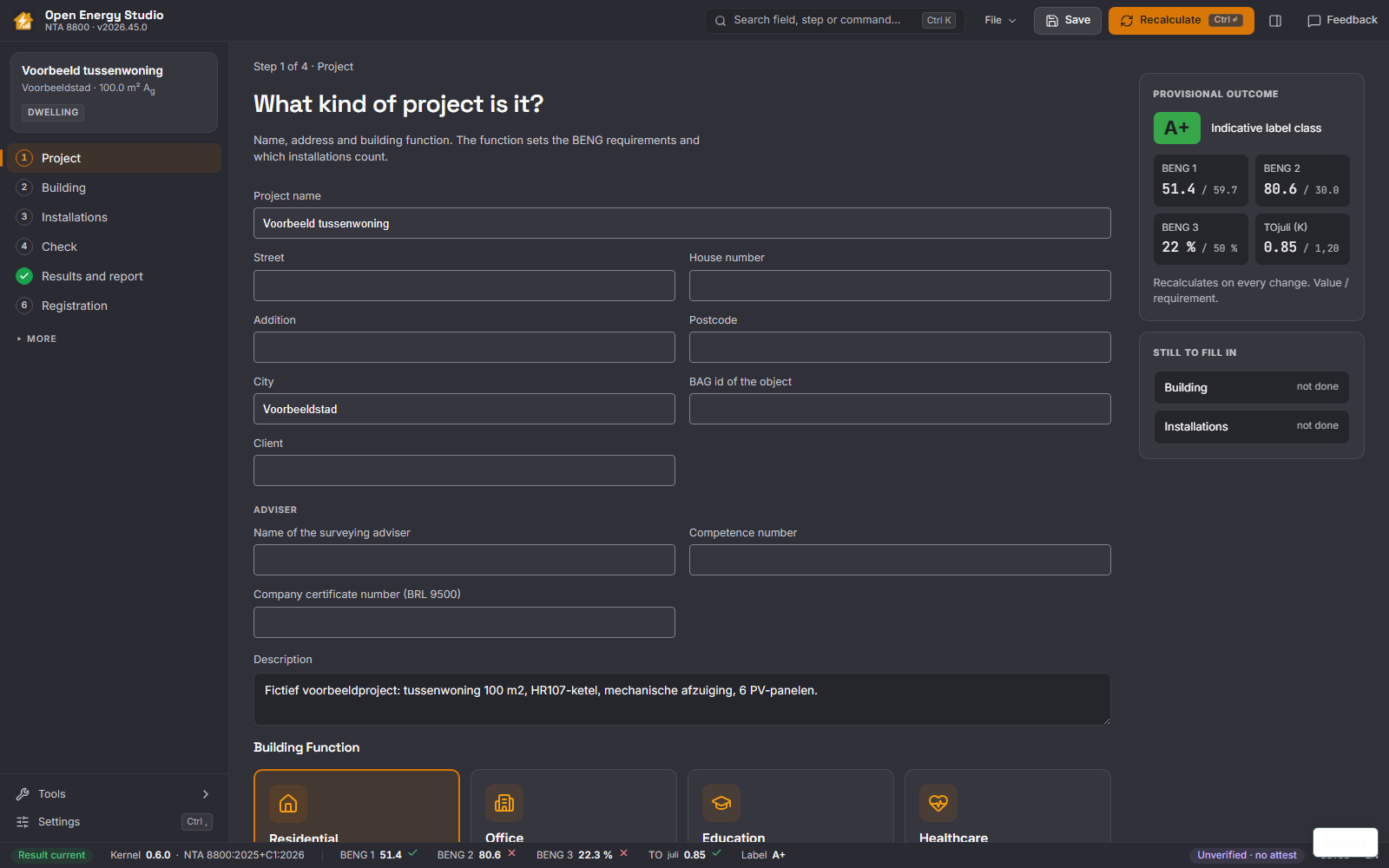
Open Energy Studio in a dark theme with an English interface: the fictional terraced-house example, with the provisional outcome label A+ and the BENG indicators
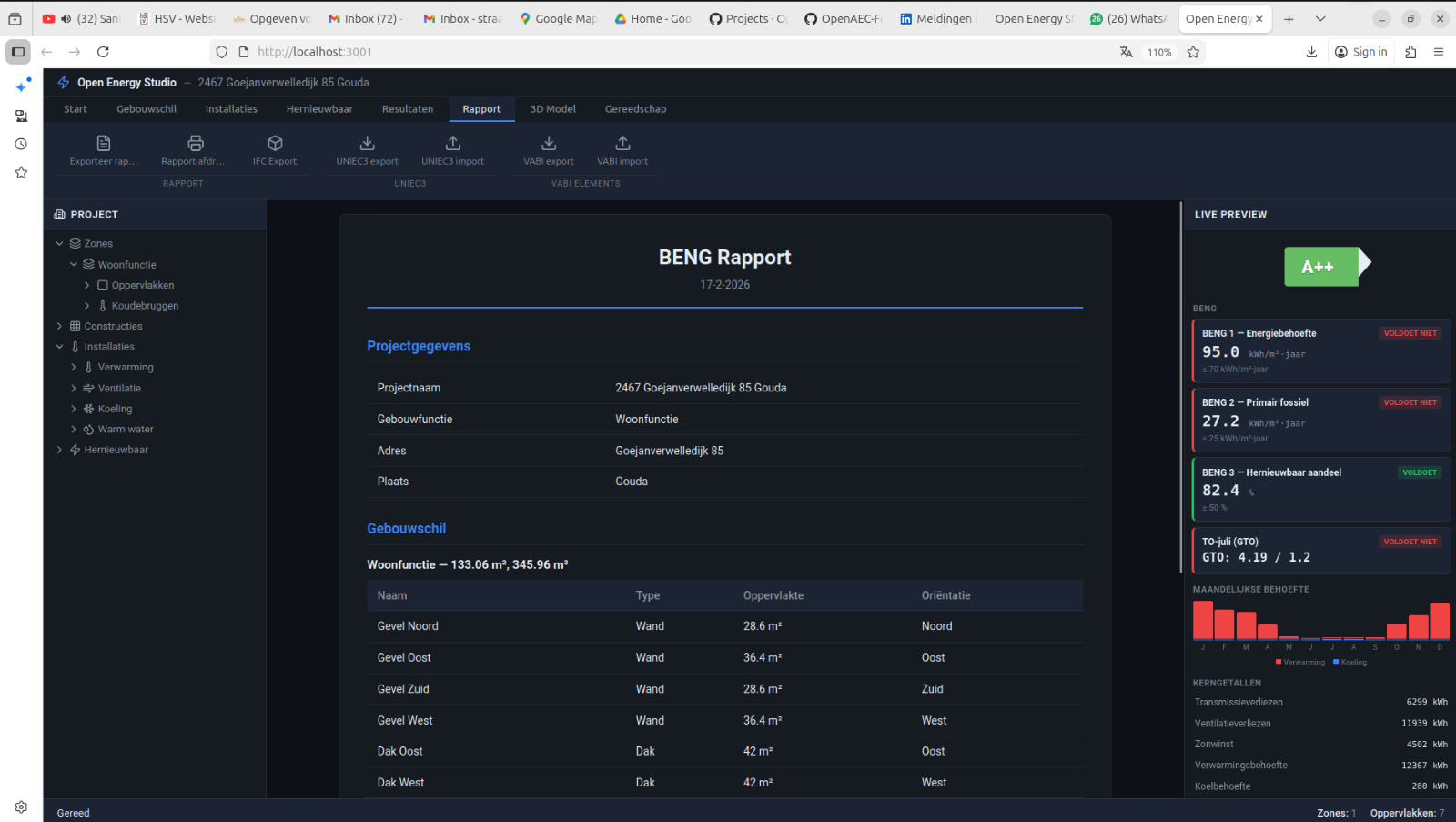
The results page of Open Energy Studio with the energy label, BENG 1, 2 and 3, TOjuli and the monthly energy need of a sample office
Entering the thermal envelope of a sample dwelling: walls, roofs, floor and windows by orientation, with the provisional result on the right
The results overview with the energy use per month and the key figures of the calculation

Not yet attested. Open Energy Studio does not (yet) hold a BRL 9501 attest. The results are indicative and cannot be used for an official energy label, a BENG check for a permit or registration in EP-Online.

Features

From building envelope to registration file

Start with the highlights or pick a topic.

The results page of Open Energy Studio with the energy label, BENG 1, 2 and 3, TOjuli and the monthly energy need of a sample office

01 Calculation kernel

NTA 8800 in an open calculation kernel

Energy need, BENG 1, 2 and 3, TOjuli, primary fossil energy use and the energy label all come from one calculation kernel written in Rust. Every result carries the kernel version and a fingerprint of the input, and the calculation trace shows where a number comes from.

Learn more
Entering the thermal envelope of a sample dwelling: walls, roofs, floor and windows by orientation, with the provisional result on the right

02 Input

Step by step, with the result alongside

Project, building, installations, check, results and registration: the app guides you through the calculation in fixed steps. For each calculation zone you enter the surfaces, constructions, thermal bridges and airtightness, and the provisional result updates with every change.

Learn more
The results overview with the energy use per month and the key figures of the calculation

03 Existing buildings

Survey, tailored advice and relabelling

Survey existing dwellings and utility buildings following ISSO 82.1 and 75.1 and turn the answers into project input. Build tailored advice with user profiles, fitting to measured consumption, packages of measures and net present value, and compare an original and a changed project when relabelling.

Learn more
Entering the thermal envelope of a sample dwelling: walls, roofs, floor and windows by orientation, with the provisional result on the right

04 File

Report, file and integrations

Produce a report at three levels of detail, attach evidence to the input and export a file with a manifest and a SHA-256 per document. Other programs and AI assistants can calculate along through a local HTTP API and an MCP server.

Learn more
  • NTA 8800 kernel

    Energy need, BENG 1/2/3, TOjuli, primary energy and the energy label, deterministic and without I/O.

  • Standard editions

    NTA 8800:2025+C1 by default; 2024, 2023, 2022 and 2020+A1 as older editions that cannot be registered.

  • Envelope and zones

    Walls, roofs, floors and windows per calculation zone, with constructions, thermal bridges, airtightness and unheated spaces.

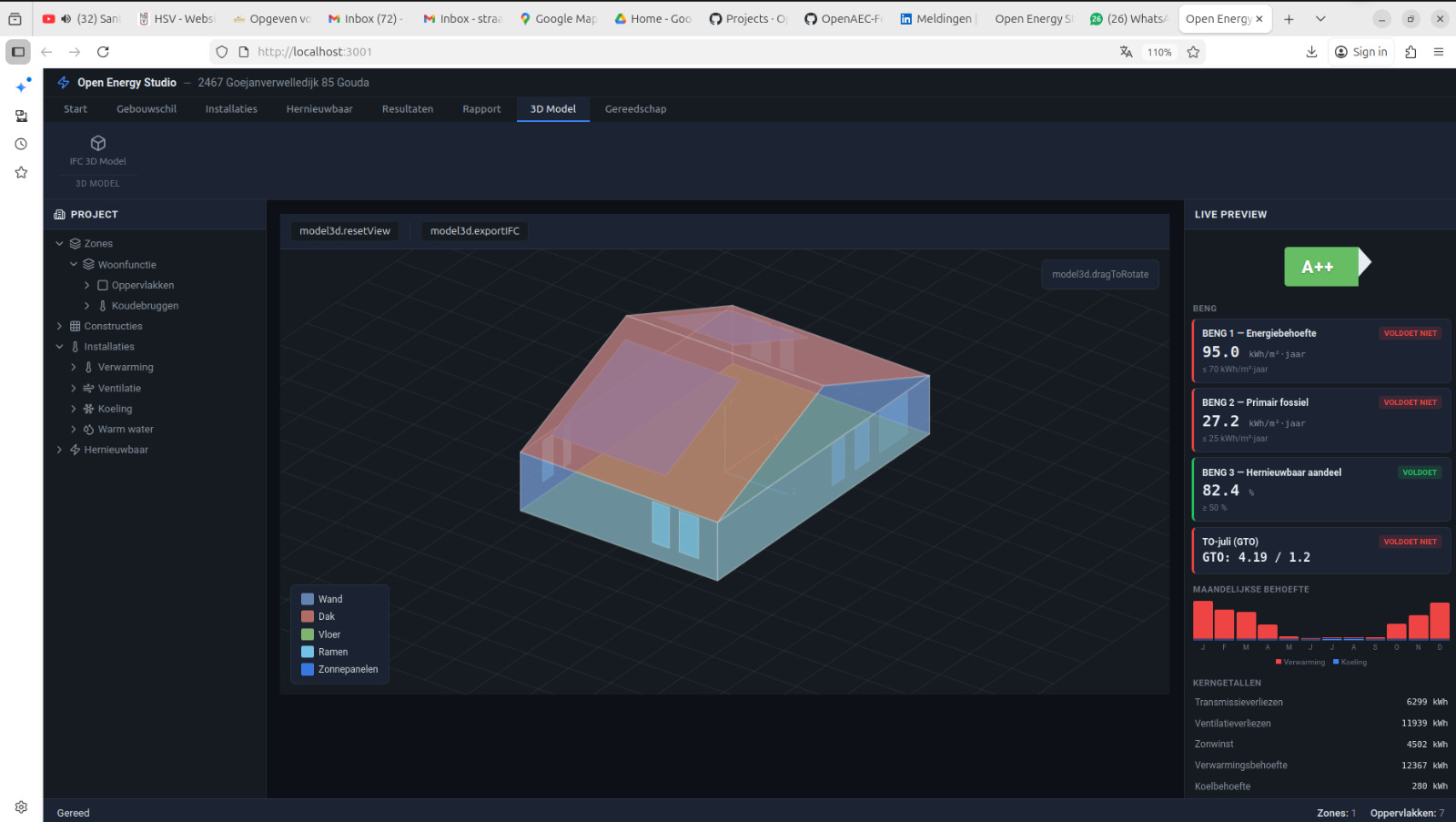
  • 3D model

    View the building envelope you entered in 3D.

  • Results and calculation trace

    By service, by zone and by month, with the origin of every number.

  • Survey

    Survey of existing dwellings (ISSO 82.1) and utility buildings (ISSO 75.1), converted into project input.

  • Tailored advice

    Following ISSO 82.2 and 75.2: user profiles, measured consumption, packages of measures and net present value.

  • Relabelling

    Compare an original and a changed project following BRL 9500, annexes 6a and 6b.

  • Reports

    An energy performance report as a summary, standard or detailed, plus a report for the tailored advice.

  • Source and evidence

    Evidence linked to the input, including what you take over from the register of a quality declaration.

  • Registration file

    Registration data, label statements and a ZIP with a manifest and a SHA-256 per file.

  • EP-Online overview

    The data in the structure of the EP-Online export, with the field limits from the schema.

  • HTTP API

    All 46 kernel operations through a local API with an OpenAPI 3.1 description.

  • Works with an AI assistant

    An MCP server with the same operations; every tool only calculates and changes nothing.

  • Import and export

    Exchange files from other NTA 8800 software, with the file name, a SHA-256 and the import notes for each import.

  • Desktop and browser

    The same interface on Windows, macOS and Linux, and in the browser with the kernel as WebAssembly, without a server.

  • Manual

    A Dutch manual in the app and with every release, stamped for the kernel version.

Download

Download v2026.45.0

Free, no account needed. This is a preview release; the desktop app tells you itself when a new version is out.

.exe installer ·

Other platforms

Rather not install anything? The app also runs in the browser, where the kernel calculates on your own computer, without a server.

New in v2026.45.0

Feedback from the app and recorded declarations

Released on 6 November 2026 as a preview release, with calculation kernel 0.6.0.

  • Feedback from the app

    Report a problem, idea or question with the button in the title bar; it becomes a public issue on GitHub.

  • Register snapshot

    Record what you take over from the register of a quality declaration; the kernel checks whether the input still matches it.

  • Clearer import

    An incomplete building folder in an exchange file is now reported instead of silently skipped.

  • MCP tools only calculate

    Every tool states that it changes nothing, so an assistant may use it without write permissions.

  • New app logo

    The approved logo in the app, the title bar, the start view and the installers.

  • Also as a Snap

    For Linux there is now also a Snap package, next to .deb, .rpm and AppImage.

Frequently asked questions

What does it cost?

Nothing. Open Energy Studio is open source under the LGPL-3.0: no licence fees and no account. The texts of NTA 8800, ISSO and BRL are not included; you need your own copies of those.

Can I use it for an official energy label?

Not yet. The software holds no BRL 9501 attest, so the results are indicative and cannot be used for an energy label, a BENG check for a permit or registration in EP-Online. The goal is a calculation tool that can be attested; what is still open for that is listed requirement by requirement in the repository.

Which edition of NTA 8800 does it calculate?

NTA 8800:2025+C1:2026 by default. You can also calculate the 2024, 2023, 2022 and 2020+A1 editions, but those cannot be registered. When you switch edition, the app first shows what the new edition refuses or additionally requires.

Does it also work for existing buildings?

Yes. There is a survey for existing dwellings (ISSO 82.1) and utility buildings (ISSO 75.1), tailored advice following ISSO 82.2 and 75.2, and relabelling following BRL 9500.

What is the difference between the web version and the desktop app?

Both have the same interface and the same kernel. In the browser the kernel runs as WebAssembly on your own computer, without a server. The desktop app saves projects as files and tells you itself when a new version is out.

How do I know the calculation is right?

Every change to the kernel has to pass a fixed gate: tests with values calculated from the standard's pages independently of the code, public calculation reports and the RVO reference dwellings. In the app the calculation trace shows where every number comes from.

Can I import projects from other software?

Yes, through exchange files from other NTA 8800 software. Every import records the file name, a SHA-256 and a list of import notes. Before registration you confirm yourself that you have checked the imported data.

How often is there a new version?

Regularly, as preview releases. The version number is year, week and sequence number, such as 2026.45.0; the kernel has its own version, which is stamped on every result. The download buttons on this page point to the newest release.

Technology

For those who want to know how it is built.

Kernel in Rust

Deterministic and without I/O, with a version stamped on every result.

WebAssembly

The same kernel calculates in the browser, without a server.

Tauri 2

The desktop app for Windows, macOS and Linux, with the kernel built in.

React and TypeScript

One interface for desktop and browser.

HTTP API and MCP

Every kernel operation as an OpenAPI 3.1 endpoint and as an MCP tool.

Verification gate

Tests, reference suites and a fuzz test for every change to the calculation.

All releases on GitHub

Open Energy Studio

Preview release, not yet attested under BRL 9501. Want to help think or test? Use the feedback button in the app or open an issue on GitHub.