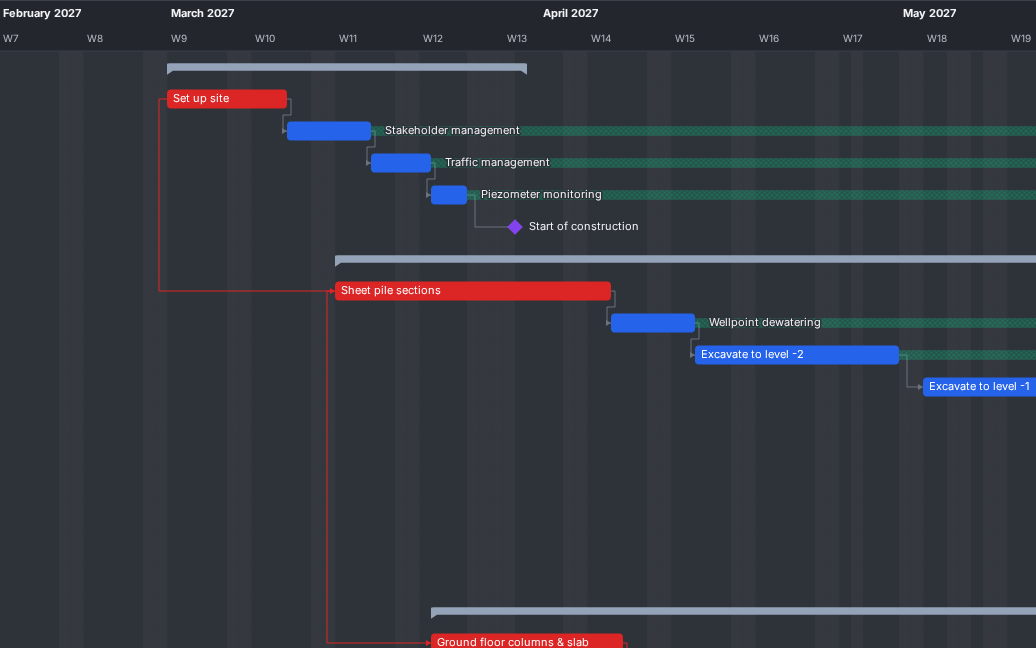
01 Planificación
Mira qué determina tu fecha de fin
La aplicación calcula la ruta crítica, la holgura y el trabajo casi crítico. Ves al instante en el Gantt varias rutas críticas y los plazos incumplidos.
Más informaciónPlanificación de obra
Planificación de obra gratuita que abre tus archivos de MS Project y P6
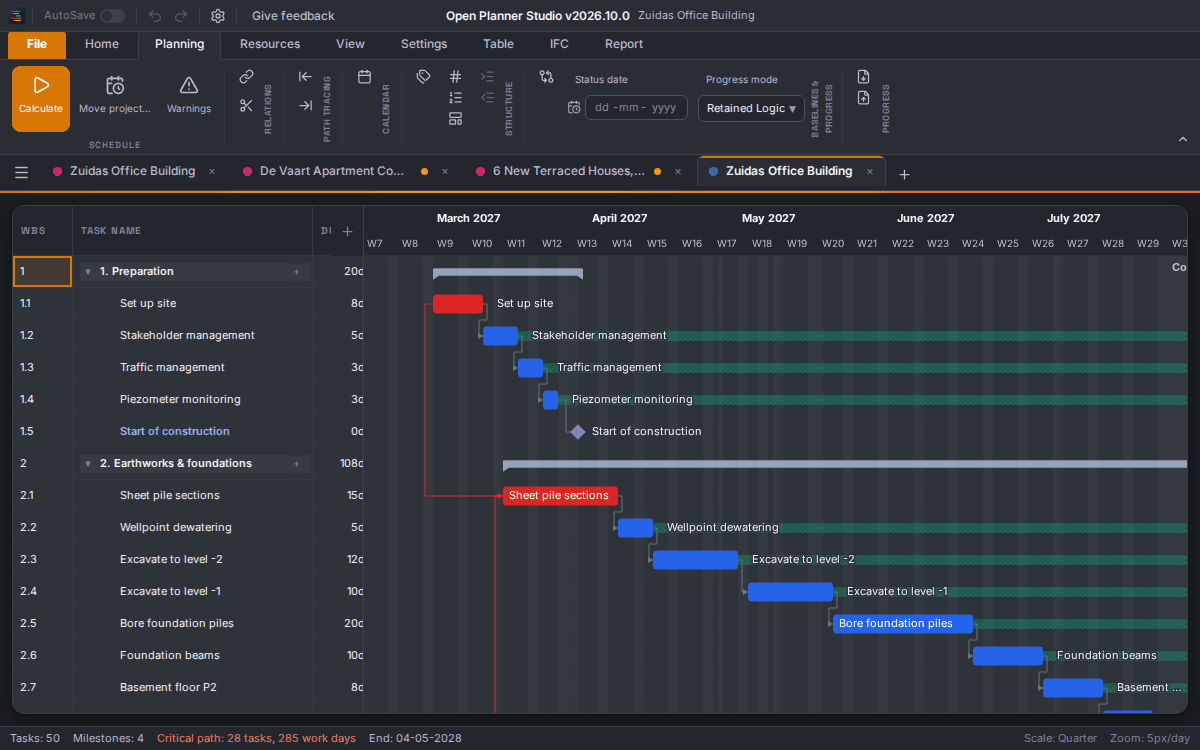
Gantt, ruta crítica y recursos, guardados como archivo IFC abierto. En tu ordenador o directamente en el navegador.
Buscamos testers: planificadores, jefes de obra, jefes de proyecto y coordinadores BIM. Apúntate
Funciones
Empieza por lo más destacado o elige un tema.
01 Planificación
La aplicación calcula la ruta crítica, la holgura y el trabajo casi crítico. Ves al instante en el Gantt varias rutas críticas y los plazos incumplidos.
Más información02 Interoperabilidad
Abre archivos .mpp y .xer directamente, sin el programa original. En 216 archivos .mpp de prueba las fechas coinciden al minuto. Fechas tal como se guardaron muestra las fechas que guardó el otro programa.
Más información03 Introducir tareas
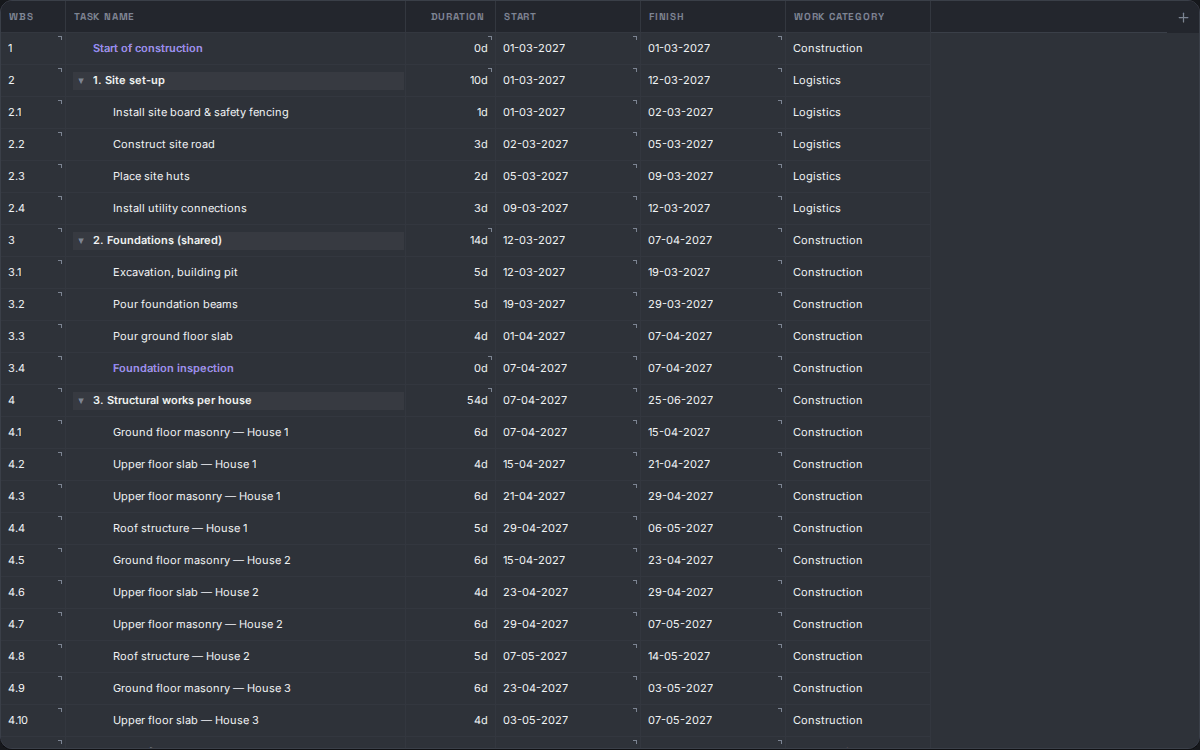
Una sola tabla de tareas junto al Gantt y a pantalla completa. Pega bloques enteros desde Excel, edita dependencias en la celda y elige días u horas por tarea.
Más información04 Recursos
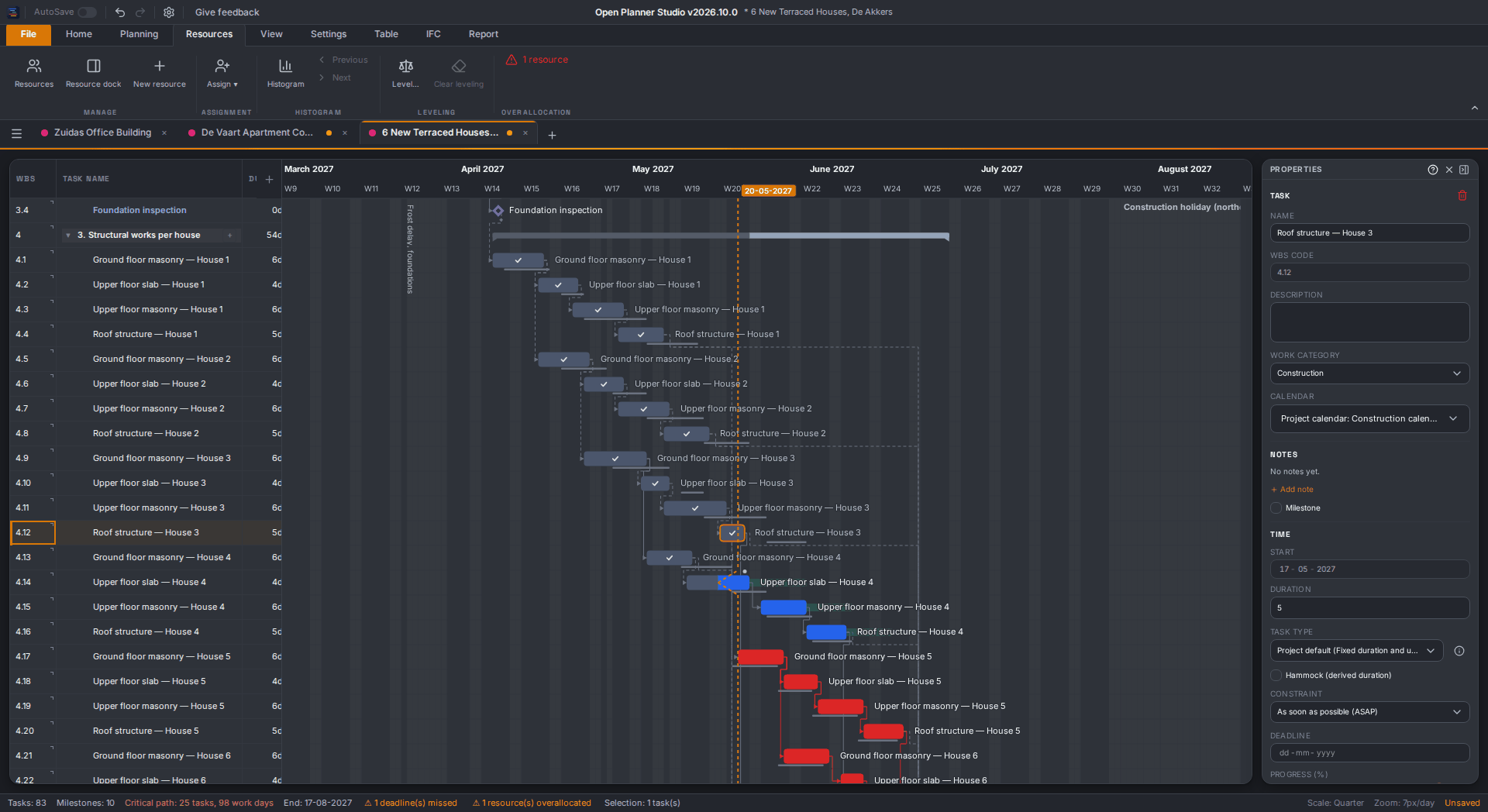
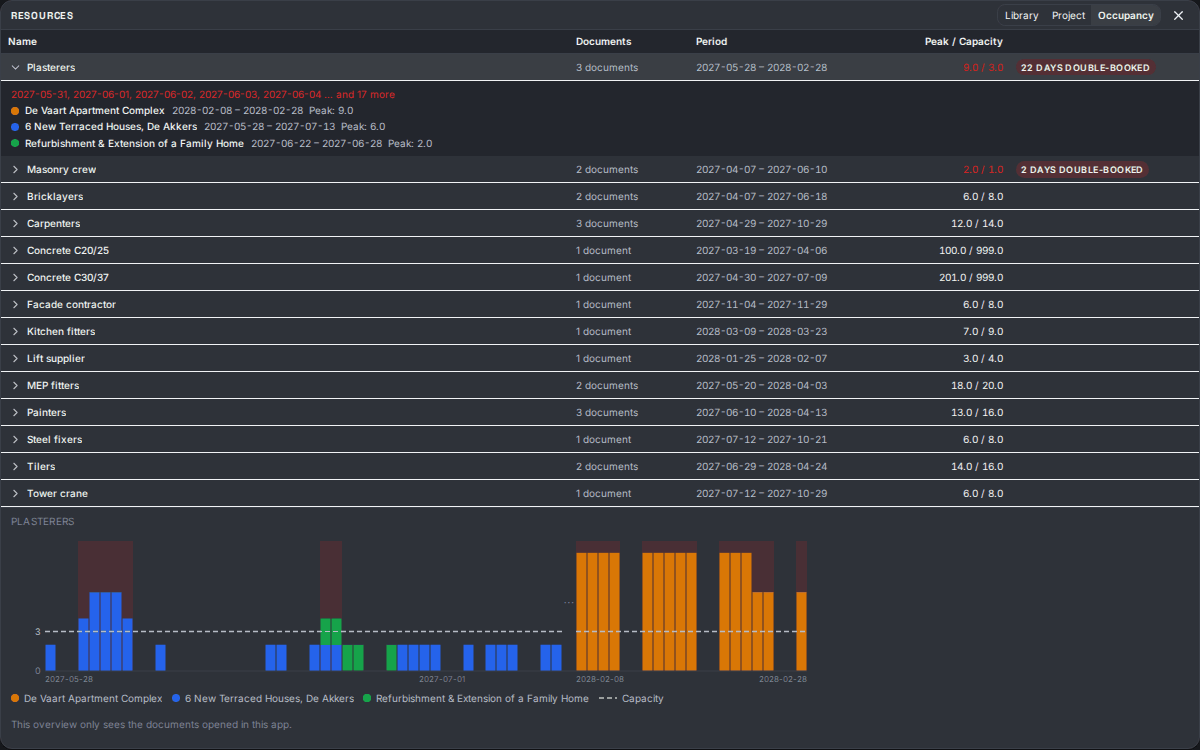
Comparte una sola biblioteca de recursos entre todos tus proyectos. La vista de ocupación suma todos los proyectos abiertos y marca los días en que la demanda supera la capacidad.
Más información05 Informes
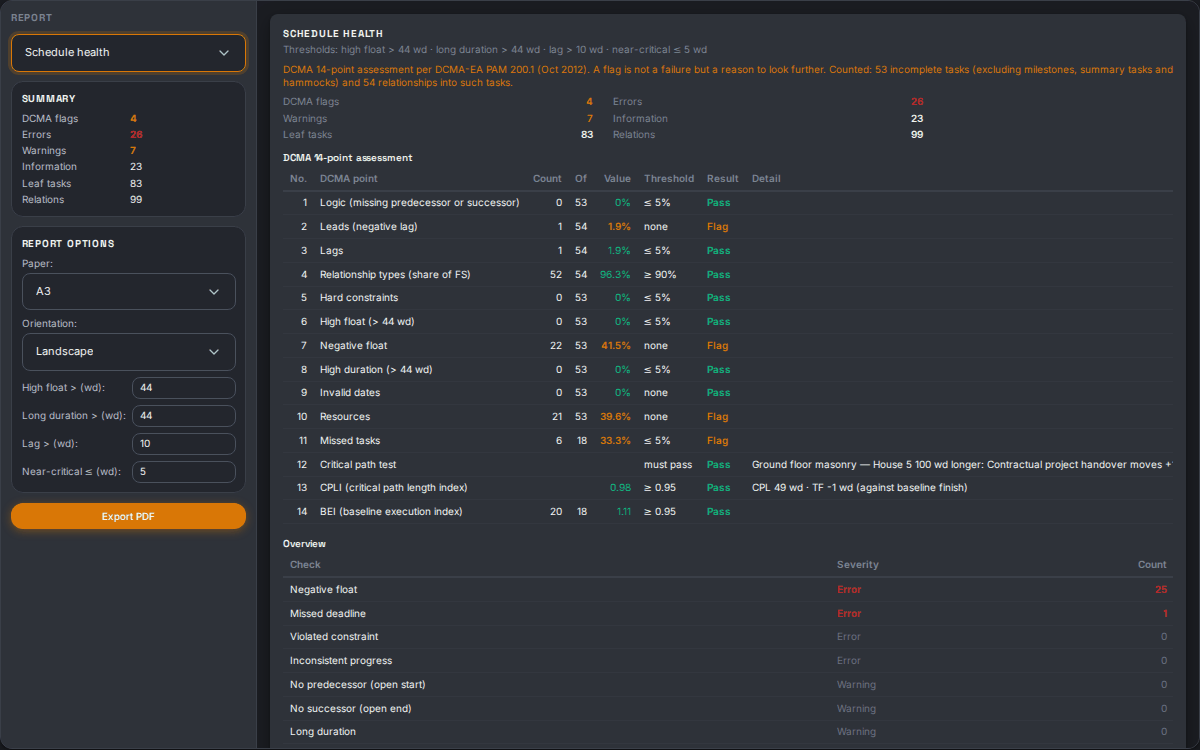
Elige entre once informes, desde la impresión del Gantt hasta un look-ahead y la evaluación DCMA de 14 puntos. Vista previa en directo y PDF de A4 a A1.
Más información06 Estándar abierto
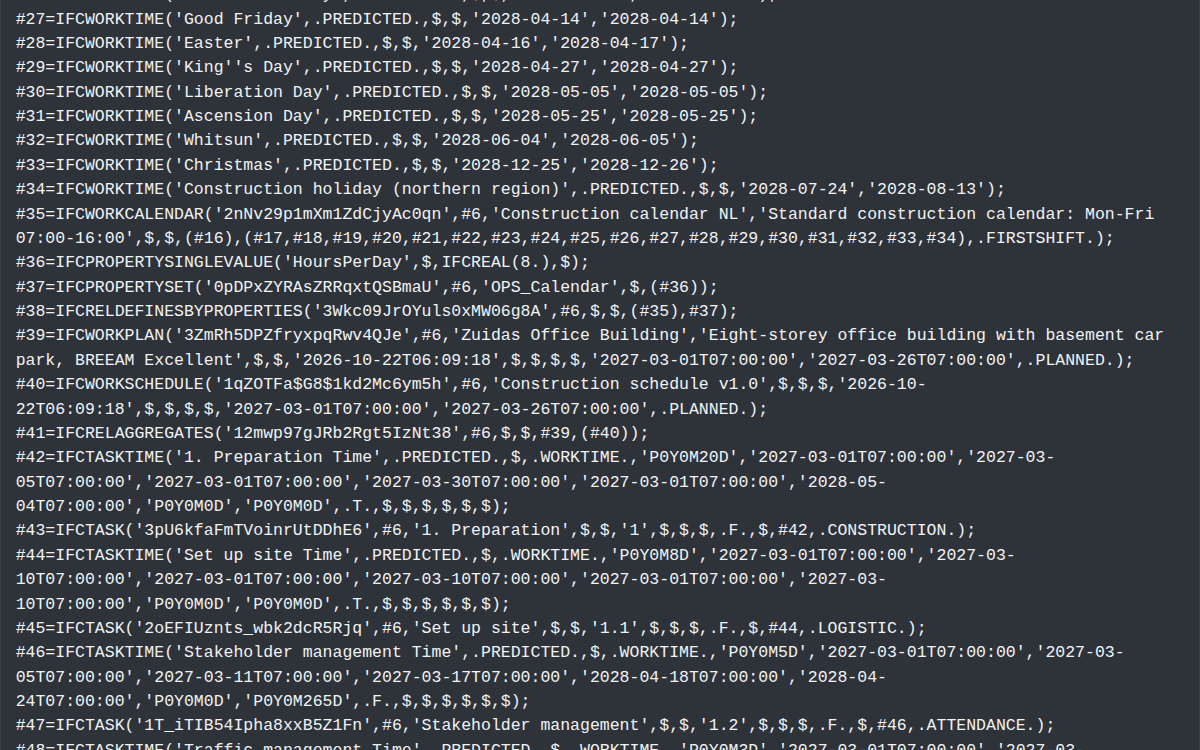
Open Planner Studio guarda en IFC 4.3, el estándar abierto de buildingSMART. No hay formato cerrado, y el software BIM puede poner tu planificación junto al modelo del edificio para un análisis 4D.
Más informaciónArrastra barras, dibuja relaciones con el ratón y haz zoom desde todo el proyecto hasta la hora.
Más informaciónHolgura, trabajo casi crítico y varias rutas críticas, con restricciones y plazos.
Más informaciónUna estructura de tareas plegable con plantillas de EDT y tus propias categorías de trabajo. Lo editas todo como en una hoja de cálculo.
Más informaciónCalcula como Primavera P6, como Microsoft Project o con el perfil propio de la aplicación. En cada regla ves qué hace el perfil.
Más informaciónFestivos, vacaciones de la construcción y horarios propios por calendario. Cada tarea se planifica en días o en horas.
Más informaciónCorta una barra en una fecha y separa las partes arrastrando. Quita una interrupción desde el menú contextual.
Más informaciónGuarda varias líneas base y actualiza el avance con una fecha de estado y una línea de avance.
Más informaciónExporta una hoja de avance en Excel o CSV, haz que la rellenen y vuelve a leerla. Antes ves exactamente qué cambia.
Más informaciónGuarda una vista con su filtro, agrupación, columnas y escala de tiempo como botón en la cinta.
Más informaciónUna lista de las reglas que incumple tu planificación. Un clic te lleva a la tarea, relación o recurso.
Más informaciónMano de obra, maquinaria y subcontratas con histograma. Nivela la sobreasignación automáticamente y ve por día por qué alguien está sobrecargado.
Más informaciónElige por tarea duración fija, trabajo fijo o unidades fijas. El tipo de tarea decide qué cambia cuando modificas la duración o la dedicación.
Más informaciónComparte un solo grupo de recursos entre varios proyectos y gestiónalo en un solo lugar. Las diferencias en un proyecto se marcan.
Más informaciónSuma la carga de todos tus proyectos abiertos y ve qué días un recurso está reservado dos veces.
Más informaciónReparte el trabajo de una asignación a lo largo de su duración con una curva, o ajusta tú mismo la distribución.
Más informaciónAbre directamente archivos .mpp de MS Project 2010 a 2021, sin Microsoft Project.
Más informaciónAbre archivos de P6 con EDT, calendarios, recursos y avance. Un archivo con varios proyectos abre una pestaña por proyecto.
Más informaciónExporta a MS Project XML, Primavera P6 XML, CSV e IFC. La aplicación te dice por formato qué no se conserva.
Más informaciónTu planificación es un archivo IFC. Elige IFC 4.3 o IFC4 al guardar para que el software BIM pueda fusionarlo con tu modelo.
Más informaciónConecta un asistente de IA como Claude Code en la aplicación de escritorio. Mantienes el control con modo de solo lectura, copias de seguridad y un registro.
Más informaciónImpresión del Gantt, diagrama de recursos, hitos, desviación, look-ahead, avance, ruta crítica y más, con un periodo de informe común.
Más informaciónEl informe de salud de la planificación empieza con la evaluación DCMA de 14 puntos. Una alerta es un motivo para mirar, no un fallo.
Más informaciónEl Gantt por recurso, una hoja por persona, con la carga por semana o por mes.
Más informaciónVista previa en directo y PDF en A4, A3, A2 o A1, con línea base y línea de estado o de avance.
Más informaciónInstala en Windows, macOS o Linux, o trabaja directamente en el navegador, con abrir y guardar incluidos.
Más informaciónDeja que la aplicación guarde tu archivo con regularidad. Aparte, la recuperación tras fallos conserva tu trabajo si algo sale mal.
Más informaciónPulsa F1 para 78 artículos. El signo de interrogación de una ventana abre directamente el artículo adecuado.
Más informaciónLa interfaz y la ayuda están en 28 idiomas, incluidos el árabe y el persa de derecha a izquierda.
Más informaciónTodos los atajos en una pantalla con Ctrl+/, y un menú de clic derecho en fila, barra y escala de tiempo.
Más informaciónDescargar
Gratis y sin cuenta. La aplicación de escritorio te avisa cuando hay una versión nueva.
Open Planner Studio está pensado para una pantalla grande. Ábrelo en tu ordenador o pruébalo aquí en el navegador.
¿Prefieres no instalar nada? La aplicación también funciona por completo en el navegador, con abrir y guardar incluidos.
Novedades de v2026.43.0
Conecte Claude Desktop, utilice el planificador sin la aplicación de escritorio y trabaje con mayor fluidez con planificaciones grandes. Esta versión también mejora la recuperación, el intercambio de archivos y la introducción del progreso. La lista completa está en el registro de cambios.
La nueva extensión .mcpb conecta Claude Desktop con la aplicación abierta mediante el puerto y el token que muestra la aplicación.
Las mismas 41 herramientas del planificador mediante un servidor MCP independiente, con acceso a archivos limitado a una carpeta de trabajo.
Mejoras al cargar IFC, calcular con F5 y nivelar recursos. Las propuestas grandes solo dibujan las filas visibles.
Los datos de recuperación ilegibles o desconocidos se conservan. Los problemas de almacenamiento y los errores al guardar se indican con mayor claridad.
Correcciones del progreso y las relaciones, mejor intercambio de archivos e informes PDF directamente desde la cinta.
AppImage ahora se integra en el menú de aplicaciones y los 28 idiomas de interfaz están actualizados. El paquete AUR para Arch Linux aún no se ha publicado.
Sí. La aplicación abre directamente archivos .mpp (MS Project 2010 a 2021) y .xer de Primavera P6, sin el programa original. MS Project XML, Primavera P6 XML, CSV e IFC se pueden abrir y exportar. La aplicación nunca modifica un .mpp o .xer: guardas en IFC.
Lo eliges con el perfil de cálculo: Primavera P6, Microsoft Project u Open Planner Studio. Un .xer se abre con el perfil de P6 y un .mpp con el de MS Project. Fechas tal como se guardaron muestra además las fechas que calculó el otro programa.
No. Toda la aplicación funciona en el navegador, con abrir, guardar, autoguardado y recuperación tras fallos. En Chrome y Edge, Ctrl+S guarda en el mismo archivo; en Firefox y Safari eliges un archivo al guardar. Si prefieres instalar, hay versiones para Windows, macOS y Linux.
Nada. La aplicación es gratuita y de código abierto bajo la licencia LGPL-3.0. Sin suscripción ni licencias por usuario.
En IFC 4.3, el estándar abierto de buildingSMART. Tu planificación es un archivo IFC; no hay un formato propio cerrado. Tus datos siguen legibles fuera de esta aplicación, y el software BIM puede poner tu planificación junto a un modelo del edificio para un análisis 4D.
Windows (.exe), macOS (.dmg universal, para Intel y Apple Silicon) y Linux (.deb, .rpm, AppImage y snap). Además, por completo en el navegador.
Sí. Creas calendarios con festivos, vacaciones de la construcción y horarios propios, y planificas cada tarea en días o en horas. Los recursos pueden ser mano de obra, maquinaria, material o subcontratas, y los informes están pensados para reuniones de obra y clientes.
Es opcional y está desactivado por defecto. Activa el modo IA en la aplicación de escritorio y un cliente de IA como Claude Code podrá leer y editar tu planificación abierta. Tú mantienes el control: botón de pausa, modo de solo lectura, copia de seguridad automática antes del primer cambio y un registro de cada llamada.
Para quien quiera saber cómo está hecho.
Una capa nativa ligera en Rust para Windows, macOS y Linux. La misma aplicación funciona también como versión web.
CPM, calendarios, nivelación y perfiles de cálculo funcionan en el navegador y en la aplicación de escritorio.
La interfaz, con Zustand e Immer para el estado y deshacer. Construida con Vite y Tailwind CSS.
La línea de tiempo del Gantt se dibuja en un canvas; la misma rutina genera la impresión y el PDF.
El formato propio, escrito conforme al esquema; también IFC4. En el navegador la aplicación usa la File System Access API cuando existe.
En la aplicación de escritorio, un servidor MCP integrado ofrece herramientas planner_* a un cliente de IA.
v2026.43.0 · 2026-10-24 · Los puntos clave por versión. Pulse Más para ver las notas completas.
3 días · 442 commits · +18.064 líneas de código
Instale la nueva extensión y trabaje en su planificación abierta desde Claude Desktop.
This release makes MCP clients easier to connect, improves large-schedule performance, and hardens file handling, recovery and progress entry. Versions now use the ISO week-year, week and sequence (YYYY.W.N); the jump from 2026.10.0 reflects that numbering change.
.mcpb asset connects Claude Desktop to the MCP bridge of the running desktop app. It forwards calls and contains no planner; the user supplies the token and port shown in the app.planner_* tools can run on Node without the desktop app, over stdio or authenticated loopback HTTP, in an isolated store context. File tools stay within a configured working folder, reject symlink escapes and save atomically without a direct-write fallback. The source build embeds the guides and examples it needs.50 días · 2882 commits · +248.901 líneas de código
Abra .xer directamente, un proyecto por pestaña, con las fechas que calculó P6.
13 días · 289 commits · +60.405 líneas de código
Use la misma cuadrícula accesible y configurable en Gantt y Tabla.
2 días · 360 commits · +45.066 líneas de código
Abra planes de MS Project conservando sus fechas.
docs/superpowers/specs/2026-07-13-bouwmodus-toggle-design.md).serde_with 3.18.0 → 3.21.0 (GHSA-7gcf-g7xr-8hxj).App.tsx teruggebracht van 741 naar 345 regels.F1 of ga naar Bestand → Help: een quick-start ("je eerste planning in 10 minuten"), negen…Ctrl+/ (of via Weergave → Sneltoetsen) voor een volledig, vertaald overzicht van alle sneltoetsen.F2 taak bewerken · Insert taak invoegen boven de selectie · Ctrl+M mijlpaal toevoegen · Ctrl+A alle zichtbare taken selecteren…IfcTaskTime fields, baselines travel as named BASELINE work schedules. Files without progress or baselines stay byte-identical.IfcCrewResource, per-resource work calendars and task priority) and through Primavera P6 XML and MS Project MSPDI — resources, assignments, curves, calendars and rates travel along. Files without resources stay byte-identical.Start Milestone / Finish Milestone).* after constrained dates in the table, negative float in red, and status-bar counters for missed deadlines and violated constraints.OPS_Constraints property set) — the schedule recalculates identically after save/reload.glib bindings assessed and dismissed: the vulnerable VariantStrIter API is not used by the app (the fix requires GTK4 bindings that Tauri 2 does not use).2d vs 3ed in all…SS+50%, MS Project semantics): lag as a percentage of the predecessor's *current* duration, re-evaluated on every schedule…-P2D)…2d/3ed/50%/-25e%)..deb install detection no longer matches the .sig file (curl error on Linux updates)..deb-installatie met een…