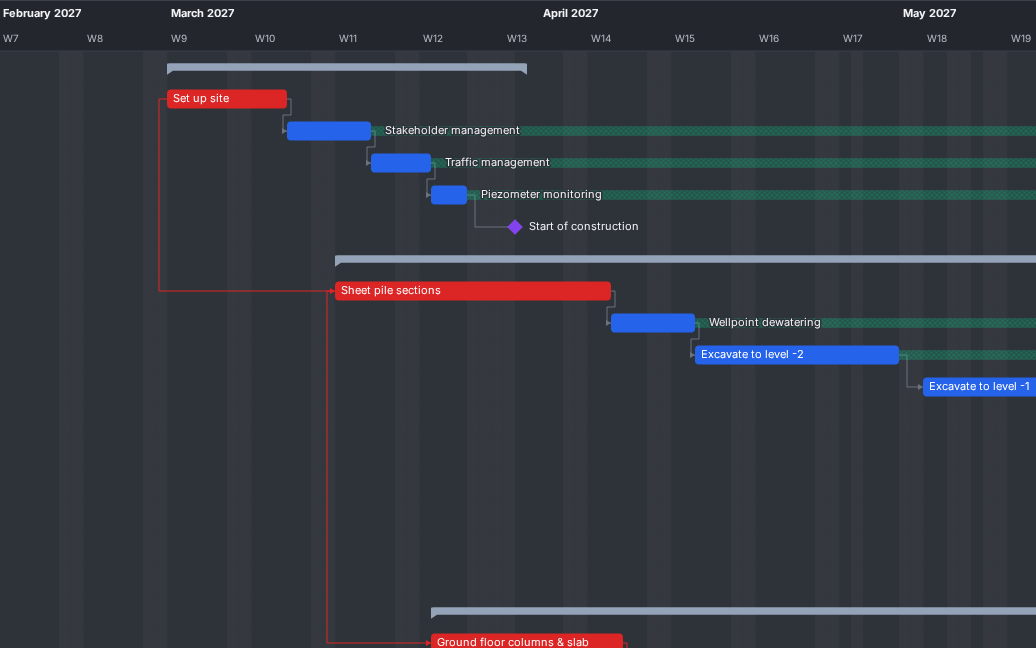
01 Planning
Zie wat je einddatum bepaalt
De app berekent het kritieke pad, de speling en het bijna-kritieke werk. Meerdere kritieke paden en gemiste deadlines zie je meteen in de Gantt.
Meer lezenBouwplanning
Gratis bouwplanning die je MS Project- en P6-bestanden opent
Gantt, kritiek pad en resources, opgeslagen als open IFC-bestand. Op je computer of direct in de browser.
Testers gezocht: werkvoorbereiders, planners, projectleiders en BIM-coördinatoren. Meld je aan
Functies
Begin bij de hoogtepunten of kies een onderwerp.
01 Planning
De app berekent het kritieke pad, de speling en het bijna-kritieke werk. Meerdere kritieke paden en gemiste deadlines zie je meteen in de Gantt.
Meer lezen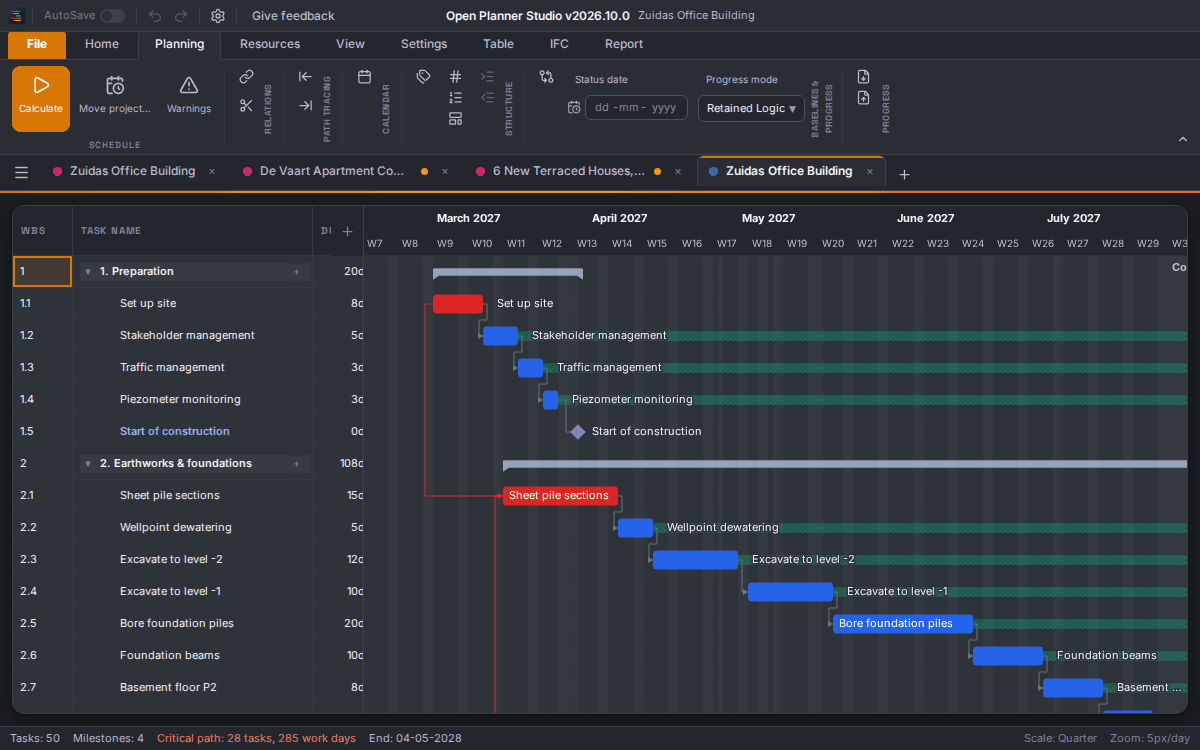
02 Uitwisseling
Open .mpp- en .xer-bestanden rechtstreeks, zonder het oorspronkelijke programma. Op 216 .mpp-testbestanden kloppen de datums tot op de minuut. Met Datums zoals opgeslagen zie je de datums die het andere programma zelf heeft bewaard.
Meer lezen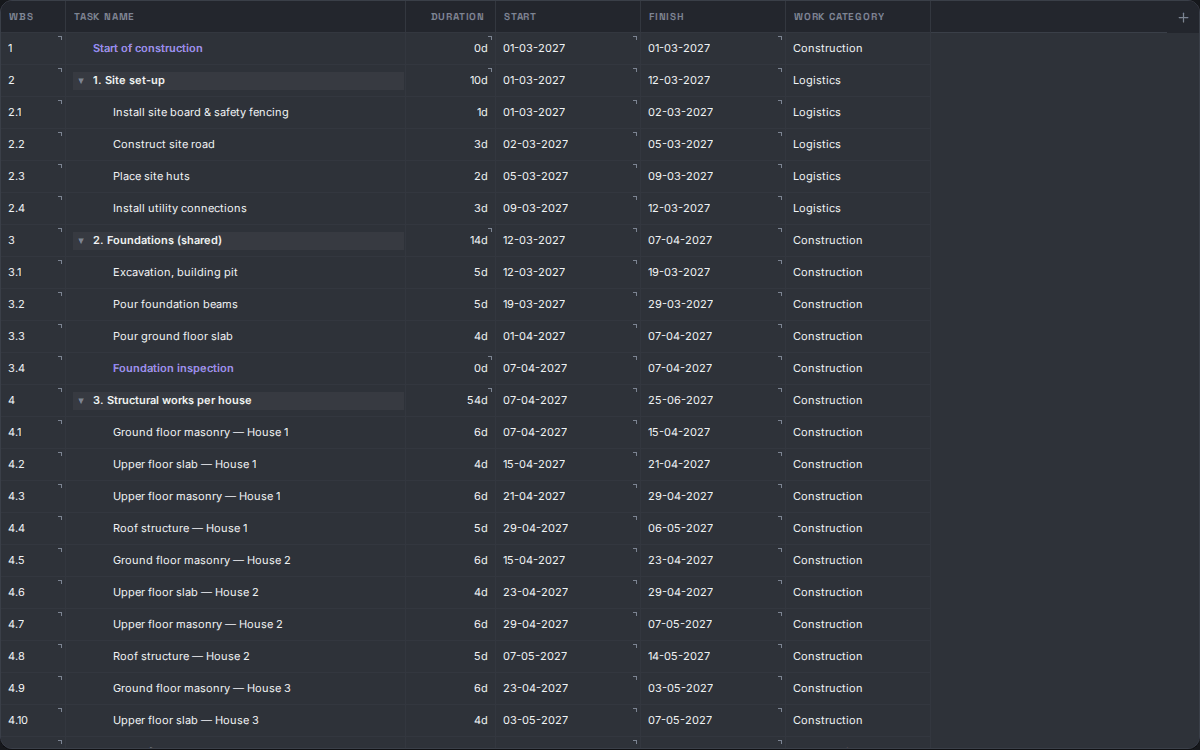
03 Taken invoeren
Eén taaktabel naast de Gantt en als volledig scherm. Plak hele blokken uit Excel, bewerk afhankelijkheden in de cel en kies per taak dagen of uren.
Meer lezen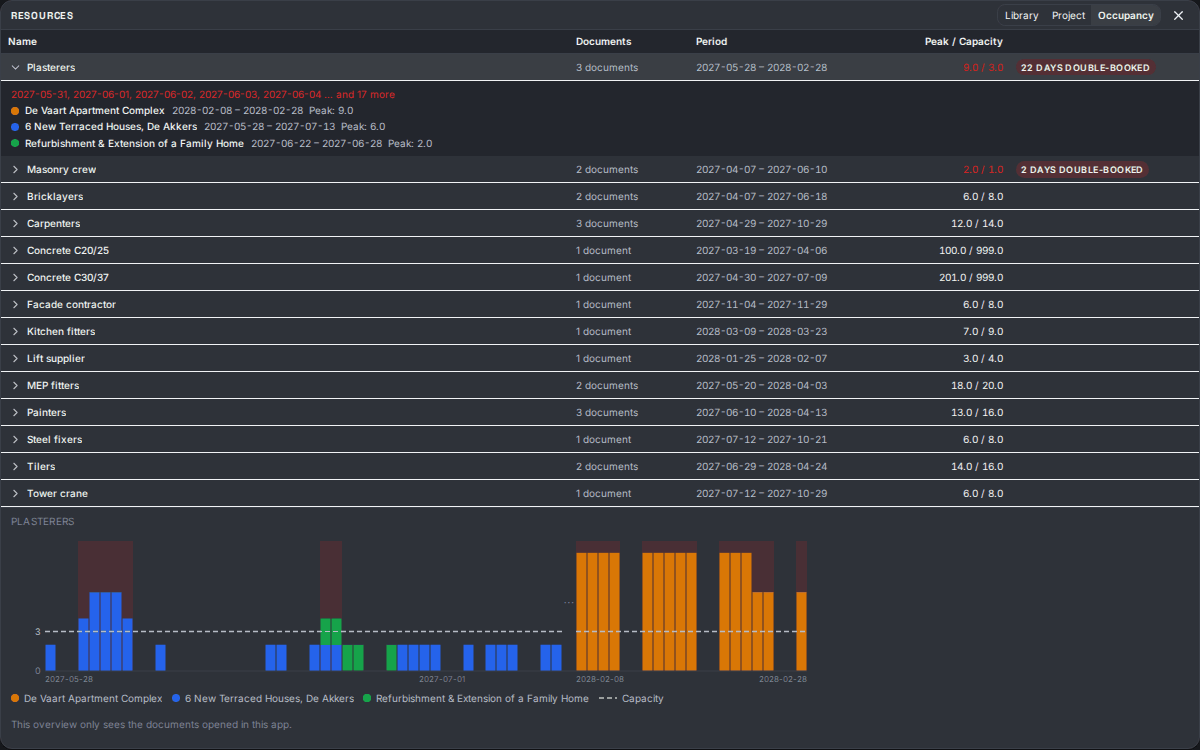
04 Resources
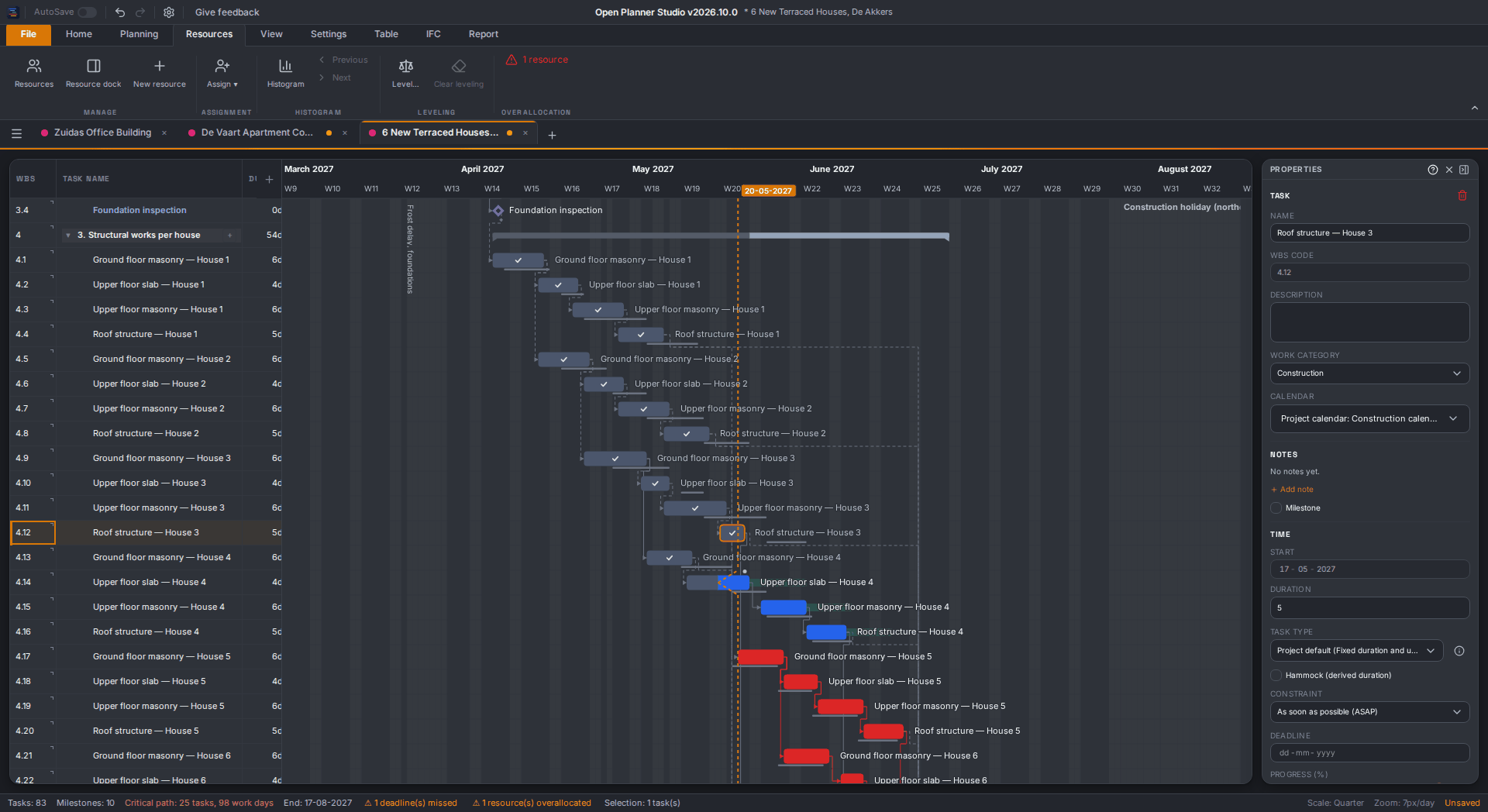
Deel één resourcebibliotheek over al je projecten. Het bezettingsoverzicht telt alle open projecten op en markeert de dagen waarop de vraag groter is dan de capaciteit.
Meer lezen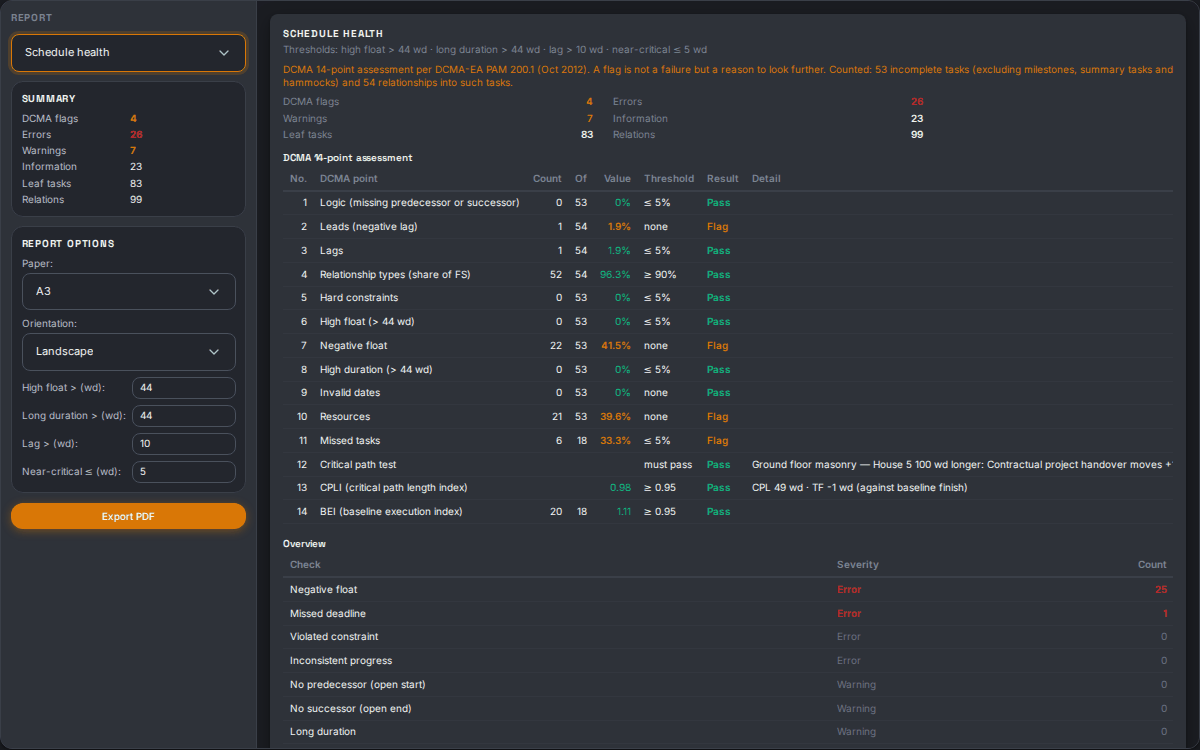
05 Rapportage
Kies uit elf rapporten, van de Gantt-afdruk tot een look-ahead en de DCMA 14-puntentoets. Je ziet een live afdrukvoorbeeld en maakt een PDF op A4 tot en met A1.
Meer lezen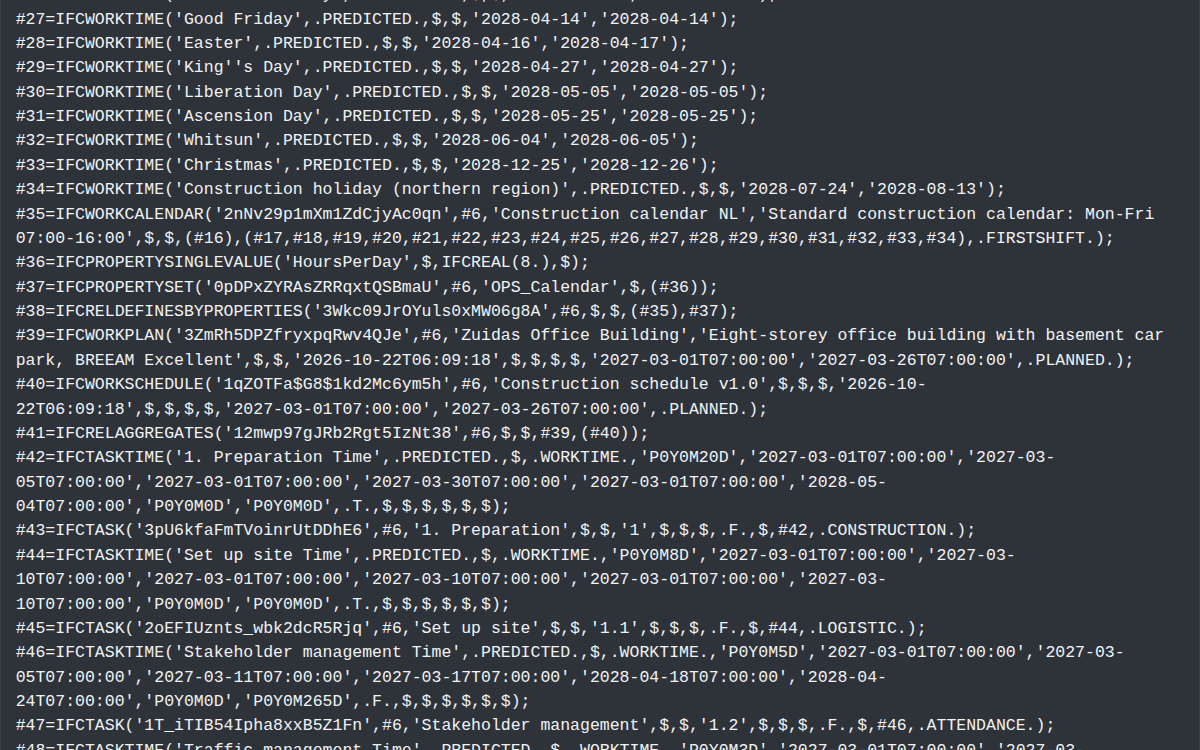
06 Open standaard
Open Planner Studio slaat op in IFC 4.3, de open standaard van buildingSMART. Er is geen gesloten formaat, en BIM-software kan je planning naast het gebouwmodel leggen voor een 4D-analyse.
Meer lezenSleep balken, leg relaties met de muis en zoom van het hele project tot op het uur.
Meer lezenSpeling, bijna-kritiek werk en meerdere kritieke paden, met constraints en deadlines.
Meer lezenEen inklapbare taakstructuur met WBS-sjablonen en eigen werksoorten. Je bewerkt alles zoals in een spreadsheet.
Meer lezenReken zoals Primavera P6, zoals Microsoft Project of met het eigen profiel. Per rekenregel zie je wat het profiel doet.
Meer lezenFeestdagen, bouwvak en eigen werktijden per kalender. Per taak plan je in dagen of in uren.
Meer lezenKnip een balk op een datum en sleep de delen los. Een onderbreking haal je weer weg via het contextmenu.
Meer lezenLeg meerdere baselines vast en werk de voortgang bij met een statusdatum en een voortgangslijn.
Meer lezenExporteer een voortgangsblad als Excel of CSV, laat het invullen en lees het terug. Vooraf zie je precies wat er verandert.
Meer lezenBewaar een weergave met filter, groepering, kolommen en tijdschaal als knop in het lint.
Meer lezenEen lijst met de regels die je planning breekt. Eén klik en je staat op de taak, relatie of resource.
Meer lezenArbeid, materieel en onderaannemers met een histogram. Nivelleer overbelasting automatisch; per dag zie je waarom iemand overbezet is.
Meer lezenKies per taak vaste duur, vast werk of vaste inzet. Het taaktype bepaalt wat meebeweegt als je de duur of de inzet wijzigt.
Meer lezenDeel één resourcepool over meerdere projecten en beheer hem op één plek. Afwijkingen in een project worden gemarkeerd.
Meer lezenTel de inzet over al je open projecten op en zie op welke dagen een resource dubbel geboekt is.
Meer lezenVerdeel het werk van een toewijzing over de duur met een curve, of pas de verdeling zelf aan.
Meer lezenOpen .mpp-bestanden van MS Project 2010 tot en met 2021 rechtstreeks, zonder Microsoft Project.
Meer lezenOpen P6-bestanden met WBS, kalenders, resources en voortgang. Een bestand met meerdere projecten opent per project een tabblad.
Meer lezenExporteer naar MS Project XML, Primavera P6 XML, CSV en IFC. De app zegt per formaat wat er niet meegaat.
Meer lezenJe planning is een IFC-bestand. Kies bij opslaan IFC 4.3 of IFC4, zodat BIM-software het kan samenvoegen met je model.
Meer lezenKoppel in de desktop-app een AI-assistent zoals Claude Code. Je houdt de regie met een alleen-lezen-stand, back-ups en een logboek.
Meer lezenGantt-afdruk, resourcediagram, mijlpalen, afwijking, look-ahead, voortgang, kritiek pad en meer, met een gedeelde rapportageperiode.
Meer lezenHet rapport Planningsgezondheid begint met de DCMA 14-puntentoets. Een vlag is een reden om te kijken, geen fout.
Meer lezenDe Gantt per resource, één blad per persoon, met de belasting per week of per maand.
Meer lezenLive afdrukvoorbeeld en PDF op A4, A3, A2 of A1, met baseline en statuslijn of voortgangslijn.
Meer lezenInstalleer op Windows, macOS of Linux, of werk direct in de browser, met openen en opslaan.
Meer lezenLaat de app je bestand regelmatig opslaan. Los daarvan bewaart crashherstel je werk als er iets misgaat.
Meer lezenDruk op F1 voor 78 artikelen. Het vraagteken in een venster opent meteen het juiste artikel.
Meer lezenDe interface en de Help zijn er in 28 talen, ook in Arabisch en Perzisch van rechts naar links.
Meer lezenAlle sneltoetsen op één scherm via Ctrl+/, en een rechtermuismenu op rij, balk en tijdas.
Meer lezenDownload
Gratis en zonder account. De desktop-app meldt zelf wanneer er een nieuwe versie is.
Open Planner Studio is gemaakt voor een groot scherm. Open hem op je computer, of probeer hem hier in de browser.
Liever niets installeren? De app draait ook volledig in de browser, met openen en opslaan.
Nieuw in v2026.10.0
Een grote versie. Hiernaast de belangrijkste punten. Verder schrijft de app standaard IFC 4.3 ADD2, staan uren overal als 10u, en stuurt de feedbackknop je melding direct naar Open Feedback Studio, een externe dienst van OpenAEC, zonder GitHub-account. De volledige lijst staat in de changelog.
Met WBS, kalenders, resources en voortgang. Het originele bestand gaat mee in je IFC.
Reken zoals P6, MS Project of Open Planner Studio, en zie per regel het verschil.
Kies per taak vaste duur, inzet of werk. Het oude veld Taaktype heet nu Werksoort. In de Gantt knip je een balk op een datum.
Exporteer een blad als .xlsx of CSV, laat het invullen en lees het terug met een voorbeeld.
Met de DCMA 14-puntentoets, plus een resourcediagram per persoon.
Interface en Help in 28 talen. De Help is herschreven in 78 artikelen.
Ja. De app opent .mpp-bestanden (MS Project 2010 tot en met 2021) en .xer-bestanden van Primavera P6 rechtstreeks, zonder het oorspronkelijke programma. MS Project XML, Primavera P6 XML, CSV en IFC kun je openen én exporteren. Een .mpp of .xer verandert de app nooit: je slaat op als IFC.
Dat kies je met het rekenprofiel: Primavera P6, Microsoft Project of Open Planner Studio. Een .xer opent met het P6-profiel en een .mpp met het MS Project-profiel. Met Datums zoals opgeslagen zie je daarnaast de datums die het andere programma zelf heeft berekend.
Nee. De hele app draait in de browser, met openen, opslaan, automatisch opslaan en crashherstel. In Chrome en Edge sla je met Ctrl+S op in hetzelfde bestand; in Firefox en Safari kies je bij opslaan een bestand. Wil je toch installeren, dan zijn er versies voor Windows, macOS en Linux.
Niets. De app is gratis en open source onder de LGPL-3.0-licentie. Geen abonnement en geen licentiekosten per gebruiker.
In IFC 4.3, de open standaard van buildingSMART. Je planning ís een IFC-bestand; er is geen eigen, gesloten formaat. Daardoor blijft je data leesbaar buiten deze app, en kan BIM-software je planning naast een gebouwmodel leggen voor 4D-analyse.
Windows (.exe), macOS (universele .dmg, voor Intel en Apple Silicon) en Linux (.deb, .rpm, AppImage en snap). Daarnaast volledig in de browser.
Ja. Je maakt kalenders met feestdagen, bouwvak en eigen werktijden, en plant per taak in dagen of in uren. Resources zijn arbeid, materieel, materiaal of onderaannemers, en de rapporten zijn gemaakt voor bouwoverleg en opdrachtgevers.
Dat is optioneel en staat standaard uit. Zet je de AI-modus aan in de desktop-app, dan kan een AI-client zoals Claude Code je open planning lezen en bewerken. Je houdt de regie: er is een pauzeknop, een alleen-lezen-stand, een automatische back-up vóór de eerste wijziging en een logboek met elke aanroep.
Voor wie wil weten hoe het gebouwd is.
Een dunne native schil in Rust voor Windows, macOS en Linux. Dezelfde app draait ook als webversie.
CPM, kalenders, nivellering en rekenprofielen draaien in de browser én in de desktop-app.
De interface, met Zustand en Immer voor de toestand en ongedaan maken. Gebouwd met Vite en Tailwind CSS.
De Gantt-tijdas wordt op een canvas getekend; dezelfde tekenroutine maakt de afdruk en de PDF.
Het eigen bestandsformaat, schema-geldig geschreven; IFC4 kan ook. In de browser gebruikt de app de File System Access API waar die er is.
In de desktop-app biedt een ingebouwde MCP-server planner_*-tools aan een AI-client.
v2026.10.0 · 2026-10-21 · De hoofdpunten per versie. Klik op Meer voor de volledige notities.
50 dagen · 2.882 commits · +248.901 regels code
Open .xer direct, elk project in een eigen tab, met de datums zoals P6 ze rekende.
A large release: 2,165 commits (228 merged pull requests) since v2026.9.0. It opens Primavera P6 (.xer) files natively and makes the difference between P6, MS Project and Open Planner Studio calculation explicit through scheduling profiles; adds task types (fixed duration, units or work), task splitting, saved layouts, a progress sheet that round-trips through a spreadsheet, a resource diagram and seven new table reports (with a DCMA 14-point assessment); writes schema-valid IFC 4.3 ADD2 by default; ships the interface and the Help in 28 languages; replaces the Help with a Diátaxis-structured set of 78 articles; and prepares the product for the OpenAEC ecosystem with a headless core package, a headless HTTP API with a container and AWS definition, a release verification workflow and signed Windows programs. The features are backed by planning, library, MCP and browser regression coverage, including a fidelity measurement against P6's own calculated output and the 216-file .mpp corpus.
SCHEDOPTIONS). A Level-of-Effort activity becomes a hammock. A file with several projects opens one tab per project (the largest first); a project that P6 designates as another project's baseline becomes that project's baseline instead of a tab; cross-project links are preserved as source data. Documents are named "Project name (Project ID)". XER is read-only: the app never writes .xer and never changes the file..xer travels as a compact, verified source archive, so reopening the IFC still knows P6's own dates and settings. An unusable archive (damaged, or rewritten by another IFC program) no longer blocks opening: the project opens in full without the archive and a notice explains what is missing. Exports to CSV, MS Project XML and P6 XML state per format what XER source data they lose.measure:profiles gate that no exact cell may become inexact when engine behaviour changes.remain_qty_per_hr, RemainingUnitsPerTime) and keeps the planned rate separately (*Planned units per day*), so a Foreman assignment shows 34 instead of 1.11 next to 306 h of remaining work, and a duration change gives the same work as in P6.planner_set_task_splits offers the same.planner_export_ifc never change the schema silently. This makes IfcOpenShell MergeProjects work with IFC4 and IFC 4.3 models (issue #292). A newly written file loses calendar data when it is opened in an older app version (see Changed).24:00 / 12:00 AM, a night block such as 22:00–06:00 is written as "next day", and the input accepts 13, 1300 and 1 pm.20-09-2006 17:00 in your date and time notation instead of raw ISO, and the progress line compares "done" and "not started" at that moment instead of per day. Two files with status dates 12:00 and 17:00 no longer look the same while the remaining work differs by half a day. A day-based calendar shows no time field and behaves as before, because the solver ignores the time there (isHourModeCalendar, one test shared by ribbon, renderer, print and solver).open-feedback-studio.pages.dev, together with an optional e-mail address, an optional screenshot and the app version, operating system and language; the dialog states this in a privacy line, and the e-mail address is remembered only on your own device (#395, #397). There are three kinds: *Something's not working*, *Idea* and *Question or comment*. The screenshot editor gained *Cover* (a solid black block that is drawn into the sent image, so the pixels underneath are not sent) and *Retake*; an unsent draft survives closing the dialog during the session; and the dialog says when the same report has already arrived or when it is uncertain whether it arrived. Only when sending certainly failed does it offer the old route, *Open on GitHub*, which prepares the issue as before. If the annotated screenshot cannot be prepared, nothing is sent: the editor stays open with an error instead of falling back to the uncovered original (#408). Until the studio is linked to this repository, reports arrive in the studio's dashboard, not as GitHub issues.npm run build:platform -- --base /path/ produces a bundle for a sub-path with a manifest; extensions, AI mode and the demo start are off there. Open, Save, Save As, Recent files and crash recovery also work against the hosting site through a third file-reference kind (window.openaecHost, versions and conflict detection; AutoSave deliberately excluded), and ?fakeSite=1 installs a fake site for development.@openaec/open-planner-core (#440). src/core/ offers three calls: openIfc(text) opens IFC text like *File → Open*, doc.schedule() calculates like F5 (the project's task types and calculation profile) and returns a JSON summary (project, start and finish, counts, tasks with dates, late dates, total float and critical flag, the critical path and warnings), and doc.toIfc() writes the IFC back. Every failure is a PlannerCoreError with a fixed code (INVALID_INPUT, IFC_READ_FAILED, NO_TASKS, SCHEDULE_FAILED, IFC_WRITE_FAILED). npm run build:core builds one ESM bundle for Node 22 with type declarations, a generated package.json (version = app version, LGPL-3.0-or-later) and the licence texts of the bundled dependencies, and fails if React, Tauri or the app singleton end up in it; the store itself now comes from a factory (appStoreFactory.ts) without that singleton. A test proves that the core returns the same dates, float, critical flag, finish and critical path as the app for all 32 example files, and npm run verify:core-package (new step in npm run verify) builds the package, installs the tarball in an empty folder and runs the example in headless/consumer-example/. The package is not published to npm: a consumer installs the tarball from npm pack (docs/headless-kern.md).headless/server/ is a small server on the headless core: GET /healthz (no authentication) and POST /v1/schedule?output=summary|ifc, which takes IFC text and returns the JSON summary or the recalculated IFC. It needs a Bearer token (OPS_API_TOKEN or OPS_API_TOKEN_FILE; without one the server refuses to start), limits the body (20 MiB by default), the calculation time (60 s by default) and the number of calculations at once, always answers errors as { "error": { "code", "message" } }, and logs one JSON line per request without IFC content or token. The contract is headless/server/openapi.yaml (OpenAPI 3.1) and a 21-check smoke test runs against it. A multi-stage Dockerfile builds a container that runs as a non-root user with a health check, and deploy/aws/ecs-fargate.yaml defines ECS Fargate behind a load balancer with HTTPS, the token from AWS Secrets Manager and a minimal execution role. CI (headless-api.yml) runs the server, builds the container, runs the smoke test against both and lints the template with cfn-lint. Nothing is deployed or published: there is no AWS account yet, so the template is only linted and no image is hosted (docs/headless-api.md).verify:translations) keeps them current. A Help article read in a language other than Dutch or English shows a notice with buttons to read the English or Dutch source.? buttons in dialogs and panels that open the matching article, anchors, aliases and draft support. New explanations cover calculation profiles, task types, dates as recorded, days and hours, leveling, calendars, constraints and the critical path.gen:docs-screenshots), a generated tutorial project ("Aanbouw woning", nl/en) with intermediate states per tutorial, and a first-start question that offers the tutorial after the guided tour (no "Just updated" dialog on the first start).initialize instructions, a read tool planner_get_planning_guide, and two downloadable skills (*goed-plannen*, *progress-update*), all in English.help permission and api.help.* with a guidance panel**, so an extension can ship its own Help. Extensions can also read the XER source archive through a separate read-only importSource permission.stats data branch. The web build also ships release-highlights.json as the source for the release timeline on open-aec.com.mspdiImportLoss.ts and mppImportLoss.ts; the readers themselves did not change for it (part of issue #391).taskType, workRule) or file format name (the CSV column Task Type still holds the work category).10h in English and 10u in Dutch, without a space (#400). This covers the *Duration* column, the Gantt bar labels, tooltips, the properties panel, print and reports, the remaining-work notice (320u → 88u), the work deviation on assignments, and lags in the grid, the lag field, warnings and the health report. Input is unchanged: 80u, 80h, 2u and 2h work in every language. Spelled-out words ("800 hours of work"), days (5d) and minutes (30m) stay as they were. A lag in the CSV export follows the app language (3FS+2u in Dutch, 3FS+2h in English); a language without a readable abbreviation, such as Russian, gets u, and the CSV reader accepts u, h, eu and eh.320u → 88u; one notice per action, with a count for several tasks, and one updating notice while dragging in the Gantt). *Ctrl+Z* restores duration, remaining duration and work in one step, and the warning mark returns. MCP agents get no question; the response carries remainingWorkRecomputed. This also fixed three follow-on faults with the same cause: a start on 0 % raised the remaining work, the histogram showed a phantom "done" part and, under Fixed work, the units did not adjust. Root cause and rule: settleDurationEdit in src/engine/work/workRuleApply.ts.day_hr_cnt, P6 XML HoursPerDay, MSPDI MinutesPerDay) differ from the *Standard workday* the app calculates, an orange block under that field names both numbers and says that the file's value is kept on export. The block follows edits live and disappears when the blocks match the file again. Nothing is calculated or exported differently; one comparison (hoursPerDayDiffers) now serves the dialog and the IFC writer.src/engine/taskGrid/scrollExtent.ts). Checked in Chromium and in WebKitGTK, the engine of the Linux desktop app (#362).day_hr_cnt) is kept and exported unchanged. A baseline saved with the old day count gets a warning marker.planner_run_cpm is gone because the read tools recalculate a stale schedule themselves (and respect the edit and calculation-error brakes), planner_update_calendar accepts breaks and working exceptions from a read-out, and AI backups of a saved file are kept in one fixed folder and thinned instead of a fixed ten.initialize returns an Mcp-Session-Id; every later request must carry it (without it the request gets 400, an unknown id 404), and the check that the document did not change under the agent is kept per session, so a second client no longer shares the first one's anchor. Sessions survive a bridge restart or port change and are cleared by a new token. The bridge also closes each connection after its answer, which fixed a first request hanging after a restart. The official MCP SDK now tests the server in npm test and, in a separate workflow (mcp-real-app.yml), against the real desktop bridge. After updating, an AI client must connect again (restart Claude Desktop).loadProject keep baselines, calendars, codes, fields, GlobalIds, the calculation profile and the document's link to its saved file.1,500 in English or 1.500 in Dutch, is refused with a red notice and the value stays. The number fields grow with the shown value, so 306,5 or 1234,5 is not cut off at 200 or 280 px, and the warning triangle sits inside the work field. Curve, move and assign use the app's own drop-down lists instead of the browser's. *Ctrl+S* and *F5* save the field you are typing in (the field is committed, automatic calculation runs, then the file is saved), and afterwards *Ctrl+Z*, *Ctrl+Y* and *Esc* belong to the app again. An unfinished entry is committed before the document is switched, duplicated, closed, reloaded or the desktop app closes, so it never lands in the wrong document or is lost. This brings together the work of #369 and #389 (TaskAssignmentsSection.tsx, UnitsInput.tsx, pendingTextEdits.ts).617.14 and 1.71428571428571 next to a duration of 146,9d. They now follow the *Duration* column: at most two decimals, the decimal sign of the language and no needless zeros. Typed or pasted text accepts a comma or a point, and the name: hours; name: hours separator stays ;. Opening a cell and confirming with Enter without a change writes nothing, and putting back the text as shown keeps the exact stored value, so no history step and no stale schedule appear. In the cell editor the units field is now a text field in the language (it was a number field that took only a point) and *Remaining work* has an input field for the first time. Copying gives readable text in the language with the tokens kept exact, and pasting inside the app is exact. The contour window and the axis of the histogram use the decimal sign of the language too, and the *Table columns* guide is updated (Dutch and English). The task panel *Assignments* block stays as described above (#369).codesign, Gatekeeper (spctl: *Notarized Developer ID*) and stapler validate. A failing check keeps the release as a draft, so Windows and publishing wait; pull requests that touch signing run the same checks in macos-sign-check.yml (scripts/macos-notarize-dmg.sh, scripts/macos-verify-dmg.sh, release.yml).open-planner-studio.exe was NotSigned after installation. The release build now has Tauri sign the program, the uninstaller and the setup during bundling (scripts/windows-sign.ps1, Microsoft's signing client with a checked hash, RFC 3161 timestamp), and a gate keeps the release a draft unless the setup and the program carry a valid, timestamped signature. CI builds, tauri:dev and local builds stay unsigned. A release-like build without a tag (windows-sign-check.yml) showed valid signatures on all three files; only a real release will show that the signed setup, its .exe.sig and latest.json agree.scripts/verify-release.mjs <tag> checks the minisign updater signatures, latest.json and the sha256 of each asset against GitHub's digest, and release-verify.yml installs, starts and removes the packages on fresh runners (Ubuntu 22.04 and 24.04, Fedora, Windows, macOS) and checks the platform signatures, automatically after each release build. Run against v2026.9.0 it found three faults: the .exe.sig did not fit the signed setup (the release workflow now signs and uploads it again after Authenticode), the macOS app lacked notarization (the signed and notarized installers above) and the installed Windows program was unsigned (the item above). Linux packages carry no GPG signature; that is still an open decision (docs/release-verificatie.md).npm run measure:large-plans, one machine, headless Chromium, no targets set) gives for 1,000, 5,000 and 10,000 tasks: opening 0.5, 2.0 and 3.7 s, F5 0.2, 0.8 and 1.5 s, one leveling calculation 0.6, 8.4 and 37.6 s, and an auto-save tick 0.09, 0.28 and 0.55 s; scrolling and zooming stay near 45 ms per wheel step (#437).AGENTS.md is the single instruction source, the CI runs the full verify in parallel parts (deploy now waits for a green CI run), a translation release gate and a documentation audit skill were added, code comments were trimmed across the codebase, and the full verify no longer runs locally before every push. The browser tests are now spread over the CI shards by measured duration (a test guards that every spec runs in exactly one shard), a new browser test first extends an existing scenario, a flaky document-switch test was made reliable, and an update loop in the feedback dialog that lost the 52nd typed character was removed. The TypeScript runner for tests now removes its temporary bundle folder after each run, also after a failure (#427), and the IFC round-trip date check no longer fails on days when the creation date equals a contract date (#428).P1.5DT2H, an empty calendar description, line breaks and non-ASCII text inside strings (now ISO 10303-21 encoded), conforming GlobalIds that tasks, the project, resources, calendars and relations keep, constraint dates written as dates, phases with an invalid task status, and 24:00 end-of-day times.IfcWorkCalendar, work plans, work schedules and resources are written with the right number of arguments, REAL values with a decimal point, schema-correct enumeration literals per schema and negative durations in ISO form, and older files, including those merged by IfcOpenShell, are still read. The example projects were regenerated.<CalendarUID> with the work week inherited from the base calendar, MSPDI work with half-hour durations survives export and import, a full MS Project calendar no longer receives Dutch holidays, and the task-duration unit is stored in the real Text30 field (the old Flag9 ID is still read).0402ScheduleMSP.xml) was read as a 24-hour day calendar; it now becomes an hour calendar with its blocks per day. The writer writes a day calendar with its real blocks, so 07:00–16:00 with a 60-minute break survives export and reopening: a 20-day task stays 20 days and its successor stays in place instead of shifting by a day. An invalid 7.5:00:00 clock time is no longer written (an old export with it is still read as 7.5).status_code is derived from progress, Arabic, Cyrillic and Greek files are no longer silently read as Windows-1252, a raw line break in a cell no longer truncates the row, a missing planned start no longer becomes 1970, the WBS tree has a real root and numeric sibling order, and a project end without an end date no longer anchors the late side on the project start.<Project>, progress according to PercentCompleteType, Not Started ignoring actual dates, 24-hour working exceptions staying workdays, holidays returned as a series, and a notice when a file has no readable activities.Math.min/max over large arrays, and the solver no longer writes scheduleFinish back.await, expired queued requests are not executed, move_project validates dates strictly, self-relations are refused per item, a parent cycle no longer hangs planner_move_task, and clear_leveling sees the same output as the store.rustls, source-map-js, brace-expansion, browserslist), and two CodeQL findings were fixed: a pasted percentage such as 5%0 or 50%% is now refused instead of read silently as 50%.# column can be hidden or removed (issue #93).onLoad still runs, a hanging onLoad times out after 15 s, api.ui.showNotification is visible to the user, a failed extension importer reports an error, and the ZIP download has an idle limit.1 and then 2 no longer gives 21 (#416). A lag of −1.5 days typed in days became −1 while the same lag in minutes rounds to −2; days now round half away from zero in both directions, for internal and external relations (#411). Saving a branch as a WBS template dropped the minutes of an hour lag (a 4-hour lag came back as nothing); the template keeps them now, but templates saved earlier cannot get them back and must be saved again (#410).crypto.randomUUID the first web recovery session fell back to one shared key, so a busy tab or *Later* could crash; all three web paths now make their own id (#423). Cancelling an export in Backstage jumped to *Start* as if it had succeeded; it now stays on *Export* (#425). *Save failed* on the desktop showed no reason because Tauri plugins reject with a string, not an Error (#434). A failing local ZIP or JS extension install showed nothing; it now gives a notice, while cancelling stays silent (#415). After *Port busy* or *Error* the AI port field stayed locked although the bridge was not running; only *live* locks it now (#412). api.events.emit in the extension API now refuses the reserved host: namespace, so an extension cannot forge host events; this guards the API contract, not a sandbox (#431).planner_get_project_overview and planner_get_task described the read-only wbs as writable wbsCode (#420); the planner_update_calendar description still said an unused calendar does not survive save and reload, though IFC keeps it (#421); planner_update_tasks reported an explicit duration on a phase as updated although the duration is derived from the subtasks, and planner_add_tasks accepted a duration on an item that got children in the same call; both are now refused (#422); planner_list_tasks with zonder_relaties reported leaf tasks as orphans that are linked through their phase, and now counts relations on all parent phases (#426); and a batch with planner_level_resources on a stale schedule added an empty undo step (#432).src/styles/globals.css, check-dependency-presentation.ts).importDateTime in mspdiReader.ts, check-mspdi-hour-baseline.ts). A *Baseline 0* whose start or finish is empty or unreadable (for example NA) counts as missing: the task gets no baseline instead of aborting the import or receiving a made-up date (the text NA or today's date) that would show a false variance (#406).planner_get_calendars); AGENTS.md and the path-bound rules cover six architecture changes since v2026.9.0, with a new import-export rule.docs/ecosysteem-gereedheid.md gives a capability matrix (installers, updater, browser and platform build, headless core, HTTP API, AWS, MCP, Claude Code and Desktop) and the status per requirement, linking to the detail documents added with it: docs/headless-kern.md, docs/headless-api.md, docs/release-verificatie.md (outcome of the v2026.9.0 check) and docs/mcp-verificatie.md (what was tested with the official MCP client and what is not delivered: no .mcpb bundle, no Claude connector, no stdio server). Still open: a real AWS deployment, GPG for Linux packages, publishing to npm, and testing Claude Desktop itself (#453).claude mcp add --transport http …) and Claude Desktop (through mcp-remote) (#439). The progress-import guide now says that the CSV also accepts decimals with a comma or point and ISO dates, not only whole numbers and dd-mm-yyyy (#407).AGENTS.md became the single agent instruction source (with path-bound rules in .claude/rules/ and recipes in docs/recepten/), knownbugs.md collects side findings, docs/platformbouw.md describes the platform build and site storage, and design documents cover scheduling profiles, task types, task splitting and the translation pipeline.13 dagen · 289 commits · +60.405 regels code
Gebruik hetzelfde toegankelijke, instelbare raster in de Gantt- en volledige Tabelweergave.
2 dagen · 360 commits · +45.066 regels code
Open MS Project-planningen met behoud van de vastgelegde datums.
docs/superpowers/specs/2026-07-13-bouwmodus-toggle-design.md).serde_with 3.18.0 → 3.21.0 (GHSA-7gcf-g7xr-8hxj).App.tsx teruggebracht van 741 naar 345 regels.F1 of ga naar Bestand → Help: een quick-start ("je eerste planning in 10 minuten"), negen…Ctrl+/ (of via Weergave → Sneltoetsen) voor een volledig, vertaald overzicht van alle sneltoetsen.F2 taak bewerken · Insert taak invoegen boven de selectie · Ctrl+M mijlpaal toevoegen · Ctrl+A alle zichtbare taken selecteren…IfcTaskTime fields, baselines travel as named BASELINE work schedules. Files without progress or baselines stay byte-identical.IfcCrewResource, per-resource work calendars and task priority) and through Primavera P6 XML and MS Project MSPDI — resources, assignments, curves, calendars and rates travel along. Files without resources stay byte-identical.Start Milestone / Finish Milestone).* after constrained dates in the table, negative float in red, and status-bar counters for missed deadlines and violated constraints.OPS_Constraints property set) — the schedule recalculates identically after save/reload.glib bindings assessed and dismissed: the vulnerable VariantStrIter API is not used by the app (the fix requires GTK4 bindings that Tauri 2 does not use).2d vs 3ed in all…SS+50%, MS Project semantics): lag as a percentage of the predecessor's *current* duration, re-evaluated on every schedule…-P2D)…2d/3ed/50%/-25e%)..deb install detection no longer matches the .sig file (curl error on Linux updates)..deb-installatie met een…