Open and independent
A publicly documented drawing model that different CAD applications can read and write.
OpenAEC · open CAD format
An open CAD drawing format built on IFCX. You can now open and save IFCX drawings directly in Open CAD Studio itself. Usable on its own, with BIM integration as a further development goal.
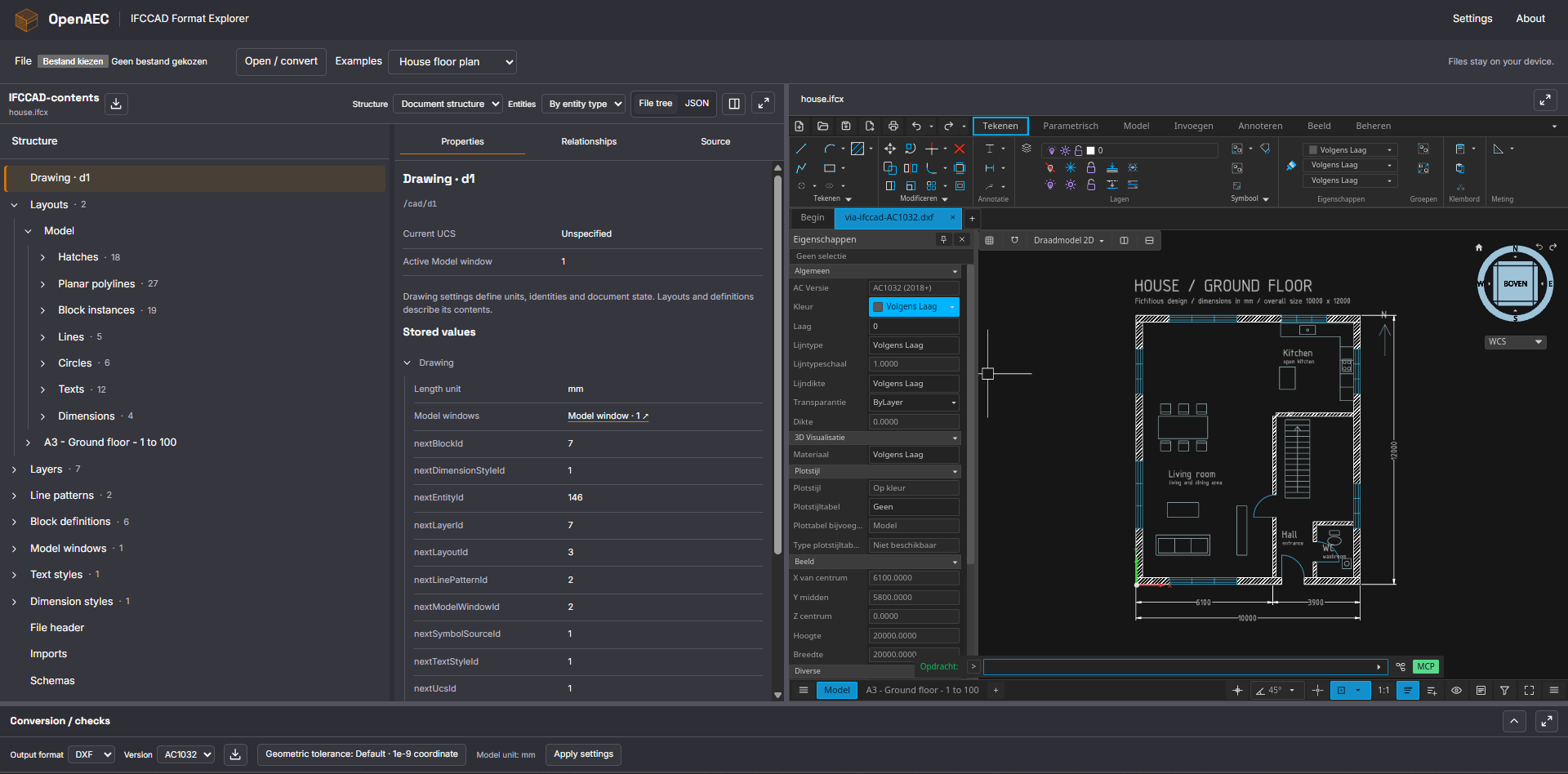
Open an IFCCAD, DWG or DXF file, or try the built-in examples. Inspect drawing structure and properties alongside the drawing in Open CAD Studio. Drawing files are processed locally in your browser.
CAD drawings remain essential: for details, working drawings, existing projects and designs that do not need a BIM model. Yet exchanging this information relies heavily on DWG, a format whose development is controlled by a software vendor. OpenAEC wants to develop an open alternative that lets drawings move between applications and remain accessible for the long term.
IFCCAD needs to preserve more than visible lines. Layers, blocks, text, dimensions, paper layouts and their relationships are also part of a usable drawing. Our goal is to replace DWG as a working and exchange format, with a transition that preserves the meaning of existing DWG and DXF files.
A publicly documented drawing model that different CAD applications can read and write.
A complete CAD drawing must also be usable without a BIM model or BIM connection.
A foundation for connecting drawings, building objects and generated CAD content.
We are working towards a faithful roundtrip: converting DWG or DXF to IFCCAD, working with it and writing it back while preserving geometry, drawing structure, properties and relevant relationships. The aim is to preserve meaning and editability; internal file bytes or reassigned CAD handles do not need to be identical.
Current exchange uses the same shared drawing layer as Open CAD Studio. We check supported examples by reading exported DWG and DXF files back in. This qualifies bounded cases; it does not guarantee complete equality of geometry, properties, display and editability for every drawing. We also want to support other CAD formats later.
Open CAD Studio now supports opening and saving IFCX directly. You can work with drawings following the IFCCAD profile in the CAD application itself and save them as IFCX again. No intermediate DWG or DXF is needed.
The Explorer uses the same support to display the actual IFCX file in Open CAD Studio. Both share IFCCAD exchange through opencaddocument; opencadcodec also provides DWG/DXF exchange. This support is part of the CAD environment itself and is also available through the Explorer.
IFCCAD uses the structure and composition capabilities of IFCX for CAD drawings. IFCX provides a way to describe information through schemas and namespaces. IFCCAD adds the meaning and rules needed for a drawing: geometry, presentation, ownership and references between drawing components.
We want to reuse existing IFCX schemas directly wherever they can express the required CAD semantics. Temporary custom definitions fill the current gaps. This lets us explore how CAD can fit into the growing IFCX ecosystem, while an IFCCAD file can also describe a standalone drawing.
IFCCAD is currently an experimental OpenAEC profile. Both the profile and IFCX are in development; IFCCAD is not yet an official buildingSMART CAD standard.
Development status · November 2026
The current native alpha provides the core, schemas and examples as a source package for developers. The Explorer is a separately published browser application. Both remain in development.
Files may change between alpha releases. Compatibility with earlier IFCCAD files and automatic migration are not yet guaranteed; keep the original drawing files.
IFCCAD has a dedicated drawing model, schemas, strict validation, readers and writers. The Format Explorer opens IFCCAD, DWG and DXF and includes an entity catalogue and house floor plan to try. The capabilities below describe native storage; CAD exchange and display support bounded profiles of that content.
Points, lines, circles and arcs, full and partial ellipses, planar and spatial polylines, and native SOLID/TRACE faces.
Layers, colours, transparency, lineweights, simple and complex linetypes and scale settings, with ByLayer, ByBlock and explicit properties.
Reusable and nested local blocks, insertion points, rotation and scale, plus text and multiline text within the supported formatting profiles.
Solid, line-pattern and gradient hatches, with stored boundaries, association data and additional records for classic CAD editing and boundary construction.
Modelspace, multiple paper layouts, tab order, paper sizes, supported plot settings and viewports with cameras and clipping.
Supported UCS definitions, model viewports and grid and snap settings, alongside visibility and draw order.
All nine ordinary dimension kinds, with measurement and formatting information, references to supported source geometry and optional stored dimension graphics. Automatic updates and fully identical display remain separate development topics.
Extrusion thickness for points, lines, circles, arcs and planar polylines. Polyline widths can be constant or vary by segment. These properties are separate from plotted lineweight.
Nine dimension kinds, polyline widths and extrusion thickness are part of the native model. This does not yet solve complete drawing display, general associative updates or regeneration. Conversion messages help reveal limitations, but do not yet cover every possible loss of information.
Preservation is a planned mechanism for retaining additional data from a source file and restoring it on conversion back, where relationships and context remain valid. Current CAD exchange does not yet offer this as a general guarantee.
When downloading an opened IFCX/JSON file again, the Explorer retains the original source. When converting to another format, data retention depends on the supported exchange route.
Alongside readable IFCX/JSON, IFCCAD can write and read experimental CBOR and CBOR with Zstd compression. The Explorer offers these binary variants as download options. This is binary storage of the IFCCAD drawing model, not a general binary IFCX format.
Binary output contains the supported drawing model; additional IFCX information outside that model is not automatically included. File size, memory use and efficient reading and writing remain development goals, without a general performance guarantee.
Our ambition goes beyond linking a drawing to a BIM object. We also want to generate CAD content from BIM and regenerate it when the model changes. Manually added drawing work must be preserved in the process.
Imagine a drafter adding dimensions and annotations to a floor plan generated from BIM, then placing it on a sheet with viewports. When a wall moves, we want to update the generated geometry, have the associated dimensions follow, and preserve the manual additions and sheet layout.
This requires stable identity, source relationships and reliable change processing. The next steps focus on shared annotation scale contexts and bounded associative updates. BIM integration and regeneration that preserves manual CAD work remain ambitions; this complete workflow has not yet been implemented.
Try the Explorer, browse the source code or share practical experience and test files you have permission to share. Feedback from CAD users, BIM specialists and developers helps us focus the next steps on real drawing workflows.