Civil and geotechnical engineering

Open Geotechniek Studio

Read CPTs and boreholes, put them on the map and run the numbers

Read Dutch CPTs and boreholes, fetch them from the BRO, place them on the map and the site plan, and turn them into reports and pile calculations you can check line by line.

  • Windows · macOS · Linux
  • GEF · BRO-XML · IFCX
  • BRO and PDOK on the map
  • Free · MIT
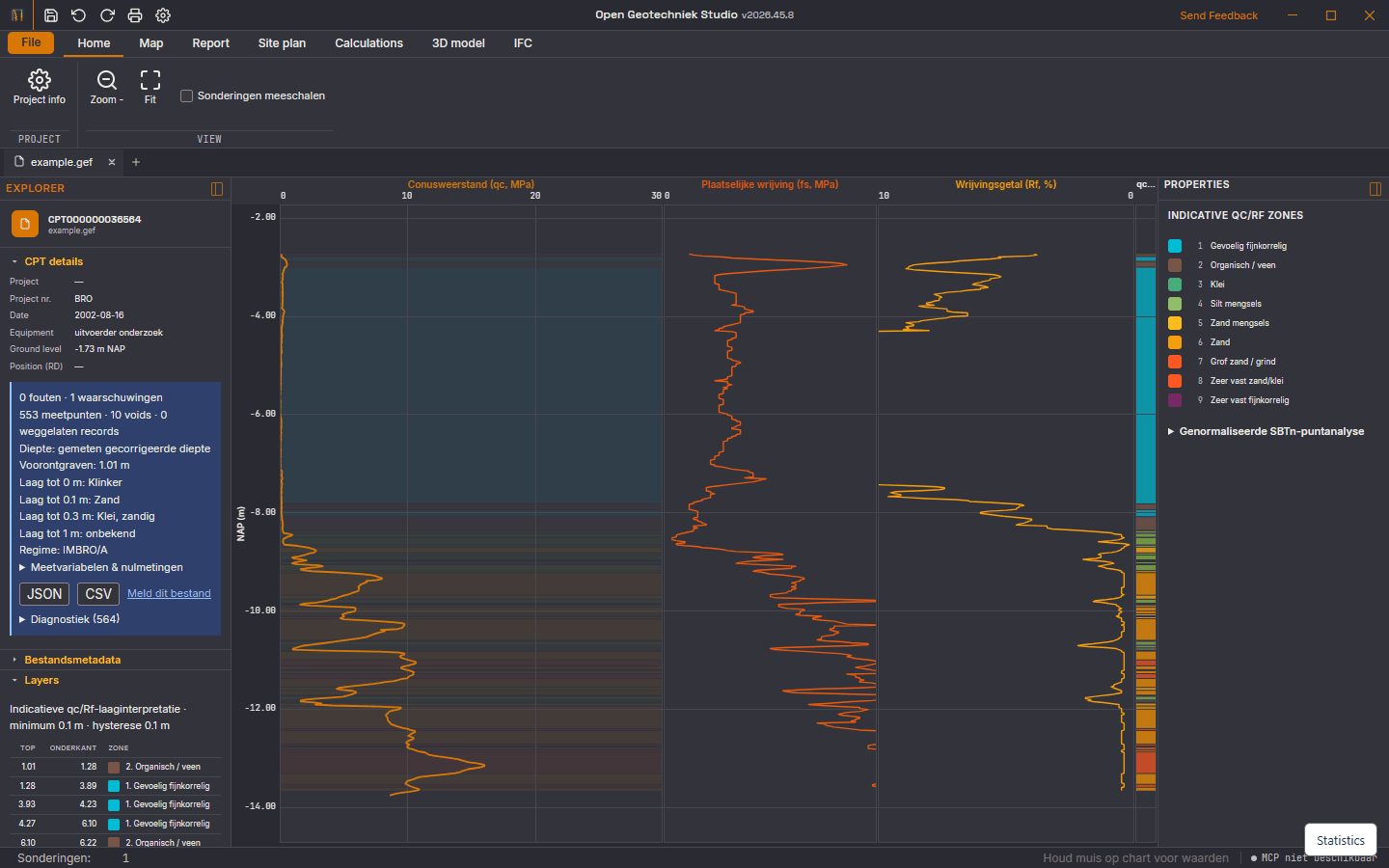
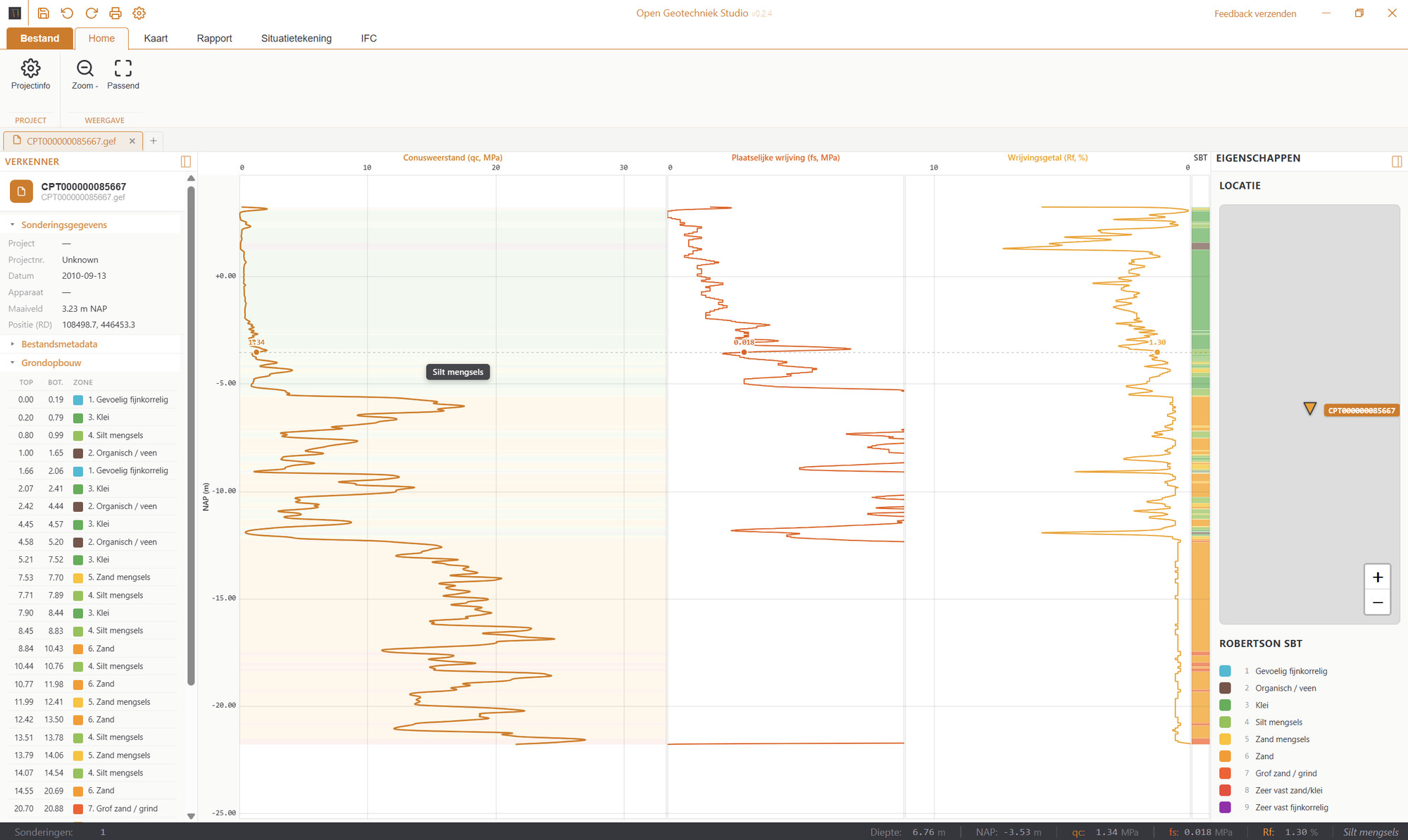
Open Geotechniek Studio in a dark theme: a CPT with cone resistance, sleeve friction and friction ratio, and the indicative soil layers
A CPT with cone resistance, sleeve friction and friction ratio against depth, with the soil profile and the location
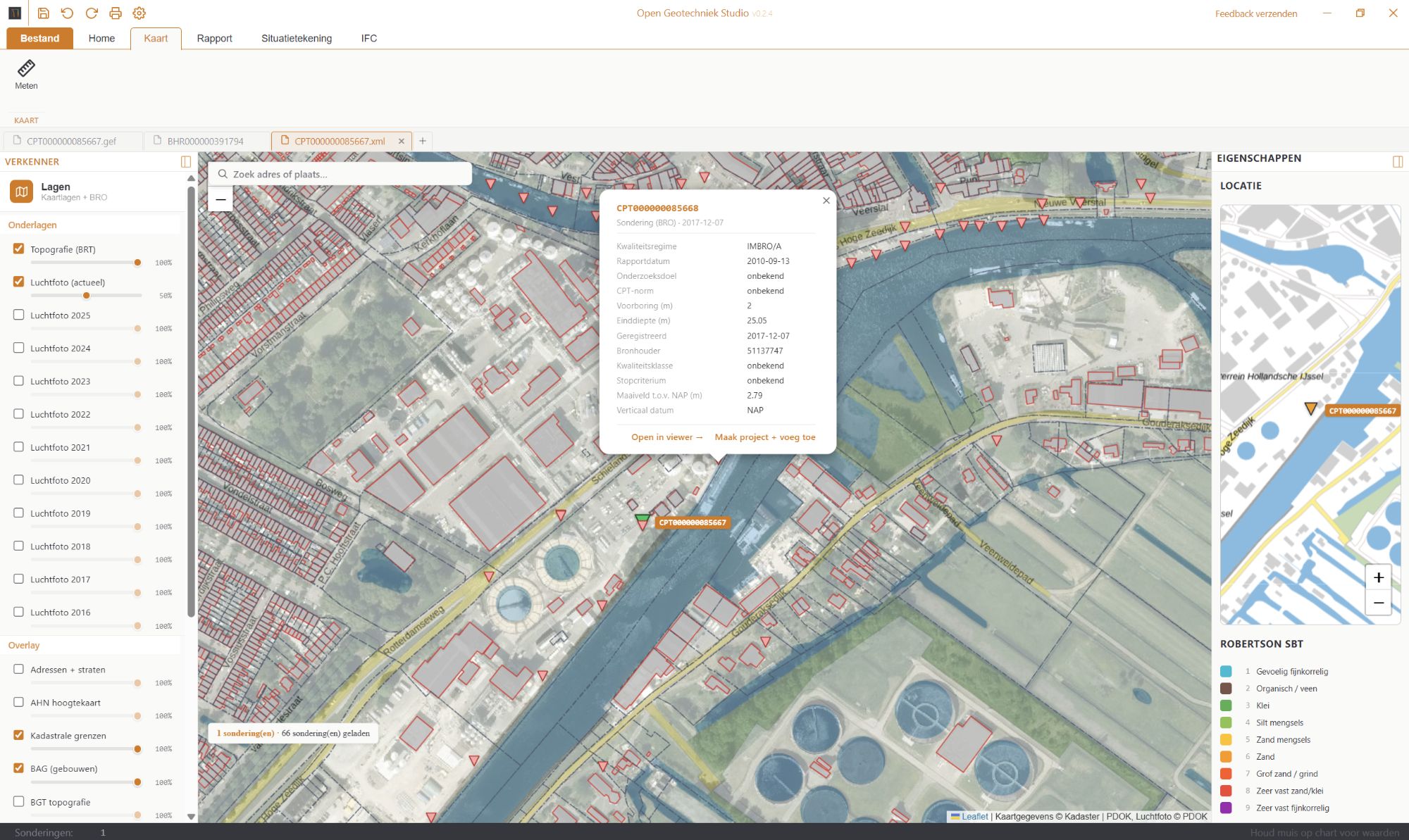
The map with CPTs from the BRO on an aerial photo, with the details of a selected CPT
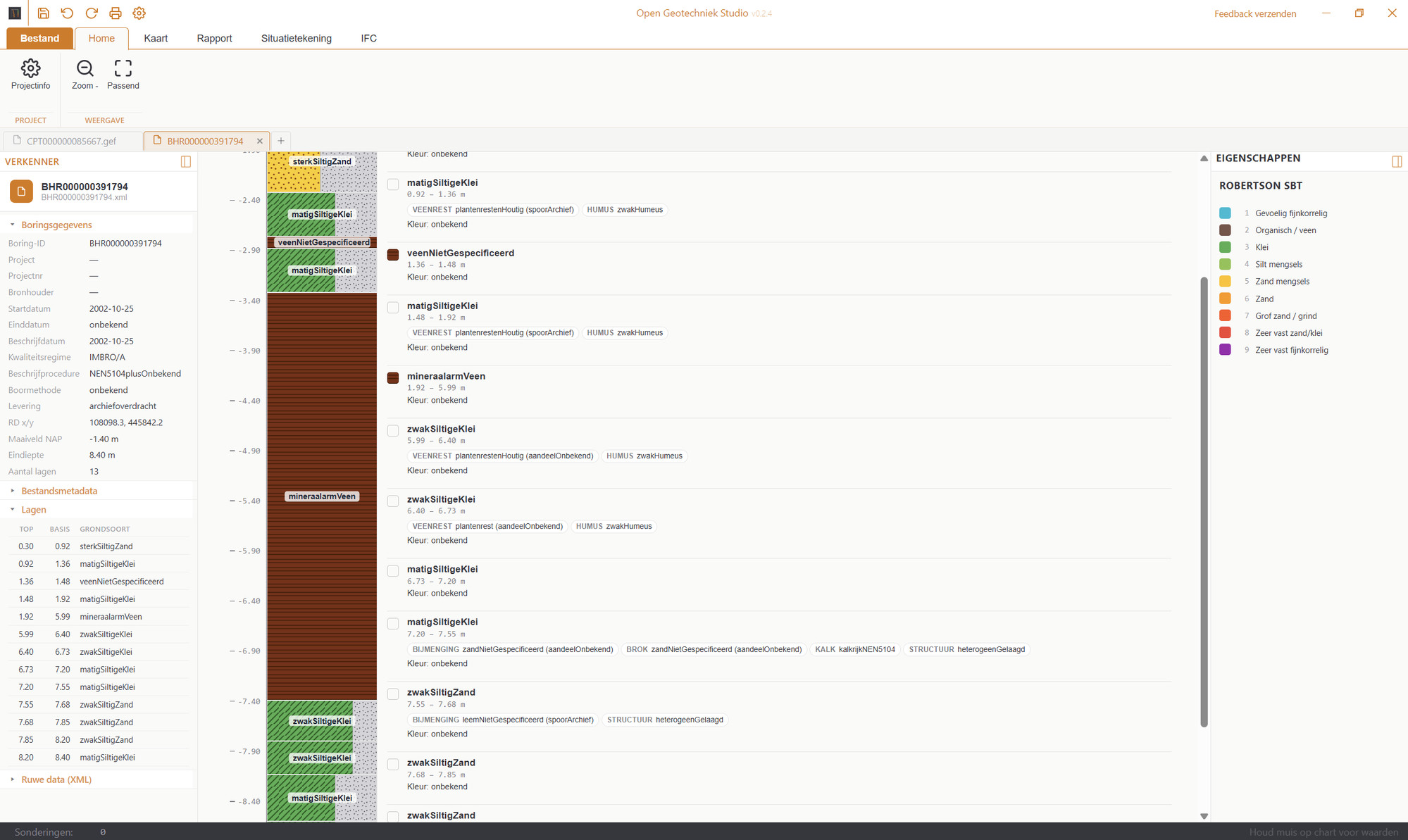
A BRO borehole with soil layers, admixtures and the description per layer
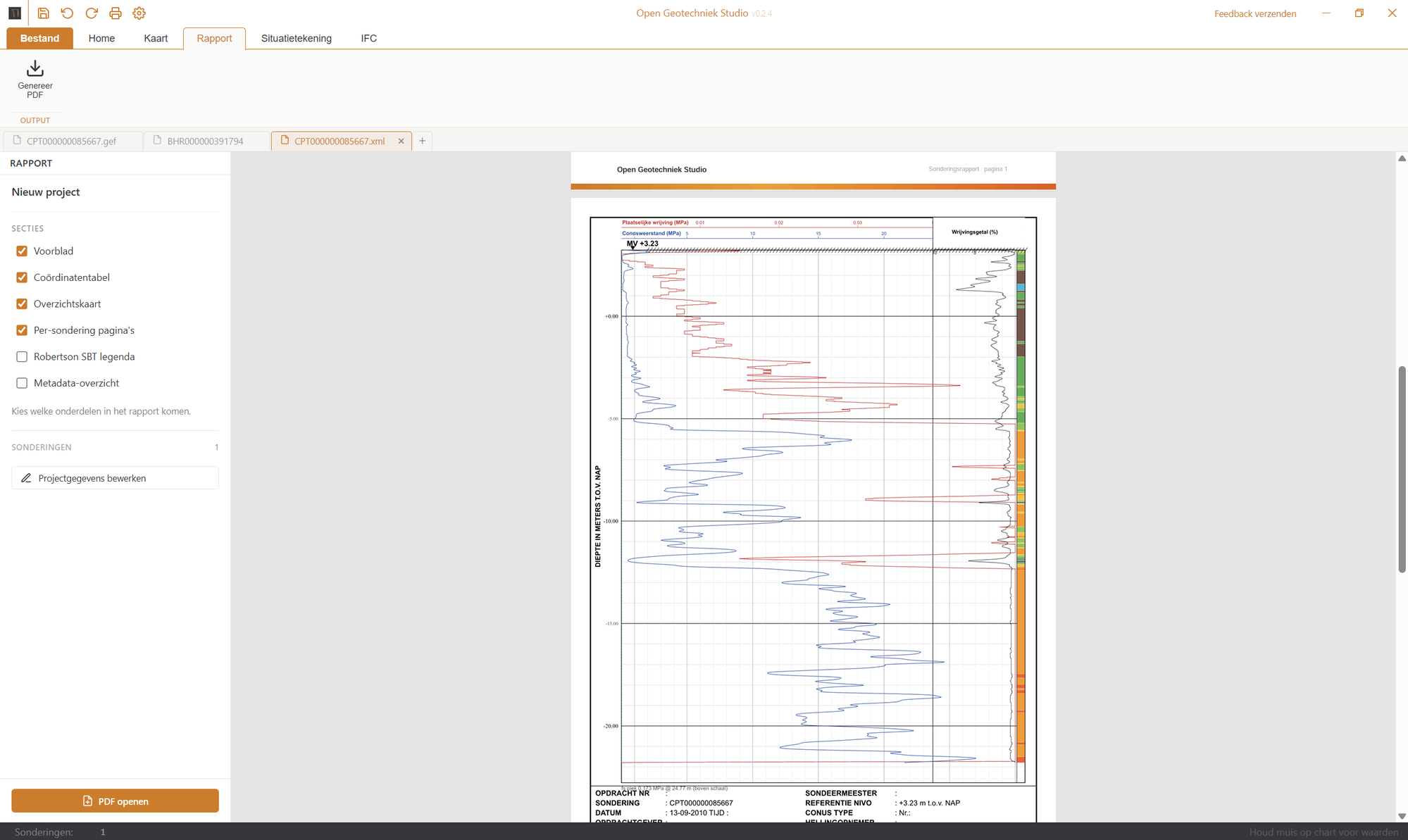
The Report tab with the sections of the CPT report and a preview of a page

Concept calculations: the pile calculations show every step, but they do not replace a checked design. They carry a concept mark on screen and in every PDF.

Features

From CPT to foundation advice

Start with the highlights or pick a topic.

A CPT with cone resistance, sleeve friction and friction ratio against depth, with the soil profile and the location

01 CPTs and boreholes

Every GEF and BRO CPT at a glance

Open GEF 1.x and BRO-XML files and see cone resistance, sleeve friction, friction ratio and pore pressure against depth in m NAP, with indicative soil zones. Boreholes from the BRO show their soil layers. Put several CPTs side by side to compare them.

Read more
The map with CPTs from the BRO on an aerial photo, with the details of a selected CPT

02 Map

Every CPT nearby in one click

Pick an area on the map and load every CPT and borehole from the BRO. Underneath are the PDOK maps: aerial photos from 2016 to 2025, BAG buildings, cadastral parcels, zoning plans, BGT and elevation, with a measuring tool.

Read more
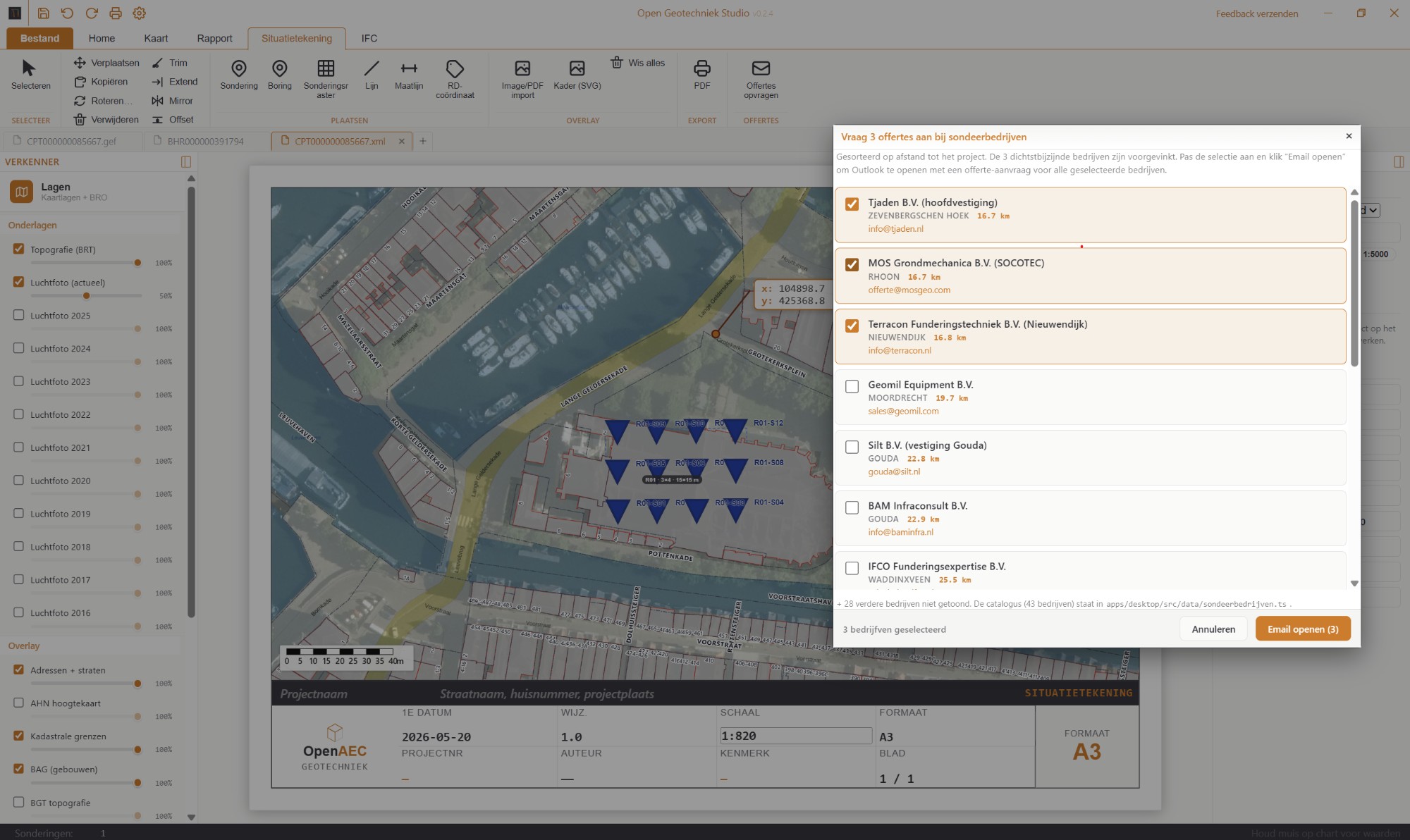
A site plan with a grid of CPTs and the title block, with the dialog for requesting quotes

03 Site plan

A site plan at true scale

Draw on a fixed A2 or A3 sheet with CPT markers, a CPT grid, dimension lines and RD coordinates, with a PDF or image as underlay and a title block. Then request quotes: the app sorts CPT contractors by distance to the project and prepares a request in your mail app.

Read more
The Report tab with the sections of the CPT report and a preview of a page

04 Calculate and report

Calculations you can check

Work out the bearing capacity of piles, build a capacity table per CPT or calculate a laterally loaded pile. Every calculation sheet shows the formula, the filled-in values and the outcome next to the input. Bundle it all into a CPT report or a foundation advice report as a PDF.

Read more
  • GEF and BRO-XML

    CPTs as GEF 1.x or BRO-XML (CPT_O and CPT_O_DP) and boreholes from BHR-GT. Import messages stay with the project and can be exported as CSV or JSON.

  • The CPT chart

    qc, fs, Rf and u2 against depth in m NAP, with indicative qc/Rf soil zones. The zones are indicative, not a normalised classification.

  • Boreholes

    BRO boreholes with soil layers, admixtures and humus content, next to the CPTs in the same project.

  • CPTs side by side

    Put many CPTs side by side and scale the columns with the zoom, or fit them to the window.

  • Load an area from the BRO

    Fetch every CPT and borehole in the visible map area from the Dutch subsurface register (BRO).

  • PDOK map layers

    Background maps, aerial photos from 2016 to 2025, BAG buildings, cadastral parcels, zoning plans, BGT and elevation, with a measuring tool.

  • Site plan

    An A2 or A3 sheet at true scale with CPT markers, a CPT grid, dimension lines, RD tags, an underlay from PDF or an image, snapping to buildings and parcels, and a title block.

  • Request quotes

    The app sorts CPT contractors by distance to the project, preselects the three nearest and opens your mail app with a filled-in request. You adjust the choice before you send.

  • Bearing capacity of a pile

    Steel, concrete and timber piles, including timber with a concrete extension. The sheet shows the input and the CPT next to the worked-out result, with a print preview and PDF.

  • Capacity table

    Rc;net;d per CPT for a range of pile sizes and toe levels. Enter the capacity you need and see per size the shortest pile that reaches it and how much the toe level varies between CPTs.

  • Laterally loaded pile

    A beam on linear or non-linear soil springs, with the section and reinforcement as a drawing. Output: displacement, moment and shear, the soil reaction per layer, the N-M interaction and a PDF.

  • Pile table

    Many laterally loaded piles in one table, with per row its own head load, the utilisation ratio and the lightest standard size that passes.

  • Settings per calculation

    Pile factors from the table or as a project value, standard size series, subgrade values and pu profiles per soil type.

  • Verified

    The lateral pile kernel is compared with closed-form solutions and an independent solver; the bearing capacity with an external reference calculation and 100 public reference cases.

  • CPT report

    Cover, coordinate table, overview map and one page per CPT, in the OpenAEC house style.

  • Foundation advice

    One PDF with cover, table of contents, soil investigation, site plan, soil profile, pile advice and appendices. The texts per pile system are drafts for the consultant to check.

  • One project file

    A project is one .ifcgeo file (IFCX JSON) with the CPTs, the import messages, the site plan and the calculations. Older .ifcgis and .ifcx projects still open.

  • Open formats out

    Save as GEF, CSV or GeoJSON, or as an IFCX snapshot. You can open IFC4x3 to inspect it.

  • Works with an AI assistant

    An MCP server controls the open window on your own computer: open files, change project data and pile calculations, and write a PDF report.

  • Ten languages

    The interface is available in ten languages. The calculation modules and their reports are in Dutch only.

Download

Download v2026.45.8

Free and without an account. Signed installers for Windows, macOS and Linux.

Installer for Windows (x64) ·

Other platforms

There is no built-in updater yet: install a new version over the old one. Your projects are ordinary files and stay where they are.

New in v2026.45.8

A pile table, a foundation advice report and its own logo

Released on 6 November 2026. This version gives the app its approved logo. The release from the same day, v2026.45.7, brought the pile table for laterally loaded piles and the foundation advice report.

  • Its own app logo

    The approved logo is now in the app and in the installers and app icons.

  • Pile table

    One table for many laterally loaded piles with the same soil and section. Each row has its own head load, and a cell that fails turns red.

  • Lightest size

    For each pile, the lightest standard size that meets the utilisation ratio and the limit for head displacement, with a button to apply it.

  • Foundation advice as a report

    CPTs and pile calculations together in one PDF, with a cover, table of contents, a site plan to scale and appendices.

  • Bearing layer

    The advice shows an indicative bearing layer for each CPT; you set the limits for it yourself.

  • More for the AI assistant

    Through MCP an assistant can now also fill the pile table and add, change and export a foundation advice report as a PDF.

Frequently asked questions

What does it cost?

Nothing. Open Geotechniek Studio is open source under the MIT licence: no licence fees, no account and no lock-in.

Can I use the pile calculations directly?

No. The calculations are concept: they show every step, but they do not replace a checked design. They carry a concept mark on screen and in every PDF. Have the results checked by a qualified consultant.

Which files can I open?

CPTs as GEF or BRO-XML, boreholes as BRO BHR-GT, projects as .ifcgeo, and older .ifcgis and .ifcx projects. You can also open IFCX and IFC4x3. And you can load CPTs and boreholes straight from the BRO on the map.

Which systems does it run on?

Windows x64, macOS on Apple silicon and Intel, and Linux x64 as .deb, AppImage or Snap.

Is the app available in English?

The interface is available in ten languages, including English. The calculation modules and their reports are in Dutch only, because they are based on Dutch CPTs and standards.

How do I update to a new version?

There is no built-in updater yet. Download the new installer and install it over the old version. Your projects are ordinary files and stay where they are.

Are the downloads signed?

Yes. Windows with Authenticode and a timestamp, macOS with a Developer ID and notarized by Apple, Linux with the OpenAEC OpenPGP key. The SHA256SUMS.txt file in every release lists the checksums of all files.

What can an AI assistant do with it?

The desktop app has an MCP server that controls the open window: open files, edit project data, add and change pile calculations, read the capacity table and write a PDF report. The server runs only on your own computer, and an indicator shows when an assistant is connected.

Technology

Open building blocks, also usable on their own.

Tauri 2

Lightweight desktop apps for Windows, macOS and Linux.

React and TypeScript

The interface, with the shared look, fonts and icons of the OpenAEC Blueprint.

Rust crates

The CPT parsers, charts and reports come from the shared OpenAEC crates-warehouse.

Node core with HTTP API

The same GEF and BRO parser also runs without a window, with an HTTP API and MCP.

Native SDK

An SDK with a C interface for Windows and Linux, shipped with every release.

IFCX

The project format is IFCX JSON: open and readable by anyone.

All releases on GitHub

Why Open Geotechniek Studio?

Free and open: no licence fees, no account and no lock-in. Open formats in and out, the BRO and PDOK right on the map, reports you can hand over and calculations you can check. For geotechnical consultants, structural engineers and everyone in civil engineering who works with CPTs.