Use cases for AEC professionals
Whether you're inspecting on-site, taking minutes in a project meeting, or dictating an email between tasks - Open Speech Studio works everywhere, even offline.
On-site inspections
Dictate findings directly into Open Field Studio while taking photos. No taking off gloves, no typing on a tiny screen. Just talk - done.
Meeting minutes
Real-time transcription of project meetings on location. Fully processed locally - no privacy concerns about client names, prices, or confidential project data in the cloud.
Quick emails on-site
Dictate into Outlook or Gmail between tasks. Hands-free when your hands are dirty, you're wearing safety gloves, or holding a ladder.
Writing AI prompts
Dictate a prompt for Claude or ChatGPT much faster than typing. Speaking is ~3x faster and you often phrase more naturally - ideal for long, detailed prompts.
Code comments and commits
Dictate code explanations, docstrings, and commit messages directly into your IDE or terminal. Works seamlessly in VS Code, Cursor, Neovim - anywhere you can enter text.
Accessibility
For RSI patients, people with motor impairments, or temporary injuries. Work your entire computer completely keyboard-free - GDPR-safe and subscription-free.
Why local?
Cloud speech recognition sends your voice to third-party servers. Open Speech Studio does everything on your own PC - faster, safer, and without monthly costs.
Privacy
Your voice never leaves your computer. GDPR-safe automatically - no DPA needed with external providers, no risk of data breaches.
No subscription
Otter.ai charges ~€20/month. Dragon NaturallySpeaking ~€500 one-time. Open Speech Studio is free forever - open source LGPL-3.0.
€0 foreverNo rate limits
Dictate 10 hours a day if you want. No API quotas, no 'Fair Use Policy', no surprise invoices. Your hardware is the only limit.
| Feature | Open Speech Studio | Dragon NaturallySpeaking | Otter.ai |
|---|---|---|---|
| Price | €0 (open source) | ~€500 one-time | ~€20/maand |
| 100% local | Yes | Yes | No (cloud) |
| GDPR-safe without DPA | Yes | Yes | No |
| Languages | 99 talen (Whisper) | ~6 talen | ~10 talen |
| GPU acceleration (CUDA) | Yes | No | N/A (cloud) |
| Open source | Ja (LGPL-3.0) | No | No |
Features - what can it do?
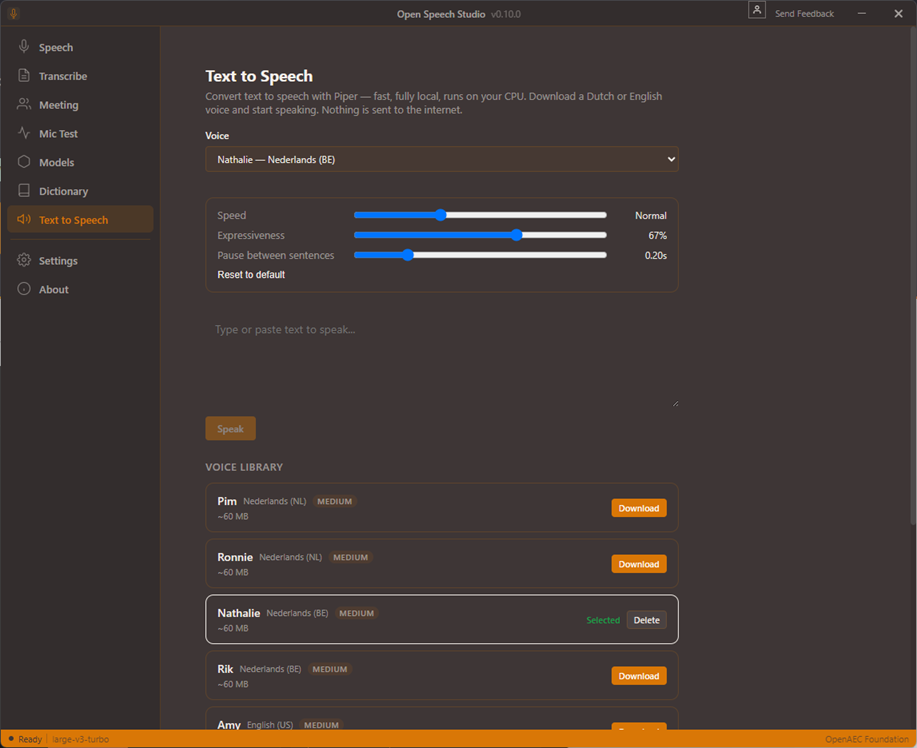
Open Speech Studio is more than a dictation tool. It's a complete speech-to-text suite with audio file transcription, meeting recordings, multiple Whisper models, and export to standard subtitle formats.
Dictate anywhere
Dictate text directly into any application via a system-wide overlay. Works in Outlook, Word, Chrome, VS Code, Slack, Teams - literally anywhere in your OS.
Audio file transcription
Transcribe audio files (.mp3, .wav, .m4a, .ogg) with parallel processing. Multiple files at once, fast and accurate.
Real-time meeting transcription
Record project meetings and watch the transcription appear in real time. Automatic minutes, even offline on the job site.
CUDA GPU acceleration
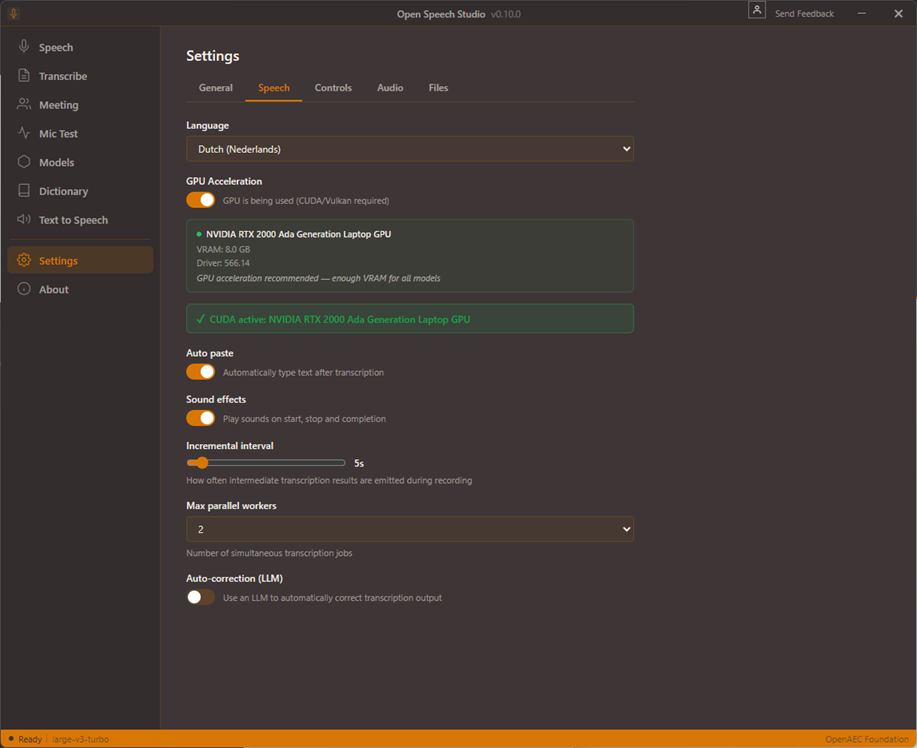
CUDA GPU acceleration for faster results. On a modern GPU, Whisper Large runs nearly real-time - optimal use of your hardware.
Keyboard shortcuts
CTRL+Win for the overlay, CTRL+SHIFT+Space as alternative. No mouse click needed, no menu hunting - dictation starts in <100ms.
Whisper AI models
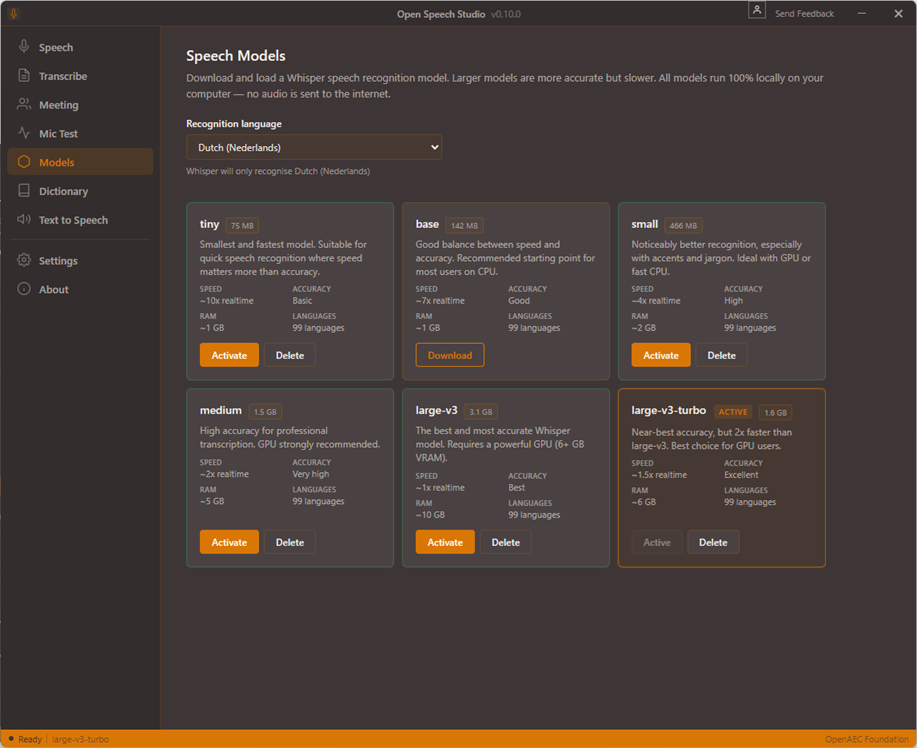
5 models: tiny, base, small, medium, large. Choose between speed (tiny) or accuracy (large). Memory usage 1-10GB depending on model.
99 languages
Whisper supports 99 languages: Dutch, English, German, French, Spanish, Polish, Arabic, Mandarin and many more. Automatic language detection.
Spotify-style overlay
Sleek, minimalist overlay UI with live waveform visualization. Stays out of the way, disappears automatically after inserting.
History
Full history of transcriptions - searchable, reusable. Everything stored locally, you stay in control.
Export TXT, SRT, VTT
Export transcriptions as plain text (.txt) or as subtitles (.srt, .vtt) for video content with timestamps.
Clipboard integration
Automatic clipboard integration - dictate and paste directly, or let text auto-insert at the cursor position.
100% local
Everything runs locally on your own computer. Your data never leaves your PC. No cloud, no subscription, no limits. GDPR-safe out of the box.
Keyboard shortcuts
Start speech-to-text anywhere in your operating system:
Configurable in settings - choose your own shortcut if it conflicts with other software.
Tech stack
Open Speech Studio is built on a modern, performant stack. OpenAI Whisper for state-of-the-art speech recognition. Rust for a lightweight, fast backend (no Python runtime needed). Tauri 2 for the desktop app - much lighter than Electron (~10MB instead of 200MB). TypeScript + Svelte for the UI. Fully open source under LGPL-3.0.
Download now - 30 second setup
1 installer file (.exe), no registration, no account, no credit card. Ready to dictate in <1 minute. Works on Windows 10 and Windows 11.