Editor PDF para la construcción

Open PDF Studio

Editor PDF gratuito para anotar, medir y comparar planos

Abre planos de construcción sin esperas, añade nubes y símbolos, mide a escala y ve de un vistazo qué ha cambiado entre dos revisiones. En tu ordenador, tu tableta o directamente en el navegador.

  • Motor PDF propio para planos vectoriales
  • 39 idiomas
  • Windows · macOS · Linux · Android · Web
  • Gratis · LGPL-3.0
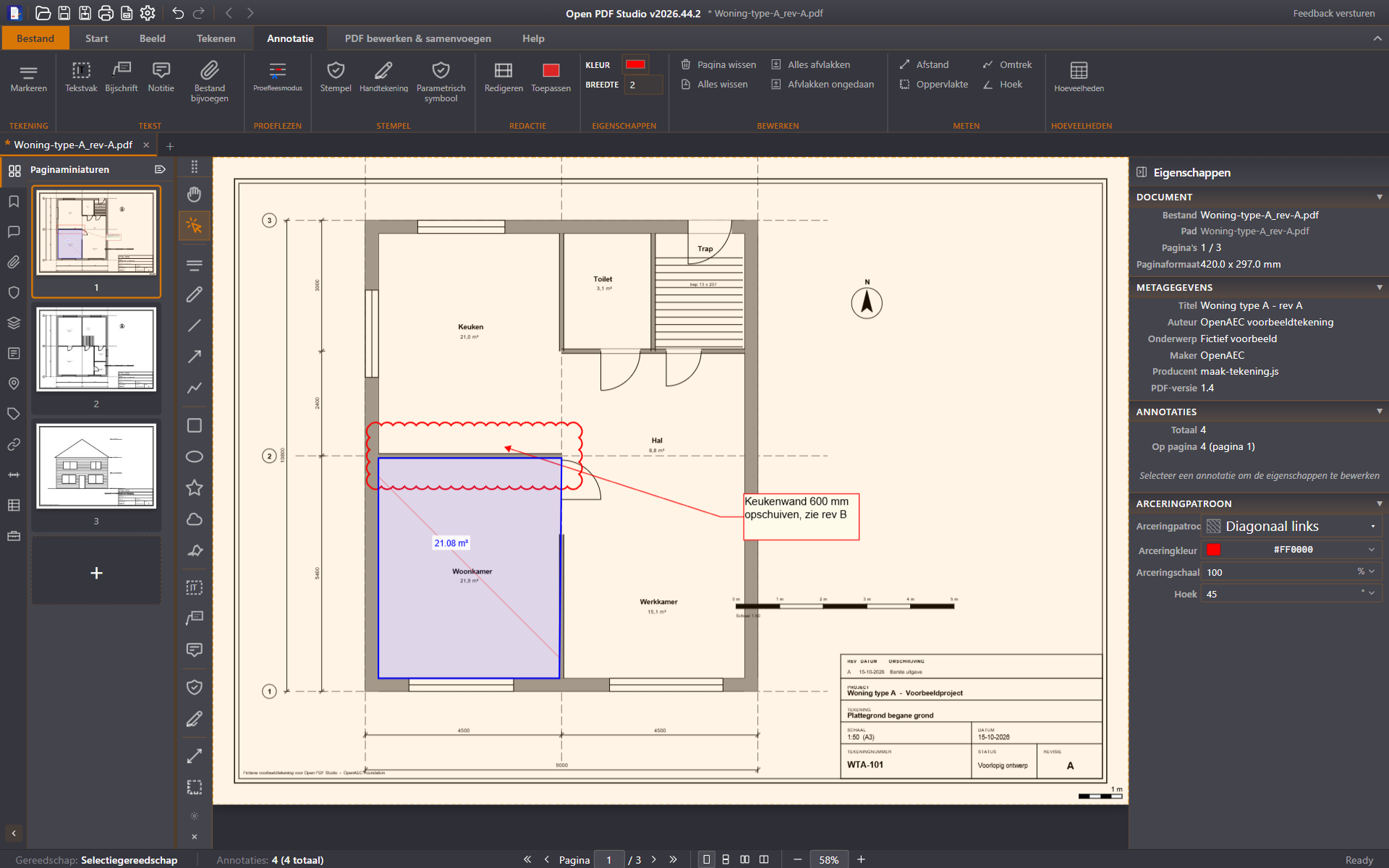
Open PDF Studio: planta de una vivienda con una nube de revisión, un globo de texto y una superficie medida de 21,08 m²
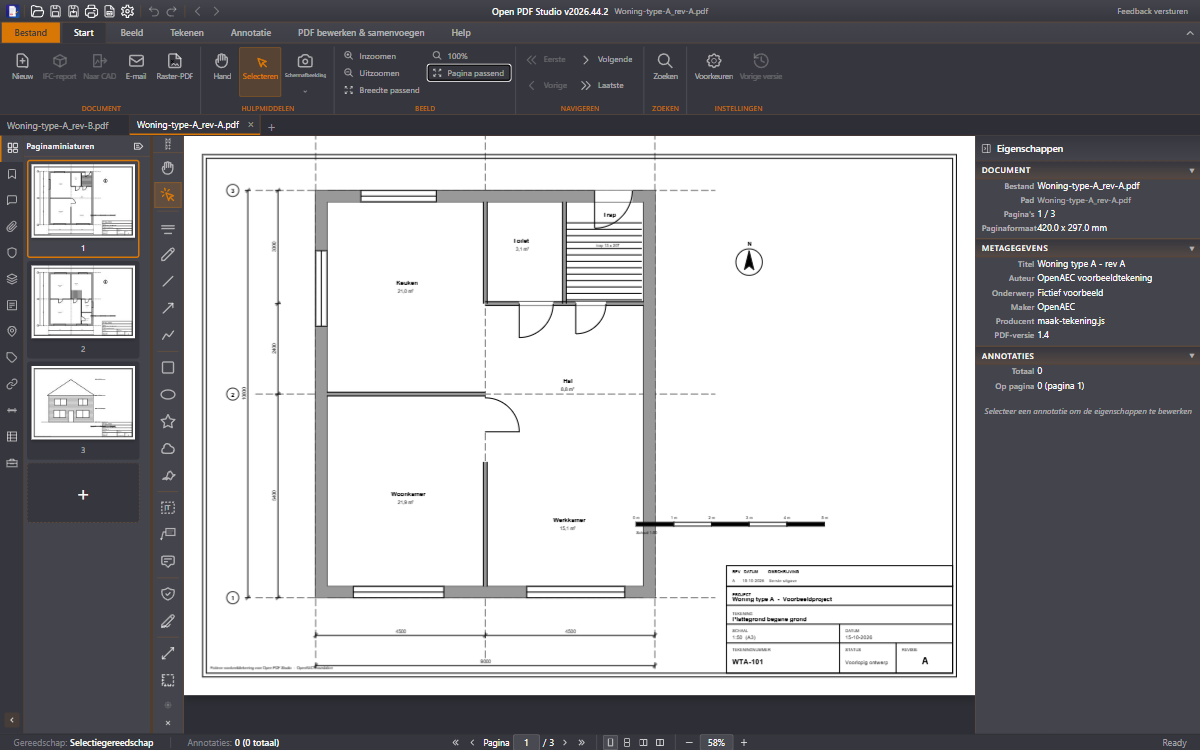
Planta de una vivienda ajustada a la ventana, con miniaturas de las tres hojas
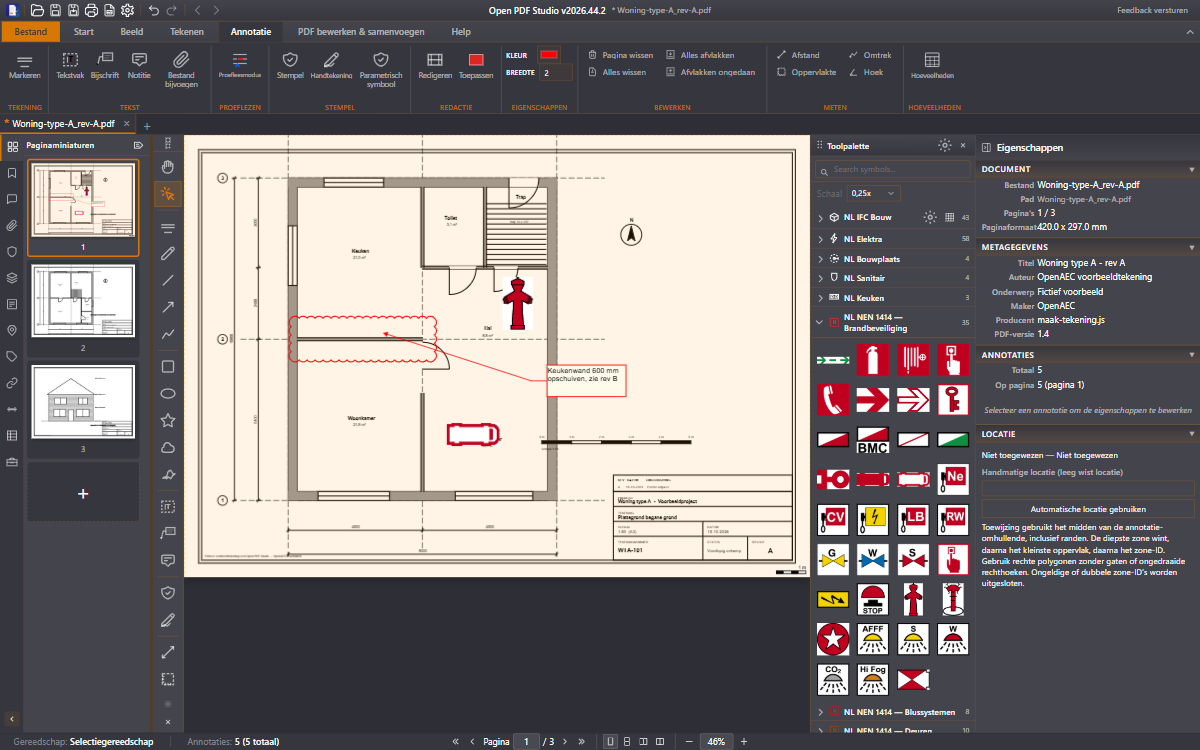
Nube de revisión, globo de texto y símbolos de protección contra incendios NEN 1414 en una planta, con la paleta de herramientas abierta
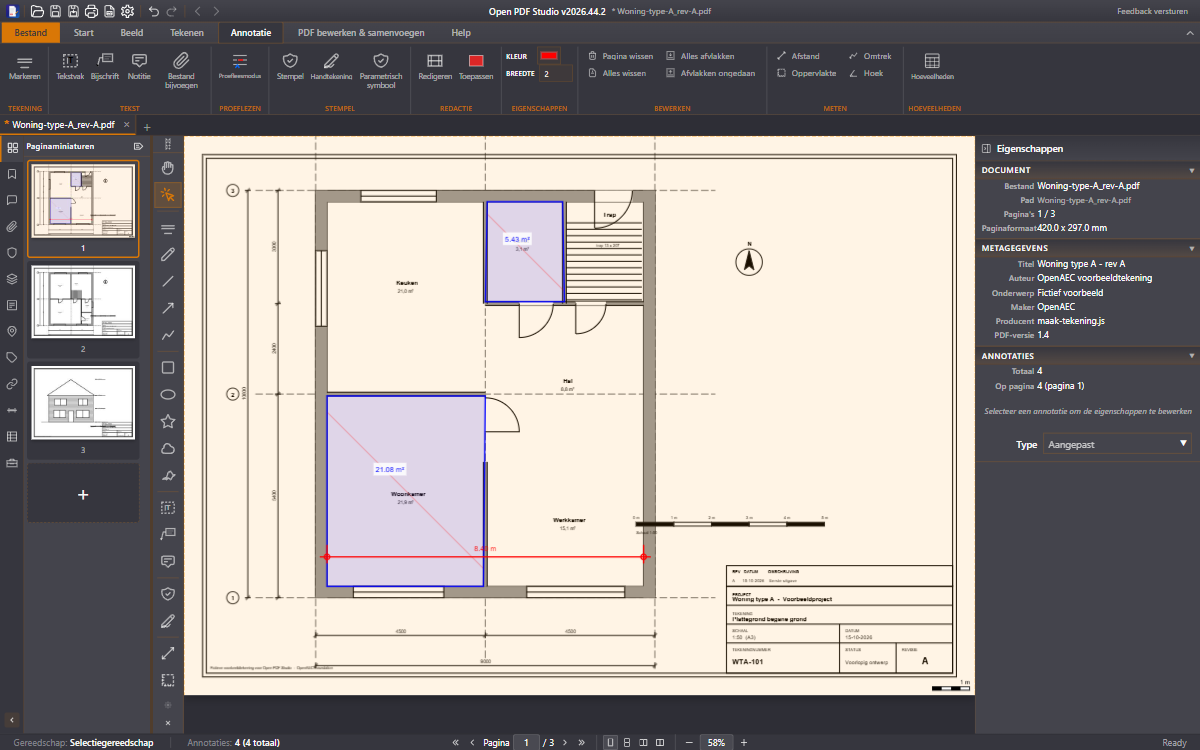
Planta a 1:50 con dos superficies medidas y una distancia de 8,40 m
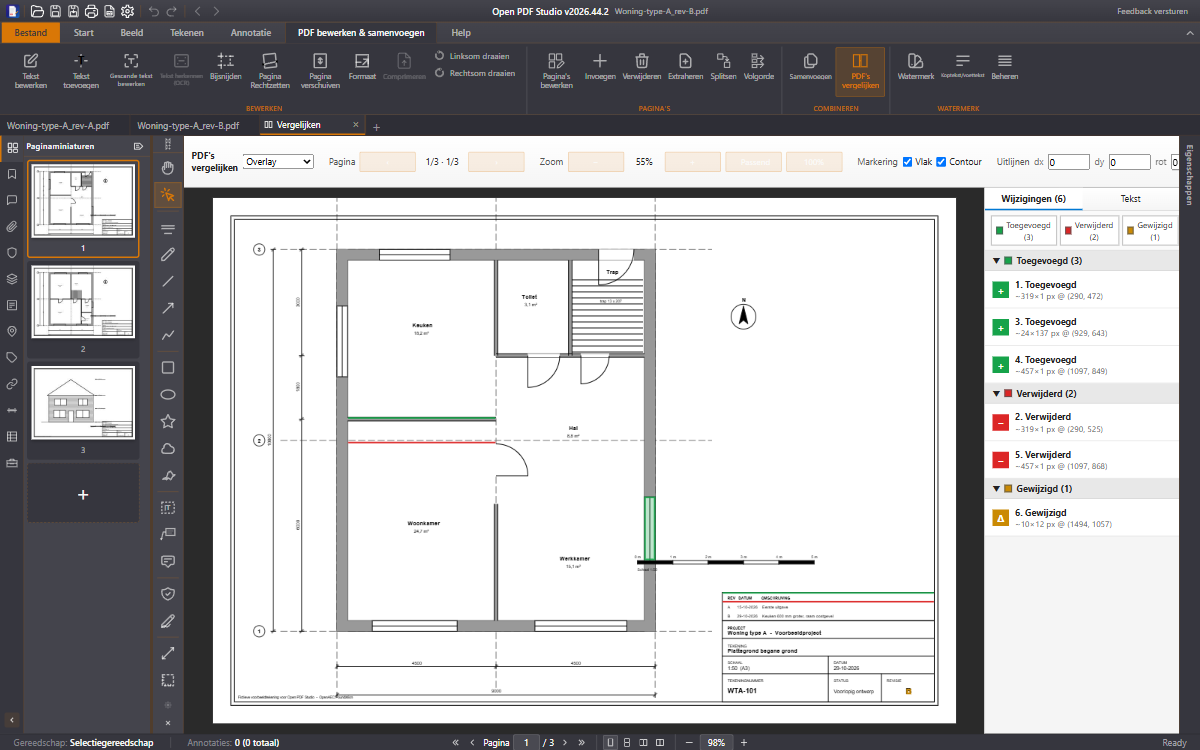
Revisiones A y B superpuestas: el muro de cocina desplazado en rojo y verde, con una lista de seis cambios
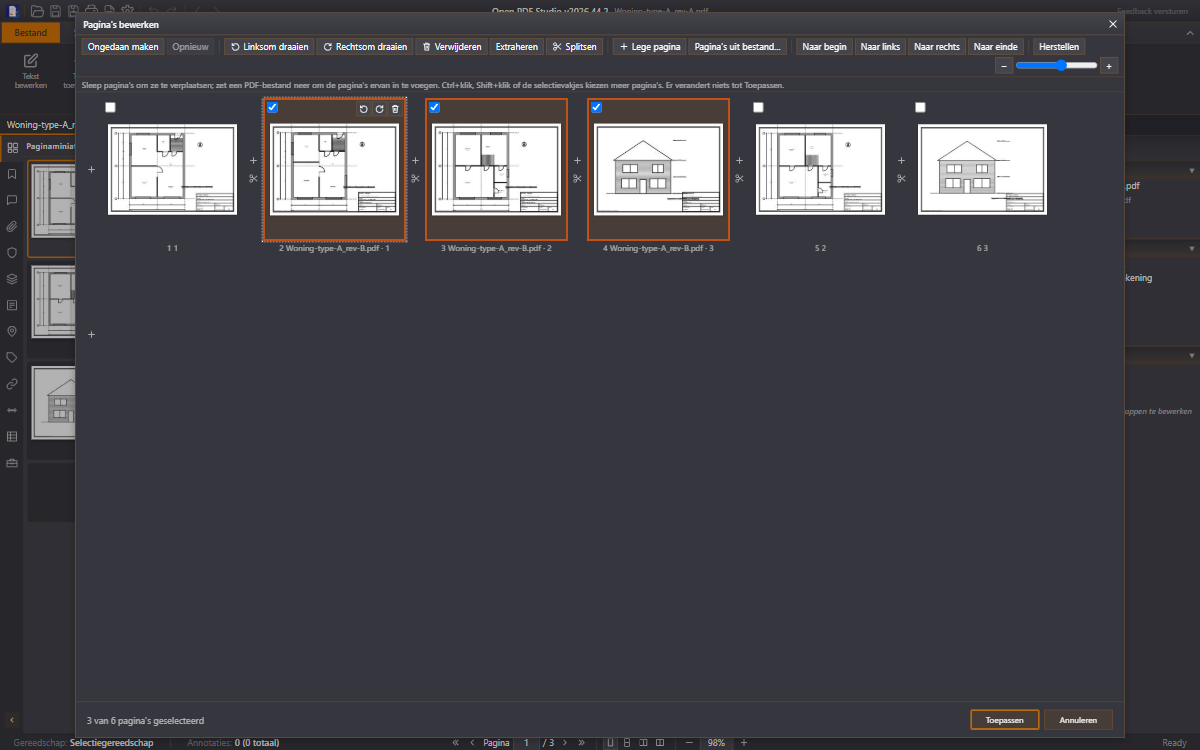
Editar páginas: seis hojas como miniaturas, con las hojas de la revisión B insertadas
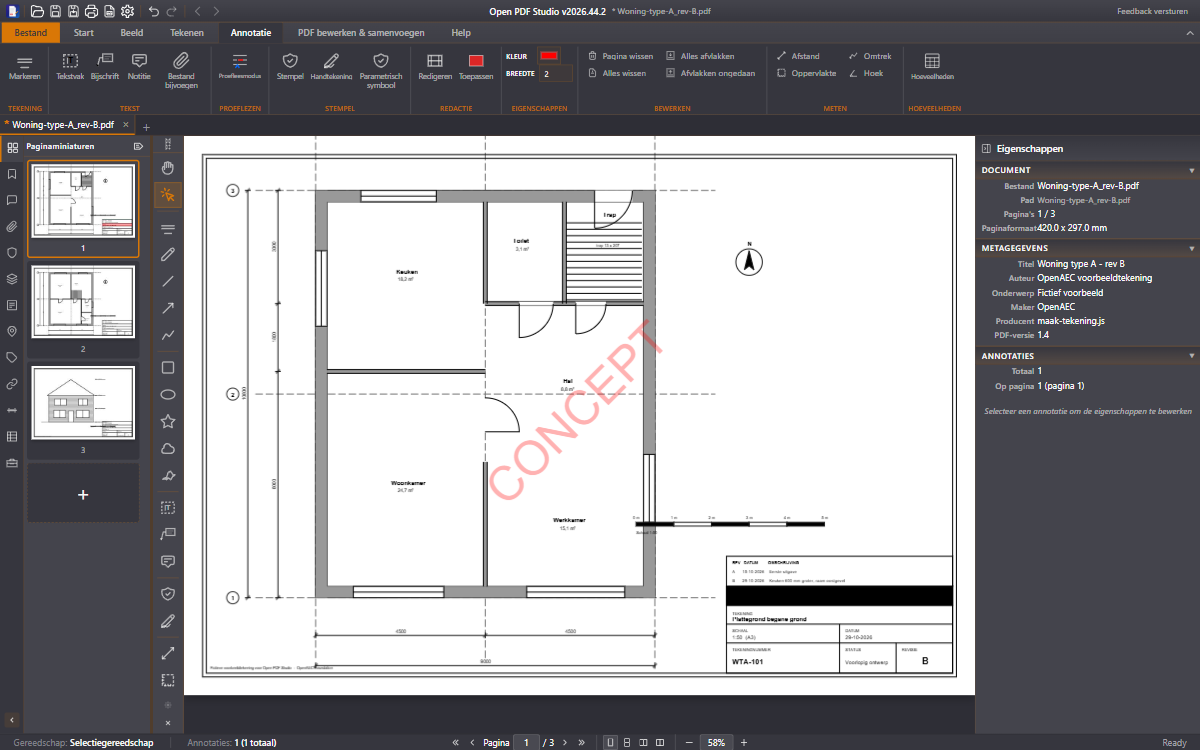
Plano con la marca de agua CONCEPT y un bloque de proyecto tachado en negro en el cajetín

Pruébalo ya: abre tu propio PDF en el navegador. El archivo se queda en tu ordenador y nunca se sube. Abrir la versión web

Funciones

Todo para tus planos, en una sola aplicación

Empieza por lo más destacado o elige un tema.

Planta de una vivienda ajustada a la ventana, con miniaturas de las tres hojas

01 Planos

Abre planos grandes sin esperas

En la aplicación de escritorio, un motor PDF propio escrito en Rust muestra los PDF vectoriales al instante, incluidas hojas grandes y juegos de cientos de páginas. Trabaja con varios planos en pestañas y salta a la hoja correcta con las miniaturas.

Más información
Nube de revisión, globo de texto y símbolos de protección contra incendios NEN 1414 en una planta, con la paleta de herramientas abierta

02 Anotar

Marca lo que hay que cambiar

Nubes, flechas, globos, notas y sellos, además de una paleta de herramientas con símbolos NEN 1414 e IFC. Cada anotación tiene autor, estado y respuestas, para que resolváis los comentarios juntos.

Más información
Planta a 1:50 con dos superficies medidas y una distancia de 8,40 m

03 Medir

Mide a escala, incluso con varias escalas por hoja

Coloca una zona de escala en el plano y mide distancias, superficies, perímetros y ángulos, con enganche a extremos y puntos medios. Cada medición va a una tabla de mediciones que puedes colocar en el plano como tabla o guardar como CSV.

Más información
Revisiones A y B superpuestas: el muro de cocina desplazado en rojo y verde, con una lista de seis cambios

04 Comparar

Ve al momento qué ha cambiado entre dos revisiones

Superpón dos versiones, muéstralas una al lado de otra o usa una línea de barrido. Lo añadido se ve en verde, lo eliminado en rojo, y una lista resume cada cambio.

Más información
Editar páginas: seis hojas como miniaturas, con las hojas de la revisión B insertadas

05 Páginas

Monta tu juego de planos

Reordena, gira, elimina y divide páginas en una vista de miniaturas, e inserta páginas de otro archivo. Al combinar, se conservan anotaciones, mediciones, campos de formulario y marcadores.

Más información
Plano con la marca de agua CONCEPT y un bloque de proyecto tachado en negro en el cajetín

06 Compartir

Comparte tu plano como quieras

Añade una marca de agua o un encabezado y pie de página, oculta los datos sensibles y firma con tu firma. Imprime en color, en escala de grises o en blanco y negro, o guarda las hojas como imágenes.

Más información
  • Más de 20 herramientas de anotación

    Resaltar, subrayar, tachar, nubes, flechas, formas, mano alzada, cuadros de texto, globos y notas.

  • Símbolos para la construcción

    Una paleta de herramientas con símbolos NEN 1414 e IFC, además de símbolos paramétricos como armaduras, ensayos de penetración (CPT) y una grúa torre con su radio de giro.

  • Resuelve comentarios

    Cada anotación tiene autor, estado y respuestas. La lista de anotaciones y las capas de anotación mantienen ordenados los juegos grandes.

  • Conjuntos de herramientas

    Guarda tus estilos de anotación y preajustes de medición en conjuntos y compártelos con tus compañeros como archivo .opdstools.

  • Dibuja como en CAD

    Líneas, arcos, sombreados y cotas, con mover, simetría, matriz y girar. Los marcos con cajetín se rellenan aparte.

  • Recorte vectorial

    Recorta un detalle de un PDF y pégalo en otro, como datos vectoriales nítidos en lugar de una captura de pantalla.

  • Distancia, superficie, perímetro y ángulo

    Mide en mm, cm, m, pulgadas o pies, con enganche a extremos, puntos medios, vértices y centros.

  • Zonas de escala

    Varias escalas en una hoja, de 1:1 a 1:200 o una escala personalizada. O mide la escala en el propio plano.

  • Tabla de mediciones

    Superficies, longitudes y recuentos por categoría IFC, como tabla en el plano o como CSV para tu presupuesto.

  • Contar

    Cuenta símbolos y elementos con un clic cada uno; el total va a la tabla de mediciones.

  • Editar páginas

    Reordena, gira, elimina, inserta y divide en una vista con zoom. No cambia nada hasta que haces clic en Aplicar.

  • Combinar y dividir

    Combina PDF conservando anotaciones, mediciones, campos de formulario, marcadores y capas, o divide un juego en hojas sueltas.

  • Comparar y vista dividida

    Compara dos revisiones superpuestas, una al lado de otra o con una línea de barrido, o ve dos partes de un mismo plano una al lado de otra.

  • Editar y reconocer texto

    Cambia el texto existente o añade texto nuevo. En la aplicación de escritorio, el reconocimiento de texto (OCR) hace que los escaneos se puedan buscar.

  • Marcas de agua, encabezados y pies de página

    Texto o imagen, con opacidad, rotación y posición. Encabezados y pies de página con número de página, fecha y nombre de archivo.

  • Ocultar datos

    Marca zonas con nombres, direcciones o precios y ocúltalas antes de compartir el plano.

  • Firmas y sellos

    Dibuja tu firma y guarda algunas para más adelante. Diez sellos listos para usar, o crea uno a partir de una imagen.

  • Imprimir y exportar

    Imprime en color, en escala de grises o en blanco y negro, con vista previa. Guarda las hojas como PNG o JPEG hasta 600 ppp, o como PDF rasterizado.

  • Formularios

    Rellena formularios PDF interactivos y crea tus propios campos de texto, casillas de verificación y botones de opción.

  • Tu trabajo sobrevive a un fallo

    La aplicación guarda una copia de recuperación de cada documento con cambios sin guardar. Tu archivo original nunca se toca.

  • Tus propios atajos

    Da a cada comando y botón de la cinta su propio atajo, y llévatelos a otro ordenador.

  • 39 idiomas y cinco temas

    Incluida la escritura de derecha a izquierda para árabe, hebreo, persa y urdu. Oscuro, claro, azul, alto contraste o sistema.

  • Manejable por IA

    Un servidor MCP integrado permite que un asistente de IA como Claude mida, anote y guarde, con 102 herramientas.

La cinta completa, función por función

Descargar

Descargar v2026.44.2

Gratis y sin cuenta. Para Windows, macOS y Linux, y como aplicación para tabletas Android.

instalador .exe · 39.2 MB

Otras plataformas

¿Prefieres no instalar nada? La aplicación también funciona por completo en el navegador, y tu archivo se queda en tu ordenador.

Novedades de v2026.44

Vista dividida y tus propios atajos

Ve dos partes de un plano una al lado de otra, guarda tus estilos en conjuntos de herramientas y define tus propios atajos de teclado. Con aportaciones de la comunidad. La lista completa está en las notas de versión.

  • Vista dividida

    Dos partes del mismo documento una al lado de otra, cada una con su propio zoom y su propia página.

  • Conjuntos de herramientas

    Guarda estilos de anotación y preajustes de medición en conjuntos, e intercámbialos como archivo .opdstools.

  • Editar páginas

    Una vista nueva con miniaturas con zoom para reordenar, girar, eliminar, insertar y dividir.

  • Tus propios atajos

    Asigna un atajo a cada comando y botón de la cinta, e impórtalos o expórtalos.

  • Imprimir y guardar

    Imprime en escala de grises o en blanco y negro, y detén un guardado largo con Cancelar o Esc.

  • Archivos más pequeños

    Los planos con sombreados de puntos se guardan mucho más pequeños, por ejemplo 194 KB en lugar de 45,6 MB.

Preguntas frecuentes

¿Tengo que instalar algo?

No. Open PDF Studio también funciona por completo en el navegador, y tu PDF se queda en tu ordenador. Para trabajos pesados hay versiones para Windows, macOS y Linux, y una aplicación para Android.

¿Cuánto cuesta Open PDF Studio?

Nada. La aplicación es gratuita y de código abierto bajo la licencia LGPL-3.0. Sin suscripción, sin licencias por usuario y sin telemetría.

¿Puedo medir a escala?

Sí. Colocas una zona de escala en el plano, con una escala fija como 1:50 o 1:100, o una escala que mides en el propio plano. Una hoja puede tener varias zonas de escala, por ejemplo para una planta y un detalle.

¿Puedo comparar dos revisiones de un plano?

Sí. Abre los dos archivos y elige Comparar PDF. Ves las versiones superpuestas, una al lado de otra o con una línea de barrido. Las partes añadidas se ven en verde, las eliminadas en rojo, y una lista resume los cambios.

¿Pueden otros ver mis anotaciones?

Sí. Las anotaciones se guardan como anotaciones PDF estándar, así que otros lectores de PDF también las muestran. Si quieres fijarlas, acóplalas al contenido de la página.

¿Funciona en una tableta?

Sí. Hay una aplicación (.apk) para tabletas Android, y en un iPad la versión web funciona en el navegador. Muy útil para tener tus planos a mano en la obra.

¿Qué idiomas hay disponibles?

39 idiomas, incluidos idiomas de derecha a izquierda como árabe, hebreo, persa y urdu.

¿Qué puede hacer un asistente de IA con mi PDF?

La aplicación de escritorio tiene un servidor MCP integrado (Model Context Protocol, un estándar abierto). Con él, un asistente de IA como Claude puede manejar la aplicación: cada función de la cinta, además de 102 herramientas para medir, anotar y guardar. El servidor funciona en tu propio ordenador; el archivo en sí no se envía a ningún servicio externo.

Tecnología

Para quien quiera saber cómo está hecho.

Tauri 2

Una capa nativa ligera en Rust para Windows, macOS, Linux y Android, con un instalador pequeño.

Motor PDF en Rust

En la aplicación de escritorio, un motor propio muestra los PDF vectoriales, como los planos de construcción, sin los retrasos de JavaScript.

SolidJS

Una interfaz reactiva con actualizaciones precisas, incluso con cientos de anotaciones.

PDF.js y pdf-lib

Mozilla PDF.js para mostrar en el navegador, pdf-lib para editar y guardar documentos.

Categorías IFC

Los símbolos y las mediciones reciben una categoría IFC, para que las cantidades se conecten con BIM.

Servidor MCP

En la aplicación de escritorio, un servidor MCP integrado ofrece 102 herramientas a un cliente de IA.

Notas de la versión

v2026.44.2 · 2026-10-29 · Los puntos clave por versión. Pulse Más para ver las notas completas.

  1. v2026.44.22026-10-29
    • Split view: show two parts of the same document side by side, each with its own zoom and page.
    • Tool Sets: save your markup styles and measurement presets in sets and draw with them; export and import sets as .opdstools files.
    • Dashed and dotted ink lines stay dashed in other PDF readers; saved dash patterns now match what you see on screen.
    • Toggled layers stay as they were after Save As or renaming the open file.
  2. v2026.44.12026-10-29
    • Layers: a layer tree, annotation layers and a saved default state. Toggling a layer only changes the view; "Set as default" saves it.
    • File attachments: attach files to a page and manage them in the attachments panel.
    • Annotation summary: filter all annotations and export them as CSV or a PDF report.
    • Move guides: tracking, extension and parallel guides while moving (follows the Object snap setting).
    • Structural drawing tools: rebar, steel connections and bolts, with a bar schedule.
  3. v2026.44.02026-10-29
    • Your own keyboard shortcuts: assign, change or remove shortcuts for every command and ribbon button, and import or export them.
    • Cancel a save: stop a long save with Cancel or Esc; your file stays untouched.
    • Edit Pages: a page organizer with a zoomable grid, drag-to-reorder, rotate, delete, insert and split.
    • Print in grayscale or black & white.
    • Zoom to fit by double-clicking the middle mouse button.
  4. v2026.43.42026-10-20
    • Merging PDFs keeps everything: annotations, stamps, measurements, comments and replies, form fields, bookmarks, links, layers and page labels now come…
    • Decimal comma or point: every number field, including all scale fields, now accepts both 0,1 and 0.1.
    • Square hollow sections are named the Dutch way: K100/5 instead of Koker 100x100x5, also in IFC exports. Older files keep working.
  5. v2026.43.32026-10-20
    • Your work survives a crash: while you edit, Open PDF Studio keeps a recovery copy of every document with unsaved changes, in a separate folder (your…
    • Smaller files: saving a PDF repeatedly no longer makes the file grow each time.
    • Images and stamps from older files are shown without distortion, exactly as other PDF viewers show them, and saving keeps them that way.
  6. v2026.43.02026-10-20
    • A new Windows installer: a cleaner look in the app's own style, and only four steps: welcome, one page with all options (install location, open PDFs with…
    • Pasted images and stamps on rotated pages are shown upright and at the right size again, and other PDF viewers now show them the same way after you save.
  7. v2026.42.132026-10-19
    • Polygons corner by corner: click to place each corner (with snapping, angle steps and typed lengths), then edit corners on screen: drag them, insert one on…
    • Pages per sheet: page content stays upright, and Auto-rotate now decides whether a page turns inside its cell. Thanks to @Tarek-Hasan.
    • Scale region: the Opacity setting works again, the fill has its own colour and opacity, and both survive a save. Thanks to @chan-a.
  8. v2026.42.122026-10-19
    • Screenshot: on the Home tab, drag a region over the document and copy it to the clipboard or save it as PNG or JPEG, at the resolution you choose (up to…
    • Flatten all / Unflatten all: turn every markup into page content in one step, and restore them later if you allowed it. Thanks to @chan-a.
    • Callouts in two clicks: first the tip, then the note. Thanks to @chan-a.
    • Print modes: Normal, Multiple, Flyer, Booklet and Poster as buttons, with new booklet options (binding side, manual duplex, back-side rotation, creep)…
    • Saving keeps your work: alignment, underline and strike-through, rotation, arcs, names, subjects, replies, the Marked state, hatches on shapes, count…
  9. v2026.42.112026-10-19
    • Flyers: print 2 to 16 copies of a page on one sheet, with cut marks if you like. Thanks to @Tarek-Hasan for the idea.
    • Books in signatures: booklets can now be split into signatures of a chosen number of sheets.
    • See the page order: the pages-per-sheet preview shows page numbers and arrows for the chosen order.
    • A nicer PDF printer window: jobs printed to "Open PDF Printer" show their document name, page count and paper size, with a page preview, a clear toolbar…
    • PDF thumbnails in File Explorer (Windows): turn it on under Preferences → File association. Thanks to @jaisekjames for the request.
  10. v2026.42.102026-10-16
    • Split line compare: a third way to compare two revisions. Both drawings lie on top of each other, and you drag a line to see the old one on the left and…
    • 3D models in PDFs: 3D (U3D) models embedded in a PDF can now be rotated, zoomed and shown in their saved views right on the page, with a model tree and…
    • Proofreading with the keyboard: press F2 and correct text with the cursor. Type to insert, type over a selection to replace, and press Delete to strike…
    • Units for image size: the width and height of an image show their unit, and you can choose mm, cm, in or pt. Thanks to @rrickyhuang.
    • Split a document every N pages, by bookmarks or by file size, and print booklets in folding order.
  11. v2026.42.92026-10-15
    • Poster printing: print large drawings such as A1 or A0 over several A4 or A3 sheets. Choose "Poster (tiles)" under page placement, then set the scale, the…
    • The app can now open files, both from the app and with "Open with" from another app, and shows the real file name.
    • Pages render on older phones too: missing browser features are now filled in for older Android WebView versions.
    • Settings and the open documents are remembered.
    • The top and bottom bars no longer sit under the Android system bars, so the buttons work.
  12. v2026.42.82026-10-15
    • Pages no longer stay empty: on Android pages, thumbnails and continuous view now render reliably.
    • Opening a PDF from another app ("Open with" or share) now loads it, whether the app was closed or already running.
    • The bottom toolbar fits on every phone width, and its tools and the menu actions (Save, Save as, About) work.
    • Feedback can be sent from the menu, and dialogs (including error messages) now open on phones.
    • Text boxes with Simplified Chinese text now show every character after saving.
  13. v2026.42.72026-10-14
    • Symbol formatting before placing: choosing a symbol in the tool palette shows the Format tab right away. Colour, line width, opacity and blend mode apply…
    • The print preview now shows pages per sheet, with the chosen page order, border and orientation. Thanks to @Tarek-Hasan for the report.
    • Text boxes with Chinese, Japanese or other non-Latin text keep their text when saved, instead of showing question marks. Thanks to @philip-tam.
    • The page placeholder during page transitions shows the thumbnail again.
    • Property panel edits now count as a document change for extensions.
  14. v2026.42.62026-10-14
    • Open password-protected PDFs: a PDF with an open password now asks for the password and opens read-only. The original file stays protected and is never…
  15. v2026.42.52026-10-14
    • AI connection (MCP): ribbon tabs that an extension adds itself are now listed with their buttons, can be opened and run, and can be read with the interface…
  16. v2026.42.42026-10-14
    • Page labels (sheet names): labels show under the thumbnails and in the status bar, can be renamed with a double-click, and a name builder reads them from…
    • Bookmarks: the current sheet stays highlighted, and a find box jumps to a bookmark. Thanks to @Seed-43.
    • Thumbnails grow with the panel, wrap into columns and stay sharp on marked-up pages. Thanks to @Seed-43.
    • Extensions: typed commands with schemas for the AI connection, property panels for linked system instances, and agent tasks without opening the assistant…
    • AI connection (MCP): screenshots of the whole window or one element (Windows), extension ribbon buttons can be listed and run, and a new tool reads the…
  17. v2026.41.02026-10-13
    • Floor plans: cavity walls with openings per layer, real window and door frames, a frame element for curtain walls and window frames, wall joins that can be…
    • Plan symbols: sanitary fixtures and kitchen layouts as parametric plan symbols.
    • Grid: grid line ends can be coupled so their bubbles move together, with a padlock per end.
    • Rotate the view: turn the page on screen without changing the document (#200).
    • Annotation layers: group markups on named layers and switch them on and off.
  18. v2026.392026-09-23
    • Import DWG and DXF: open a CAD drawing through File > Import, Open, or by dropping it on the app. The import dialog lets you choose layers, model space or…
    • Export to DXF and DWG: File > Export > CAD drawing (DXF, DWG) converts one or more pages, with the PDF layers as CAD layers, at real size according to the…
    • Print: Save as PDF: "Save as PDF" is now at the top of the printer list. It writes a PDF with vectors and text (not an image) and the sheet in the chosen…
    • Search text and annotations: checkboxes for both sources, on by default, with a list underneath showing the hits per page that you can click.
    • Printing through the AI connection: an assistant can list the printers, write a print to a PDF file, or send it to a printer.
  19. v2.4.12026-09-19
    • Pagina verschuiven: zet de inhoud van een scheef of uit het midden gescande pagina precies op zijn plek. Sleep het voorbeeld of typ de verschuiving in…
    • Leesmodus per document: Leesmodus geldt nu per PDF in plaats van voor alle documenten tegelijk. Zet je hem uit, dan blijft hij uit; zet je hem aan, dan…
    • Openen zonder gegevensverlies: open je een document dat al open is (via Bestand > Openen, de recente lijst, slepen of een sessie), dan springt de app naar…
    • Sessieherstel neemt de focus niet meer over: als het herstellen van de vorige sessie traag is (bijvoorbeeld op een netwerk- of cloudmap), blijft het…
    • Shift Page: put the content of an off-centre scanned page exactly in place. Drag the preview or type the offset in millimetres, for the current page, all…
  20. v2.4.02026-09-19
    • Digitale handtekeningen controleren: een balk boven de pagina toont per handtekening of die geldig is, of het certificaat bekend is en of het document na…
    • Tekst herkennen (OCR): maak gescande pagina's doorzoekbaar en kopieerbaar. Het gereedschap herkent de tekst op de huidige pagina of in het hele document en…
    • Leesmodus: zet Leesmodus aan op het tabblad Beeld en een PDF gaat bij het volgende openen verder op dezelfde pagina, scrollpositie en zoom. De positie…
    • Kruis in ronde sparingen: cirkels en ellipsen kunnen nu ook een kruis krijgen, in de stijl van de omtrek en meedraaiend met de vorm.
    • Maatlijn op lengte slepen: typ tijdens het slepen van een eindpunt van een maatlijn, lijn of pijl een lengte en druk op Enter. De lijn krijgt precies die…
  21. v2.3.02026-09-16
    • Pagina rechtzetten: trek een lijn langs iets dat recht hoort te staan (een rand, een tabel) en de gescande pagina wordt met die hoek rechtgezet. Enter voor…
    • Printinstellingen worden onthouden: printer, aantal exemplaren, paginabereik, schaal en de overige keuzes staan bij de volgende printopdracht weer klaar…
    • Wanden zijn IfcWall: elke getekende wand draagt de IFC-categorie IfcWall, ook na opslaan en opnieuw openen, voor hoeveelheden en IFC-export.
    • Ondertekening op Windows: naast de installer zijn nu ook de geïnstalleerde programmabestanden (open-pdf-studio.exe, pdfium-worker.exe en uninstall.exe)…
    • Sneller bladeren door gescande tekeningen: bij rasterbladen zonder vectorinhoud wordt geen snap-geometrie meer uitgelezen. Dat scheelt 2 tot 6 seconden per…
  22. v2.2.02026-09-14
    • Kleurdropdown wordt niet meer afgekapt in kleinere vensters; lijnbreedte en dekking zijn nu fijnmazig in te typen in plaats van een vaste keuzelijst
    • Laatste punt ongedaan maken tijdens het schetsen (Backspace); de boogmodus blijft daarbij gekozen
    • De weergave schuift automatisch mee als de cursor de rand bereikt tijdens het schetsen
    • De schetsvoorvertoning blijft doorzichtig zolang de contour nog open is, zodat je de onderliggende scan blijft zien
    • Het venster is direct bruikbaar; het herstellen van de vorige sessie blokkeert de start niet meer
  23. v2.0.12026-09-12
    • Lint: de stijlgalerij op het tabblad Opmaak liep bij een smal venster over de knoppen ernaast heen. De galerij blijft nu binnen zijn groep; het pijltje…
    • Vertaling: de overloopknop in het lint toonde de kale sleutel common.more in plaats van "Meer". Een meegegeven standaardtekst werkt nu overal, en de…
    • Ribbon: the style gallery on the Format tab overlapped the controls next to it in a narrow window. The gallery now stays inside its own group; the chevron…
    • Translation: the ribbon's overflow button showed the raw key common.more instead of "More". A supplied fallback text now works everywhere, and the text…
  24. v2.0.02026-09-12
    • Claude Desktop: open-pdf-studio.mcpb
  25. v1.96.12026-09-09
    • Deels vet of cursief: selecteer een woord in het tekstvlak en druk Ctrl+B / Ctrl+I (of gebruik de knoppen in het eigenschappenpaneel). De opmaak wordt…
    • Ctrl+klik op een geselecteerd object maakt een nieuwe instantie — voor álle objecten, ook via de verplaats-grepen van lijnen en cirkels
    • Telelement is na plaatsen weer selecteerbaar en verplaatsbaar
    • Hoeklijnen (L-profielen, gelijk- en ongelijkzijdig, EN 10056-1) in het NL Constructie-palet naast HEA/HEB/IPE/UNP/Koker; maat wisselbaar in het…
    • Nieuw document: de onderhoek werd weggeclipt bij het samenstellen van het vel (alleen wat randlijnen bleven over); eigen onderhoeken met een verschoven…
  26. v1.95.02026-09-07
    • Rechthoek: optie Kruis tekent beide diagonalen (ook zichtbaar in andere PDF-lezers)
    • Ctrl+klik op een geselecteerd object maakt een nieuwe instantie op dezelfde plek; Ctrl+slepen kopieert en verplaatst
    • Balken en wanden: hoeken worden nu ook getrimd als de elementen elkaar passeren
    • Symbolen: linework-catalogus met wisselbare maten, constructie- en bouwplaats-symbolen, stempels op ware maat; kleur en lijnbreedte werken op geplaatste…
    • Grote symboolcatalogi worden als los bestand naast preferences.json bewaard (#354)
  27. v1.93.32026-09-02
    • Annotaties werden niet meer verdubbeld bij "sluiten en opslaan": elke opslag bij het sluiten van een tabblad schreef alle annotaties opnieuw in het bestand…
    • Witte vlakken en wit flikkeren in de doorlopende leesmodus op zware tekeningen zijn verholpen.
    • Een pagina blijft na snel zoomen niet meer wit of vaag hangen.
    • Plakken gebruikt weer het meest recente klembord (extern gekopieerde inhoud kreeg soms geen voorrang).
    • De annotatielaag is nu op elk zoomniveau scherp in de doorlopende leesmodus, zonder prestatieverlies.
  28. v1.93.12026-08-31
    • Echte in-place tekstbewerking: de PDF-tekst zelf wordt aangepast (niet langer alleen afdekken), met behoud van lettertype en opmaak
    • Losse woorden vet/cursief maken (ook met Ctrl+B / Ctrl+I), kleuren per geselecteerd woord, tabkolommen blijven staan tijdens het bewerken
    • Tekst verplaatsen en nieuwe tekstblokken toevoegen als echte paginatekst
    • Bewerkingen ook correct op pagina's met verschoven MediaBox
    • Systeemgenerator: parametrische systemen (zoals systeemplafonds) als herbruikbaar type, met bewerkbare contour, panelenraster, randcondities en sparingsregels
  29. v1.84.02026-07-28Ver en GitHub →
  30. v1.82.02026-07-23Ver en GitHub →
  31. v1.80.02026-07-20
    • Meerdere PDF's tegelijk openen: multi-selectie in het Openen-venster; elk bestand opent in een eigen tab (ook via Ctrl+O)
    • Review-statussen uit andere PDF-software: statussen als "Afgerond"/"Geaccepteerd" verschijnen nu op de juiste annotatie (met auteur en datum) in plaats van…
    • Tekstvak-rotatie op gedraaide pagina's definitief opgelost: tekstvakken en callouts worden correct weggeschreven én weergegeven op pagina's met een…
    • Draaiknoppen op tabblad Beeld: pagina linksom/rechtsom draaien direct vanuit de kijkweergave (undo-baar)
    • Grote reeks editor-verbeteringen: betrouwbaarder ongedaan maken/opnieuw, lijnselectie en klembordacties, PDF-tekstbewerking (positionering, lettertypen…
  32. v1.67.02026-06-18
    • PDF viewing and navigation
    • Text selection and search
    • Annotations: highlight, underline, strikethrough
    • Drawing tools: freehand, shapes, text
    • Multi-tab document support
  33. v1.62.02026-06-13
    • PDF viewing and navigation
    • Text selection and search
    • Annotations: highlight, underline, strikethrough
    • Drawing tools: freehand, shapes, text
    • Multi-tab document support
  34. v1.47.132026-05-07
    • PDF tekst-rendering — gestripte tekst (.HOGHU shift) — fonts met ontbrekende /CIDToGIDMap werden niet correct als Identity geïnterpreteerd, waardoor…
    • Embedded Type1 fonts (UniviaPro, Calibri Light, etc.) — werden eerder volledig genegeerd door de vector renderer, waardoor tekst onzichtbaar bleef in…
    • "Open with → Open PDF Studio" werkt nu vanuit Nautilus/Files (file-association in tauri.conf.json toegevoegd).
    • Printers selecteren werkt op Linux + macOS via CUPS (lpstat -p); cups-bsd toegevoegd aan .deb dependencies.
    • Thumbnails 108× sneller — de processor was 3 seconden gepauzeerd bij elke renderPage (auto-resume timer zonder early-resume signaal)…
  35. v1.47.122026-05-06
    • PDF viewing and navigation
    • Text selection and search
    • Annotations: highlight, underline, strikethrough
    • Drawing tools: freehand, shapes, text
    • Multi-tab document support
  36. v1.47.112026-05-06
    • PDF viewing and navigation
    • Text selection and search
    • Annotations: highlight, underline, strikethrough
    • Drawing tools: freehand, shapes, text
    • Multi-tab document support
  37. v1.47.102026-05-06
    • PDF viewing and navigation
    • Text selection and search
    • Annotations: highlight, underline, strikethrough
    • Drawing tools: freehand, shapes, text
    • Multi-tab document support
  38. v1.47.92026-05-06
    • PDF viewing and navigation
    • Text selection and search
    • Annotations: highlight, underline, strikethrough
    • Drawing tools: freehand, shapes, text
    • Multi-tab document support
  39. v1.47.82026-05-06
    • PDF viewing and navigation
    • Text selection and search
    • Annotations: highlight, underline, strikethrough
    • Drawing tools: freehand, shapes, text
    • Multi-tab document support
  40. v1.47.52026-05-06
    • CAD-pariteit: scale region, hatch patterns, parametrische symbolen, vergelijken-tool en uitgebreide snap-modi (eindpunten, middens, perpendiculair…
    • Polyline-tool: vertex-drag, close-contour-snap met visuele indicator, plugin snapHook met priorPoints, plugin-types blijven actief na voltooien.
    • Plugin API: getAnnotations en getPageCount voor dashboard-plugins, generieke applyMove / applyResize voor plugin annotation-types met {x,y,w,h}.
    • Rendering: dichtere dashed-patronen, butt line caps, krappere textbox padding — visueel afgestemd op gangbare PDF-editors.
    • Compare: oude pagina niet meer dubbel renderen, detectie-raster gecached → merkbaar sneller.
  41. v1.47.42026-05-06
    • PDF viewing and navigation
    • Text selection and search
    • Annotations: highlight, underline, strikethrough
    • Drawing tools: freehand, shapes, text
    • Multi-tab document support
  42. v1.45.02026-04-23
    • PDF viewing and navigation
    • Text selection and search
    • Annotations: highlight, underline, strikethrough
    • Drawing tools: freehand, shapes, text
    • Multi-tab document support
  43. v1.43.02026-04-07
    • PDF viewing and navigation
    • Text selection and search
    • Annotations: highlight, underline, strikethrough
    • Drawing tools: freehand, shapes, text
    • Multi-tab document support
  44. v1.41.02026-04-07
    • PDF viewing and navigation
    • Text selection and search
    • Annotations: highlight, underline, strikethrough
    • Drawing tools: freehand, shapes, text
    • Multi-tab document support
  45. v1.40.02026-04-01
    • PDF viewing and navigation
    • Text selection and search
    • Annotations: highlight, underline, strikethrough
    • Drawing tools: freehand, shapes, text
    • Multi-tab document support
  46. v1.37.02026-03-30
    • PDF viewing and navigation
    • Text selection and search
    • Annotations: highlight, underline, strikethrough
    • Drawing tools: freehand, shapes, text
    • Multi-tab document support
  47. v1.36.02026-03-30
    • PDF viewing and navigation
    • Text selection and search
    • Annotations: highlight, underline, strikethrough
    • Drawing tools: freehand, shapes, text
    • Multi-tab document support
  48. v1.35.02026-03-25
    • PDF viewing and navigation
    • Text selection and search
    • Annotations: highlight, underline, strikethrough
    • Drawing tools: freehand, shapes, text
    • Multi-tab document support
  49. v1.34.02026-03-23
    • PDF viewing and navigation
    • Text selection and search
    • Annotations: highlight, underline, strikethrough
    • Drawing tools: freehand, shapes, text
    • Multi-tab document support
  50. v1.32.02026-03-18
    • PDF viewing and navigation
    • Text selection and search
    • Annotations: highlight, underline, strikethrough
    • Drawing tools: freehand, shapes, text
    • Multi-tab document support
  51. v1.31.02026-03-18
    • PDF viewing and navigation
    • Text selection and search
    • Annotations: highlight, underline, strikethrough
    • Drawing tools: freehand, shapes, text
    • Multi-tab document support
  52. v1.30.02026-03-17
    • PDF viewing and navigation
    • Text selection and search
    • Annotations: highlight, underline, strikethrough
    • Drawing tools: freehand, shapes, text
    • Multi-tab document support
  53. v1.29.02026-03-11
    • PDF viewing and navigation
    • Text selection and search
    • Annotations: highlight, underline, strikethrough
    • Drawing tools: freehand, shapes, text
    • Multi-tab document support
  54. v1.25.02026-03-09
    • PDF viewing and navigation
    • Text selection and search
    • Annotations: highlight, underline, strikethrough
    • Drawing tools: freehand, shapes, text
    • Multi-tab document support
  55. v1.24.02026-03-09
    • PDF viewing and navigation
    • Text selection and search
    • Annotations: highlight, underline, strikethrough
    • Drawing tools: freehand, shapes, text
    • Multi-tab document support
  56. v1.23.02026-03-04
    • PDF viewing and navigation
    • Text selection and search
    • Annotations: highlight, underline, strikethrough
    • Drawing tools: freehand, shapes, text
    • Multi-tab document support
  57. v1.22.02026-03-03
    • PDF viewing and navigation
    • Text selection and search
    • Annotations: highlight, underline, strikethrough
    • Drawing tools: freehand, shapes, text
    • Multi-tab document support
  58. v1.21.02026-03-02
    • PDF viewing and navigation
    • Text selection and search
    • Annotations: highlight, underline, strikethrough
    • Drawing tools: freehand, shapes, text
    • Multi-tab document support
  59. v1.20.02026-02-25
    • PDF viewing and navigation
    • Text selection and search
    • Annotations: highlight, underline, strikethrough
    • Drawing tools: freehand, shapes, text
    • Multi-tab document support
  60. v1.18.02026-02-24
    • PDF viewing and navigation
    • Text selection and search
    • Annotations: highlight, underline, strikethrough
    • Drawing tools: freehand, shapes, text
    • Multi-tab document support
  61. v1.17.02026-02-24
    • PDF viewing and navigation
    • Text selection and search
    • Annotations: highlight, underline, strikethrough
    • Drawing tools: freehand, shapes, text
    • Multi-tab document support
  62. v1.16.02026-02-24
    • PDF viewing and navigation
    • Text selection and search
    • Annotations: highlight, underline, strikethrough
    • Drawing tools: freehand, shapes, text
    • Multi-tab document support
  63. v1.15.02026-02-19
    • PDF viewing and navigation
    • Text selection and search
    • Annotations: highlight, underline, strikethrough
    • Drawing tools: freehand, shapes, text
    • Multi-tab document support
  64. v1.13.02026-02-17
    • PDF viewing and navigation
    • Text selection and search
    • Annotations: highlight, underline, strikethrough
    • Drawing tools: freehand, shapes, text
    • Multi-tab document support
  65. v1.12.02026-02-17
    • PDF viewing and navigation
    • Text selection and search
    • Annotations: highlight, underline, strikethrough
    • Drawing tools: freehand, shapes, text
    • Multi-tab document support
  66. v1.10.02026-02-13
    • PDF viewing and navigation
    • Text selection and search
    • Annotations: highlight, underline, strikethrough
    • Drawing tools: freehand, shapes, text
    • Multi-tab document support
  67. v1.9.02026-02-12
    • PDF viewing and navigation
    • Text selection and search
    • Annotations: highlight, underline, strikethrough
    • Drawing tools: freehand, shapes, text
    • Multi-tab document support
  68. v1.8.02026-02-12
    • PDF viewing and navigation
    • Text selection and search
    • Annotations: highlight, underline, strikethrough
    • Drawing tools: freehand, shapes, text
    • Multi-tab document support
  69. v1.7.02026-02-12
    • PDF viewing and navigation
    • Text selection and search
    • Annotations: highlight, underline, strikethrough
    • Drawing tools: freehand, shapes, text
    • Multi-tab document support
  70. v1.6.02026-02-12
    • PDF viewing and navigation
    • Text selection and search
    • Annotations: highlight, underline, strikethrough
    • Drawing tools: freehand, shapes, text
    • Multi-tab document support
  71. v1.5.02026-02-11
    • PDF viewing and navigation
    • Text selection and search
    • Annotations: highlight, underline, strikethrough
    • Drawing tools: freehand, shapes, text
    • Multi-tab document support
  72. v1.4.02026-02-10
    • PDF viewing and navigation
    • Text selection and search
    • Annotations: highlight, underline, strikethrough
    • Drawing tools: freehand, shapes, text
    • Multi-tab document support
  73. v1.3.02026-02-10
    • PDF viewing and navigation
    • Text selection and search
    • Annotations: highlight, underline, strikethrough
    • Drawing tools: freehand, shapes, text
    • Multi-tab document support
  74. v1.2.02026-02-09
    • PDF viewing and navigation
    • Text selection and search
    • Annotations: highlight, underline, strikethrough
    • Drawing tools: freehand, shapes, text
    • Multi-tab document support
  75. v1.1.02026-02-02
    • Multi-selection: Ctrl+click, rubber band drag, Ctrl+A with bulk move/resize/delete/copy
    • Stamps: Built-in stamps (Approved, Rejected, Draft, etc.) and custom stamps from images
    • Ink Signatures: Draw and save signatures for reuse
    • Measurement Tools: Distance, area, and perimeter with calibration
    • Redaction: Mark areas for redaction and apply permanently
  76. v1.0.3-tauri2026-01-28
    • PDF viewing and navigation
    • Text selection and search
    • Annotations: highlight, underline, strikethrough
    • Drawing tools: freehand, shapes, text
    • Multi-tab document support
  77. v1.0.32026-01-26
    • Find/Search Feature: Added Find functionality in Home ribbon (Ctrl+F) with match case and whole word options
    • Search Highlighting: Accurate text highlighting on search results
    • Text Selection: Improved text layer accuracy for precise text selection
    • Thumbnail Caching: Enhanced thumbnail generation with caching and priority for active document
    • Copy Fix: Fixed Ctrl+C to allow native text copy when no annotation is selected
  78. v1.0.22026-01-22Ver en GitHub →
  79. v1.0.02026-01-22
    • PDF viewing with single page and continuous scroll modes
    • Annotation tools: highlight, draw, line, arrow, circle, rectangle, polygon, polyline, cloud, text, textbox, callout, comment, stamp
    • Arrow annotations with multiple arrowhead styles
    • Full annotation editing: select, move, resize, rotate
    • Properties panel with appearance customization

Ver todas las versiones en GitHub →

Todas las versiones en GitHub