İnşaat için PDF düzenleyici

Open PDF Studio

Çizimleri işaretlemek, ölçmek ve karşılaştırmak için ücretsiz PDF düzenleyici

İnşaat çizimlerini beklemeden açın, bulut ve semboller ekleyin, ölçekli ölçün ve iki revizyon arasında neyin değiştiğini bir bakışta görün. Bilgisayarınızda, tabletinizde ya da doğrudan tarayıcıda.

  • Vektörel çizimler için kendi PDF motoru
  • 40 dil
  • Windows · macOS · Linux · Android · Web
  • Ücretsiz · LGPL-3.0
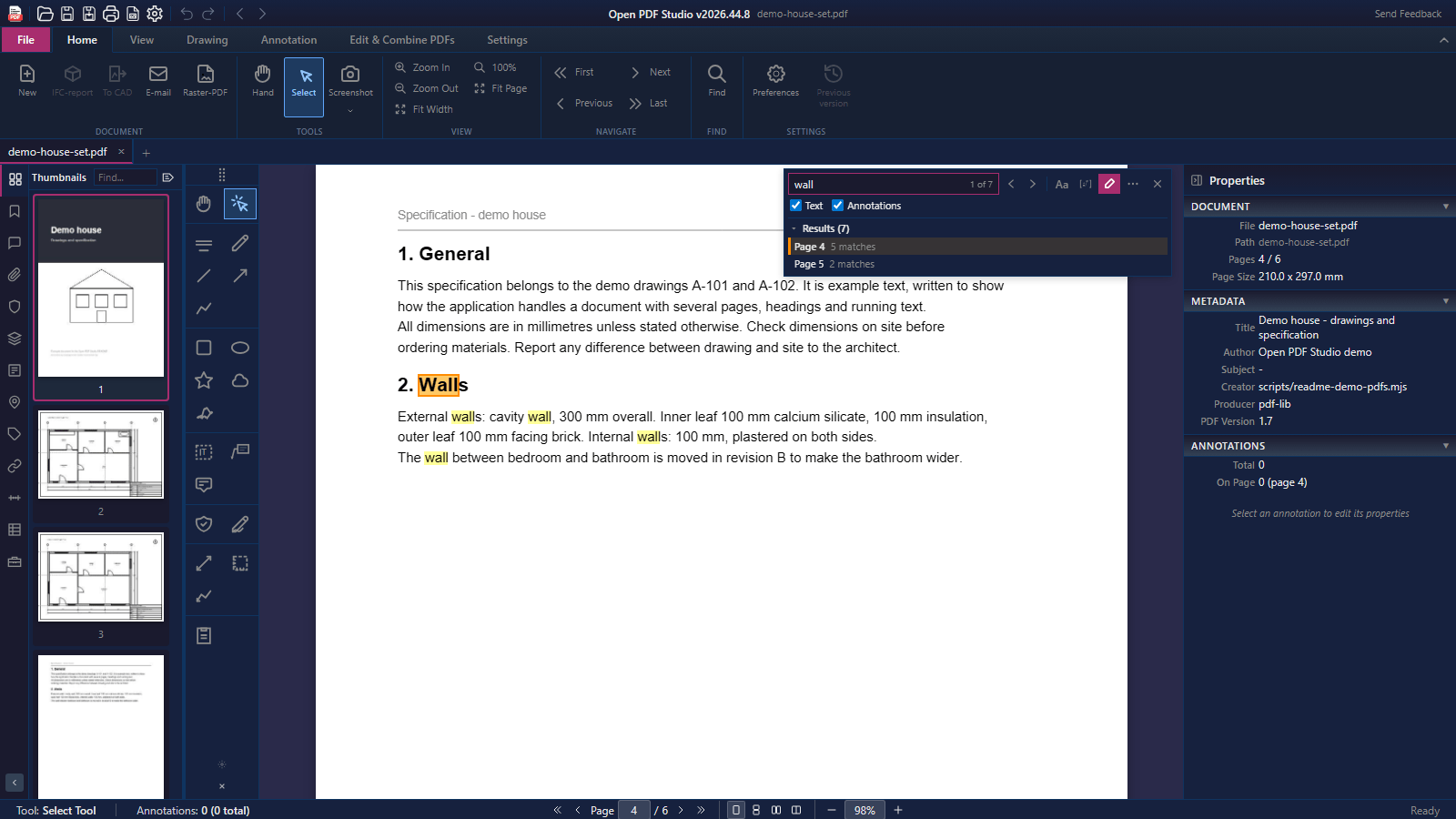
Koyu temada Open PDF Studio: bir demo şartnamesinin metninde “wall” için arama sonuçları, küçük resimler ve belge özellikleriyle
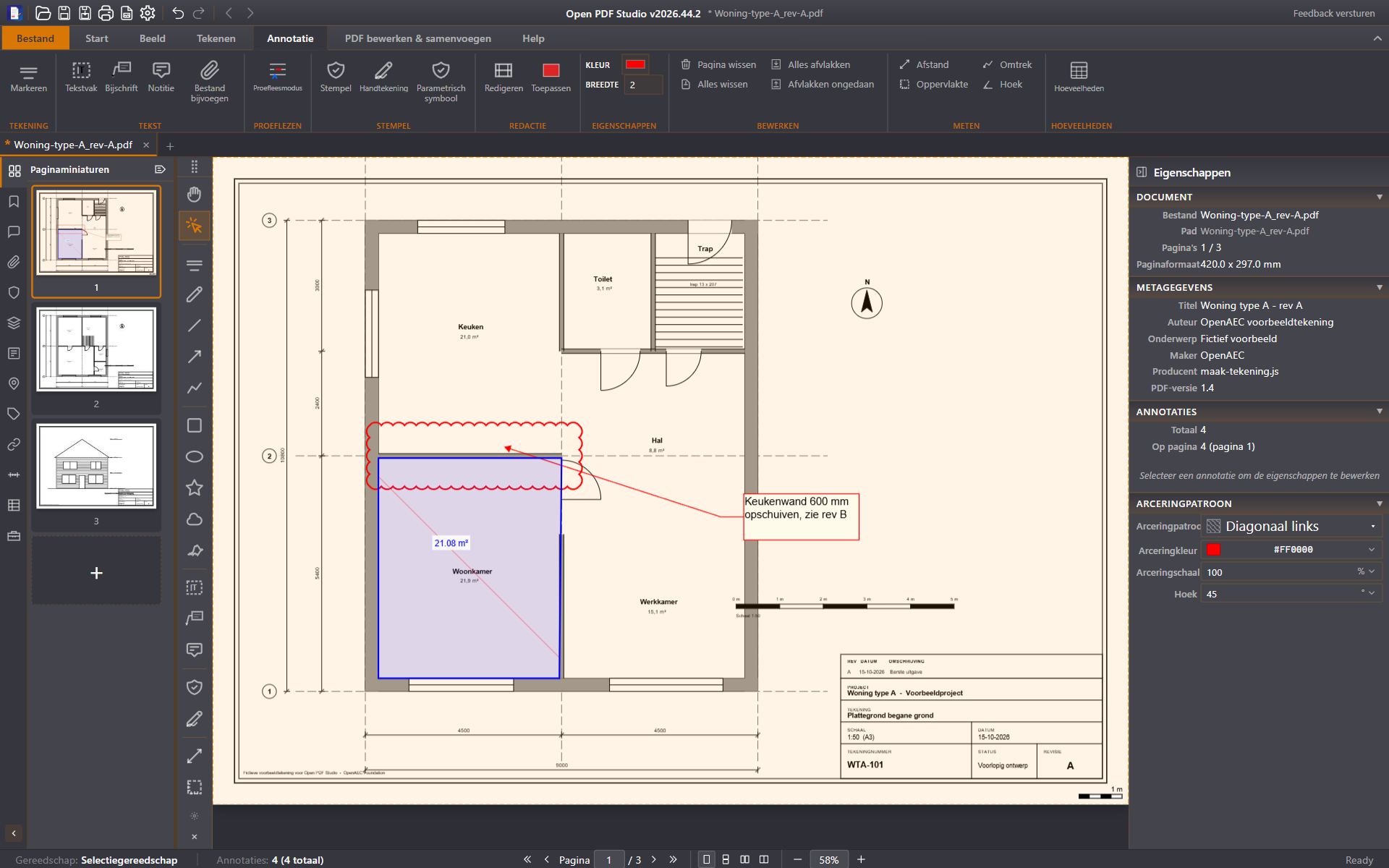
Open PDF Studio: revizyon bulutu, açıklama balonu ve 21,08 m² ölçülmüş alan içeren bir ev kat planı
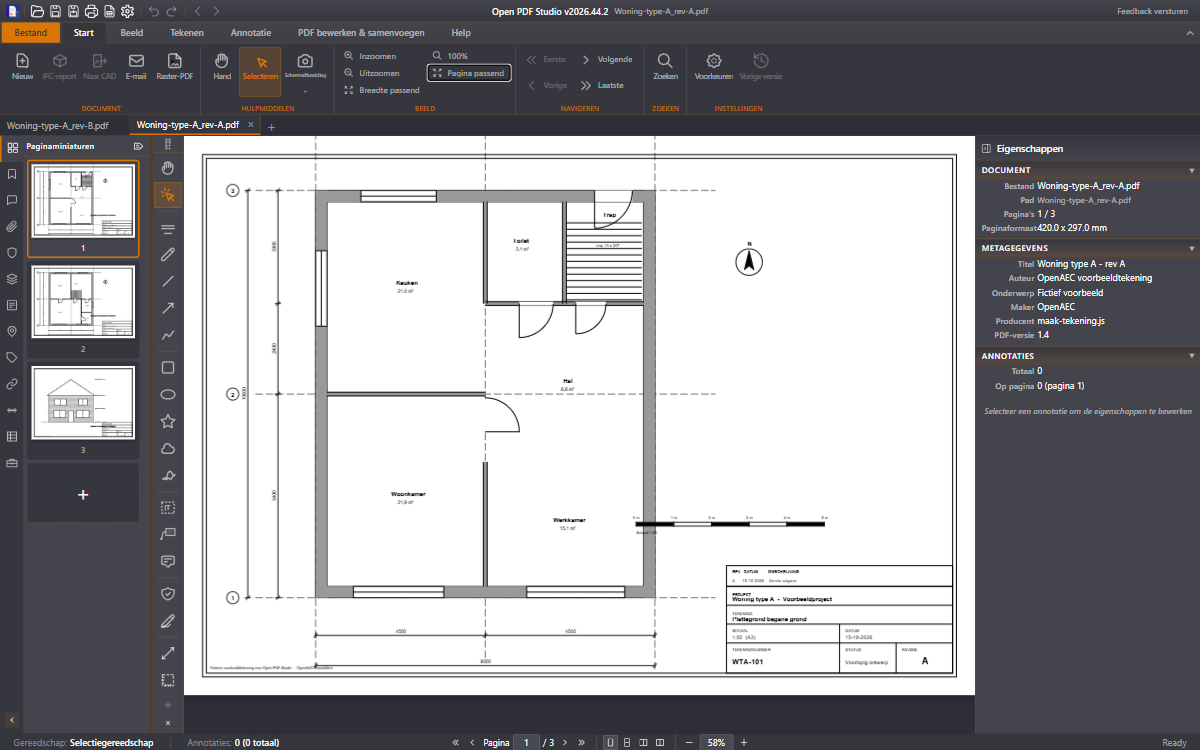
Pencereye sığdırılmış bir ev kat planı ve üç paftanın küçük resimleri
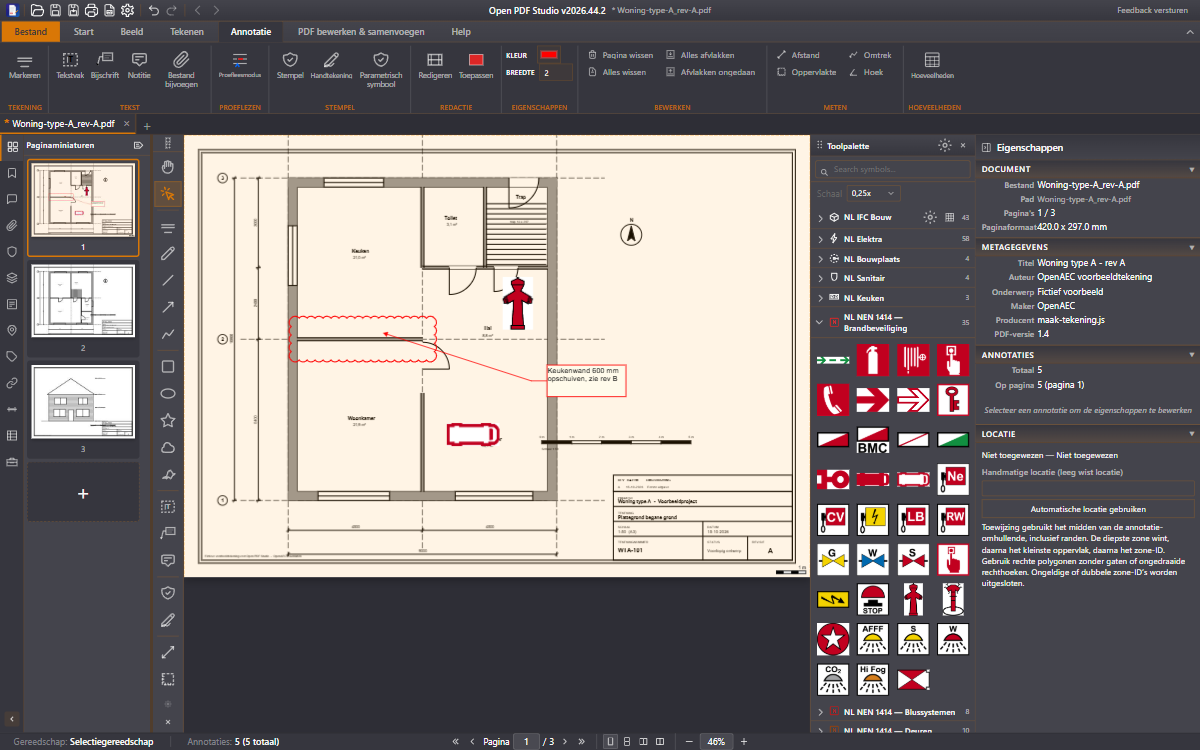
Kat planı üzerinde revizyon bulutu, açıklama balonu ve NEN 1414 yangın güvenliği sembolleri, araç paleti açık
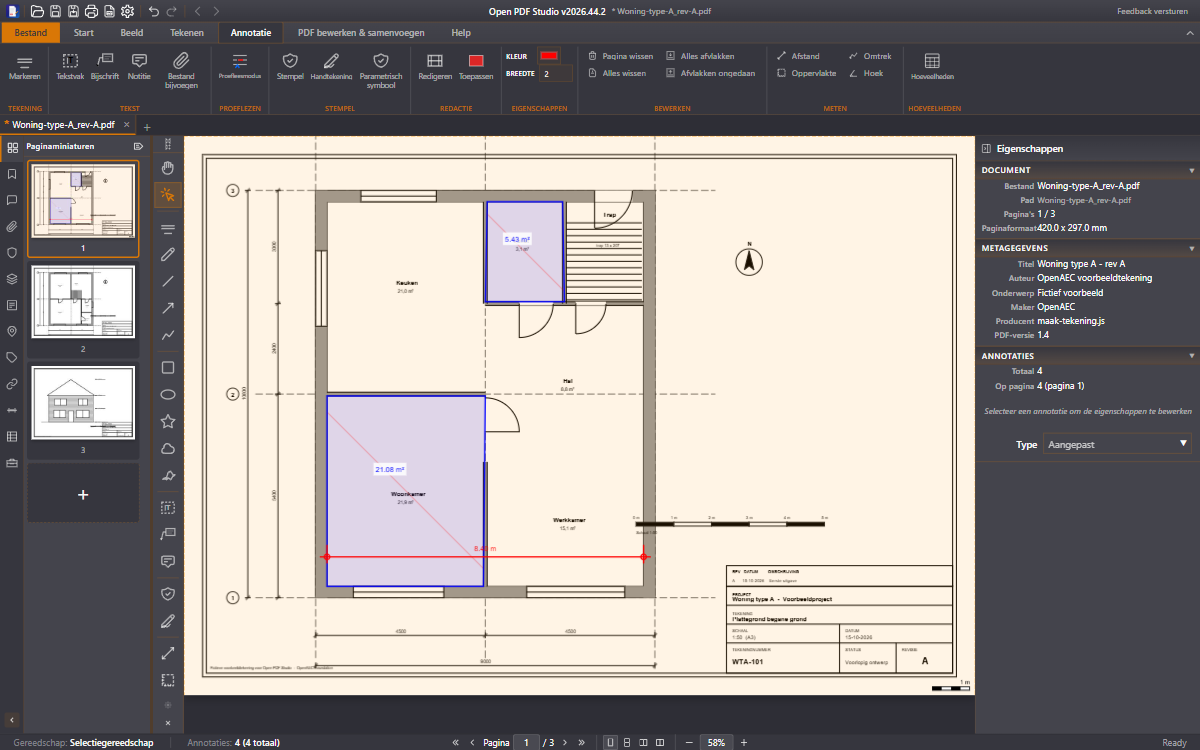
1:50 ölçekli kat planında iki ölçülmüş alan ve 8,40 m'lik bir mesafe
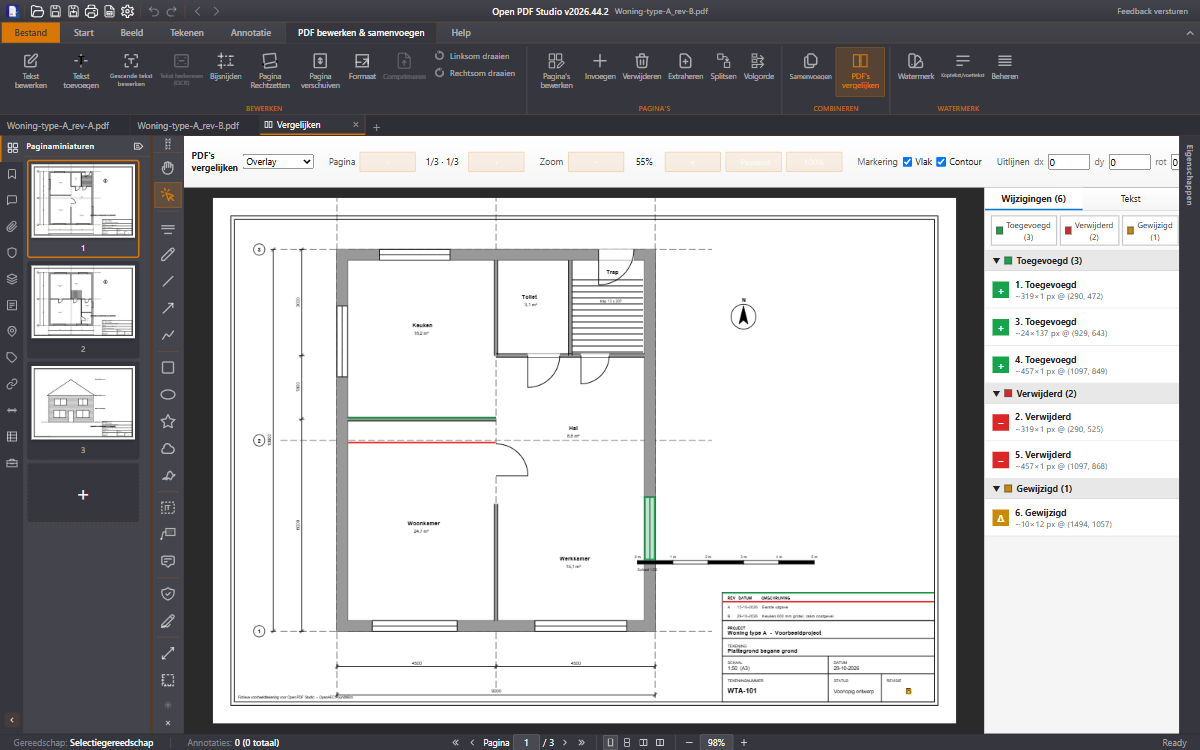
Üst üste bindirilmiş A ve B revizyonları: taşınan mutfak duvarı kırmızı ve yeşil, altı değişikliğin listesiyle
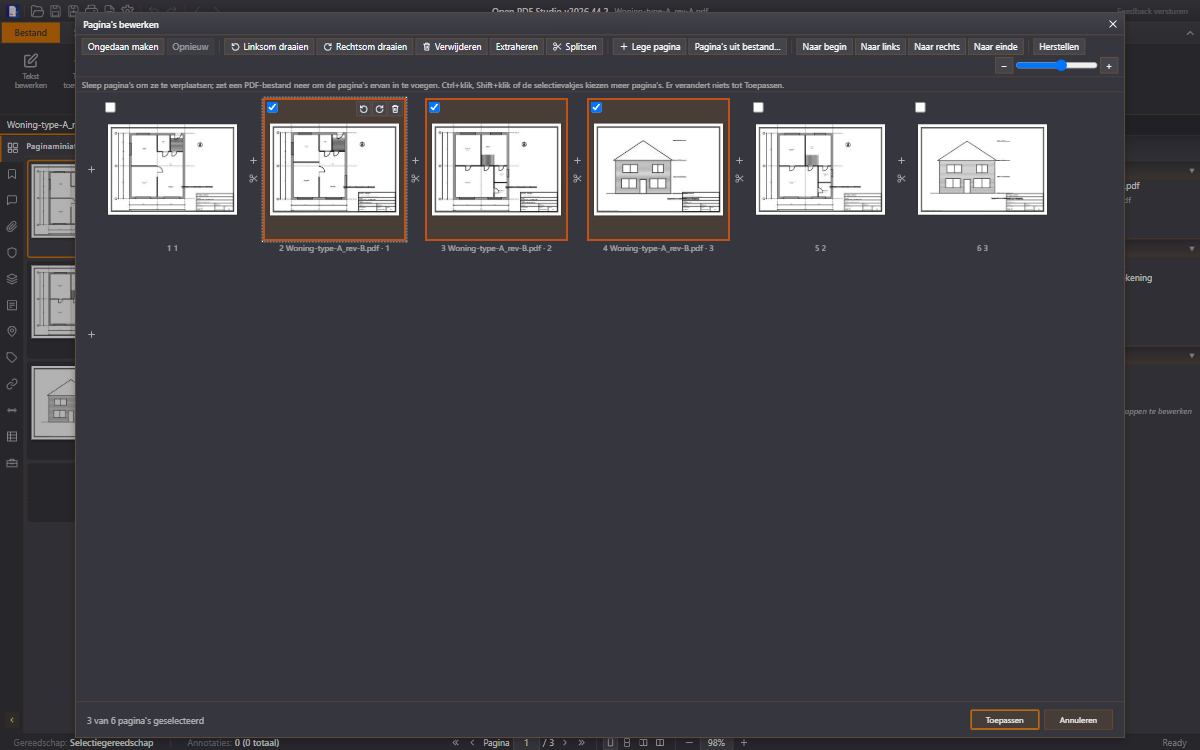
Sayfaları Düzenle: küçük resim olarak altı pafta, B revizyonunun paftaları eklenmiş
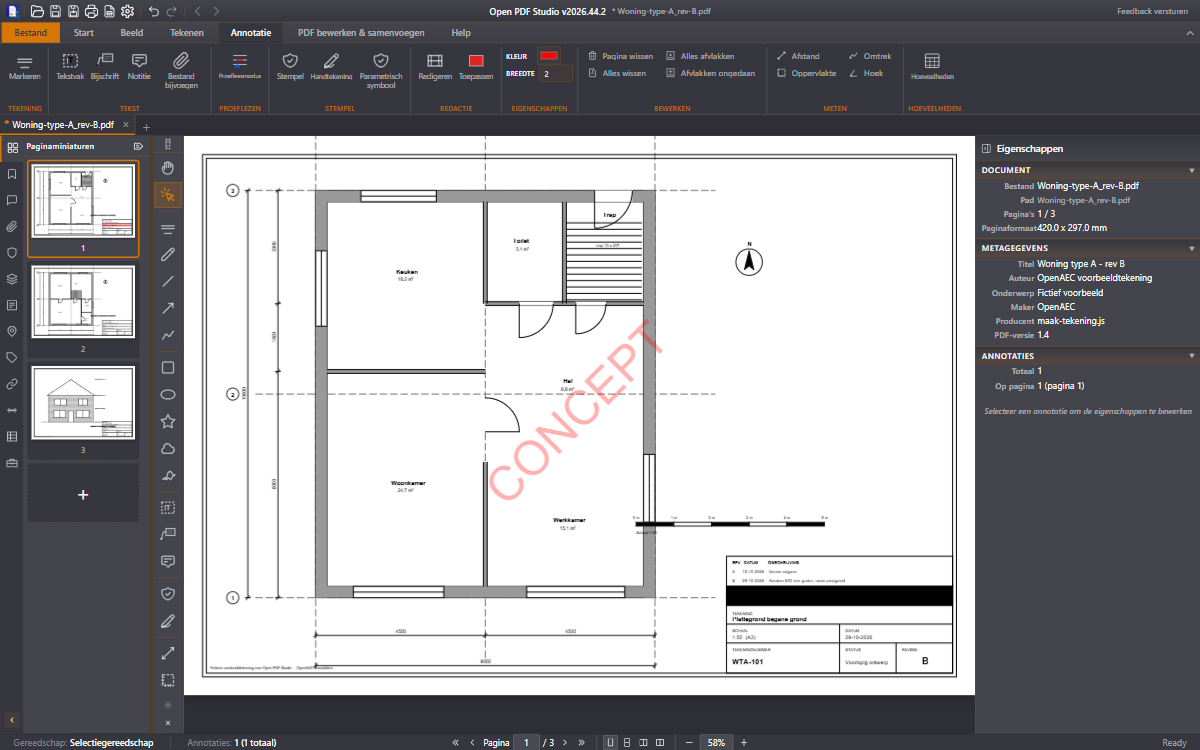
CONCEPT filigranlı ve antetteki proje bloğu karartılmış bir çizim

Hemen deneyin: kendi PDF'inizi tarayıcıda açın. Dosya kendi bilgisayarınızda kalır ve hiçbir yere yüklenmez. Web sürümünü aç

Özellikler

Çizimleriniz için her şey, tek uygulamada

Öne çıkanlarla başlayın ya da bir konu seçin.

Pencereye sığdırılmış bir ev kat planı ve üç paftanın küçük resimleri

01 Çizimler

Büyük çizimleri beklemeden açın

Masaüstü uygulamasında Rust ile yazılmış özel bir PDF motoru, büyük paftalar ve yüzlerce sayfalık setler dahil vektörel PDF'leri anında gösterir. Sekmelerde birden fazla çizimle çalışın ve küçük resimlerle doğru paftaya atlayın.

Daha fazla bilgi
Kat planı üzerinde revizyon bulutu, açıklama balonu ve NEN 1414 yangın güvenliği sembolleri, araç paleti açık

02 İşaretleme

Neyin değişmesi gerektiğini işaretleyin

Bulutlar, oklar, açıklama balonları, notlar ve damgalar, ayrıca NEN 1414 ve IFC sembolleri içeren bir araç paleti. Her işaretlemenin bir yazarı, bir durumu ve yanıtları vardır; böylece yorumları birlikte çözersiniz.

Daha fazla bilgi
1:50 ölçekli kat planında iki ölçülmüş alan ve 8,40 m'lik bir mesafe

03 Ölçme

Ölçekli ölçün, pafta başına birden fazla ölçekle bile

Çizime bir ölçek bölgesi yerleştirin ve uç noktalara ve orta noktalara yakalayarak mesafe, alan, çevre ve açı ölçün. Her ölçüm bir metraj listesine gider; bu listeyi çizime tablo olarak yerleştirebilir ya da CSV olarak kaydedebilirsiniz.

Daha fazla bilgi
Üst üste bindirilmiş A ve B revizyonları: taşınan mutfak duvarı kırmızı ve yeşil, altı değişikliğin listesiyle

04 Karşılaştırma

İki revizyon arasında neyin değiştiğini hemen görün

İki sürümü üst üste bindirin, yan yana gösterin ya da bir kaydırma çizgisi kullanın. Eklenenler yeşil, kaldırılanlar kırmızı olur ve bir liste tüm değişiklikleri özetler.

Daha fazla bilgi
Sayfaları Düzenle: küçük resim olarak altı pafta, B revizyonunun paftaları eklenmiş

05 Sayfalar

Çizim setinizi oluşturun

Küçük resim görünümünde sayfaları yeniden sıralayın, döndürün, silin ve bölün, başka bir dosyadan sayfa ekleyin. Birleştirirken işaretlemeler, ölçümler, form alanları ve yer imleri de korunur.

Daha fazla bilgi
CONCEPT filigranlı ve antetteki proje bloğu karartılmış bir çizim

06 Paylaşma

Çiziminizi istediğiniz gibi paylaşın

Filigran ya da üst bilgi ve alt bilgi ekleyin, hassas bilgileri kapatın ve imzanızla imzalayın. Renkli, gri tonlamalı ya da siyah beyaz yazdırın veya paftaları görüntü olarak kaydedin.

Daha fazla bilgi
  • 20'den fazla işaretleme aracı

    Vurgulama, altını çizme, üstünü çizme, bulutlar, oklar, şekiller, serbest çizim, metin kutuları, açıklama balonları ve notlar.

  • İnşaat için semboller

    NEN 1414 ve IFC sembolleri içeren bir araç paleti, ayrıca donatı, CPT sondajları ve dönüş yarıçapıyla kule vinç gibi parametrik semboller.

  • Yorumları çözün

    Her işaretlemenin yazarı, durumu ve yanıtları vardır. İşaretleme listesi ve işaretleme katmanları büyük setleri düzenli tutar.

  • Araç setleri

    İşaretleme stillerinizi ve ölçüm ön ayarlarınızı setlerde kaydedin ve meslektaşlarınızla .opdstools dosyası olarak paylaşın.

  • CAD'deki gibi çizin

    Çizgiler, yaylar, taramalar ve ölçülendirmeler; taşıma, aynalama, dizi ve döndürme ile. Antetli çerçeveler ayrıca doldurulur.

  • Vektörel kesit

    Bir PDF'ten bir detayı kesip başka bir PDF'e yapıştırın; ekran görüntüsü yerine keskin vektörel veri olarak.

  • Mesafe, alan, çevre ve açı

    mm, cm, m, inç veya fit cinsinden ölçün; uç noktalara, orta noktalara, köşelere ve merkezlere yakalayarak.

  • Ölçek bölgeleri

    Tek paftada birden fazla ölçek, 1:1'den 1:200'e veya özel bir ölçek. Ya da ölçeği çizimin kendisi üzerinde ölçün.

  • Metraj listesi

    IFC kategorisine göre alanlar, uzunluklar ve sayımlar; çizim üzerinde tablo olarak ya da maliyet tahmininiz için CSV olarak.

  • Sayma

    Sembolleri ve öğeleri her biri için tek tıkla sayın; toplam metraj listesine gider.

  • Sayfaları düzenleyin

    Yakınlaştırılabilir bir görünümde yeniden sıralayın, döndürün, silin, ekleyin ve bölün. Uygula'ya tıklayana kadar hiçbir şey değişmez.

  • Birleştirme ve bölme

    İşaretlemeleri, ölçümleri, form alanlarını, yer imlerini ve katmanları koruyarak PDF'leri birleştirin ya da bir seti ayrı paftalara bölün.

  • Karşılaştırma ve bölünmüş görünüm

    İki revizyonu üst üste, yan yana veya kaydırma çizgisiyle karşılaştırın ya da tek bir çizimin iki bölümünü yan yana görün.

  • Metni düzenleme ve tanıma

    Mevcut metni değiştirin ya da yeni metin ekleyin. Masaüstü uygulamasında metin tanıma (OCR) taramaları aranabilir yapar.

  • Filigranlar, üst ve alt bilgiler

    Metin veya görüntü; opaklık, döndürme ve konum ayarıyla. Sayfa numarası, tarih ve dosya adı içeren üst ve alt bilgiler.

  • Bilgileri kapatın

    İsim, adres veya fiyat içeren alanları işaretleyin ve çizimi paylaşmadan önce kapatın.

  • İmzalar ve damgalar

    İmzanızı çizin ve sonrası için birkaçını saklayın. On hazır damga, ya da bir görüntüden kendi damganızı yapın.

  • Yazdırma ve dışa aktarma

    Önizlemeyle renkli, gri tonlamalı ya da siyah beyaz yazdırın. Paftaları 600 dpi'ye kadar PNG veya JPEG olarak ya da raster PDF olarak kaydedin.

  • Formlar

    Etkileşimli PDF formlarını doldurun ve kendi metin alanlarınızı, onay kutularınızı ve seçenek düğmelerinizi oluşturun.

  • Çökmeden sağ çıkan çalışma

    Uygulama, kaydedilmemiş değişiklikleri olan her belgenin bir kurtarma kopyasını tutar. Orijinal dosyanıza asla dokunulmaz.

  • Kendi kısayollarınız

    Her komuta ve şerit düğmesine kendi kısayolunu verin ve bunları başka bir bilgisayara taşıyın.

  • 40 dil ve beş tema

    Arapça, İbranice, Farsça ve Urduca için sağdan sola dahil. Koyu, açık, mavi, yüksek kontrast veya sistem.

  • Yapay zekâ ile kullanılabilir

    Yerleşik bir MCP sunucusu, Claude gibi bir yapay zekâ asistanının 94 araçla ölçmesini, işaretlemesini ve kaydetmesini sağlar.

Şeridin tamamı, özellik özellik

İndir

v2026.48.5 indir

Ücretsiz, hesap gerekmez. Windows, macOS ve Linux için, ayrıca Android tabletler için uygulama olarak.

.exe yükleyici · 41.1 MB

Diğer platformlar

Hiçbir şey kurmak istemiyor musunuz? Uygulama tamamen tarayıcıda da çalışır ve dosyanız kendi bilgisayarınızda kalır.

v2026.45 sürümündeki yenilikler

İmzalama, koruma ve arşivleme

Bir sertifikayla imzalayın, parolayla koruyun, PDF/A biçimine dönüştürün ve bütün bir tarama klasörünü aranabilir yapın. Ayrıca yeni: kurulum gerektirmeyen bir Windows sürümü ve Linux için bir .snap. Tam liste sürüm notlarında.

  • Dijital imza

    PAdES uyarınca bir sertifikayla imzalayın ve bir belgedeki imzaları doğrulayın.

  • Parolalar ve izinler

    Bir PDF'e AES-256 şifrelemeyle parola ve izinler koyun ya da bunları yeniden kaldırın.

  • PDF/A

    Bir belgenin PDF/A'ya uygun olup olmadığını denetleyin ve arşivleme için dönüştürün.

  • Bütün bir klasör için OCR

    Bir klasördeki tüm taramalardaki metni tek seferde tanıyın ya da doğrudan aranabilir bir PDF'e tarayın.

  • Kapatma gerçekten siler

    Kapatmayı uygulamak artık kapatılan içeriği dosyadan gerçekten kaldırıyor.

  • Daha akıllı karşılaştırma

    İki revizyon otomatik olarak hizalanır ve sayfa sayfa eşleştirilir; değişikliklerin bir raporu da hazırlanır.

Sık sorulan sorular

Bir şey kurmam gerekiyor mu?

Hayır. Open PDF Studio tamamen tarayıcıda da çalışır ve PDF'iniz kendi bilgisayarınızda kalır. Yoğun işler için Windows, macOS ve Linux sürümleri, Android için de bir uygulama var.

Open PDF Studio ne kadar?

Hiçbir şey. Uygulama LGPL-3.0 lisansıyla ücretsiz ve açık kaynaklıdır. Abonelik yok, kullanıcı başına lisans ücreti yok ve telemetri yok.

Ölçekli ölçebilir miyim?

Evet. Çizime 1:50 veya 1:100 gibi sabit bir ölçekle ya da çizimin kendisi üzerinde ölçtüğünüz bir ölçekle bir ölçek bölgesi yerleştirirsiniz. Bir paftada birden fazla ölçek bölgesi olabilir, örneğin bir kat planı ve bir detay için.

Bir çizimin iki revizyonunu karşılaştırabilir miyim?

Evet. İki dosyayı da açın ve PDF'leri Karşılaştır'ı seçin. Sürümleri üst üste, yan yana veya kaydırma çizgisiyle görürsünüz. Eklenen kısımlar yeşil, kaldırılan kısımlar kırmızı olur ve bir liste değişiklikleri özetler.

Başkaları işaretlemelerimi görebilir mi?

Evet. İşaretlemeler standart PDF açıklamaları olarak kaydedilir, bu yüzden diğer PDF okuyucular da onları gösterir. Sabitlemek isterseniz onları sayfa içeriğine düzleştirin.

Tablette çalışıyor mu?

Evet. Android tabletler için bir uygulama (.apk) var, iPad'de ise web sürümü tarayıcıda çalışır. Şantiyede çizimlerinizi yanınızda bulundurmak için kullanışlı.

Hangi diller mevcut?

Arapça, İbranice, Farsça ve Urduca gibi sağdan sola diller dahil 40 dil.

Bir yapay zekâ asistanı PDF'imle ne yapabilir?

Masaüstü uygulamasında yerleşik bir MCP sunucusu (Model Context Protocol, açık bir standart) vardır. Bununla Claude gibi bir yapay zekâ asistanı uygulamayı kullanabilir: şeritteki her özellik, ayrıca ölçmek, işaretlemek ve kaydetmek için 94 araç. Sunucu kendi bilgisayarınızda çalışır; dosyanın kendisi harici bir hizmete gönderilmez.

Teknoloji

Nasıl yapıldığını merak edenler için.

Tauri 2

Windows, macOS, Linux ve Android için Rust ile ince bir yerel kabuk, küçük bir yükleyiciyle.

Rust ile PDF motoru

Masaüstü uygulamasında özel bir motor, inşaat çizimleri gibi vektörel PDF'leri JavaScript gecikmeleri olmadan gösterir.

SolidJS

Yüzlerce işaretlemeyle bile ince taneli güncellemeler yapan reaktif bir arayüz.

PDF.js ve pdf-lib

Tarayıcıda görüntüleme için Mozilla PDF.js, belgeleri düzenlemek ve kaydetmek için pdf-lib.

IFC kategorileri

Semboller ve ölçümler bir IFC kategorisi alır, böylece metrajlar BIM'e bağlanır.

MCP sunucusu

Masaüstü uygulamasında yerleşik bir MCP sunucusu, bir yapay zekâ istemcisine 94 araç sunar.

Sürüm notları

v2026.48.8 · 2026-11-24 · Sürüm başına öne çıkanlar. Tüm notlar için Daha fazla'ya tıklayın.

  1. v2026.48.82026-11-24
    • PDF viewing and navigation
    • Text selection and search
    • Annotations: highlight, underline, strikethrough
    • Drawing tools: freehand, shapes, text
    • Multi-tab document support
  2. v2026.48.72026-11-24
    • PDF viewing and navigation
    • Text selection and search
    • Annotations: highlight, underline, strikethrough
    • Drawing tools: freehand, shapes, text
    • Multi-tab document support
  3. v2026.48.62026-11-24
    • PDF viewing and navigation
    • Text selection and search
    • Annotations: highlight, underline, strikethrough
    • Drawing tools: freehand, shapes, text
    • Multi-tab document support
  4. v2026.48.52026-11-24
    • Count groups: set the size of the count markers per group (50% to 300%), delete a group with its markers, and rename the active group from the ribbon.
    • Links to an area: a link to a page can show a chosen area of that page. In the link dialog choose View > Area on the page, then Pick area and drag a rectangle…
    • Links to a bookmark: a link can lead to a bookmark of the document, as a named place.
    • Add bookmarks for the selected pages from the thumbnail menu, named after the page label or the page number.
    • Paint annotation styles onto other annotations with a single command.
  5. v2026.48.32026-11-23
    • PDF viewing and navigation
    • Text selection and search
    • Annotations: highlight, underline, strikethrough
    • Drawing tools: freehand, shapes, text
    • Multi-tab document support
  6. v2026.48.22026-11-21
    • Semi-transparent annotation fills keep their color and opacity when the document is saved and reopened. (#1201)
    • A text box with a stray callout line keeps its original type unless the PDF explicitly marks it as a callout. (#1202)
    • The tab bar docking hint follows the selected interface language. (#1203)
    • Drawing objects support a subject independent of their note. The subject is saved in the standard PDF subject field. (#1204)
    • Choose File → Print Area, drag a rectangle and print the selection. The preview follows the selection, including on rotated pages. Vector content stays…
  7. v2026.48.12026-11-20
    • Embed installed fonts selected by their localized family names, including individual faces in font collections.
    • Desktop search uses the same text extraction as the web viewer for more consistent results on rotated text and subset fonts. Supported desktop builds can embed…
    • Reduced the repository and desktop distribution footprint by removing duplicate test drawings, unused viewer assets and tracked build output.
  8. v2026.47.12026-11-18
    • One "Units" setting (Metric, Imperial or both) in Preferences > General. Imperial switches measuring to feet and inches: the display, the calibration and scale…
    • Type feet, inches and fractions in every length field: 12', 6", 12'-6 3/8" or 1.5', also directly while drawing and measuring.
    • Acres and hectares as an area unit, in the panel, in schedules and when saving.
    • Fit Box to Text: a command that sizes text boxes and callouts to their text, also for several at once.
    • Close all tabs and close other tabs, in the tab menu and the File menu.
  9. v2026.47.02026-11-16
    • OCR in meer talen: kies in het OCR-venster uit elke geïnstalleerde taal, voeg met "Taal toevoegen…" een taal toe (meer dan honderd talen van het…
    • Kalibreren met een getekende lijn: kies in het kalibratievenster "Lijn tekenen op de tekening", klik de twee uiteinden van een bekende maat aan en typ de…
    • Pannen met de spatiebalk: houd Spatie ingedrukt en sleep om het blad te verschuiven; het gekozen gereedschap blijft actief.
    • Grotere knoppen Linksom en Rechtsom draaien, nu ook op het tabblad Start.
    • Opdrachten voor stijl kopiëren, stijl plakken en als standaard instellen, die je aan een sneltoets kunt koppelen.
  10. v2026.46.32026-11-14
    • Eigen statussen voor markeringen: leg onder Voorkeuren → Annotaties → Opmerkingen statussen vast met een eigen naam en kleur, zoals "Approved" of "In…
    • Alleen open punten: één klik in Weergeven → Status verbergt alle afgeronde markeringen, in de lijst en op de tekening.
    • Schaal per pagina: elke miniatuur toont de schaal van die pagina; klik erop om hem in te stellen, ook voor meerdere pagina's tegelijk. Schalen herkennen uit de…
    • Zoomrichting van het muiswiel omkeren, onder Voorkeuren → Gedrag → Navigatie.
    • Centrale documenten (eerste stap): via Bestand → Centrale documenten aanmelden bij een eigen samenwerkingsserver, PDF's uploaden en delen, en een momentopname…
  11. v2026.46.22026-11-12
    • Dubbelzijdig afdrukken: kies enkelzijdig, of dubbelzijdig met binden langs de lange of de korte zijde.
    • Tekeningen inkleuren: bij Vergelijken toon je beide tekeningen over elkaar, elk in een eigen kleur; een vectorknipsel kan een eigen lijnkleur krijgen.
    • Het gekozen lettertype wordt bij opslaan ingebed in tekstvakken en callouts, zodat de tekst er in andere programma's hetzelfde uitziet.
    • De lettertypelijst toont de lettertypen die op je computer zijn geïnstalleerd.
    • Toegevoegde tekst draaien: een veld Rotatie (graden) in het eigenschappenpaneel.
  12. v2026.46.02026-11-11
    • Documentgegevens bewerken: titel, auteur, onderwerp, trefwoorden en maker zijn te wijzigen in het eigenschappenpaneel en worden opgeslagen in de PDF (ook in de…
    • Goedkeurings- en ondertekeningsverzoeken: ontvangers met een rol, een voorbeeld van het verzoek, een concept-mail of ZIP, en status per ontvanger.
    • Nieuwe telling met één klik: nieuwe groep met eigen kleur en een nummering die opnieuw bij 1 begint.
    • Imperiale schalen: 1/8" = 1'-0" en vergelijkbare schalen worden herkend en getoond; voet-inch-breukinvoer; ARCH- en ANSI-papierformaten.
    • Toetsreeksen als sneltoets: D en dan L start de lijntool.
  13. v2026.45.02026-11-06
    • Het goedgekeurde Snap Store-logo is verwerkt in de app en alle toepassingsiconen.
    • PDF's bekijken en navigeren
    • Tekst selecteren en zoeken
    • Annotaties: markeren, onderstrepen, doorhalen
    • Tekengereedschappen: vrije hand, vormen, tekst
  14. v2026.44.82026-11-02
    • Annotations on /UserUnit pages stay in place. On a page with /UserUnit 2, annotations landed twice as far at the first opening, and each save and reopen…
    • In the web version such a page now shows at the same size as on the desktop, and its annotations line up with it.
    • A release gate that checks annotations on /UserUnit pages through three rounds of saving and reopening.
  15. v2026.44.72026-11-02
    • The app no longer crashes when it closes. The next start no longer reports an unclean shutdown, and decrypted working copies of password-protected PDFs are…
    • The close button in the title bar counts as a normal exit.
    • Context menus fit the window at large interface sizes.
    • A 1:N scale works correctly in documents with pages of different user units.
    • Confirmation dialogs follow the interface language.
  16. v2026.44.62026-11-01
    • Two different PDFs in split view, each pane with its own document.
    • Interface size from 100% to 200%, for better readability.
    • Bookmarks: drag and drop works again, rename with F2 or double-click, and copy names between bookmarks and page labels.
    • Imperial scale presets and a built-in markup-style shortcut preset.
    • PDF to IFCX export (beta).
  17. v2026.44.52026-10-31
    • Live watermark preview: see the watermark on the page while you set it up, drag it into place and browse the pages.
    • Edit area measurement vertices: right-click or double-click an edge to add a vertex, or a vertex to remove it. The area updates at once.
    • Pivot point for shapes: rectangles, ellipses, polygons, clouds and highlights can rotate and scale around a point you choose.
    • Poster overview: a clickable overview of all poster sheets, and step buttons on number fields.
    • Wall button on the Drawing tab, for every palette country.
  18. v2026.44.42026-10-29
    • Split view shortcuts: Ctrl+\ splits vertically and Ctrl+Shift+\ horizontally, and pressing the shortcut again unsplits. The divider is easier to grab.
    • Background colour around the page, set in Preferences > Page Display.
    • Switch ribbon tabs with the mouse wheel, with a preference to turn it off.
    • Watermarks: a font size field, "Auto-fit to page", and a history of earlier watermark texts.
    • Edit pages: blank pages take the size of the adjacent page, or a size you choose (A4–A0, Letter, Legal, custom).
  19. v2026.44.22026-10-29
    • Split view: show two parts of the same document side by side, each with its own zoom and page.
    • Tool Sets: save your markup styles and measurement presets in sets and draw with them; export and import sets as .opdstools files.
    • Dashed and dotted ink lines stay dashed in other PDF readers; saved dash patterns now match what you see on screen.
    • Toggled layers stay as they were after Save As or renaming the open file.
  20. v2026.44.12026-10-29
    • Layers: a layer tree, annotation layers and a saved default state. Toggling a layer only changes the view; "Set as default" saves it.
    • File attachments: attach files to a page and manage them in the attachments panel.
    • Annotation summary: filter all annotations and export them as CSV or a PDF report.
    • Move guides: tracking, extension and parallel guides while moving (follows the Object snap setting).
    • Structural drawing tools: rebar, steel connections and bolts, with a bar schedule.
  21. v2026.44.02026-10-29
    • Your own keyboard shortcuts: assign, change or remove shortcuts for every command and ribbon button, and import or export them.
    • Cancel a save: stop a long save with Cancel or Esc; your file stays untouched.
    • Edit Pages: a page organizer with a zoomable grid, drag-to-reorder, rotate, delete, insert and split.
    • Print in grayscale or black & white.
    • Zoom to fit by double-clicking the middle mouse button.
  22. v2026.43.42026-10-20
    • Merging PDFs keeps everything: annotations, stamps, measurements, comments and replies, form fields, bookmarks, links, layers and page labels now come…
    • Decimal comma or point: every number field, including all scale fields, now accepts both 0,1 and 0.1.
    • Square hollow sections are named the Dutch way: K100/5 instead of Koker 100x100x5, also in IFC exports. Older files keep working.
  23. v2026.43.32026-10-20
    • Your work survives a crash: while you edit, Open PDF Studio keeps a recovery copy of every document with unsaved changes, in a separate folder (your…
    • Smaller files: saving a PDF repeatedly no longer makes the file grow each time.
    • Images and stamps from older files are shown without distortion, exactly as other PDF viewers show them, and saving keeps them that way.
  24. v2026.43.02026-10-20
    • A new Windows installer: a cleaner look in the app's own style, and only four steps: welcome, one page with all options (install location, open PDFs with…
    • Pasted images and stamps on rotated pages are shown upright and at the right size again, and other PDF viewers now show them the same way after you save.
  25. v2026.42.132026-10-19
    • Polygons corner by corner: click to place each corner (with snapping, angle steps and typed lengths), then edit corners on screen: drag them, insert one on…
    • Pages per sheet: page content stays upright, and Auto-rotate now decides whether a page turns inside its cell. Thanks to @Tarek-Hasan.
    • Scale region: the Opacity setting works again, the fill has its own colour and opacity, and both survive a save. Thanks to @chan-a.
  26. v2026.42.122026-10-19
    • Screenshot: on the Home tab, drag a region over the document and copy it to the clipboard or save it as PNG or JPEG, at the resolution you choose (up to…
    • Flatten all / Unflatten all: turn every markup into page content in one step, and restore them later if you allowed it. Thanks to @chan-a.
    • Callouts in two clicks: first the tip, then the note. Thanks to @chan-a.
    • Print modes: Normal, Multiple, Flyer, Booklet and Poster as buttons, with new booklet options (binding side, manual duplex, back-side rotation, creep)…
    • Saving keeps your work: alignment, underline and strike-through, rotation, arcs, names, subjects, replies, the Marked state, hatches on shapes, count…
  27. v2026.42.112026-10-19
    • Flyers: print 2 to 16 copies of a page on one sheet, with cut marks if you like. Thanks to @Tarek-Hasan for the idea.
    • Books in signatures: booklets can now be split into signatures of a chosen number of sheets.
    • See the page order: the pages-per-sheet preview shows page numbers and arrows for the chosen order.
    • A nicer PDF printer window: jobs printed to "Open PDF Printer" show their document name, page count and paper size, with a page preview, a clear toolbar…
    • PDF thumbnails in File Explorer (Windows): turn it on under Preferences → File association. Thanks to @jaisekjames for the request.
  28. v2026.42.102026-10-16
    • Split line compare: a third way to compare two revisions. Both drawings lie on top of each other, and you drag a line to see the old one on the left and…
    • 3D models in PDFs: 3D (U3D) models embedded in a PDF can now be rotated, zoomed and shown in their saved views right on the page, with a model tree and…
    • Proofreading with the keyboard: press F2 and correct text with the cursor. Type to insert, type over a selection to replace, and press Delete to strike…
    • Units for image size: the width and height of an image show their unit, and you can choose mm, cm, in or pt. Thanks to @rrickyhuang.
    • Split a document every N pages, by bookmarks or by file size, and print booklets in folding order.
  29. v2026.42.92026-10-15
    • Poster printing: print large drawings such as A1 or A0 over several A4 or A3 sheets. Choose "Poster (tiles)" under page placement, then set the scale, the…
    • The app can now open files, both from the app and with "Open with" from another app, and shows the real file name.
    • Pages render on older phones too: missing browser features are now filled in for older Android WebView versions.
    • Settings and the open documents are remembered.
    • The top and bottom bars no longer sit under the Android system bars, so the buttons work.
  30. v2026.42.82026-10-15
    • Pages no longer stay empty: on Android pages, thumbnails and continuous view now render reliably.
    • Opening a PDF from another app ("Open with" or share) now loads it, whether the app was closed or already running.
    • The bottom toolbar fits on every phone width, and its tools and the menu actions (Save, Save as, About) work.
    • Feedback can be sent from the menu, and dialogs (including error messages) now open on phones.
    • Text boxes with Simplified Chinese text now show every character after saving.
  31. v2026.42.72026-10-14
    • Symbol formatting before placing: choosing a symbol in the tool palette shows the Format tab right away. Colour, line width, opacity and blend mode apply…
    • The print preview now shows pages per sheet, with the chosen page order, border and orientation. Thanks to @Tarek-Hasan for the report.
    • Text boxes with Chinese, Japanese or other non-Latin text keep their text when saved, instead of showing question marks. Thanks to @philip-tam.
    • The page placeholder during page transitions shows the thumbnail again.
    • Property panel edits now count as a document change for extensions.
  32. v2026.42.62026-10-14
    • Open password-protected PDFs: a PDF with an open password now asks for the password and opens read-only. The original file stays protected and is never…
  33. v2026.42.52026-10-14
    • AI connection (MCP): ribbon tabs that an extension adds itself are now listed with their buttons, can be opened and run, and can be read with the interface…
  34. v2026.42.42026-10-14
    • Page labels (sheet names): labels show under the thumbnails and in the status bar, can be renamed with a double-click, and a name builder reads them from…
    • Bookmarks: the current sheet stays highlighted, and a find box jumps to a bookmark. Thanks to @Seed-43.
    • Thumbnails grow with the panel, wrap into columns and stay sharp on marked-up pages. Thanks to @Seed-43.
    • Extensions: typed commands with schemas for the AI connection, property panels for linked system instances, and agent tasks without opening the assistant…
    • AI connection (MCP): screenshots of the whole window or one element (Windows), extension ribbon buttons can be listed and run, and a new tool reads the…
  35. v2026.41.02026-10-13
    • Floor plans: cavity walls with openings per layer, real window and door frames, a frame element for curtain walls and window frames, wall joins that can be…
    • Plan symbols: sanitary fixtures and kitchen layouts as parametric plan symbols.
    • Grid: grid line ends can be coupled so their bubbles move together, with a padlock per end.
    • Rotate the view: turn the page on screen without changing the document (#200).
    • Annotation layers: group markups on named layers and switch them on and off.
  36. v2026.392026-09-23
    • Import DWG and DXF: open a CAD drawing through File > Import, Open, or by dropping it on the app. The import dialog lets you choose layers, model space or…
    • Export to DXF and DWG: File > Export > CAD drawing (DXF, DWG) converts one or more pages, with the PDF layers as CAD layers, at real size according to the…
    • Print: Save as PDF: "Save as PDF" is now at the top of the printer list. It writes a PDF with vectors and text (not an image) and the sheet in the chosen…
    • Search text and annotations: checkboxes for both sources, on by default, with a list underneath showing the hits per page that you can click.
    • Printing through the AI connection: an assistant can list the printers, write a print to a PDF file, or send it to a printer.
  37. v2.4.12026-09-19
    • Pagina verschuiven: zet de inhoud van een scheef of uit het midden gescande pagina precies op zijn plek. Sleep het voorbeeld of typ de verschuiving in…
    • Leesmodus per document: Leesmodus geldt nu per PDF in plaats van voor alle documenten tegelijk. Zet je hem uit, dan blijft hij uit; zet je hem aan, dan…
    • Openen zonder gegevensverlies: open je een document dat al open is (via Bestand > Openen, de recente lijst, slepen of een sessie), dan springt de app naar…
    • Sessieherstel neemt de focus niet meer over: als het herstellen van de vorige sessie traag is (bijvoorbeeld op een netwerk- of cloudmap), blijft het…
    • Shift Page: put the content of an off-centre scanned page exactly in place. Drag the preview or type the offset in millimetres, for the current page, all…
  38. v2.4.02026-09-19
    • Digitale handtekeningen controleren: een balk boven de pagina toont per handtekening of die geldig is, of het certificaat bekend is en of het document na…
    • Tekst herkennen (OCR): maak gescande pagina's doorzoekbaar en kopieerbaar. Het gereedschap herkent de tekst op de huidige pagina of in het hele document en…
    • Leesmodus: zet Leesmodus aan op het tabblad Beeld en een PDF gaat bij het volgende openen verder op dezelfde pagina, scrollpositie en zoom. De positie…
    • Kruis in ronde sparingen: cirkels en ellipsen kunnen nu ook een kruis krijgen, in de stijl van de omtrek en meedraaiend met de vorm.
    • Maatlijn op lengte slepen: typ tijdens het slepen van een eindpunt van een maatlijn, lijn of pijl een lengte en druk op Enter. De lijn krijgt precies die…
  39. v2.3.02026-09-16
    • Pagina rechtzetten: trek een lijn langs iets dat recht hoort te staan (een rand, een tabel) en de gescande pagina wordt met die hoek rechtgezet. Enter voor…
    • Printinstellingen worden onthouden: printer, aantal exemplaren, paginabereik, schaal en de overige keuzes staan bij de volgende printopdracht weer klaar…
    • Wanden zijn IfcWall: elke getekende wand draagt de IFC-categorie IfcWall, ook na opslaan en opnieuw openen, voor hoeveelheden en IFC-export.
    • Ondertekening op Windows: naast de installer zijn nu ook de geïnstalleerde programmabestanden (open-pdf-studio.exe, pdfium-worker.exe en uninstall.exe)…
    • Sneller bladeren door gescande tekeningen: bij rasterbladen zonder vectorinhoud wordt geen snap-geometrie meer uitgelezen. Dat scheelt 2 tot 6 seconden per…
  40. v2.2.02026-09-14
    • Kleurdropdown wordt niet meer afgekapt in kleinere vensters; lijnbreedte en dekking zijn nu fijnmazig in te typen in plaats van een vaste keuzelijst
    • Laatste punt ongedaan maken tijdens het schetsen (Backspace); de boogmodus blijft daarbij gekozen
    • De weergave schuift automatisch mee als de cursor de rand bereikt tijdens het schetsen
    • De schetsvoorvertoning blijft doorzichtig zolang de contour nog open is, zodat je de onderliggende scan blijft zien
    • Het venster is direct bruikbaar; het herstellen van de vorige sessie blokkeert de start niet meer
  41. v2.0.12026-09-12
    • Lint: de stijlgalerij op het tabblad Opmaak liep bij een smal venster over de knoppen ernaast heen. De galerij blijft nu binnen zijn groep; het pijltje…
    • Vertaling: de overloopknop in het lint toonde de kale sleutel common.more in plaats van "Meer". Een meegegeven standaardtekst werkt nu overal, en de…
    • Ribbon: the style gallery on the Format tab overlapped the controls next to it in a narrow window. The gallery now stays inside its own group; the chevron…
    • Translation: the ribbon's overflow button showed the raw key common.more instead of "More". A supplied fallback text now works everywhere, and the text…
  42. v2.0.02026-09-12
    • Claude Desktop: open-pdf-studio.mcpb
  43. v1.96.12026-09-09
    • Deels vet of cursief: selecteer een woord in het tekstvlak en druk Ctrl+B / Ctrl+I (of gebruik de knoppen in het eigenschappenpaneel). De opmaak wordt…
    • Ctrl+klik op een geselecteerd object maakt een nieuwe instantie — voor álle objecten, ook via de verplaats-grepen van lijnen en cirkels
    • Telelement is na plaatsen weer selecteerbaar en verplaatsbaar
    • Hoeklijnen (L-profielen, gelijk- en ongelijkzijdig, EN 10056-1) in het NL Constructie-palet naast HEA/HEB/IPE/UNP/Koker; maat wisselbaar in het…
    • Nieuw document: de onderhoek werd weggeclipt bij het samenstellen van het vel (alleen wat randlijnen bleven over); eigen onderhoeken met een verschoven…
  44. v1.95.02026-09-07
    • Rechthoek: optie Kruis tekent beide diagonalen (ook zichtbaar in andere PDF-lezers)
    • Ctrl+klik op een geselecteerd object maakt een nieuwe instantie op dezelfde plek; Ctrl+slepen kopieert en verplaatst
    • Balken en wanden: hoeken worden nu ook getrimd als de elementen elkaar passeren
    • Symbolen: linework-catalogus met wisselbare maten, constructie- en bouwplaats-symbolen, stempels op ware maat; kleur en lijnbreedte werken op geplaatste…
    • Grote symboolcatalogi worden als los bestand naast preferences.json bewaard (#354)
  45. v1.93.32026-09-02
    • Annotaties werden niet meer verdubbeld bij "sluiten en opslaan": elke opslag bij het sluiten van een tabblad schreef alle annotaties opnieuw in het bestand…
    • Witte vlakken en wit flikkeren in de doorlopende leesmodus op zware tekeningen zijn verholpen.
    • Een pagina blijft na snel zoomen niet meer wit of vaag hangen.
    • Plakken gebruikt weer het meest recente klembord (extern gekopieerde inhoud kreeg soms geen voorrang).
    • De annotatielaag is nu op elk zoomniveau scherp in de doorlopende leesmodus, zonder prestatieverlies.
  46. v1.93.12026-08-31
    • Echte in-place tekstbewerking: de PDF-tekst zelf wordt aangepast (niet langer alleen afdekken), met behoud van lettertype en opmaak
    • Losse woorden vet/cursief maken (ook met Ctrl+B / Ctrl+I), kleuren per geselecteerd woord, tabkolommen blijven staan tijdens het bewerken
    • Tekst verplaatsen en nieuwe tekstblokken toevoegen als echte paginatekst
    • Bewerkingen ook correct op pagina's met verschoven MediaBox
    • Systeemgenerator: parametrische systemen (zoals systeemplafonds) als herbruikbaar type, met bewerkbare contour, panelenraster, randcondities en sparingsregels
  47. v1.80.02026-07-20
    • Meerdere PDF's tegelijk openen: multi-selectie in het Openen-venster; elk bestand opent in een eigen tab (ook via Ctrl+O)
    • Review-statussen uit andere PDF-software: statussen als "Afgerond"/"Geaccepteerd" verschijnen nu op de juiste annotatie (met auteur en datum) in plaats van…
    • Tekstvak-rotatie op gedraaide pagina's definitief opgelost: tekstvakken en callouts worden correct weggeschreven én weergegeven op pagina's met een…
    • Draaiknoppen op tabblad Beeld: pagina linksom/rechtsom draaien direct vanuit de kijkweergave (undo-baar)
    • Grote reeks editor-verbeteringen: betrouwbaarder ongedaan maken/opnieuw, lijnselectie en klembordacties, PDF-tekstbewerking (positionering, lettertypen…
  48. v1.67.02026-06-18
    • PDF viewing and navigation
    • Text selection and search
    • Annotations: highlight, underline, strikethrough
    • Drawing tools: freehand, shapes, text
    • Multi-tab document support
  49. v1.62.02026-06-13
    • PDF viewing and navigation
    • Text selection and search
    • Annotations: highlight, underline, strikethrough
    • Drawing tools: freehand, shapes, text
    • Multi-tab document support
  50. v1.47.132026-05-07
    • PDF tekst-rendering — gestripte tekst (.HOGHU shift) — fonts met ontbrekende /CIDToGIDMap werden niet correct als Identity geïnterpreteerd, waardoor…
    • Embedded Type1 fonts (UniviaPro, Calibri Light, etc.) — werden eerder volledig genegeerd door de vector renderer, waardoor tekst onzichtbaar bleef in…
    • "Open with → Open PDF Studio" werkt nu vanuit Nautilus/Files (file-association in tauri.conf.json toegevoegd).
    • Printers selecteren werkt op Linux + macOS via CUPS (lpstat -p); cups-bsd toegevoegd aan .deb dependencies.
    • Thumbnails 108× sneller — de processor was 3 seconden gepauzeerd bij elke renderPage (auto-resume timer zonder early-resume signaal)…
  51. v1.47.122026-05-06
    • PDF viewing and navigation
    • Text selection and search
    • Annotations: highlight, underline, strikethrough
    • Drawing tools: freehand, shapes, text
    • Multi-tab document support
  52. v1.47.112026-05-06
    • PDF viewing and navigation
    • Text selection and search
    • Annotations: highlight, underline, strikethrough
    • Drawing tools: freehand, shapes, text
    • Multi-tab document support
  53. v1.47.102026-05-06
    • PDF viewing and navigation
    • Text selection and search
    • Annotations: highlight, underline, strikethrough
    • Drawing tools: freehand, shapes, text
    • Multi-tab document support
  54. v1.47.92026-05-06
    • PDF viewing and navigation
    • Text selection and search
    • Annotations: highlight, underline, strikethrough
    • Drawing tools: freehand, shapes, text
    • Multi-tab document support
  55. v1.47.82026-05-06
    • PDF viewing and navigation
    • Text selection and search
    • Annotations: highlight, underline, strikethrough
    • Drawing tools: freehand, shapes, text
    • Multi-tab document support
  56. v1.47.52026-05-06
    • CAD-pariteit: scale region, hatch patterns, parametrische symbolen, vergelijken-tool en uitgebreide snap-modi (eindpunten, middens, perpendiculair…
    • Polyline-tool: vertex-drag, close-contour-snap met visuele indicator, plugin snapHook met priorPoints, plugin-types blijven actief na voltooien.
    • Plugin API: getAnnotations en getPageCount voor dashboard-plugins, generieke applyMove / applyResize voor plugin annotation-types met {x,y,w,h}.
    • Rendering: dichtere dashed-patronen, butt line caps, krappere textbox padding — visueel afgestemd op gangbare PDF-editors.
    • Compare: oude pagina niet meer dubbel renderen, detectie-raster gecached → merkbaar sneller.
  57. v1.47.42026-05-06
    • PDF viewing and navigation
    • Text selection and search
    • Annotations: highlight, underline, strikethrough
    • Drawing tools: freehand, shapes, text
    • Multi-tab document support
  58. v1.45.02026-04-23
    • PDF viewing and navigation
    • Text selection and search
    • Annotations: highlight, underline, strikethrough
    • Drawing tools: freehand, shapes, text
    • Multi-tab document support
  59. v1.43.02026-04-07
    • PDF viewing and navigation
    • Text selection and search
    • Annotations: highlight, underline, strikethrough
    • Drawing tools: freehand, shapes, text
    • Multi-tab document support
  60. v1.41.02026-04-07
    • PDF viewing and navigation
    • Text selection and search
    • Annotations: highlight, underline, strikethrough
    • Drawing tools: freehand, shapes, text
    • Multi-tab document support
  61. v1.40.02026-04-01
    • PDF viewing and navigation
    • Text selection and search
    • Annotations: highlight, underline, strikethrough
    • Drawing tools: freehand, shapes, text
    • Multi-tab document support
  62. v1.37.02026-03-30
    • PDF viewing and navigation
    • Text selection and search
    • Annotations: highlight, underline, strikethrough
    • Drawing tools: freehand, shapes, text
    • Multi-tab document support
  63. v1.36.02026-03-30
    • PDF viewing and navigation
    • Text selection and search
    • Annotations: highlight, underline, strikethrough
    • Drawing tools: freehand, shapes, text
    • Multi-tab document support
  64. v1.35.02026-03-25
    • PDF viewing and navigation
    • Text selection and search
    • Annotations: highlight, underline, strikethrough
    • Drawing tools: freehand, shapes, text
    • Multi-tab document support
  65. v1.34.02026-03-23
    • PDF viewing and navigation
    • Text selection and search
    • Annotations: highlight, underline, strikethrough
    • Drawing tools: freehand, shapes, text
    • Multi-tab document support
  66. v1.32.02026-03-18
    • PDF viewing and navigation
    • Text selection and search
    • Annotations: highlight, underline, strikethrough
    • Drawing tools: freehand, shapes, text
    • Multi-tab document support
  67. v1.31.02026-03-18
    • PDF viewing and navigation
    • Text selection and search
    • Annotations: highlight, underline, strikethrough
    • Drawing tools: freehand, shapes, text
    • Multi-tab document support
  68. v1.30.02026-03-17
    • PDF viewing and navigation
    • Text selection and search
    • Annotations: highlight, underline, strikethrough
    • Drawing tools: freehand, shapes, text
    • Multi-tab document support
  69. v1.29.02026-03-11
    • PDF viewing and navigation
    • Text selection and search
    • Annotations: highlight, underline, strikethrough
    • Drawing tools: freehand, shapes, text
    • Multi-tab document support
  70. v1.25.02026-03-09
    • PDF viewing and navigation
    • Text selection and search
    • Annotations: highlight, underline, strikethrough
    • Drawing tools: freehand, shapes, text
    • Multi-tab document support
  71. v1.24.02026-03-09
    • PDF viewing and navigation
    • Text selection and search
    • Annotations: highlight, underline, strikethrough
    • Drawing tools: freehand, shapes, text
    • Multi-tab document support
  72. v1.23.02026-03-04
    • PDF viewing and navigation
    • Text selection and search
    • Annotations: highlight, underline, strikethrough
    • Drawing tools: freehand, shapes, text
    • Multi-tab document support
  73. v1.22.02026-03-03
    • PDF viewing and navigation
    • Text selection and search
    • Annotations: highlight, underline, strikethrough
    • Drawing tools: freehand, shapes, text
    • Multi-tab document support
  74. v1.21.02026-03-02
    • PDF viewing and navigation
    • Text selection and search
    • Annotations: highlight, underline, strikethrough
    • Drawing tools: freehand, shapes, text
    • Multi-tab document support
  75. v1.20.02026-02-25
    • PDF viewing and navigation
    • Text selection and search
    • Annotations: highlight, underline, strikethrough
    • Drawing tools: freehand, shapes, text
    • Multi-tab document support
  76. v1.18.02026-02-24
    • PDF viewing and navigation
    • Text selection and search
    • Annotations: highlight, underline, strikethrough
    • Drawing tools: freehand, shapes, text
    • Multi-tab document support
  77. v1.17.02026-02-24
    • PDF viewing and navigation
    • Text selection and search
    • Annotations: highlight, underline, strikethrough
    • Drawing tools: freehand, shapes, text
    • Multi-tab document support
  78. v1.16.02026-02-24
    • PDF viewing and navigation
    • Text selection and search
    • Annotations: highlight, underline, strikethrough
    • Drawing tools: freehand, shapes, text
    • Multi-tab document support
  79. v1.15.02026-02-19
    • PDF viewing and navigation
    • Text selection and search
    • Annotations: highlight, underline, strikethrough
    • Drawing tools: freehand, shapes, text
    • Multi-tab document support
  80. v1.13.02026-02-17
    • PDF viewing and navigation
    • Text selection and search
    • Annotations: highlight, underline, strikethrough
    • Drawing tools: freehand, shapes, text
    • Multi-tab document support
  81. v1.12.02026-02-17
    • PDF viewing and navigation
    • Text selection and search
    • Annotations: highlight, underline, strikethrough
    • Drawing tools: freehand, shapes, text
    • Multi-tab document support
  82. v1.10.02026-02-13
    • PDF viewing and navigation
    • Text selection and search
    • Annotations: highlight, underline, strikethrough
    • Drawing tools: freehand, shapes, text
    • Multi-tab document support
  83. v1.9.02026-02-12
    • PDF viewing and navigation
    • Text selection and search
    • Annotations: highlight, underline, strikethrough
    • Drawing tools: freehand, shapes, text
    • Multi-tab document support
  84. v1.8.02026-02-12
    • PDF viewing and navigation
    • Text selection and search
    • Annotations: highlight, underline, strikethrough
    • Drawing tools: freehand, shapes, text
    • Multi-tab document support
  85. v1.7.02026-02-12
    • PDF viewing and navigation
    • Text selection and search
    • Annotations: highlight, underline, strikethrough
    • Drawing tools: freehand, shapes, text
    • Multi-tab document support
  86. v1.6.02026-02-12
    • PDF viewing and navigation
    • Text selection and search
    • Annotations: highlight, underline, strikethrough
    • Drawing tools: freehand, shapes, text
    • Multi-tab document support
  87. v1.5.02026-02-11
    • PDF viewing and navigation
    • Text selection and search
    • Annotations: highlight, underline, strikethrough
    • Drawing tools: freehand, shapes, text
    • Multi-tab document support
  88. v1.4.02026-02-10
    • PDF viewing and navigation
    • Text selection and search
    • Annotations: highlight, underline, strikethrough
    • Drawing tools: freehand, shapes, text
    • Multi-tab document support
  89. v1.3.02026-02-10
    • PDF viewing and navigation
    • Text selection and search
    • Annotations: highlight, underline, strikethrough
    • Drawing tools: freehand, shapes, text
    • Multi-tab document support
  90. v1.2.02026-02-09
    • PDF viewing and navigation
    • Text selection and search
    • Annotations: highlight, underline, strikethrough
    • Drawing tools: freehand, shapes, text
    • Multi-tab document support
  91. v1.1.02026-02-02
    • Multi-selection: Ctrl+click, rubber band drag, Ctrl+A with bulk move/resize/delete/copy
    • Stamps: Built-in stamps (Approved, Rejected, Draft, etc.) and custom stamps from images
    • Ink Signatures: Draw and save signatures for reuse
    • Measurement Tools: Distance, area, and perimeter with calibration
    • Redaction: Mark areas for redaction and apply permanently
  92. v1.0.3-tauri2026-01-28
    • PDF viewing and navigation
    • Text selection and search
    • Annotations: highlight, underline, strikethrough
    • Drawing tools: freehand, shapes, text
    • Multi-tab document support
  93. v1.0.32026-01-26
    • Find/Search Feature: Added Find functionality in Home ribbon (Ctrl+F) with match case and whole word options
    • Search Highlighting: Accurate text highlighting on search results
    • Text Selection: Improved text layer accuracy for precise text selection
    • Thumbnail Caching: Enhanced thumbnail generation with caching and priority for active document
    • Copy Fix: Fixed Ctrl+C to allow native text copy when no annotation is selected
  94. v1.0.02026-01-22
    • PDF viewing with single page and continuous scroll modes
    • Annotation tools: highlight, draw, line, arrow, circle, rectangle, polygon, polyline, cloud, text, textbox, callout, comment, stamp
    • Arrow annotations with multiple arrowhead styles
    • Full annotation editing: select, move, resize, rotate
    • Properties panel with appearance customization

Tüm sürümleri GitHub'da görüntüle →

GitHub'daki tüm sürümler

Open PDF Studio