Open-source PDF editor

Open PDF Studio

Professional-grade PDF annotation, markup, and editing without subscriptions, telemetry, or bloatware. Built with Tauri 2 and SolidJS.

Download v1.47.13 View source
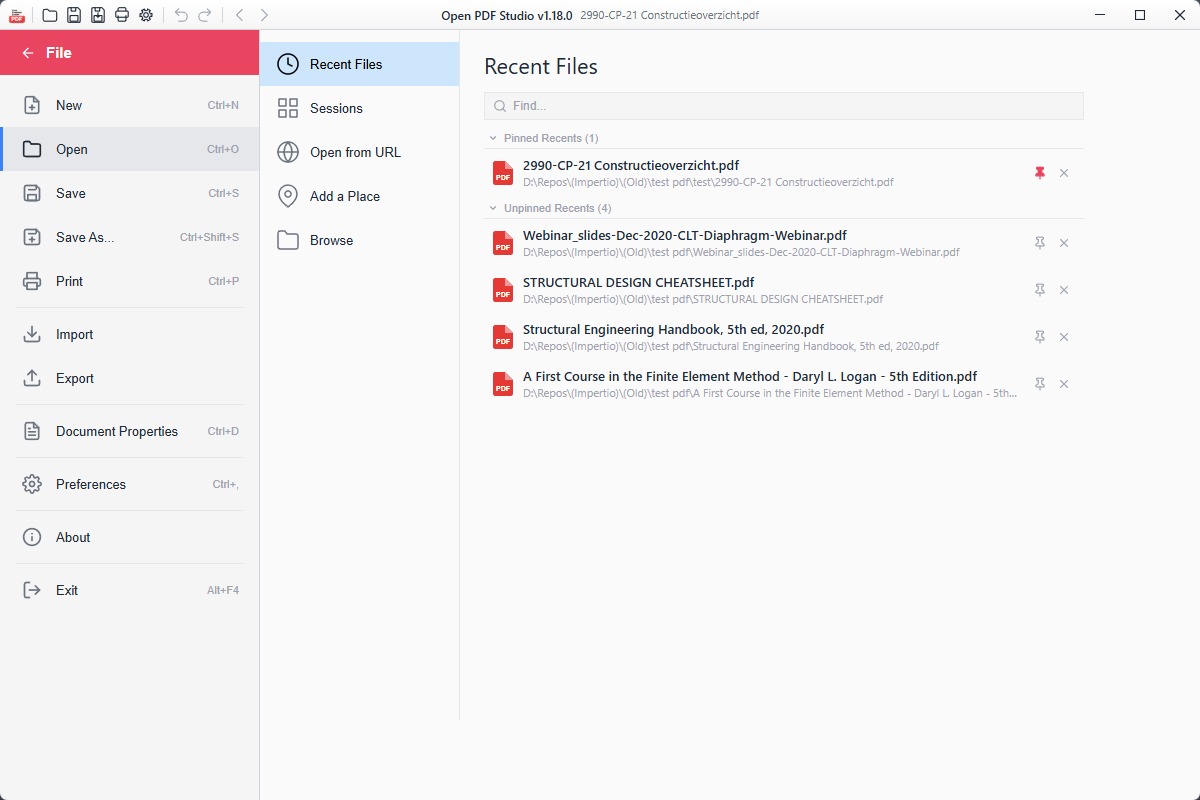
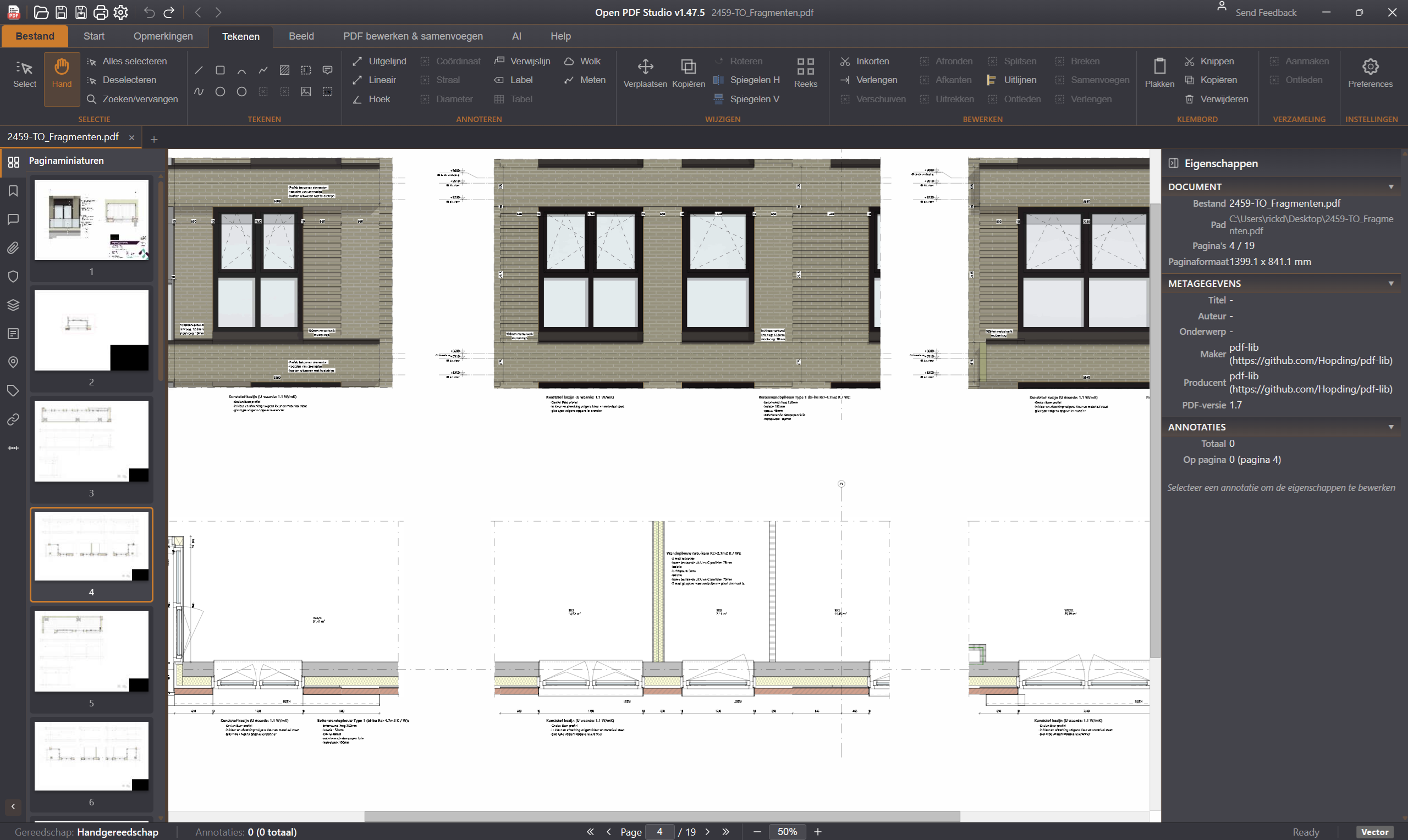
Open PDF Studio screenshot
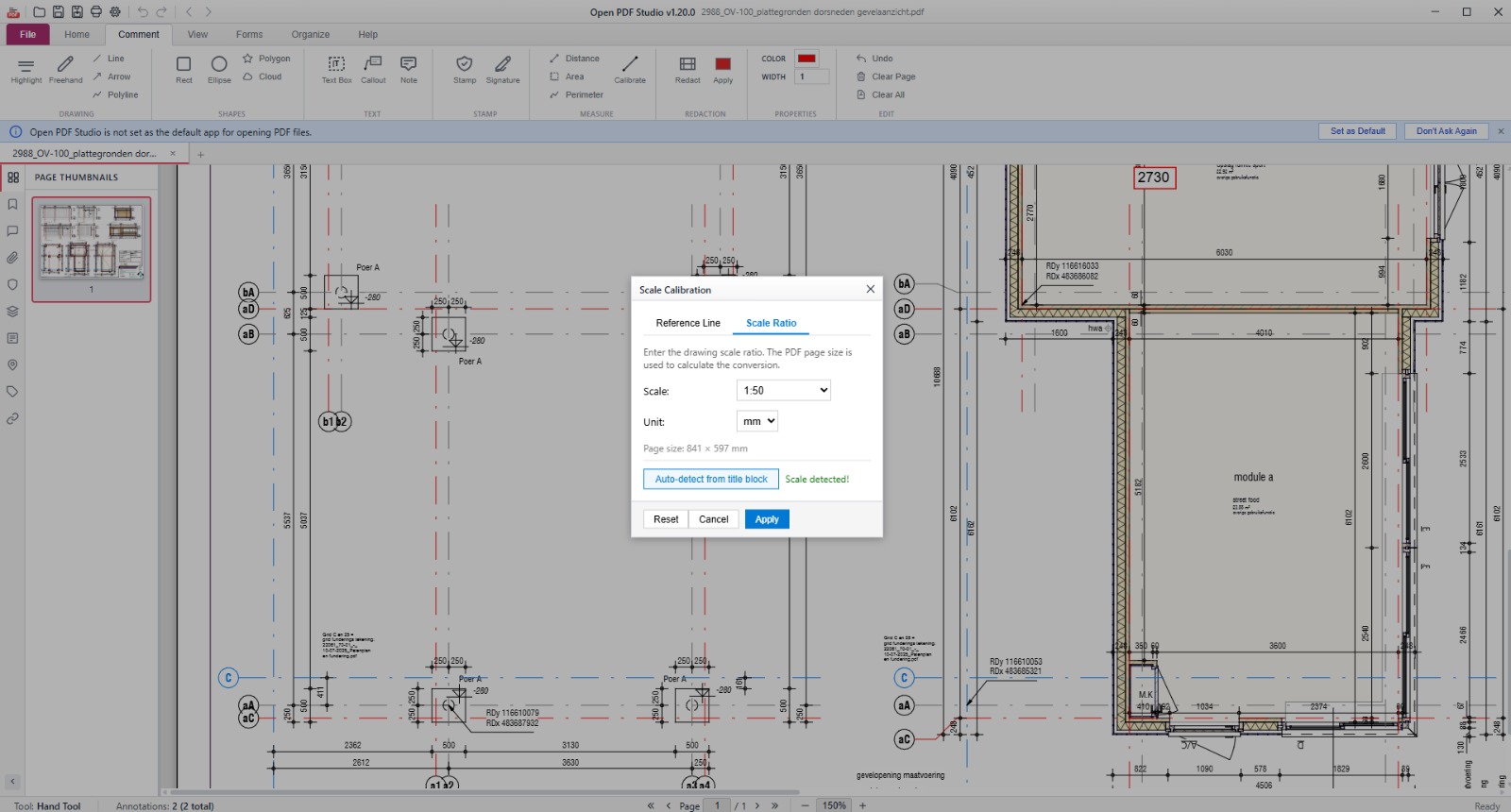
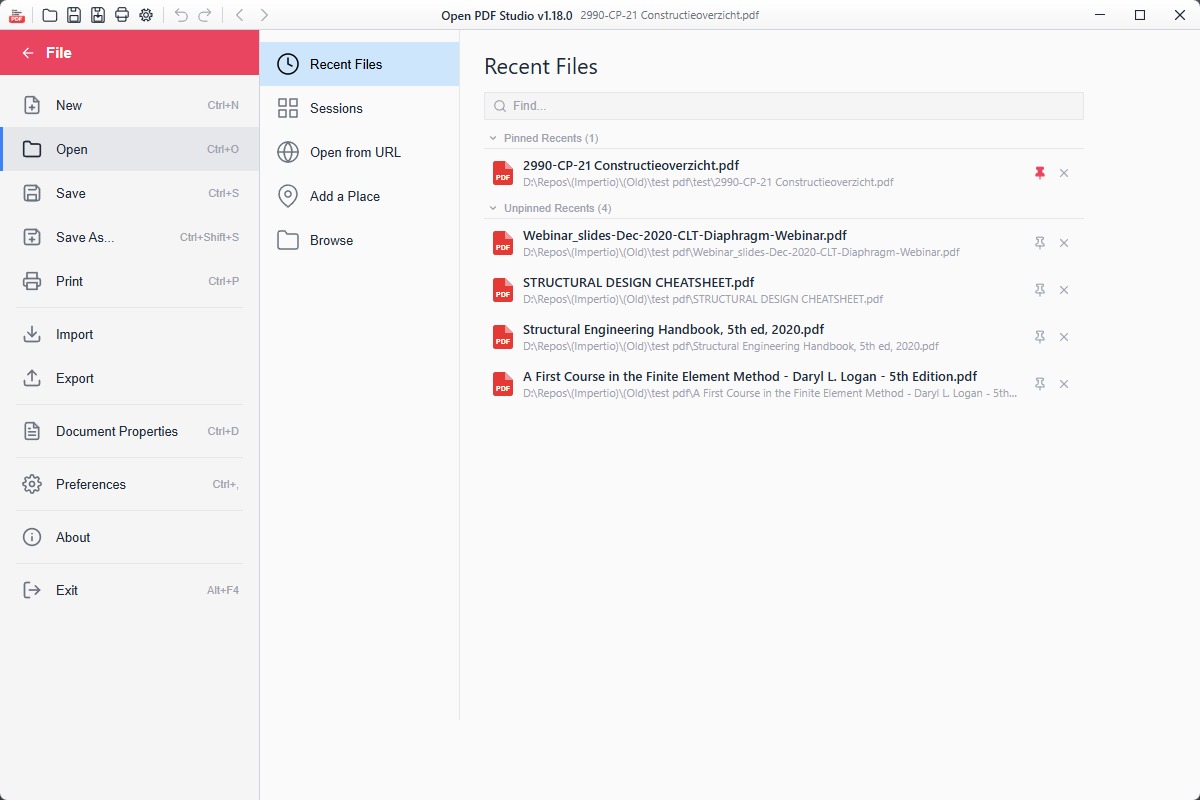
Open PDF Studio screenshot 2
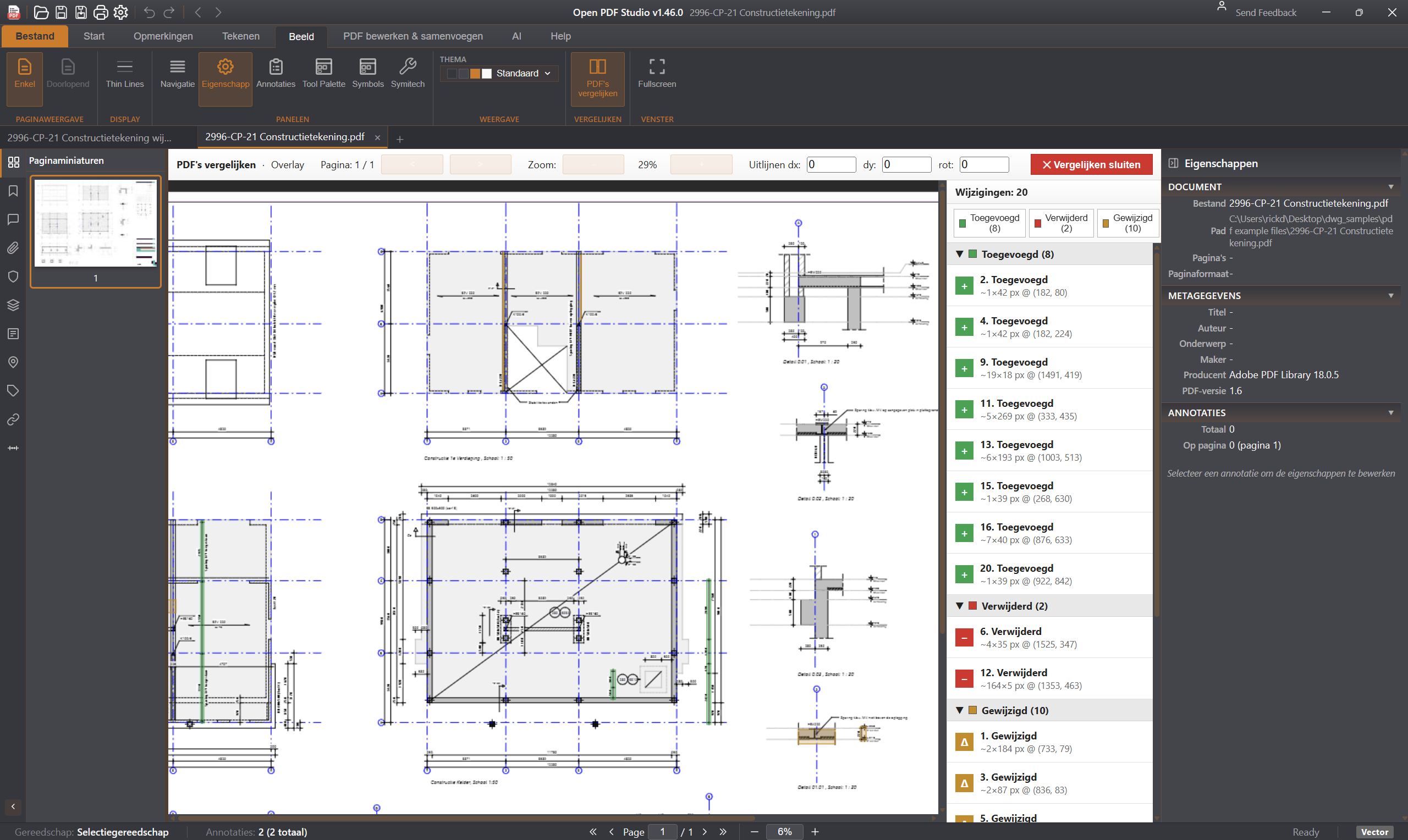
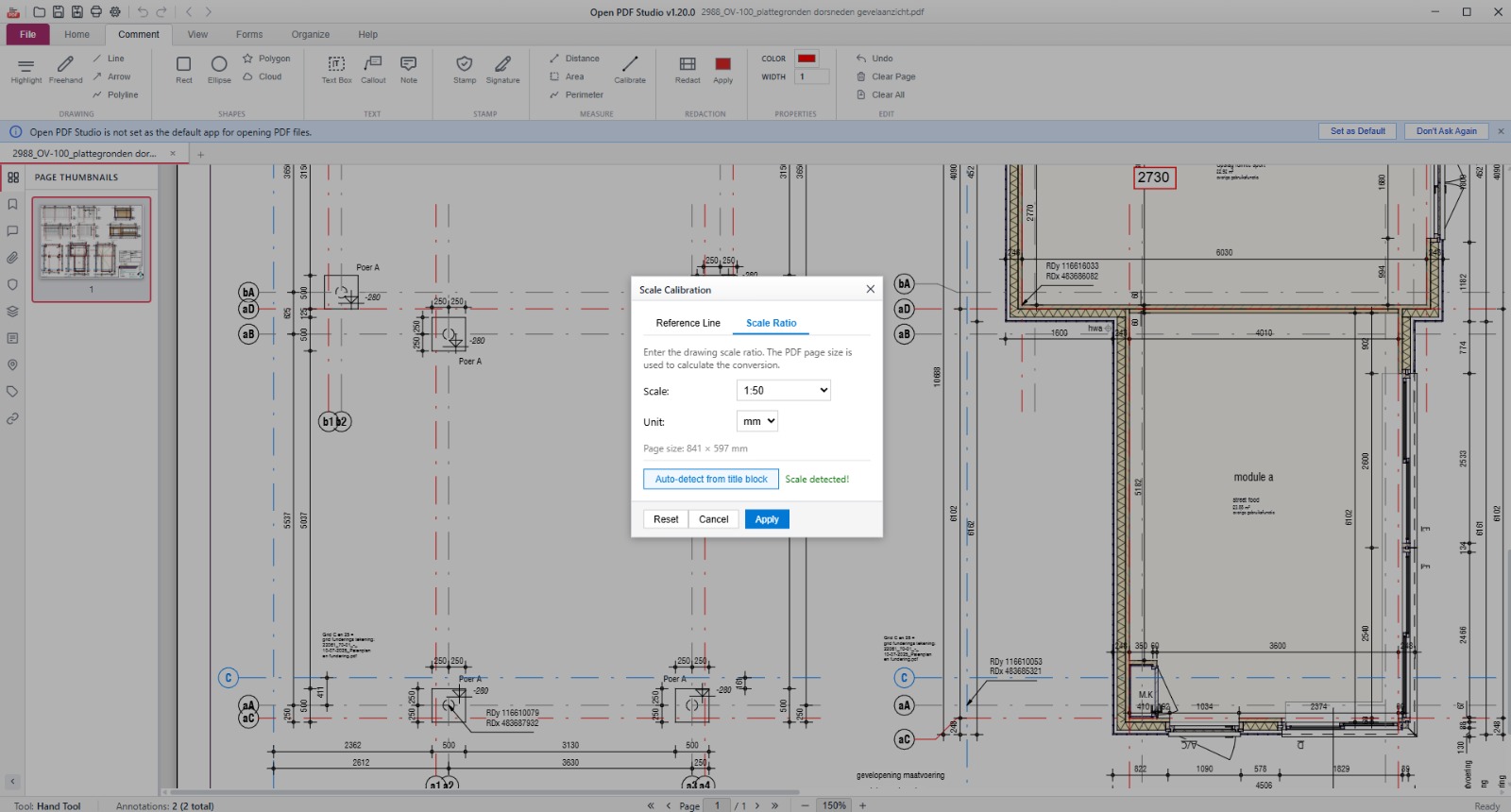
Open PDF Studio screenshot 3
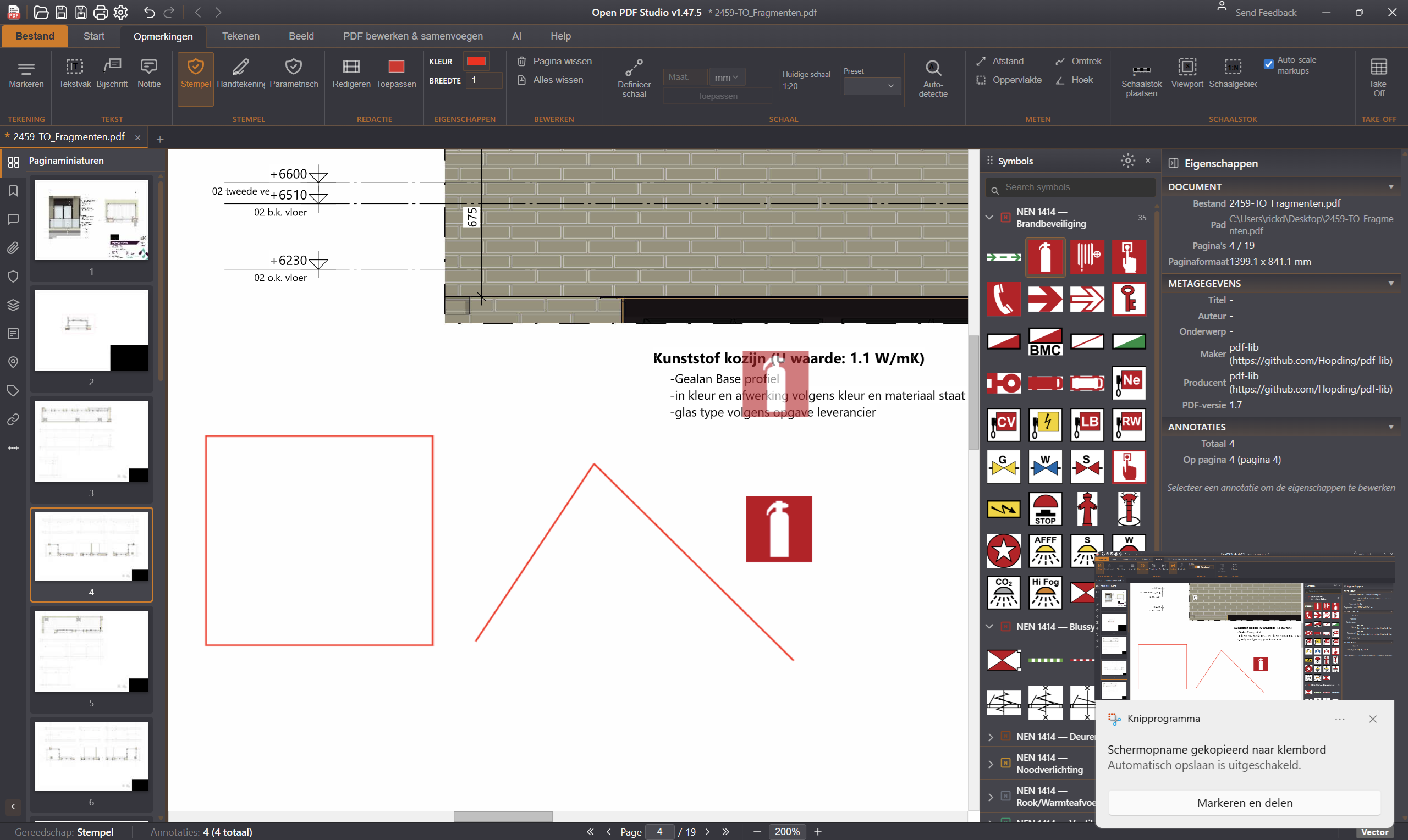
Open PDF Studio screenshot 4
Open PDF Studio screenshot 5
Open PDF Studio screenshot 6
Open PDF Studio screenshot 7

Rust PDF Engine

Razendsnelle vector PDFs

Open PDF Studio gebruikt een eigen Rust PDF-engine voor maximale prestaties. Vector-PDF-bestanden — zoals technische tekeningen, plattegronden en complexe diagrammen — worden razendsnel gerenderd, zelfs bij honderden pagina's. Geen JavaScript-bottleneck, geen wachten op rendering.

Download v1.47.13

Windows
8.3 MB
Download .exe
macOS (universal)
22.2 MB
Download .dmg
Linux (deb)
11.7 MB
Download .deb
Linux (AppImage)
85.1 MB
Download AppImage
Android
21.9 MB
Download .apk
Linux (snap)
via Snap Store
Snap Store

Features

20+ annotation tools

Highlight, underline, strikethrough, shapes (rectangle, ellipse, polygon, cloud, arrow), freehand pen, text boxes, callouts, sticky notes, stamps, and image insertion.

Measurement tools

Distance, area, and perimeter measurement with scale calibration (mm, cm, inches, points). Object snapping to endpoints, midpoints, centers, and edges.

Signatures and stamps

Draw multi-stroke signatures and save up to 5 for quick reuse. 10 built-in stamps including Approved, Rejected, Draft, Confidential, and Final.

Page management

Insert, delete, extract, replace, and reorder pages via drag-and-drop thumbnails. Merge multiple PDFs. Rotate pages 90/180/270 degrees.

Redaction

Mark areas and apply to permanently remove sensitive content from documents.

Forms support

Fill interactive PDF forms (AcroForms and XFA). Create text fields, checkboxes, and radio buttons with JavaScript validation.

Watermarks and headers/footers

Text and image watermarks with opacity, rotation, and position control. Headers and footers with page number, date, time, and filename variables.

Export and print

Export pages as PNG or JPEG at 72-600 DPI. Full print dialog with live preview, page range, scaling, and print-as-image option. XFDF annotation export/import.

Multi-tab and sessions

Work with multiple PDFs in tabs. Save and restore named workspace snapshots. Recent files with pin/unpin.

39 languages

Full interface translation including RTL support for Arabic, Hebrew, Farsi, and Urdu. 5 themes: Dark, Light, Blue, High Contrast, and System.

Tech stack

Tauri 2

Rust backend for native performance and small binary size.

SolidJS

Reactive UI framework with fine-grained updates.

PDF.js + pdf-lib

Mozilla PDF.js for rendering, pdf-lib for document manipulation.

Release notes

548 wijzigingen, gegroepeerd per minor versie.

548
Wijzigingen
40
Releases
36
Versies
v1.472 releases · 323 wijzigingen · 2026-05-06Laatste
  1. 01Line tool: rechte lijnen tekenen met snap aan eindpunten en middens
  2. 02Polyline tool: open en gesloten polylijnen met vertex-bewerking
  3. 03Arc tool: bogen tekenen via 3-punts methode (start, eind, doorlooppunt)
  4. 04Circle tool: cirkels met middelpunt + straal of via 3 punten
  5. 05Ellipse tool: ellipsen met aanpasbare assen
  6. 06Rectangle tool: rechthoeken met snap-grid en exacte dimensies
  7. 07Polygon tool: regelmatige veelhoeken (3-20 zijden)
  8. 08Cloud tool: revisie-wolken voor markup van wijzigingen
  9. 09Trim tool: lijnen knippen op snijpunten met andere objecten
  10. 10Extend tool: lijnen verlengen tot het volgende object
  11. 11Offset tool: parallelle lijnen op opgegeven afstand
  12. 12Mirror tool: spiegelen om as (verticaal, horizontaal, custom)
  13. 13Rotate tool: roteren met exacte hoekinvoer
  14. 14Scale tool: uniform en non-uniform schalen
  15. 15Move tool: verplaatsen met snap aan referentiepunten
  16. 16Copy tool: dupliceren met meerdere kopieën in array
  17. 17Array tool: rectangulaire en circulaire patronen
  18. 18Stretch tool: bewerken van geometrie via greep-punten
  19. 19Fillet tool: afronden van hoeken met radius
  20. 20Chamfer tool: aflakken van hoeken met afstand
  21. 21Hatch patterns: arcering met 30+ standaard patronen (ANSI, ISO)
  22. 22Hatch fill: solid fill met alpha transparantie
  23. 23Snap to endpoint: snap aan eindpunten van objecten
  24. 24Snap to midpoint: snap aan middens van lijnen
  25. 25Snap to center: snap aan middelpunten van cirkels
  26. 26Snap to intersection: snap aan snijpunten
  27. 27Snap to perpendicular: loodrechte snap
  28. 28Snap to tangent: rakende snap voor cirkels en bogen
  29. 29Snap to nearest: dichtstbijzijnde punt op object
  30. 30Snap to grid: snap aan instelbaar raster
  31. 31Ortho mode: forceer 0/90/180/270 graden bewegingen
  32. 32Polar tracking: snap aan instelbare hoeken (15, 30, 45, 60)
  33. 33Object tracking: tijdelijke alignment-lijnen
  34. 34Layer manager: lagen aanmaken, verbergen, vergrendelen
  35. 35Layer properties: kleur, lijnstijl, lijndikte per laag
  36. 36Layer isolation: isoleren van actieve laag
  37. 37Layer freeze: bevriezen van lagen voor performance
  38. 38Color picker: 256 standaard kleuren + custom RGB/HEX
  39. 39Line weight: 8 standaard lijndiktes (0.05mm - 2.0mm)
  40. 40Line style: continu, dashed, dotted, dash-dot, dash-dot-dot
  41. 41Line scale: globale en object-specifieke linetype scale
  42. 42Text tool: single-line en multi-line tekst
  43. 43Text styles: lettertype, grootte, justificatie, hoek
  44. 44MText editor: rich text met formatting (bold, italic, underline)
  45. 45Text on path: tekst langs curve
  46. 46Annotation scale: tekst-grootte schaalt met view zoom
  47. 47Dimension tool: lineaire dimensies met pijlen
  48. 48Aligned dimension: parallel aan object
  49. 49Angular dimension: hoekmeting tussen lijnen
  50. 50Radial dimension: straal-meting van cirkels
  51. 51Diameter dimension: diameter-meting
  52. 52Ordinate dimension: x/y-coördinaat dimensies
  53. 53Continuous dimension: doorlopende dimensieketen
  54. 54Baseline dimension: dimensies vanaf gemeenschappelijke basislijn
  55. 55Leader tool: callout-pijlen met tekst
  56. 56Multileader tool: meerdere pijlen vanuit één tekstblok
  57. 57Tolerance tool: GD&T toleranties
  58. 58Compare tool: visuele vergelijking tussen 2 PDF versies
  59. 59Compare overlay: kleur-gecodeerde verschillen (toegevoegd/verwijderd/gewijzigd)
  60. 60Compare report: PDF-rapport met alle gevonden wijzigingen
  61. 61Compare cache: gecachede detectie-rasters voor snelheid
  62. 62Scale region tool: schaal-gebaseerde area-selectie
  63. 63Parametric symbols: herbruikbare blocks met attributen
  64. 64Symbol library: 200+ ingebouwde bouwsymbolen
  65. 65Symbol manager: aanmaken, bewerken, exporteren van blocks
  66. 66Dynamic blocks: parametrische blocks met grips
  67. 67Attribute tool: tekst-attributen aan blocks koppelen
  68. 68Attribute extraction: export naar CSV/Excel
  69. 69Markup tools: highlight, strikethrough, underline
  70. 70Sticky notes: pop-up notities met threaded comments
  71. 71Stamp tool: voorgedefinieerde stempels (Approved, Rejected, Draft, Final, Confidential)
  72. 72Custom stamps: eigen stempels uploaden (PNG, JPG)
  73. 73Signature tool: digitale handtekeningen met cert-validatie
  74. 74Stempel met datum: automatische tijdstempel
  75. 75Reviewer tools: comment-threads voor team-review
  76. 76Status tracking: open, opgelost, afgewezen, hervatten
  77. 77Filter by status: alleen open issues tonen
  78. 78Filter by author: filter op reviewer
  79. 79Reply to comments: threaded conversation
  80. 80Mention users: @username voor notificaties
  81. 81Distance measurement: afstand tussen 2 punten
  82. 82Cumulative distance: doorlopende meting
  83. 83Area measurement: oppervlakte van polygon
  84. 84Perimeter measurement: omtrek van shape
  85. 85Volume measurement: 3D volume (voor PDF met diepte-info)
  86. 86Angle measurement: hoek tussen 3 punten
  87. 87Scale calibration: kalibreer op bekende afstand
  88. 88Unit conversion: mm, cm, m, inch, feet automatisch
  89. 89Decimal precision: 0-6 decimalen instelbaar
  90. 90Measurement labels: zichtbaar op tekening
  91. 91Measurement export: naar Excel met alle data
  92. 92Page management: insert, delete, duplicate, reorder
  93. 93Page rotation: 90, 180, 270 graden
  94. 94Page extract: pagina's exporteren als losse PDF
  95. 95Page replace: pagina vervangen met andere PDF
  96. 96Page merge: meerdere PDFs samenvoegen
  97. 97Page split: PDF splitsen op pagina-bereik
  98. 98Watermark: tekst- en image-watermark per pagina
  99. 99Header & footer: aanpasbare koptekst en voettekst
  100. 100Bates numbering: juridische pagina-nummering
  101. 101PDF/A export: archiveerbaar formaat (1a, 1b, 2a, 2b, 3a, 3b)
  102. 102PDF/X export: print-ready formaat
  103. 103PDF/E export: engineering format
  104. 104Optimize PDF: bestandsgrootte verkleinen
  105. 105Compress images: JPEG compressie instelbaar
  106. 106Remove unused: verwijderen van niet-gebruikte resources
  107. 107Linearize: web-optimized voor snel laden
  108. 108Encryption: AES-128 en AES-256
  109. 109Permissions: print, copy, edit, form-fill rechten
  110. 110Password protection: openings- en eigenaarwachtwoord
  111. 111Redaction tool: permanent verwijderen van tekst en afbeeldingen
  112. 112Redaction patterns: regex-patterns voor batch-redactie (BSN, telefoonnummers)
  113. 113Redaction reasons: standaard reden-codes
  114. 114OCR engine: tekst-herkenning op gescande PDFs
  115. 115OCR languages: 70+ talen ondersteund
  116. 116OCR layers: tekstlaag bovenop afbeelding
  117. 117OCR accuracy: confidence-score per woord
  118. 118Form filling: AcroForm en XFA
  119. 119Form validation: required fields, formats
  120. 120Form export: invul-data naar XML/JSON
  121. 121Form designer: nieuwe formulieren ontwerpen
  122. 122Field types: text, checkbox, radio, dropdown, listbox, button, signature
  123. 123Calculations: formules tussen velden
  124. 124JavaScript actions: scripting bij events
  125. 125Layers (OCG): pdf-lagen tonen/verbergen
  126. 126Bookmarks: PDF outline beheren
  127. 127Links: interne en externe links
  128. 128Attachments: bestanden in PDF embedden
  129. 129Metadata editor: title, author, subject, keywords
  130. 130XMP metadata: extended metadata schemas
  131. 131Dark mode UI: oogvriendelijke interface
  132. 132Light mode UI: klassieke licht thema
  133. 133Blue mode UI: kleurenblind-vriendelijk
  134. 134High contrast UI: toegankelijkheid
  135. 135Custom themes: eigen kleurenschema's
  136. 13639 talen: NL, EN, DE, FR, ES, IT, PT, PL, RU, JP, CN, KR + 27 meer
  137. 137RTL support: Arabisch, Hebreeuws
  138. 138Keyboard shortcuts: 100+ shortcuts, customizable
  139. 139Command palette: Ctrl+K voor snelle acties
  140. 140Quick access toolbar: meest-gebruikte tools bovenin
  141. 141Ribbon UI: Microsoft Office-stijl interface
  142. 142Compact mode: minimale UI voor kleine schermen
  143. 143Full-screen mode: presentation view
  144. 144Tab management: meerdere PDFs in tabs
  145. 145Tab groups: gerelateerde tabs groeperen
  146. 146Tab pinning: vastzetten van belangrijke documenten
  147. 147Recently opened: lijst van laatst geopende bestanden
  148. 148Favorites: bookmarks naar vaak-gebruikte PDFs
  149. 149Search: snel zoeken in document
  150. 150Advanced search: regex, case-sensitive, whole words
  151. 151Search across docs: zoek in alle open PDFs
  152. 152Replace text: vervang tekst (waar mogelijk)
  153. 153Spell check: spelling controleren in 39 talen
  154. 154Grammar check: grammatica-controle (EN, NL)
  155. 155Auto-save: elke 30 seconden
  156. 156Version history: laatste 50 versies bewaard
  157. 157Restore previous: rollback naar eerdere versie
  158. 158Conflict resolution: bij gelijktijdig bewerken
  159. 159Crash recovery: herstel onopgeslagen wijzigingen
  160. 160Cloud sync: Nextcloud, Dropbox, Google Drive
  161. 161WebDAV support: connectie met WebDAV servers
  162. 162Offline mode: volledig offline beschikbaar
  163. 163Background sync: synchroniseren in achtergrond
  164. 164Conflict markers: visueel bij sync-conflicten
  165. 165Print preview: WYSIWYG print-voorbeeld
  166. 166Print scaling: fit to page, custom %, multiple pages per sheet
  167. 167Booklet printing: vouwbare boekjes
  168. 168Print to PDF: PDF als printer
  169. 169Background printing: meerdere jobs in queue
  170. 170Printer profiles: opslaan van favoriete instellingen
  171. 171Export to image: PNG, JPG, TIFF, WebP per pagina
  172. 172Export to Word: PDF naar DOCX
  173. 173Export to Excel: tabellen naar XLSX
  174. 174Export to PowerPoint: pagina's naar PPTX
  175. 175Export to HTML: web-versie
  176. 176Export to ePub: e-book formaat
  177. 177Export to SVG: vector graphics per pagina
  178. 178Export to DXF: CAD formaat (waar mogelijk)
  179. 179Batch export: meerdere bestanden tegelijk
  180. 180Plugin: snapHook met priorPoints voor custom snaps
  181. 181Plugin: getAnnotations API voor dashboard-plugins
  182. 182Plugin: getPageCount voor pagina-info
  183. 183Plugin: applyMove generieke verplaatsing
  184. 184Plugin: applyResize generieke schaling
  185. 185Plugin: custom annotation types
  186. 186Plugin: custom tools registreren
  187. 187Plugin: custom export formaten
  188. 188Plugin: custom UI panels
  189. 189Plugin: theme overrides
  190. 190Plugin marketplace: 30+ plugins beschikbaar
  191. 191Rust PDF engine: native rendering performance
  192. 192WebGL acceleration: GPU rendering voor grote documenten
  193. 193Lazy loading: pagina's worden on-demand geladen
  194. 194Memory management: efficiënt met grote PDFs (1000+ pagina's)
  195. 195Multi-threading: parallel processing voor batch operations
  196. 196Streaming reads: directe rendering zonder volledig laden
  197. 197Vector PDF speed: razendsnelle rendering van CAD-tekeningen
  198. 198Tile-based rendering: alleen zichtbare delen renderen
  199. 199Detection raster cache: hergebruik bij compare
  200. 200Path simplification: minder vertices voor performance
  201. 201Texture atlasing: minder GPU memory voor patterns
  202. 202Shader optimization: snellere effects
  203. 203Async I/O: non-blocking file operations
  204. 204Worker threads: rendering in achtergrond
  205. 205Progressive loading: zichtbare content eerst
  206. 206Smart caching: voorspellend pagina's voor-laden
  207. 207Disk cache: grote bestanden gedeeltelijk op schijf
  208. 208Memory limits: configureerbare cache-grootte
  209. 209Crash safety: write-ahead logging
  210. 210Dashed pattern density: dichtere stippellijnen voor leesbaarheid
  211. 211Line cap styles: butt, round, square
  212. 212Line join styles: miter, round, bevel
  213. 213Miter limit: configureerbare hoek-clipping
  214. 214Textbox padding: tighter padding voor mainstream-uitstraling
  215. 215Snap indicators: visuele markers bij snap-events
  216. 216Tooltip system: contextual hints voor alle tools
  217. 217Status bar: live coordinaten en object-info
  218. 218Command line: AutoCAD-stijl command input
  219. 219Dynamic input: cursor-tracked input fields
  220. 220Crosshair cursor: configureerbaar (klein, groot, full)
  221. 221Selection cycling: door overlappende objecten
  222. 222Filter selection: selecteer op type, kleur, laag
  223. 223Quick select: SQL-achtige criteria
  224. 224Selection sets: opslaan en hergebruiken
  225. 225Undo/redo: 100 niveaus diep
  226. 226Macro recorder: opnemen en afspelen van actiereeksen
  227. 227Action manager: scriptable workflows
  228. 228Custom commands: nieuwe commands definiëren
  229. 229Palette docking: panels vrij positioneren
  230. 230Palette tabs: meerdere palettes in één tab
  231. 231Palette auto-hide: hover-to-show
  232. 232Multi-monitor: per-monitor palette layouts
  233. 233Workspace switcher: snel wisselen tussen UI-presets
  234. 234DPI awareness: scherp op high-DPI displays
  235. 235GPU detection: automatisch fallback naar CPU
  236. 236Hardware acceleration toggle: opt-in/out
  237. 237Vsync control: tearing voorkomen
  238. 238FPS counter: performance monitoring
  239. 239Memory usage display: live geheugen-info
  240. 240Disk usage display: cache-statistieken
  241. 241Network status: cloud-sync indicator
  242. 242Update notifier: automatische versie-check
  243. 243Auto-updater: in-app updates
  244. 244Rollback: terug naar vorige versie
  245. 245Beta channel: opt-in voor nightly builds
  246. 246Telemetry opt-in: optioneel anoniem gebruik delen
  247. 247Privacy mode: geen externe requests
  248. 248Audit log: alle acties loggen voor compliance
  249. 249Activity report: gebruiks-statistieken
  250. 250License manager: voor enterprise customers
  251. 251SSO integration: SAML, OAuth2, OpenID
  252. 252Active Directory: gebruikersbeheer integratie
  253. 253Group policies: centraal beleid voor IT
  254. 254MSI installer: voor enterprise-deployment
  255. 255Snap package: Linux Snap Store
  256. 256Flatpak: Linux Flathub
  257. 257AppImage: portable Linux binary
  258. 258DMG installer: macOS native
  259. 259Apple notarization: gateway-vrije install
  260. 260Windows MSIX: moderne app packaging
  261. 261WebView2 bundling: WebView2Loader.dll in installer
  262. 262User-level install: geen admin rechten nodig
  263. 263System-level install: voor alle gebruikers
  264. 264Silent install: command-line voor IT
  265. 265Uninstaller: complete cleanup
  266. 266Portable mode: zonder installatie draaien
  267. 267Auto-detect file associations: PDFs openen in app
  268. 268Browser plugin: Chrome, Firefox, Edge extensies
  269. 269Email integration: Outlook plugin
  270. 270MS Teams integration: PDF preview in chat
  271. 271Slack integration: PDF embeds in messages
  272. 272Mobile companion: Android tablet app
  273. 273Touch gestures: pinch-zoom, swipe, tap-and-hold
  274. 274Pen support: drukgevoelige pen-input
  275. 275Voice annotations: spraak-naar-tekst voor comments
  276. 276Accessibility: screen reader support
  277. 277Keyboard navigation: volledig zonder muis
  278. 278Focus indicators: WCAG 2.1 compliant
  279. 279Color blind modes: deuteranopia, protanopia, tritanopia
  280. 280Magnifier: vergroot-glas tool
  281. 281Read aloud: tekst voorlezen
  282. 282Document outline: hiërarchische navigatie
  283. 283Table of contents: auto-gegenereerd
  284. 284Index generator: automatische index
  285. 285Glossary tool: terminologie beheren
  286. 286Cross-references: verwijzingen tussen pagina's
  287. 287Citation manager: bron-verwijzingen
  288. 288Bibliography: literatuurlijst-generator
  289. 289Math equations: LaTeX rendering
  290. 290Chemical formulas: ChemDraw integration
  291. 291Music notation: MusicXML support
  292. 292Code snippets: syntax highlighting in tekst
  293. 293Markdown import: .md naar PDF
  294. 294Markdown export: PDF naar .md
  295. 295AsciiDoc support: .adoc rendering
  296. 296Diff view: side-by-side vergelijken
  297. 297Three-way merge: PDF-merge tool
  298. 298Conflict resolver: visueel oplossen
  299. 299Branch view: versie-vertakkingen
  300. 300Tag view: gemarkeerde versies
  301. 301Blame view: zie wie wat heeft gewijzigd
  302. 302History view: tijdlijn van wijzigingen
  303. 303Pre-commit hooks: PDF-validatie
  304. 304API: REST API voor automatisering
  305. 305CLI: command-line tool voor scripting
  306. 306Headless mode: zonder UI draaien
  307. 307Watch mode: monitor map voor nieuwe PDFs
  308. 308Batch processor: meerdere bestanden tegelijk
  309. 309Job queue: achtergrond-verwerking
  310. 310Webhooks: notificaties bij events
  311. 311iframe embed: PDF in andere websites
  312. 312JavaScript SDK: voor web-integratie
  313. 313Python bindings: voor scripting
  314. 314Node.js wrapper: server-side gebruik
  315. 315Docker image: containerized deployment
  316. 316Kubernetes ready: helm charts
  317. 317Cloud deployment: AWS, Azure, GCP guides
  318. 318On-premise: complete air-gapped deployment
  319. 319Tutorials: 50+ video-tutorials
  320. 320Documentation: complete API-docs
  321. 321Community: Discord server, GitHub discussions
  322. 322Bug bounty: security beloningen
  323. 323Translations: community-driven via Crowdin
v1.451 release · 1 wijziging · 2026-04-23
  1. 01Session restore
v1.431 release · 7 wijzigingen · 2026-04-07
  1. 01PDF viewing and navigation
  2. 02Text selection and search
  3. 03Annotations: highlight, underline, strikethrough
  4. 04Drawing tools: freehand, shapes, text
  5. 05Multi-tab document support
  6. 06Thumbnail navigation
  7. 07Session restore
v1.411 release · 1 wijziging · 2026-04-07
  1. 01Session restore
v1.401 release · 7 wijzigingen · 2026-04-01
  1. 01PDF viewing and navigation
  2. 02Text selection and search
  3. 03Annotations: highlight, underline, strikethrough
  4. 04Drawing tools: freehand, shapes, text
  5. 05Multi-tab document support
  6. 06Thumbnail navigation
  7. 07Session restore
v1.371 release · 7 wijzigingen · 2026-03-30
  1. 01PDF viewing and navigation
  2. 02Text selection and search
  3. 03Annotations: highlight, underline, strikethrough
  4. 04Drawing tools: freehand, shapes, text
  5. 05Multi-tab document support
  6. 06Thumbnail navigation
  7. 07Session restore
v1.361 release · 7 wijzigingen · 2026-03-30
  1. 01PDF viewing and navigation
  2. 02Text selection and search
  3. 03Annotations: highlight, underline, strikethrough
  4. 04Drawing tools: freehand, shapes, text
  5. 05Multi-tab document support
  6. 06Thumbnail navigation
  7. 07Session restore
v1.351 release · 7 wijzigingen · 2026-03-25
  1. 01PDF viewing and navigation
  2. 02Text selection and search
  3. 03Annotations: highlight, underline, strikethrough
  4. 04Drawing tools: freehand, shapes, text
  5. 05Multi-tab document support
  6. 06Thumbnail navigation
  7. 07Session restore
v1.341 release · 7 wijzigingen · 2026-03-23
  1. 01PDF viewing and navigation
  2. 02Text selection and search
  3. 03Annotations: highlight, underline, strikethrough
  4. 04Drawing tools: freehand, shapes, text
  5. 05Multi-tab document support
  6. 06Thumbnail navigation
  7. 07Session restore
v1.321 release · 7 wijzigingen · 2026-03-18
  1. 01PDF viewing and navigation
  2. 02Text selection and search
  3. 03Annotations: highlight, underline, strikethrough
  4. 04Drawing tools: freehand, shapes, text
  5. 05Multi-tab document support
  6. 06Thumbnail navigation
  7. 07Session restore
v1.311 release · 7 wijzigingen · 2026-03-18
  1. 01PDF viewing and navigation
  2. 02Text selection and search
  3. 03Annotations: highlight, underline, strikethrough
  4. 04Drawing tools: freehand, shapes, text
  5. 05Multi-tab document support
  6. 06Thumbnail navigation
  7. 07Session restore
v1.301 release · 7 wijzigingen · 2026-03-17
  1. 01PDF viewing and navigation
  2. 02Text selection and search
  3. 03Annotations: highlight, underline, strikethrough
  4. 04Drawing tools: freehand, shapes, text
  5. 05Multi-tab document support
  6. 06Thumbnail navigation
  7. 07Session restore
v1.291 release · 7 wijzigingen · 2026-03-11
  1. 01PDF viewing and navigation
  2. 02Text selection and search
  3. 03Annotations: highlight, underline, strikethrough
  4. 04Drawing tools: freehand, shapes, text
  5. 05Multi-tab document support
  6. 06Thumbnail navigation
  7. 07Session restore
v1.251 release · 7 wijzigingen · 2026-03-09
  1. 01PDF viewing and navigation
  2. 02Text selection and search
  3. 03Annotations: highlight, underline, strikethrough
  4. 04Drawing tools: freehand, shapes, text
  5. 05Multi-tab document support
  6. 06Thumbnail navigation
  7. 07Session restore
v1.241 release · 7 wijzigingen · 2026-03-09
  1. 01PDF viewing and navigation
  2. 02Text selection and search
  3. 03Annotations: highlight, underline, strikethrough
  4. 04Drawing tools: freehand, shapes, text
  5. 05Multi-tab document support
  6. 06Thumbnail navigation
  7. 07Session restore
v1.231 release · 7 wijzigingen · 2026-03-04
  1. 01PDF viewing and navigation
  2. 02Text selection and search
  3. 03Annotations: highlight, underline, strikethrough
  4. 04Drawing tools: freehand, shapes, text
  5. 05Multi-tab document support
  6. 06Thumbnail navigation
  7. 07Session restore
v1.221 release · 7 wijzigingen · 2026-03-03
  1. 01PDF viewing and navigation
  2. 02Text selection and search
  3. 03Annotations: highlight, underline, strikethrough
  4. 04Drawing tools: freehand, shapes, text
  5. 05Multi-tab document support
  6. 06Thumbnail navigation
  7. 07Session restore
v1.211 release · 1 wijziging · 2026-03-02
  1. 01Session restore
v1.201 release · 7 wijzigingen · 2026-02-25
  1. 01PDF viewing and navigation
  2. 02Text selection and search
  3. 03Annotations: highlight, underline, strikethrough
  4. 04Drawing tools: freehand, shapes, text
  5. 05Multi-tab document support
  6. 06Thumbnail navigation
  7. 07Session restore
v1.181 release · 7 wijzigingen · 2026-02-24
  1. 01PDF viewing and navigation
  2. 02Text selection and search
  3. 03Annotations: highlight, underline, strikethrough
  4. 04Drawing tools: freehand, shapes, text
  5. 05Multi-tab document support
  6. 06Thumbnail navigation
  7. 07Session restore
v1.171 release · 7 wijzigingen · 2026-02-24
  1. 01PDF viewing and navigation
  2. 02Text selection and search
  3. 03Annotations: highlight, underline, strikethrough
  4. 04Drawing tools: freehand, shapes, text
  5. 05Multi-tab document support
  6. 06Thumbnail navigation
  7. 07Session restore
v1.161 release · 7 wijzigingen · 2026-02-24
  1. 01PDF viewing and navigation
  2. 02Text selection and search
  3. 03Annotations: highlight, underline, strikethrough
  4. 04Drawing tools: freehand, shapes, text
  5. 05Multi-tab document support
  6. 06Thumbnail navigation
  7. 07Session restore
v1.151 release · 7 wijzigingen · 2026-02-19
  1. 01PDF viewing and navigation
  2. 02Text selection and search
  3. 03Annotations: highlight, underline, strikethrough
  4. 04Drawing tools: freehand, shapes, text
  5. 05Multi-tab document support
  6. 06Thumbnail navigation
  7. 07Session restore
v1.131 release · 1 wijziging · 2026-02-17
  1. 01Session restore
v1.121 release · 7 wijzigingen · 2026-02-17
  1. 01PDF viewing and navigation
  2. 02Text selection and search
  3. 03Annotations: highlight, underline, strikethrough
  4. 04Drawing tools: freehand, shapes, text
  5. 05Multi-tab document support
  6. 06Thumbnail navigation
  7. 07Session restore
v1.101 release · 7 wijzigingen · 2026-02-13
  1. 01PDF viewing and navigation
  2. 02Text selection and search
  3. 03Annotations: highlight, underline, strikethrough
  4. 04Drawing tools: freehand, shapes, text
  5. 05Multi-tab document support
  6. 06Thumbnail navigation
  7. 07Session restore
v1.91 release · 7 wijzigingen · 2026-02-12
  1. 01PDF viewing and navigation
  2. 02Text selection and search
  3. 03Annotations: highlight, underline, strikethrough
  4. 04Drawing tools: freehand, shapes, text
  5. 05Multi-tab document support
  6. 06Thumbnail navigation
  7. 07Session restore
v1.81 release · 7 wijzigingen · 2026-02-12
  1. 01PDF viewing and navigation
  2. 02Text selection and search
  3. 03Annotations: highlight, underline, strikethrough
  4. 04Drawing tools: freehand, shapes, text
  5. 05Multi-tab document support
  6. 06Thumbnail navigation
  7. 07Session restore
v1.71 release · 7 wijzigingen · 2026-02-12
  1. 01PDF viewing and navigation
  2. 02Text selection and search
  3. 03Annotations: highlight, underline, strikethrough
  4. 04Drawing tools: freehand, shapes, text
  5. 05Multi-tab document support
  6. 06Thumbnail navigation
  7. 07Session restore
v1.61 release · 7 wijzigingen · 2026-02-12
  1. 01PDF viewing and navigation
  2. 02Text selection and search
  3. 03Annotations: highlight, underline, strikethrough
  4. 04Drawing tools: freehand, shapes, text
  5. 05Multi-tab document support
  6. 06Thumbnail navigation
  7. 07Session restore
v1.51 release · 7 wijzigingen · 2026-02-11
  1. 01PDF viewing and navigation
  2. 02Text selection and search
  3. 03Annotations: highlight, underline, strikethrough
  4. 04Drawing tools: freehand, shapes, text
  5. 05Multi-tab document support
  6. 06Thumbnail navigation
  7. 07Session restore
v1.41 release · 7 wijzigingen · 2026-02-10
  1. 01PDF viewing and navigation
  2. 02Text selection and search
  3. 03Annotations: highlight, underline, strikethrough
  4. 04Drawing tools: freehand, shapes, text
  5. 05Multi-tab document support
  6. 06Thumbnail navigation
  7. 07Session restore
v1.31 release · 7 wijzigingen · 2026-02-10
  1. 01PDF viewing and navigation
  2. 02Text selection and search
  3. 03Annotations: highlight, underline, strikethrough
  4. 04Drawing tools: freehand, shapes, text
  5. 05Multi-tab document support
  6. 06Thumbnail navigation
  7. 07Session restore
v1.21 release · 1 wijziging · 2026-02-09
  1. 01Session restore
v1.11 release · 1 wijziging · 2026-02-02
  1. 01Close button on properties panel header
v1.04 releases · 23 wijzigingen · 2026-01-22 — 2026-01-28
  1. 01PDF viewing and navigation
  2. 02Text selection and search
  3. 03Annotations: highlight, underline, strikethrough
  4. 04Drawing tools: freehand, shapes, text
  5. 05Multi-tab document support
  6. 06Thumbnail navigation
  7. 07Session restore
  8. 08**Find/Search Feature**: Added Find functionality in Home ribbon (Ctrl+F) with match case and whole word options
  9. 09**Search Highlighting**: Accurate text highlighting on search results
  10. 10**Text Selection**: Improved text layer accuracy for precise text selection
  11. 11**Thumbnail Caching**: Enhanced thumbnail generation with caching and priority for active document
  12. 12**Copy Fix**: Fixed Ctrl+C to allow native text copy when no annotation is selected
  13. 13PDF viewing with single page and continuous scroll modes
  14. 14Annotation tools: highlight, draw, line, arrow, circle, rectangle, polygon, polyline, cloud, text, textbox, callout, comment, stamp
  15. 15Arrow annotations with multiple arrowhead styles
  16. 16Full annotation editing: select, move, resize, rotate
  17. 17Properties panel with appearance customization
  18. 18Copy/paste/duplicate annotations
  19. 19Undo support
  20. 20Keyboard shortcuts
  21. 21Context menus
  22. 22Preferences dialog
  23. 23Export to PDF with annotations

Bekijk alle releases op GitHub →

Live demo → GitHub →