Éditeur PDF pour la construction

Open PDF Studio

L'éditeur PDF gratuit pour annoter, mesurer et comparer vos plans

Ouvrez vos plans de construction sans attendre, ajoutez des nuages et des symboles, mesurez à l'échelle et voyez d'un coup d'œil ce qui a changé entre deux révisions. Sur votre ordinateur, votre tablette ou directement dans le navigateur.

  • Moteur PDF maison pour les plans vectoriels
  • 40 langues
  • Windows · macOS · Linux · Android · Web
  • Gratuit · LGPL-3.0
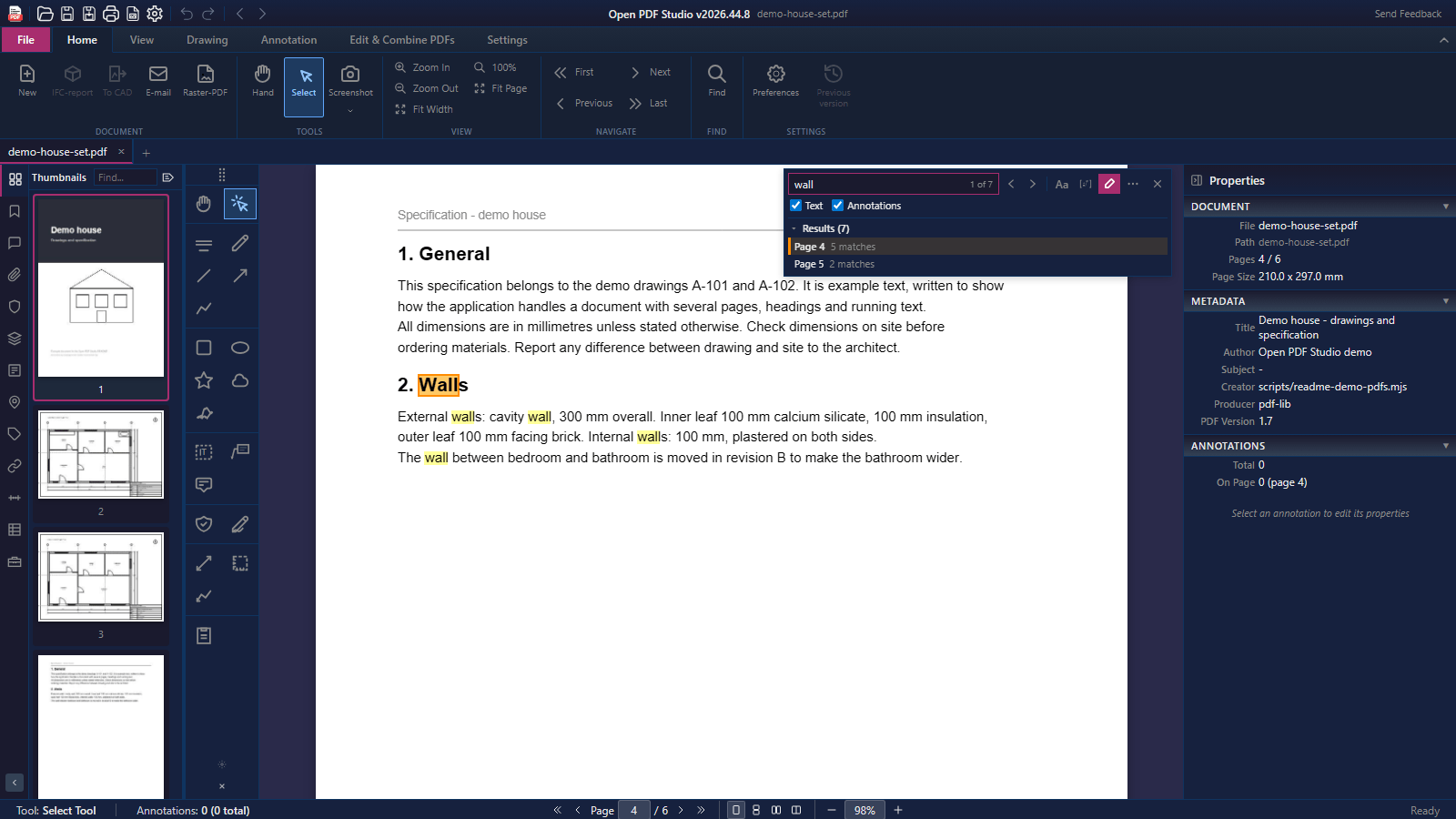
Open PDF Studio avec le thème sombre : résultats de recherche pour « wall » dans le texte d'un cahier des charges de démonstration, avec miniatures et propriétés du document
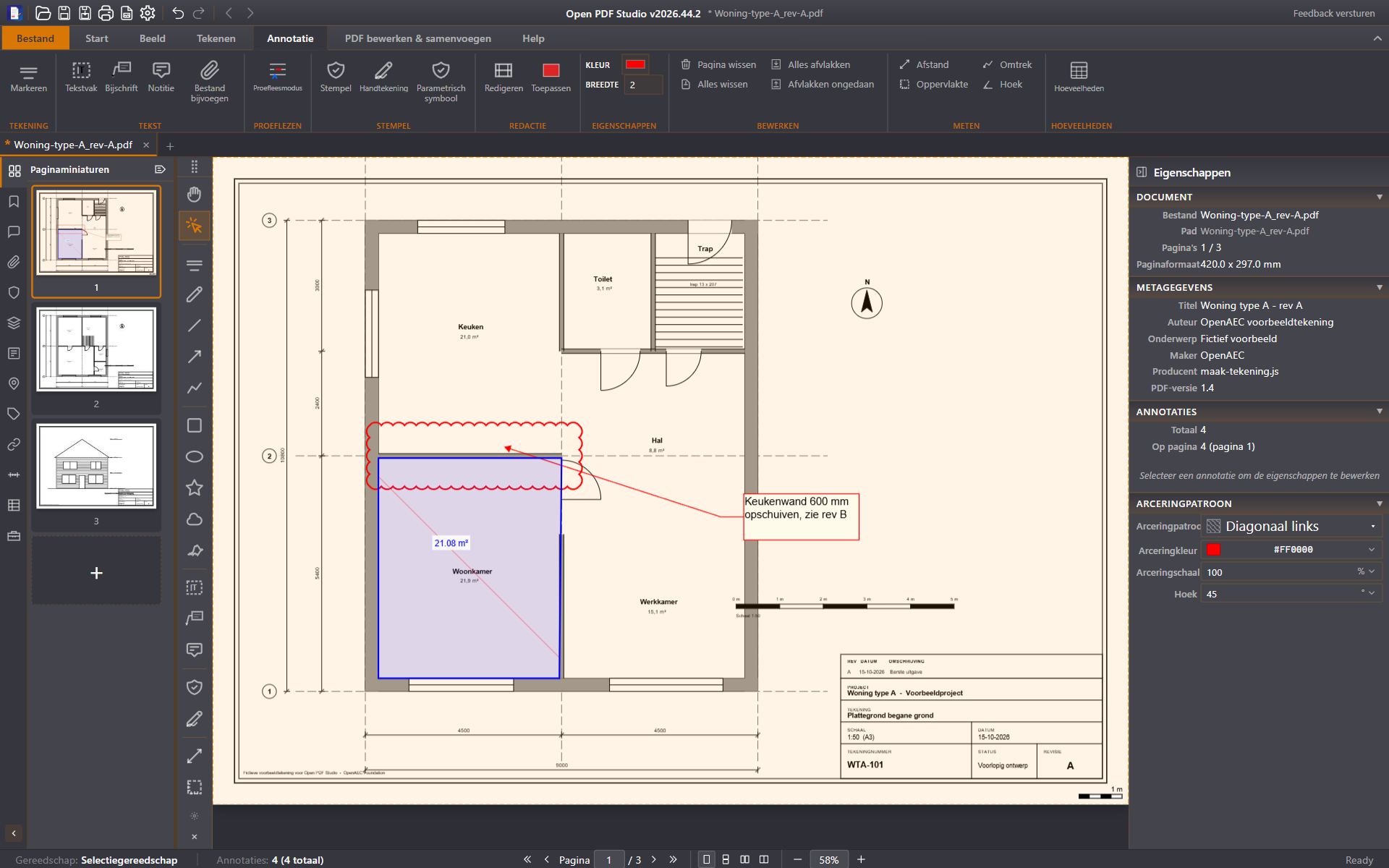
Open PDF Studio : plan d'une maison avec un nuage de révision, une bulle de texte et une surface mesurée de 21,08 m²
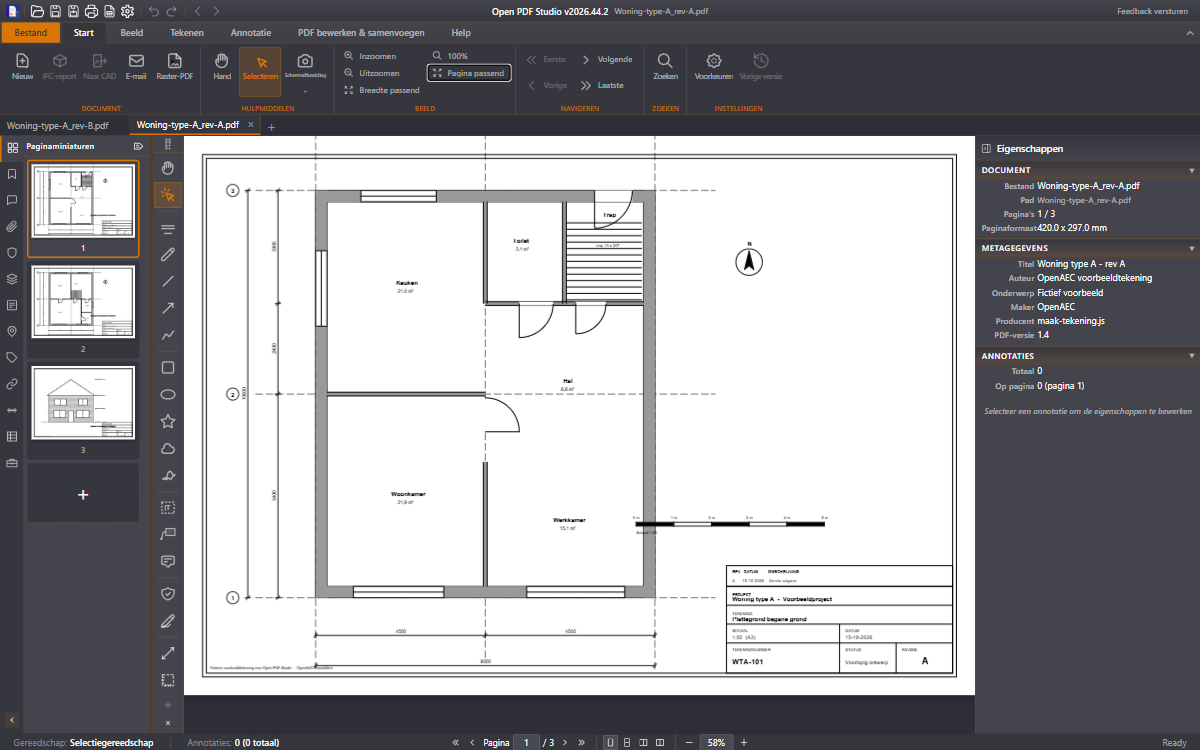
Plan d'une maison ajusté à la fenêtre, avec les vignettes des trois feuilles
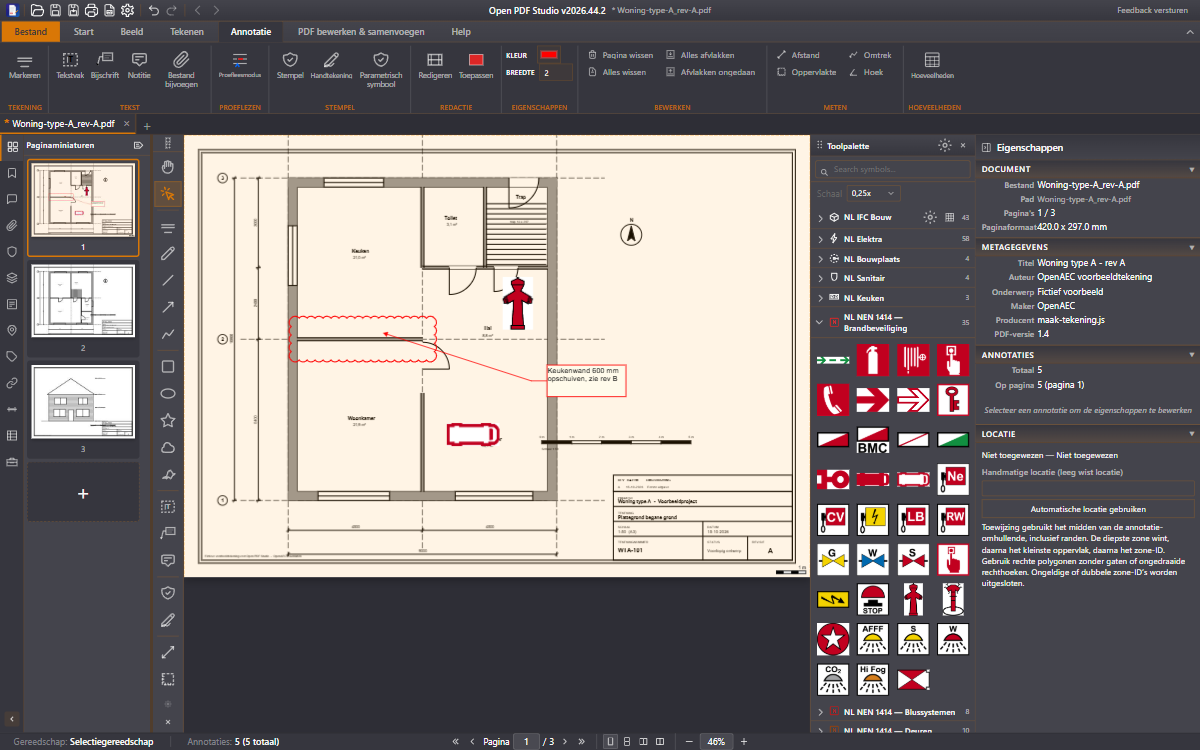
Nuage de révision, bulle de texte et symboles de sécurité incendie NEN 1414 sur un plan, avec la palette d'outils ouverte
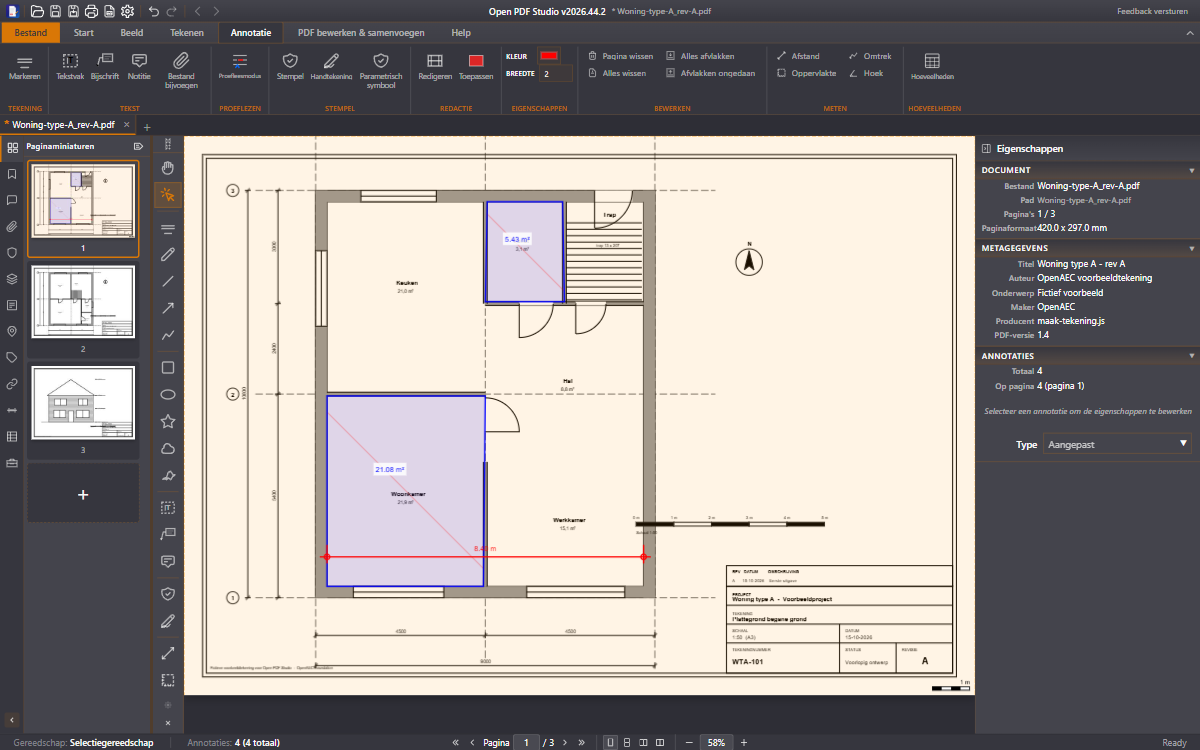
Plan au 1:50 avec deux surfaces mesurées et une distance de 8,40 m
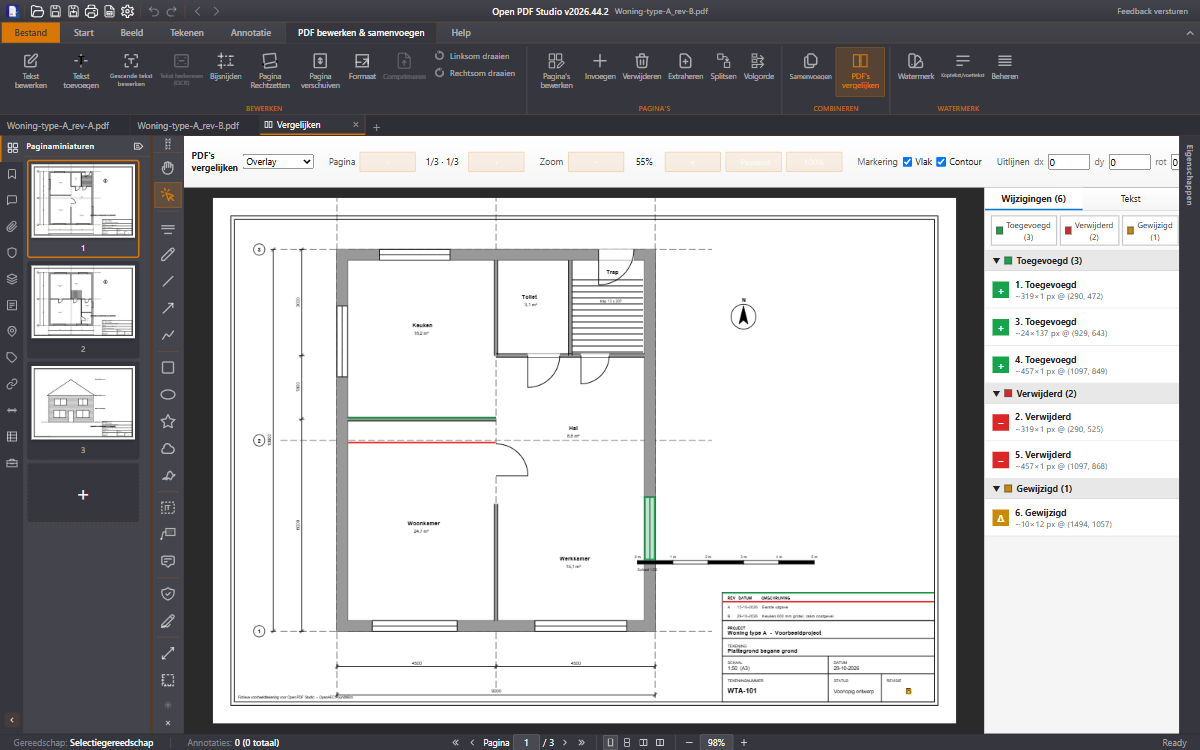
Révisions A et B superposées : le mur de cuisine déplacé en rouge et vert, avec une liste de six modifications
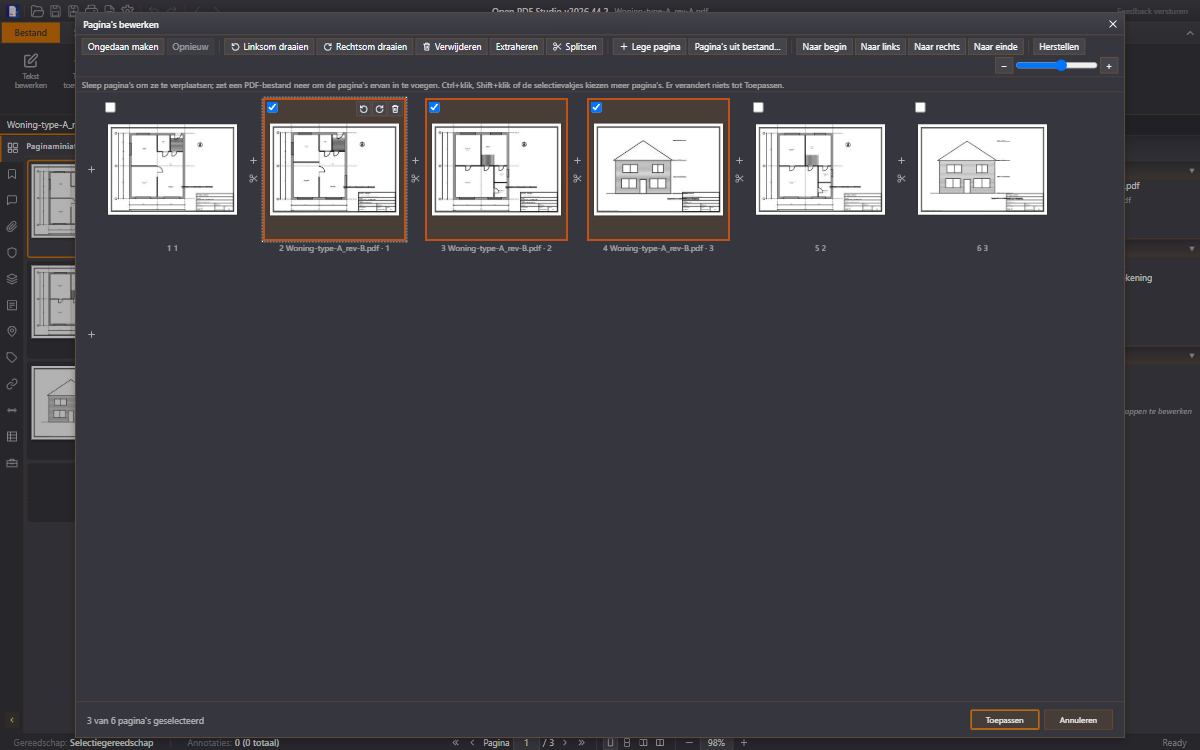
Modifier les pages : six feuilles en vignettes, avec les feuilles de la révision B insérées
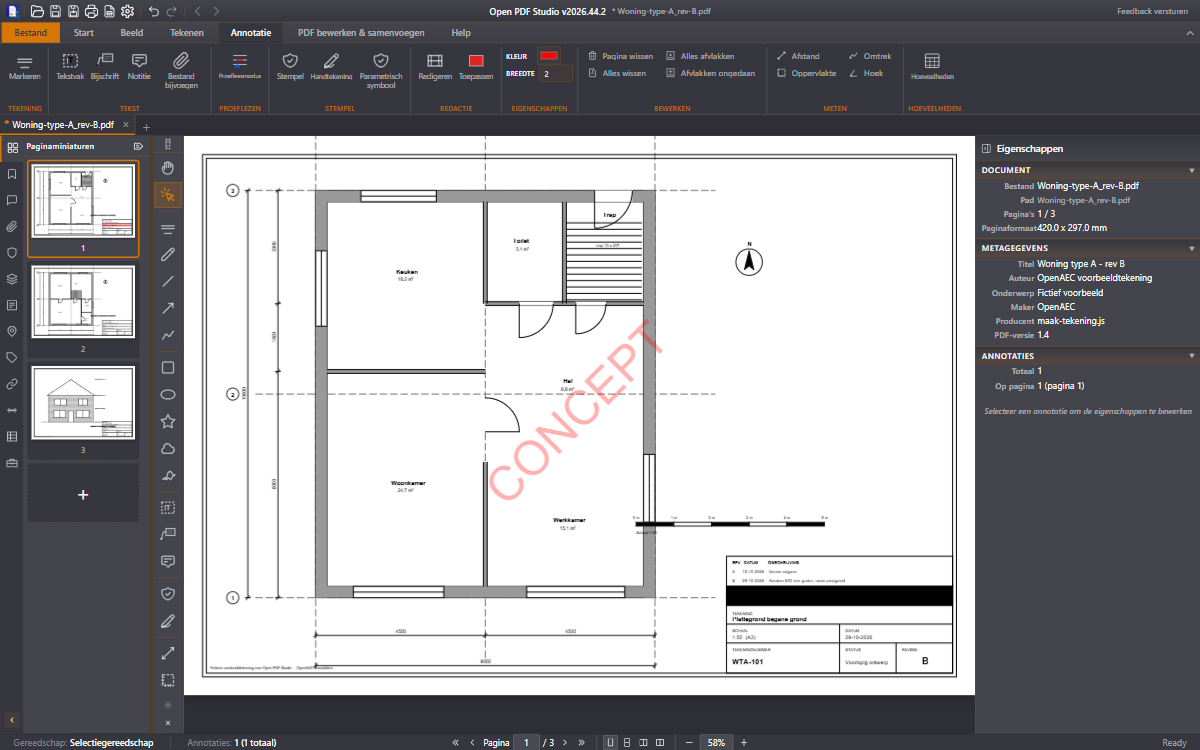
Plan avec le filigrane CONCEPT et un bloc projet noirci dans le cartouche

Essayez tout de suite : ouvrez votre propre PDF dans le navigateur. Le fichier reste sur votre ordinateur et n'est jamais envoyé. Ouvrir la version web

Regardez la vidéo

Voir sur YouTube · Notre chaîne YouTube

Fonctions

Tout pour vos plans, dans une seule application

Commencez par l'essentiel, ou choisissez un thème.

Plan d'une maison ajusté à la fenêtre, avec les vignettes des trois feuilles

01 Plans

Ouvrez de grands plans sans attendre

Dans l'application de bureau, un moteur PDF maison écrit en Rust affiche instantanément les PDF vectoriels, y compris les grandes feuilles et les jeux de plusieurs centaines de pages. Travaillez sur plusieurs plans dans des onglets et allez droit à la bonne feuille grâce aux vignettes.

En savoir plus
Nuage de révision, bulle de texte et symboles de sécurité incendie NEN 1414 sur un plan, avec la palette d'outils ouverte

02 Annoter

Indiquez ce qui doit changer

Nuages, flèches, bulles, notes et tampons, plus une palette d'outils avec des symboles NEN 1414 et IFC. Chaque annotation a un auteur, un statut et des réponses, pour traiter les remarques ensemble.

En savoir plus
Plan au 1:50 avec deux surfaces mesurées et une distance de 8,40 m

03 Mesurer

Mesurez à l'échelle, même avec plusieurs échelles par feuille

Placez une zone d'échelle sur le plan et mesurez distances, surfaces, périmètres et angles, avec accrochage aux extrémités et aux milieux. Chaque mesure va dans un métré que vous pouvez placer sur le plan sous forme de tableau ou enregistrer en CSV.

En savoir plus
Révisions A et B superposées : le mur de cuisine déplacé en rouge et vert, avec une liste de six modifications

04 Comparer

Voyez tout de suite ce qui a changé entre deux révisions

Superposez deux versions, affichez-les côte à côte ou utilisez une ligne de balayage. Ce qui a été ajouté passe en vert, ce qui a été supprimé en rouge, et une liste résume chaque modification.

En savoir plus
Modifier les pages : six feuilles en vignettes, avec les feuilles de la révision B insérées

05 Pages

Composez votre jeu de plans

Réorganisez, faites pivoter, supprimez et scindez des pages dans une vue en vignettes, et insérez des pages d'un autre fichier. À la fusion, annotations, mesures, champs de formulaire et signets sont conservés.

En savoir plus
Plan avec le filigrane CONCEPT et un bloc projet noirci dans le cartouche

06 Partager

Partagez votre plan comme vous le voulez

Ajoutez un filigrane ou un en-tête et un pied de page, masquez les informations sensibles et signez de votre main. Imprimez en couleur, en niveaux de gris ou en noir et blanc, ou enregistrez les feuilles en images.

En savoir plus
  • Plus de 20 outils d'annotation

    Surligner, souligner, barrer, nuages, flèches, formes, main levée, zones de texte, bulles et notes.

  • Symboles pour la construction

    Une palette d'outils avec des symboles NEN 1414 et IFC, plus des symboles paramétriques comme le ferraillage, les essais de pénétration (CPT) et une grue à tour avec son rayon d'orientation.

  • Traiter les remarques

    Chaque annotation a un auteur, un statut et des réponses. La liste des annotations et les calques d'annotation gardent les grands jeux bien organisés.

  • Jeux d'outils

    Enregistrez vos styles d'annotation et vos préréglages de mesure dans des jeux et partagez-les avec vos collègues sous forme de fichier .opdstools.

  • Dessinez comme en CAO

    Lignes, arcs, hachures et cotes, avec déplacer, symétrie, réseau et rotation. Les cadres avec cartouche se remplissent à part.

  • Extrait vectoriel

    Découpez un détail d'un PDF et collez-le dans un autre, en données vectorielles nettes plutôt qu'en capture d'écran.

  • Distance, surface, périmètre et angle

    Mesurez en mm, cm, m, pouces ou pieds, avec accrochage aux extrémités, milieux, sommets et centres.

  • Zones d'échelle

    Plusieurs échelles sur une feuille, du 1:1 au 1:200 ou une échelle personnalisée. Ou mesurez l'échelle sur le plan lui-même.

  • Métré

    Surfaces, longueurs et comptages par catégorie IFC, sous forme de tableau sur le plan ou en CSV pour votre estimation des coûts.

  • Compter

    Comptez symboles et éléments d'un clic chacun ; le total va dans le métré.

  • Modifier les pages

    Réorganiser, faire pivoter, supprimer, insérer et scinder dans une vue zoomable. Rien ne change avant que vous cliquiez sur Appliquer.

  • Fusionner et scinder

    Fusionnez des PDF en conservant annotations, mesures, champs de formulaire, signets et calques, ou scindez un jeu en feuilles séparées.

  • Comparer et vue partagée

    Comparez deux révisions en superposition, côte à côte ou avec une ligne de balayage, ou affichez deux parties d'un même plan côte à côte.

  • Modifier et reconnaître le texte

    Modifiez le texte existant ou ajoutez du nouveau texte. Dans l'application de bureau, la reconnaissance de texte (OCR) rend les scans consultables par recherche.

  • Filigranes, en-têtes et pieds de page

    Texte ou image, avec opacité, rotation et position. En-têtes et pieds de page avec numéro de page, date et nom de fichier.

  • Masquer des informations

    Marquez les zones contenant des noms, des adresses ou des prix et masquez-les avant de partager le plan.

  • Signatures et tampons

    Dessinez votre signature et gardez-en quelques-unes pour plus tard. Dix tampons prêts à l'emploi, ou créez-en un à partir d'une image.

  • Imprimer et exporter

    Imprimez en couleur, en niveaux de gris ou en noir et blanc, avec aperçu. Enregistrez les feuilles en PNG ou JPEG jusqu'à 600 dpi, ou en PDF matriciel.

  • Formulaires

    Remplissez des formulaires PDF interactifs et créez vos propres champs de texte, cases à cocher et boutons radio.

  • Un travail qui survit à un plantage

    L'application garde une copie de récupération de chaque document avec des modifications non enregistrées. Votre fichier d'origine n'est jamais touché.

  • Vos propres raccourcis

    Donnez à chaque commande et à chaque bouton du ruban son propre raccourci, et emportez-les sur un autre ordinateur.

  • 40 langues et cinq thèmes

    Y compris de droite à gauche pour l'arabe, l'hébreu, le persan et l'ourdou. Sombre, clair, bleu, contraste élevé ou système.

  • Pilotable par l'IA

    Un serveur MCP intégré permet à un assistant IA comme Claude de mesurer, annoter et enregistrer, avec 94 outils.

Le ruban complet, fonction par fonction

Télécharger

Télécharger v2026.48.5

Gratuit, sans compte. Pour Windows, macOS et Linux, et en application pour tablettes Android.

programme d'installation .exe · 41.1 MB

Autres plateformes

Vous préférez ne rien installer ? L'application fonctionne aussi entièrement dans le navigateur, et votre fichier reste sur votre ordinateur.

Nouveautés de la v2026.45

Signer, protéger et archiver

Signez avec un certificat, protégez par mot de passe, convertissez en PDF/A et rendez tout un dossier de scans consultable par recherche. Nouveau aussi : une version Windows sans installation et un .snap pour Linux. La liste complète figure dans les notes de version.

  • Signature numérique

    Signez avec un certificat selon PAdES et vérifiez les signatures d'un document.

  • Mots de passe et autorisations

    Protégez un PDF par un mot de passe et des autorisations avec un chiffrement AES-256, ou retirez-les.

  • PDF/A

    Vérifiez si un document est conforme à PDF/A et convertissez-le pour l'archivage.

  • OCR pour tout un dossier

    Reconnaissez le texte de tous les scans d'un dossier en une fois, ou numérisez directement vers un PDF consultable par recherche.

  • Le masquage supprime vraiment

    Appliquer le masquage retire désormais réellement le contenu masqué du fichier.

  • Comparaison plus intelligente

    Deux révisions sont alignées automatiquement et associées page par page, avec un rapport des modifications.

Questions fréquentes

Dois-je installer quelque chose ?

Non. Open PDF Studio fonctionne aussi entièrement dans le navigateur, et votre PDF reste sur votre ordinateur. Pour les gros travaux, il existe des versions pour Windows, macOS et Linux, et une application pour Android.

Combien coûte Open PDF Studio ?

Rien. L'application est gratuite et open source sous licence LGPL-3.0. Pas d'abonnement, pas de licence par utilisateur et pas de télémétrie.

Puis-je mesurer à l'échelle ?

Oui. Vous placez une zone d'échelle sur le plan, avec une échelle fixe comme 1:50 ou 1:100, ou une échelle que vous mesurez sur le plan lui-même. Une feuille peut avoir plusieurs zones d'échelle, par exemple pour un plan et un détail.

Puis-je comparer deux révisions d'un plan ?

Oui. Ouvrez les deux fichiers et choisissez Comparer des PDF. Vous voyez les versions superposées, côte à côte ou avec une ligne de balayage. Les parties ajoutées passent en vert, les parties supprimées en rouge, et une liste résume les modifications.

Les autres peuvent-ils voir mes annotations ?

Oui. Les annotations sont enregistrées comme annotations PDF standard, donc les autres lecteurs PDF les affichent aussi. Si vous voulez les figer, aplatissez-les dans le contenu de la page.

Est-ce que ça fonctionne sur une tablette ?

Oui. Il existe une application (.apk) pour les tablettes Android, et sur iPad la version web fonctionne dans le navigateur. Pratique pour avoir vos plans sous la main sur le chantier.

Quelles langues sont disponibles ?

40 langues, dont des langues écrites de droite à gauche comme l'arabe, l'hébreu, le persan et l'ourdou.

Que peut faire un assistant IA avec mon PDF ?

L'application de bureau intègre un serveur MCP (Model Context Protocol, un standard ouvert). Grâce à lui, un assistant IA comme Claude peut piloter l'application : chaque fonction du ruban, plus 94 outils pour mesurer, annoter et enregistrer. Le serveur tourne sur votre propre ordinateur ; le fichier lui-même n'est pas envoyé à un service externe.

Technologie

Pour ceux qui veulent savoir comment c'est construit.

Tauri 2

Une fine couche native en Rust pour Windows, macOS, Linux et Android, avec un petit programme d'installation.

Moteur PDF en Rust

Dans l'application de bureau, un moteur maison affiche les PDF vectoriels comme les plans de construction, sans les lenteurs de JavaScript.

SolidJS

Une interface réactive avec des mises à jour fines, même avec des centaines d'annotations.

PDF.js et pdf-lib

Mozilla PDF.js pour l'affichage dans le navigateur, pdf-lib pour modifier et enregistrer les documents.

Catégories IFC

Les symboles et les mesures reçoivent une catégorie IFC, pour que les quantités se relient au BIM.

Serveur MCP

Dans l'application de bureau, un serveur MCP intégré propose 94 outils à un client IA.

Notes de version

v2026.48.8 · 2026-11-24 · Les points forts par version. Cliquez sur Plus pour les notes complètes.

  1. v2026.48.82026-11-24
    • PDF viewing and navigation
    • Text selection and search
    • Annotations: highlight, underline, strikethrough
    • Drawing tools: freehand, shapes, text
    • Multi-tab document support
  2. v2026.48.72026-11-24
    • PDF viewing and navigation
    • Text selection and search
    • Annotations: highlight, underline, strikethrough
    • Drawing tools: freehand, shapes, text
    • Multi-tab document support
  3. v2026.48.62026-11-24
    • PDF viewing and navigation
    • Text selection and search
    • Annotations: highlight, underline, strikethrough
    • Drawing tools: freehand, shapes, text
    • Multi-tab document support
  4. v2026.48.52026-11-24
    • Count groups: set the size of the count markers per group (50% to 300%), delete a group with its markers, and rename the active group from the ribbon.
    • Links to an area: a link to a page can show a chosen area of that page. In the link dialog choose View > Area on the page, then Pick area and drag a rectangle…
    • Links to a bookmark: a link can lead to a bookmark of the document, as a named place.
    • Add bookmarks for the selected pages from the thumbnail menu, named after the page label or the page number.
    • Paint annotation styles onto other annotations with a single command.
  5. v2026.48.32026-11-23
    • PDF viewing and navigation
    • Text selection and search
    • Annotations: highlight, underline, strikethrough
    • Drawing tools: freehand, shapes, text
    • Multi-tab document support
  6. v2026.48.22026-11-21
    • Semi-transparent annotation fills keep their color and opacity when the document is saved and reopened. (#1201)
    • A text box with a stray callout line keeps its original type unless the PDF explicitly marks it as a callout. (#1202)
    • The tab bar docking hint follows the selected interface language. (#1203)
    • Drawing objects support a subject independent of their note. The subject is saved in the standard PDF subject field. (#1204)
    • Choose File → Print Area, drag a rectangle and print the selection. The preview follows the selection, including on rotated pages. Vector content stays…
  7. v2026.48.12026-11-20
    • Embed installed fonts selected by their localized family names, including individual faces in font collections.
    • Desktop search uses the same text extraction as the web viewer for more consistent results on rotated text and subset fonts. Supported desktop builds can embed…
    • Reduced the repository and desktop distribution footprint by removing duplicate test drawings, unused viewer assets and tracked build output.
  8. v2026.47.12026-11-18
    • One "Units" setting (Metric, Imperial or both) in Preferences > General. Imperial switches measuring to feet and inches: the display, the calibration and scale…
    • Type feet, inches and fractions in every length field: 12', 6", 12'-6 3/8" or 1.5', also directly while drawing and measuring.
    • Acres and hectares as an area unit, in the panel, in schedules and when saving.
    • Fit Box to Text: a command that sizes text boxes and callouts to their text, also for several at once.
    • Close all tabs and close other tabs, in the tab menu and the File menu.
  9. v2026.47.02026-11-16
    • OCR in meer talen: kies in het OCR-venster uit elke geïnstalleerde taal, voeg met "Taal toevoegen…" een taal toe (meer dan honderd talen van het…
    • Kalibreren met een getekende lijn: kies in het kalibratievenster "Lijn tekenen op de tekening", klik de twee uiteinden van een bekende maat aan en typ de…
    • Pannen met de spatiebalk: houd Spatie ingedrukt en sleep om het blad te verschuiven; het gekozen gereedschap blijft actief.
    • Grotere knoppen Linksom en Rechtsom draaien, nu ook op het tabblad Start.
    • Opdrachten voor stijl kopiëren, stijl plakken en als standaard instellen, die je aan een sneltoets kunt koppelen.
  10. v2026.46.32026-11-14
    • Eigen statussen voor markeringen: leg onder Voorkeuren → Annotaties → Opmerkingen statussen vast met een eigen naam en kleur, zoals "Approved" of "In…
    • Alleen open punten: één klik in Weergeven → Status verbergt alle afgeronde markeringen, in de lijst en op de tekening.
    • Schaal per pagina: elke miniatuur toont de schaal van die pagina; klik erop om hem in te stellen, ook voor meerdere pagina's tegelijk. Schalen herkennen uit de…
    • Zoomrichting van het muiswiel omkeren, onder Voorkeuren → Gedrag → Navigatie.
    • Centrale documenten (eerste stap): via Bestand → Centrale documenten aanmelden bij een eigen samenwerkingsserver, PDF's uploaden en delen, en een momentopname…
  11. v2026.46.22026-11-12
    • Dubbelzijdig afdrukken: kies enkelzijdig, of dubbelzijdig met binden langs de lange of de korte zijde.
    • Tekeningen inkleuren: bij Vergelijken toon je beide tekeningen over elkaar, elk in een eigen kleur; een vectorknipsel kan een eigen lijnkleur krijgen.
    • Het gekozen lettertype wordt bij opslaan ingebed in tekstvakken en callouts, zodat de tekst er in andere programma's hetzelfde uitziet.
    • De lettertypelijst toont de lettertypen die op je computer zijn geïnstalleerd.
    • Toegevoegde tekst draaien: een veld Rotatie (graden) in het eigenschappenpaneel.
  12. v2026.46.02026-11-11
    • Documentgegevens bewerken: titel, auteur, onderwerp, trefwoorden en maker zijn te wijzigen in het eigenschappenpaneel en worden opgeslagen in de PDF (ook in de…
    • Goedkeurings- en ondertekeningsverzoeken: ontvangers met een rol, een voorbeeld van het verzoek, een concept-mail of ZIP, en status per ontvanger.
    • Nieuwe telling met één klik: nieuwe groep met eigen kleur en een nummering die opnieuw bij 1 begint.
    • Imperiale schalen: 1/8" = 1'-0" en vergelijkbare schalen worden herkend en getoond; voet-inch-breukinvoer; ARCH- en ANSI-papierformaten.
    • Toetsreeksen als sneltoets: D en dan L start de lijntool.
  13. v2026.45.02026-11-06
    • Het goedgekeurde Snap Store-logo is verwerkt in de app en alle toepassingsiconen.
    • PDF's bekijken en navigeren
    • Tekst selecteren en zoeken
    • Annotaties: markeren, onderstrepen, doorhalen
    • Tekengereedschappen: vrije hand, vormen, tekst
  14. v2026.44.82026-11-02
    • Annotations on /UserUnit pages stay in place. On a page with /UserUnit 2, annotations landed twice as far at the first opening, and each save and reopen…
    • In the web version such a page now shows at the same size as on the desktop, and its annotations line up with it.
    • A release gate that checks annotations on /UserUnit pages through three rounds of saving and reopening.
  15. v2026.44.72026-11-02
    • The app no longer crashes when it closes. The next start no longer reports an unclean shutdown, and decrypted working copies of password-protected PDFs are…
    • The close button in the title bar counts as a normal exit.
    • Context menus fit the window at large interface sizes.
    • A 1:N scale works correctly in documents with pages of different user units.
    • Confirmation dialogs follow the interface language.
  16. v2026.44.62026-11-01
    • Two different PDFs in split view, each pane with its own document.
    • Interface size from 100% to 200%, for better readability.
    • Bookmarks: drag and drop works again, rename with F2 or double-click, and copy names between bookmarks and page labels.
    • Imperial scale presets and a built-in markup-style shortcut preset.
    • PDF to IFCX export (beta).
  17. v2026.44.52026-10-31
    • Live watermark preview: see the watermark on the page while you set it up, drag it into place and browse the pages.
    • Edit area measurement vertices: right-click or double-click an edge to add a vertex, or a vertex to remove it. The area updates at once.
    • Pivot point for shapes: rectangles, ellipses, polygons, clouds and highlights can rotate and scale around a point you choose.
    • Poster overview: a clickable overview of all poster sheets, and step buttons on number fields.
    • Wall button on the Drawing tab, for every palette country.
  18. v2026.44.42026-10-29
    • Split view shortcuts: Ctrl+\ splits vertically and Ctrl+Shift+\ horizontally, and pressing the shortcut again unsplits. The divider is easier to grab.
    • Background colour around the page, set in Preferences > Page Display.
    • Switch ribbon tabs with the mouse wheel, with a preference to turn it off.
    • Watermarks: a font size field, "Auto-fit to page", and a history of earlier watermark texts.
    • Edit pages: blank pages take the size of the adjacent page, or a size you choose (A4–A0, Letter, Legal, custom).
  19. v2026.44.22026-10-29
    • Split view: show two parts of the same document side by side, each with its own zoom and page.
    • Tool Sets: save your markup styles and measurement presets in sets and draw with them; export and import sets as .opdstools files.
    • Dashed and dotted ink lines stay dashed in other PDF readers; saved dash patterns now match what you see on screen.
    • Toggled layers stay as they were after Save As or renaming the open file.
  20. v2026.44.12026-10-29
    • Layers: a layer tree, annotation layers and a saved default state. Toggling a layer only changes the view; "Set as default" saves it.
    • File attachments: attach files to a page and manage them in the attachments panel.
    • Annotation summary: filter all annotations and export them as CSV or a PDF report.
    • Move guides: tracking, extension and parallel guides while moving (follows the Object snap setting).
    • Structural drawing tools: rebar, steel connections and bolts, with a bar schedule.
  21. v2026.44.02026-10-29
    • Your own keyboard shortcuts: assign, change or remove shortcuts for every command and ribbon button, and import or export them.
    • Cancel a save: stop a long save with Cancel or Esc; your file stays untouched.
    • Edit Pages: a page organizer with a zoomable grid, drag-to-reorder, rotate, delete, insert and split.
    • Print in grayscale or black & white.
    • Zoom to fit by double-clicking the middle mouse button.
  22. v2026.43.42026-10-20
    • Merging PDFs keeps everything: annotations, stamps, measurements, comments and replies, form fields, bookmarks, links, layers and page labels now come…
    • Decimal comma or point: every number field, including all scale fields, now accepts both 0,1 and 0.1.
    • Square hollow sections are named the Dutch way: K100/5 instead of Koker 100x100x5, also in IFC exports. Older files keep working.
  23. v2026.43.32026-10-20
    • Your work survives a crash: while you edit, Open PDF Studio keeps a recovery copy of every document with unsaved changes, in a separate folder (your…
    • Smaller files: saving a PDF repeatedly no longer makes the file grow each time.
    • Images and stamps from older files are shown without distortion, exactly as other PDF viewers show them, and saving keeps them that way.
  24. v2026.43.02026-10-20
    • A new Windows installer: a cleaner look in the app's own style, and only four steps: welcome, one page with all options (install location, open PDFs with…
    • Pasted images and stamps on rotated pages are shown upright and at the right size again, and other PDF viewers now show them the same way after you save.
  25. v2026.42.132026-10-19
    • Polygons corner by corner: click to place each corner (with snapping, angle steps and typed lengths), then edit corners on screen: drag them, insert one on…
    • Pages per sheet: page content stays upright, and Auto-rotate now decides whether a page turns inside its cell. Thanks to @Tarek-Hasan.
    • Scale region: the Opacity setting works again, the fill has its own colour and opacity, and both survive a save. Thanks to @chan-a.
  26. v2026.42.122026-10-19
    • Screenshot: on the Home tab, drag a region over the document and copy it to the clipboard or save it as PNG or JPEG, at the resolution you choose (up to…
    • Flatten all / Unflatten all: turn every markup into page content in one step, and restore them later if you allowed it. Thanks to @chan-a.
    • Callouts in two clicks: first the tip, then the note. Thanks to @chan-a.
    • Print modes: Normal, Multiple, Flyer, Booklet and Poster as buttons, with new booklet options (binding side, manual duplex, back-side rotation, creep)…
    • Saving keeps your work: alignment, underline and strike-through, rotation, arcs, names, subjects, replies, the Marked state, hatches on shapes, count…
  27. v2026.42.112026-10-19
    • Flyers: print 2 to 16 copies of a page on one sheet, with cut marks if you like. Thanks to @Tarek-Hasan for the idea.
    • Books in signatures: booklets can now be split into signatures of a chosen number of sheets.
    • See the page order: the pages-per-sheet preview shows page numbers and arrows for the chosen order.
    • A nicer PDF printer window: jobs printed to "Open PDF Printer" show their document name, page count and paper size, with a page preview, a clear toolbar…
    • PDF thumbnails in File Explorer (Windows): turn it on under Preferences → File association. Thanks to @jaisekjames for the request.
  28. v2026.42.102026-10-16
    • Split line compare: a third way to compare two revisions. Both drawings lie on top of each other, and you drag a line to see the old one on the left and…
    • 3D models in PDFs: 3D (U3D) models embedded in a PDF can now be rotated, zoomed and shown in their saved views right on the page, with a model tree and…
    • Proofreading with the keyboard: press F2 and correct text with the cursor. Type to insert, type over a selection to replace, and press Delete to strike…
    • Units for image size: the width and height of an image show their unit, and you can choose mm, cm, in or pt. Thanks to @rrickyhuang.
    • Split a document every N pages, by bookmarks or by file size, and print booklets in folding order.
  29. v2026.42.92026-10-15
    • Poster printing: print large drawings such as A1 or A0 over several A4 or A3 sheets. Choose "Poster (tiles)" under page placement, then set the scale, the…
    • The app can now open files, both from the app and with "Open with" from another app, and shows the real file name.
    • Pages render on older phones too: missing browser features are now filled in for older Android WebView versions.
    • Settings and the open documents are remembered.
    • The top and bottom bars no longer sit under the Android system bars, so the buttons work.
  30. v2026.42.82026-10-15
    • Pages no longer stay empty: on Android pages, thumbnails and continuous view now render reliably.
    • Opening a PDF from another app ("Open with" or share) now loads it, whether the app was closed or already running.
    • The bottom toolbar fits on every phone width, and its tools and the menu actions (Save, Save as, About) work.
    • Feedback can be sent from the menu, and dialogs (including error messages) now open on phones.
    • Text boxes with Simplified Chinese text now show every character after saving.
  31. v2026.42.72026-10-14
    • Symbol formatting before placing: choosing a symbol in the tool palette shows the Format tab right away. Colour, line width, opacity and blend mode apply…
    • The print preview now shows pages per sheet, with the chosen page order, border and orientation. Thanks to @Tarek-Hasan for the report.
    • Text boxes with Chinese, Japanese or other non-Latin text keep their text when saved, instead of showing question marks. Thanks to @philip-tam.
    • The page placeholder during page transitions shows the thumbnail again.
    • Property panel edits now count as a document change for extensions.
  32. v2026.42.62026-10-14
    • Open password-protected PDFs: a PDF with an open password now asks for the password and opens read-only. The original file stays protected and is never…
  33. v2026.42.52026-10-14
    • AI connection (MCP): ribbon tabs that an extension adds itself are now listed with their buttons, can be opened and run, and can be read with the interface…
  34. v2026.42.42026-10-14
    • Page labels (sheet names): labels show under the thumbnails and in the status bar, can be renamed with a double-click, and a name builder reads them from…
    • Bookmarks: the current sheet stays highlighted, and a find box jumps to a bookmark. Thanks to @Seed-43.
    • Thumbnails grow with the panel, wrap into columns and stay sharp on marked-up pages. Thanks to @Seed-43.
    • Extensions: typed commands with schemas for the AI connection, property panels for linked system instances, and agent tasks without opening the assistant…
    • AI connection (MCP): screenshots of the whole window or one element (Windows), extension ribbon buttons can be listed and run, and a new tool reads the…
  35. v2026.41.02026-10-13
    • Floor plans: cavity walls with openings per layer, real window and door frames, a frame element for curtain walls and window frames, wall joins that can be…
    • Plan symbols: sanitary fixtures and kitchen layouts as parametric plan symbols.
    • Grid: grid line ends can be coupled so their bubbles move together, with a padlock per end.
    • Rotate the view: turn the page on screen without changing the document (#200).
    • Annotation layers: group markups on named layers and switch them on and off.
  36. v2026.392026-09-23
    • Import DWG and DXF: open a CAD drawing through File > Import, Open, or by dropping it on the app. The import dialog lets you choose layers, model space or…
    • Export to DXF and DWG: File > Export > CAD drawing (DXF, DWG) converts one or more pages, with the PDF layers as CAD layers, at real size according to the…
    • Print: Save as PDF: "Save as PDF" is now at the top of the printer list. It writes a PDF with vectors and text (not an image) and the sheet in the chosen…
    • Search text and annotations: checkboxes for both sources, on by default, with a list underneath showing the hits per page that you can click.
    • Printing through the AI connection: an assistant can list the printers, write a print to a PDF file, or send it to a printer.
  37. v2.4.12026-09-19
    • Pagina verschuiven: zet de inhoud van een scheef of uit het midden gescande pagina precies op zijn plek. Sleep het voorbeeld of typ de verschuiving in…
    • Leesmodus per document: Leesmodus geldt nu per PDF in plaats van voor alle documenten tegelijk. Zet je hem uit, dan blijft hij uit; zet je hem aan, dan…
    • Openen zonder gegevensverlies: open je een document dat al open is (via Bestand > Openen, de recente lijst, slepen of een sessie), dan springt de app naar…
    • Sessieherstel neemt de focus niet meer over: als het herstellen van de vorige sessie traag is (bijvoorbeeld op een netwerk- of cloudmap), blijft het…
    • Shift Page: put the content of an off-centre scanned page exactly in place. Drag the preview or type the offset in millimetres, for the current page, all…
  38. v2.4.02026-09-19
    • Digitale handtekeningen controleren: een balk boven de pagina toont per handtekening of die geldig is, of het certificaat bekend is en of het document na…
    • Tekst herkennen (OCR): maak gescande pagina's doorzoekbaar en kopieerbaar. Het gereedschap herkent de tekst op de huidige pagina of in het hele document en…
    • Leesmodus: zet Leesmodus aan op het tabblad Beeld en een PDF gaat bij het volgende openen verder op dezelfde pagina, scrollpositie en zoom. De positie…
    • Kruis in ronde sparingen: cirkels en ellipsen kunnen nu ook een kruis krijgen, in de stijl van de omtrek en meedraaiend met de vorm.
    • Maatlijn op lengte slepen: typ tijdens het slepen van een eindpunt van een maatlijn, lijn of pijl een lengte en druk op Enter. De lijn krijgt precies die…
  39. v2.3.02026-09-16
    • Pagina rechtzetten: trek een lijn langs iets dat recht hoort te staan (een rand, een tabel) en de gescande pagina wordt met die hoek rechtgezet. Enter voor…
    • Printinstellingen worden onthouden: printer, aantal exemplaren, paginabereik, schaal en de overige keuzes staan bij de volgende printopdracht weer klaar…
    • Wanden zijn IfcWall: elke getekende wand draagt de IFC-categorie IfcWall, ook na opslaan en opnieuw openen, voor hoeveelheden en IFC-export.
    • Ondertekening op Windows: naast de installer zijn nu ook de geïnstalleerde programmabestanden (open-pdf-studio.exe, pdfium-worker.exe en uninstall.exe)…
    • Sneller bladeren door gescande tekeningen: bij rasterbladen zonder vectorinhoud wordt geen snap-geometrie meer uitgelezen. Dat scheelt 2 tot 6 seconden per…
  40. v2.2.02026-09-14
    • Kleurdropdown wordt niet meer afgekapt in kleinere vensters; lijnbreedte en dekking zijn nu fijnmazig in te typen in plaats van een vaste keuzelijst
    • Laatste punt ongedaan maken tijdens het schetsen (Backspace); de boogmodus blijft daarbij gekozen
    • De weergave schuift automatisch mee als de cursor de rand bereikt tijdens het schetsen
    • De schetsvoorvertoning blijft doorzichtig zolang de contour nog open is, zodat je de onderliggende scan blijft zien
    • Het venster is direct bruikbaar; het herstellen van de vorige sessie blokkeert de start niet meer
  41. v2.0.12026-09-12
    • Lint: de stijlgalerij op het tabblad Opmaak liep bij een smal venster over de knoppen ernaast heen. De galerij blijft nu binnen zijn groep; het pijltje…
    • Vertaling: de overloopknop in het lint toonde de kale sleutel common.more in plaats van "Meer". Een meegegeven standaardtekst werkt nu overal, en de…
    • Ribbon: the style gallery on the Format tab overlapped the controls next to it in a narrow window. The gallery now stays inside its own group; the chevron…
    • Translation: the ribbon's overflow button showed the raw key common.more instead of "More". A supplied fallback text now works everywhere, and the text…
  42. v2.0.02026-09-12
    • Claude Desktop: open-pdf-studio.mcpb
  43. v1.96.12026-09-09
    • Deels vet of cursief: selecteer een woord in het tekstvlak en druk Ctrl+B / Ctrl+I (of gebruik de knoppen in het eigenschappenpaneel). De opmaak wordt…
    • Ctrl+klik op een geselecteerd object maakt een nieuwe instantie — voor álle objecten, ook via de verplaats-grepen van lijnen en cirkels
    • Telelement is na plaatsen weer selecteerbaar en verplaatsbaar
    • Hoeklijnen (L-profielen, gelijk- en ongelijkzijdig, EN 10056-1) in het NL Constructie-palet naast HEA/HEB/IPE/UNP/Koker; maat wisselbaar in het…
    • Nieuw document: de onderhoek werd weggeclipt bij het samenstellen van het vel (alleen wat randlijnen bleven over); eigen onderhoeken met een verschoven…
  44. v1.95.02026-09-07
    • Rechthoek: optie Kruis tekent beide diagonalen (ook zichtbaar in andere PDF-lezers)
    • Ctrl+klik op een geselecteerd object maakt een nieuwe instantie op dezelfde plek; Ctrl+slepen kopieert en verplaatst
    • Balken en wanden: hoeken worden nu ook getrimd als de elementen elkaar passeren
    • Symbolen: linework-catalogus met wisselbare maten, constructie- en bouwplaats-symbolen, stempels op ware maat; kleur en lijnbreedte werken op geplaatste…
    • Grote symboolcatalogi worden als los bestand naast preferences.json bewaard (#354)
  45. v1.93.32026-09-02
    • Annotaties werden niet meer verdubbeld bij "sluiten en opslaan": elke opslag bij het sluiten van een tabblad schreef alle annotaties opnieuw in het bestand…
    • Witte vlakken en wit flikkeren in de doorlopende leesmodus op zware tekeningen zijn verholpen.
    • Een pagina blijft na snel zoomen niet meer wit of vaag hangen.
    • Plakken gebruikt weer het meest recente klembord (extern gekopieerde inhoud kreeg soms geen voorrang).
    • De annotatielaag is nu op elk zoomniveau scherp in de doorlopende leesmodus, zonder prestatieverlies.
  46. v1.93.12026-08-31
    • Echte in-place tekstbewerking: de PDF-tekst zelf wordt aangepast (niet langer alleen afdekken), met behoud van lettertype en opmaak
    • Losse woorden vet/cursief maken (ook met Ctrl+B / Ctrl+I), kleuren per geselecteerd woord, tabkolommen blijven staan tijdens het bewerken
    • Tekst verplaatsen en nieuwe tekstblokken toevoegen als echte paginatekst
    • Bewerkingen ook correct op pagina's met verschoven MediaBox
    • Systeemgenerator: parametrische systemen (zoals systeemplafonds) als herbruikbaar type, met bewerkbare contour, panelenraster, randcondities en sparingsregels
  47. v1.84.02026-07-28Voir sur GitHub →
  48. v1.82.02026-07-23Voir sur GitHub →
  49. v1.80.02026-07-20
    • Meerdere PDF's tegelijk openen: multi-selectie in het Openen-venster; elk bestand opent in een eigen tab (ook via Ctrl+O)
    • Review-statussen uit andere PDF-software: statussen als "Afgerond"/"Geaccepteerd" verschijnen nu op de juiste annotatie (met auteur en datum) in plaats van…
    • Tekstvak-rotatie op gedraaide pagina's definitief opgelost: tekstvakken en callouts worden correct weggeschreven én weergegeven op pagina's met een…
    • Draaiknoppen op tabblad Beeld: pagina linksom/rechtsom draaien direct vanuit de kijkweergave (undo-baar)
    • Grote reeks editor-verbeteringen: betrouwbaarder ongedaan maken/opnieuw, lijnselectie en klembordacties, PDF-tekstbewerking (positionering, lettertypen…
  50. v1.67.02026-06-18
    • PDF viewing and navigation
    • Text selection and search
    • Annotations: highlight, underline, strikethrough
    • Drawing tools: freehand, shapes, text
    • Multi-tab document support
  51. v1.62.02026-06-13
    • PDF viewing and navigation
    • Text selection and search
    • Annotations: highlight, underline, strikethrough
    • Drawing tools: freehand, shapes, text
    • Multi-tab document support
  52. v1.47.132026-05-07
    • PDF tekst-rendering — gestripte tekst (.HOGHU shift) — fonts met ontbrekende /CIDToGIDMap werden niet correct als Identity geïnterpreteerd, waardoor…
    • Embedded Type1 fonts (UniviaPro, Calibri Light, etc.) — werden eerder volledig genegeerd door de vector renderer, waardoor tekst onzichtbaar bleef in…
    • "Open with → Open PDF Studio" werkt nu vanuit Nautilus/Files (file-association in tauri.conf.json toegevoegd).
    • Printers selecteren werkt op Linux + macOS via CUPS (lpstat -p); cups-bsd toegevoegd aan .deb dependencies.
    • Thumbnails 108× sneller — de processor was 3 seconden gepauzeerd bij elke renderPage (auto-resume timer zonder early-resume signaal)…
  53. v1.47.122026-05-06
    • PDF viewing and navigation
    • Text selection and search
    • Annotations: highlight, underline, strikethrough
    • Drawing tools: freehand, shapes, text
    • Multi-tab document support
  54. v1.47.112026-05-06
    • PDF viewing and navigation
    • Text selection and search
    • Annotations: highlight, underline, strikethrough
    • Drawing tools: freehand, shapes, text
    • Multi-tab document support
  55. v1.47.102026-05-06
    • PDF viewing and navigation
    • Text selection and search
    • Annotations: highlight, underline, strikethrough
    • Drawing tools: freehand, shapes, text
    • Multi-tab document support
  56. v1.47.92026-05-06
    • PDF viewing and navigation
    • Text selection and search
    • Annotations: highlight, underline, strikethrough
    • Drawing tools: freehand, shapes, text
    • Multi-tab document support
  57. v1.47.82026-05-06
    • PDF viewing and navigation
    • Text selection and search
    • Annotations: highlight, underline, strikethrough
    • Drawing tools: freehand, shapes, text
    • Multi-tab document support
  58. v1.47.52026-05-06
    • CAD-pariteit: scale region, hatch patterns, parametrische symbolen, vergelijken-tool en uitgebreide snap-modi (eindpunten, middens, perpendiculair…
    • Polyline-tool: vertex-drag, close-contour-snap met visuele indicator, plugin snapHook met priorPoints, plugin-types blijven actief na voltooien.
    • Plugin API: getAnnotations en getPageCount voor dashboard-plugins, generieke applyMove / applyResize voor plugin annotation-types met {x,y,w,h}.
    • Rendering: dichtere dashed-patronen, butt line caps, krappere textbox padding — visueel afgestemd op gangbare PDF-editors.
    • Compare: oude pagina niet meer dubbel renderen, detectie-raster gecached → merkbaar sneller.
  59. v1.47.42026-05-06
    • PDF viewing and navigation
    • Text selection and search
    • Annotations: highlight, underline, strikethrough
    • Drawing tools: freehand, shapes, text
    • Multi-tab document support
  60. v1.45.02026-04-23
    • PDF viewing and navigation
    • Text selection and search
    • Annotations: highlight, underline, strikethrough
    • Drawing tools: freehand, shapes, text
    • Multi-tab document support
  61. v1.43.02026-04-07
    • PDF viewing and navigation
    • Text selection and search
    • Annotations: highlight, underline, strikethrough
    • Drawing tools: freehand, shapes, text
    • Multi-tab document support
  62. v1.41.02026-04-07
    • PDF viewing and navigation
    • Text selection and search
    • Annotations: highlight, underline, strikethrough
    • Drawing tools: freehand, shapes, text
    • Multi-tab document support
  63. v1.40.02026-04-01
    • PDF viewing and navigation
    • Text selection and search
    • Annotations: highlight, underline, strikethrough
    • Drawing tools: freehand, shapes, text
    • Multi-tab document support
  64. v1.37.02026-03-30
    • PDF viewing and navigation
    • Text selection and search
    • Annotations: highlight, underline, strikethrough
    • Drawing tools: freehand, shapes, text
    • Multi-tab document support
  65. v1.36.02026-03-30
    • PDF viewing and navigation
    • Text selection and search
    • Annotations: highlight, underline, strikethrough
    • Drawing tools: freehand, shapes, text
    • Multi-tab document support
  66. v1.35.02026-03-25
    • PDF viewing and navigation
    • Text selection and search
    • Annotations: highlight, underline, strikethrough
    • Drawing tools: freehand, shapes, text
    • Multi-tab document support
  67. v1.34.02026-03-23
    • PDF viewing and navigation
    • Text selection and search
    • Annotations: highlight, underline, strikethrough
    • Drawing tools: freehand, shapes, text
    • Multi-tab document support
  68. v1.32.02026-03-18
    • PDF viewing and navigation
    • Text selection and search
    • Annotations: highlight, underline, strikethrough
    • Drawing tools: freehand, shapes, text
    • Multi-tab document support
  69. v1.31.02026-03-18
    • PDF viewing and navigation
    • Text selection and search
    • Annotations: highlight, underline, strikethrough
    • Drawing tools: freehand, shapes, text
    • Multi-tab document support
  70. v1.30.02026-03-17
    • PDF viewing and navigation
    • Text selection and search
    • Annotations: highlight, underline, strikethrough
    • Drawing tools: freehand, shapes, text
    • Multi-tab document support
  71. v1.29.02026-03-11
    • PDF viewing and navigation
    • Text selection and search
    • Annotations: highlight, underline, strikethrough
    • Drawing tools: freehand, shapes, text
    • Multi-tab document support
  72. v1.25.02026-03-09
    • PDF viewing and navigation
    • Text selection and search
    • Annotations: highlight, underline, strikethrough
    • Drawing tools: freehand, shapes, text
    • Multi-tab document support
  73. v1.24.02026-03-09
    • PDF viewing and navigation
    • Text selection and search
    • Annotations: highlight, underline, strikethrough
    • Drawing tools: freehand, shapes, text
    • Multi-tab document support
  74. v1.23.02026-03-04
    • PDF viewing and navigation
    • Text selection and search
    • Annotations: highlight, underline, strikethrough
    • Drawing tools: freehand, shapes, text
    • Multi-tab document support
  75. v1.22.02026-03-03
    • PDF viewing and navigation
    • Text selection and search
    • Annotations: highlight, underline, strikethrough
    • Drawing tools: freehand, shapes, text
    • Multi-tab document support
  76. v1.21.02026-03-02
    • PDF viewing and navigation
    • Text selection and search
    • Annotations: highlight, underline, strikethrough
    • Drawing tools: freehand, shapes, text
    • Multi-tab document support
  77. v1.20.02026-02-25
    • PDF viewing and navigation
    • Text selection and search
    • Annotations: highlight, underline, strikethrough
    • Drawing tools: freehand, shapes, text
    • Multi-tab document support
  78. v1.18.02026-02-24
    • PDF viewing and navigation
    • Text selection and search
    • Annotations: highlight, underline, strikethrough
    • Drawing tools: freehand, shapes, text
    • Multi-tab document support
  79. v1.17.02026-02-24
    • PDF viewing and navigation
    • Text selection and search
    • Annotations: highlight, underline, strikethrough
    • Drawing tools: freehand, shapes, text
    • Multi-tab document support
  80. v1.16.02026-02-24
    • PDF viewing and navigation
    • Text selection and search
    • Annotations: highlight, underline, strikethrough
    • Drawing tools: freehand, shapes, text
    • Multi-tab document support
  81. v1.15.02026-02-19
    • PDF viewing and navigation
    • Text selection and search
    • Annotations: highlight, underline, strikethrough
    • Drawing tools: freehand, shapes, text
    • Multi-tab document support
  82. v1.13.02026-02-17
    • PDF viewing and navigation
    • Text selection and search
    • Annotations: highlight, underline, strikethrough
    • Drawing tools: freehand, shapes, text
    • Multi-tab document support
  83. v1.12.02026-02-17
    • PDF viewing and navigation
    • Text selection and search
    • Annotations: highlight, underline, strikethrough
    • Drawing tools: freehand, shapes, text
    • Multi-tab document support
  84. v1.10.02026-02-13
    • PDF viewing and navigation
    • Text selection and search
    • Annotations: highlight, underline, strikethrough
    • Drawing tools: freehand, shapes, text
    • Multi-tab document support
  85. v1.9.02026-02-12
    • PDF viewing and navigation
    • Text selection and search
    • Annotations: highlight, underline, strikethrough
    • Drawing tools: freehand, shapes, text
    • Multi-tab document support
  86. v1.8.02026-02-12
    • PDF viewing and navigation
    • Text selection and search
    • Annotations: highlight, underline, strikethrough
    • Drawing tools: freehand, shapes, text
    • Multi-tab document support
  87. v1.7.02026-02-12
    • PDF viewing and navigation
    • Text selection and search
    • Annotations: highlight, underline, strikethrough
    • Drawing tools: freehand, shapes, text
    • Multi-tab document support
  88. v1.6.02026-02-12
    • PDF viewing and navigation
    • Text selection and search
    • Annotations: highlight, underline, strikethrough
    • Drawing tools: freehand, shapes, text
    • Multi-tab document support
  89. v1.5.02026-02-11
    • PDF viewing and navigation
    • Text selection and search
    • Annotations: highlight, underline, strikethrough
    • Drawing tools: freehand, shapes, text
    • Multi-tab document support
  90. v1.4.02026-02-10
    • PDF viewing and navigation
    • Text selection and search
    • Annotations: highlight, underline, strikethrough
    • Drawing tools: freehand, shapes, text
    • Multi-tab document support
  91. v1.3.02026-02-10
    • PDF viewing and navigation
    • Text selection and search
    • Annotations: highlight, underline, strikethrough
    • Drawing tools: freehand, shapes, text
    • Multi-tab document support
  92. v1.2.02026-02-09
    • PDF viewing and navigation
    • Text selection and search
    • Annotations: highlight, underline, strikethrough
    • Drawing tools: freehand, shapes, text
    • Multi-tab document support
  93. v1.1.02026-02-02
    • Multi-selection: Ctrl+click, rubber band drag, Ctrl+A with bulk move/resize/delete/copy
    • Stamps: Built-in stamps (Approved, Rejected, Draft, etc.) and custom stamps from images
    • Ink Signatures: Draw and save signatures for reuse
    • Measurement Tools: Distance, area, and perimeter with calibration
    • Redaction: Mark areas for redaction and apply permanently
  94. v1.0.3-tauri2026-01-28
    • PDF viewing and navigation
    • Text selection and search
    • Annotations: highlight, underline, strikethrough
    • Drawing tools: freehand, shapes, text
    • Multi-tab document support
  95. v1.0.32026-01-26
    • Find/Search Feature: Added Find functionality in Home ribbon (Ctrl+F) with match case and whole word options
    • Search Highlighting: Accurate text highlighting on search results
    • Text Selection: Improved text layer accuracy for precise text selection
    • Thumbnail Caching: Enhanced thumbnail generation with caching and priority for active document
    • Copy Fix: Fixed Ctrl+C to allow native text copy when no annotation is selected
  96. v1.0.22026-01-22Voir sur GitHub →
  97. v1.0.02026-01-22
    • PDF viewing with single page and continuous scroll modes
    • Annotation tools: highlight, draw, line, arrow, circle, rectangle, polygon, polyline, cloud, text, textbox, callout, comment, stamp
    • Arrow annotations with multiple arrowhead styles
    • Full annotation editing: select, move, resize, rotate
    • Properties panel with appearance customization

Voir toutes les versions sur GitHub →

Toutes les versions sur GitHub