BIM coordination

Open BIM Validator

Check and discuss models together

Put the models of every discipline side by side, test them against IDS and the NL-BIM Basis ILS, find clashes, compare versions and record agreements as BCF issues. All on your own computer, as part of Open BIM Suite.

  • IFC · IDS 1.0
  • BCF 2.0, 2.1 and 3.0
  • NL-BIM Basis ILS · RVB BIM Norm
  • Part of Open BIM Suite
  • Free · LGPL-3.0
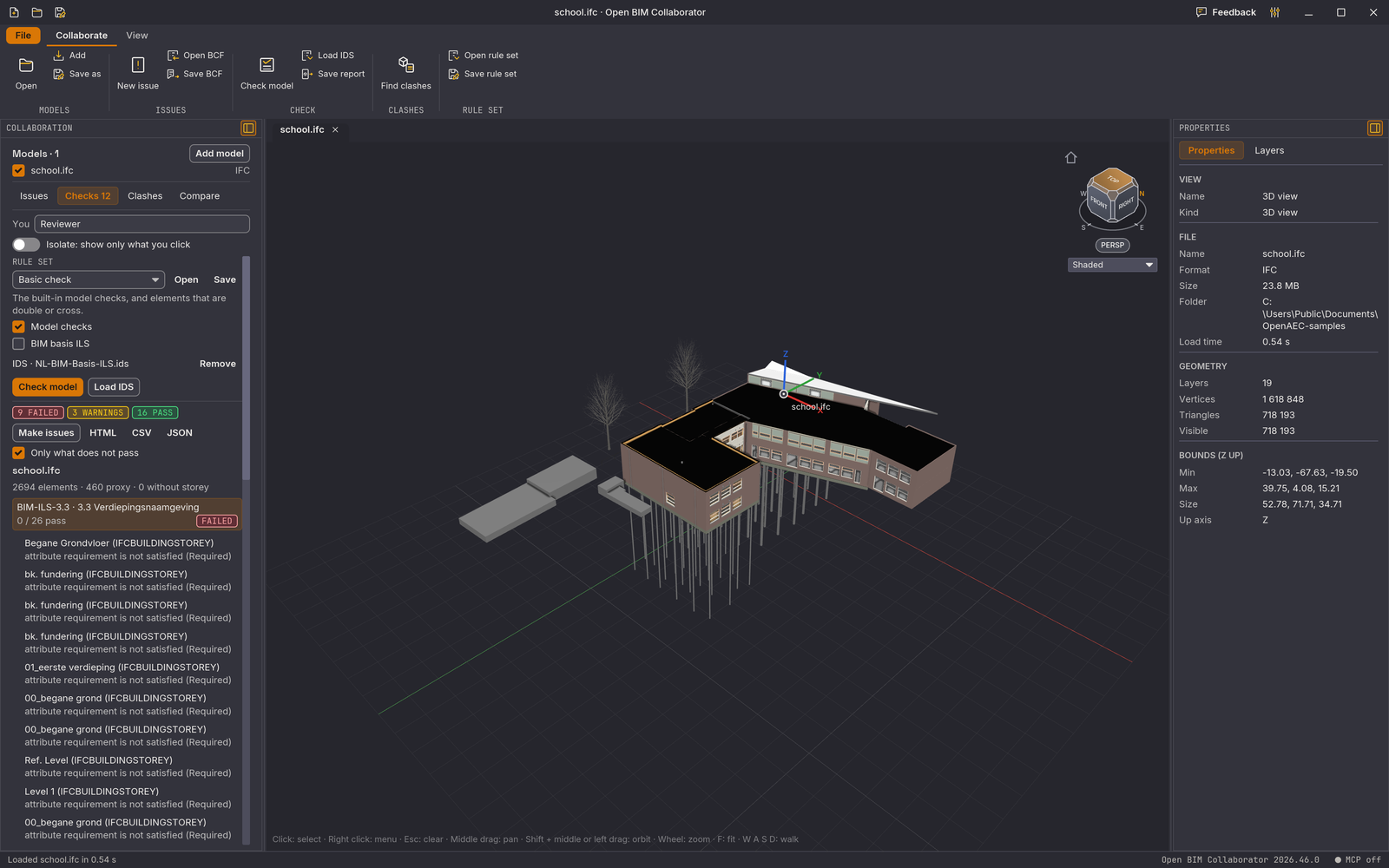
Open BIM Validator with the IFC model of a school building and, on the left, the result of an IDS check against the NL-BIM Basis ILS: what failed, warnings and what passed
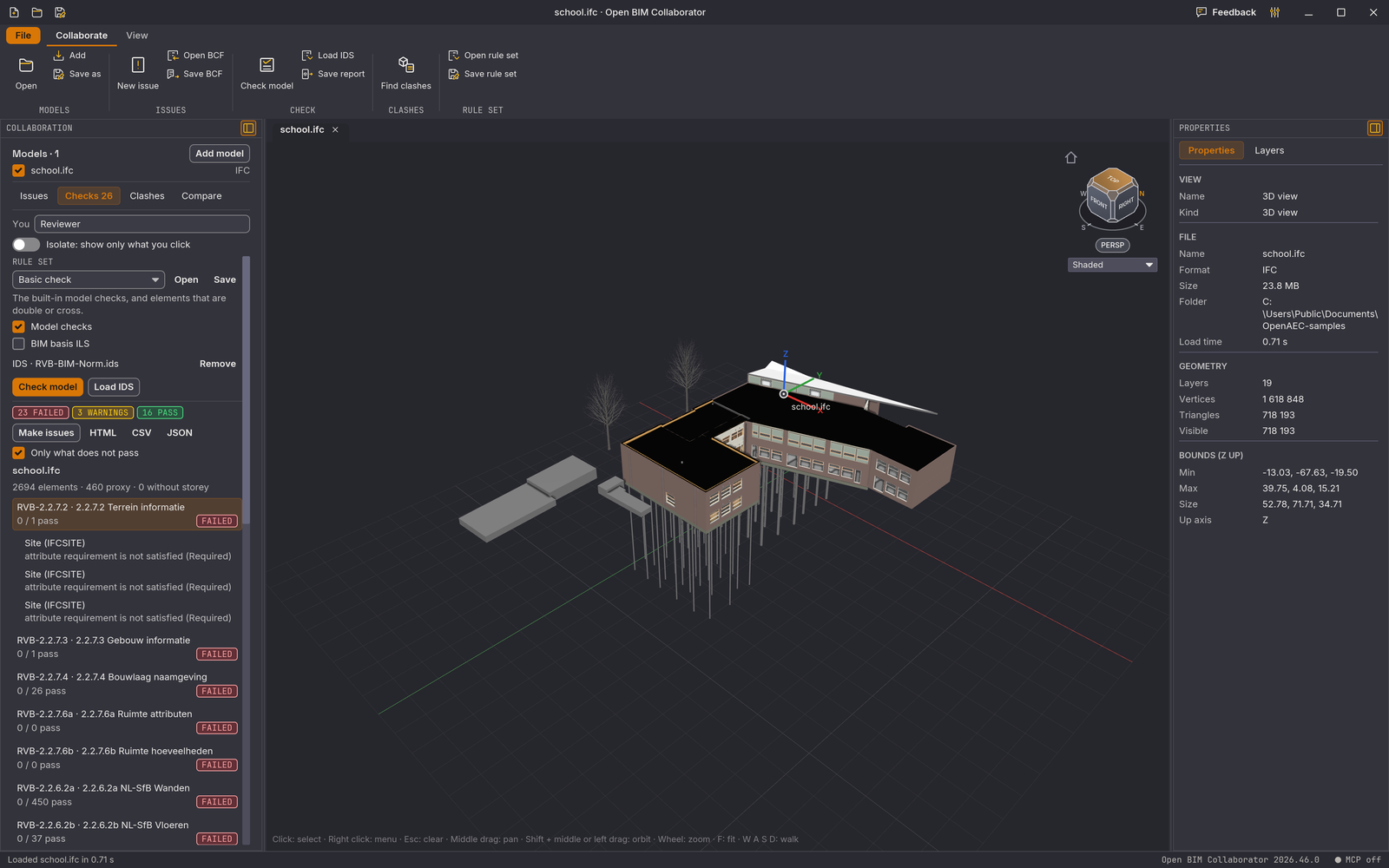
A check against the RVB BIM Norm, with the number of elements that pass per specification
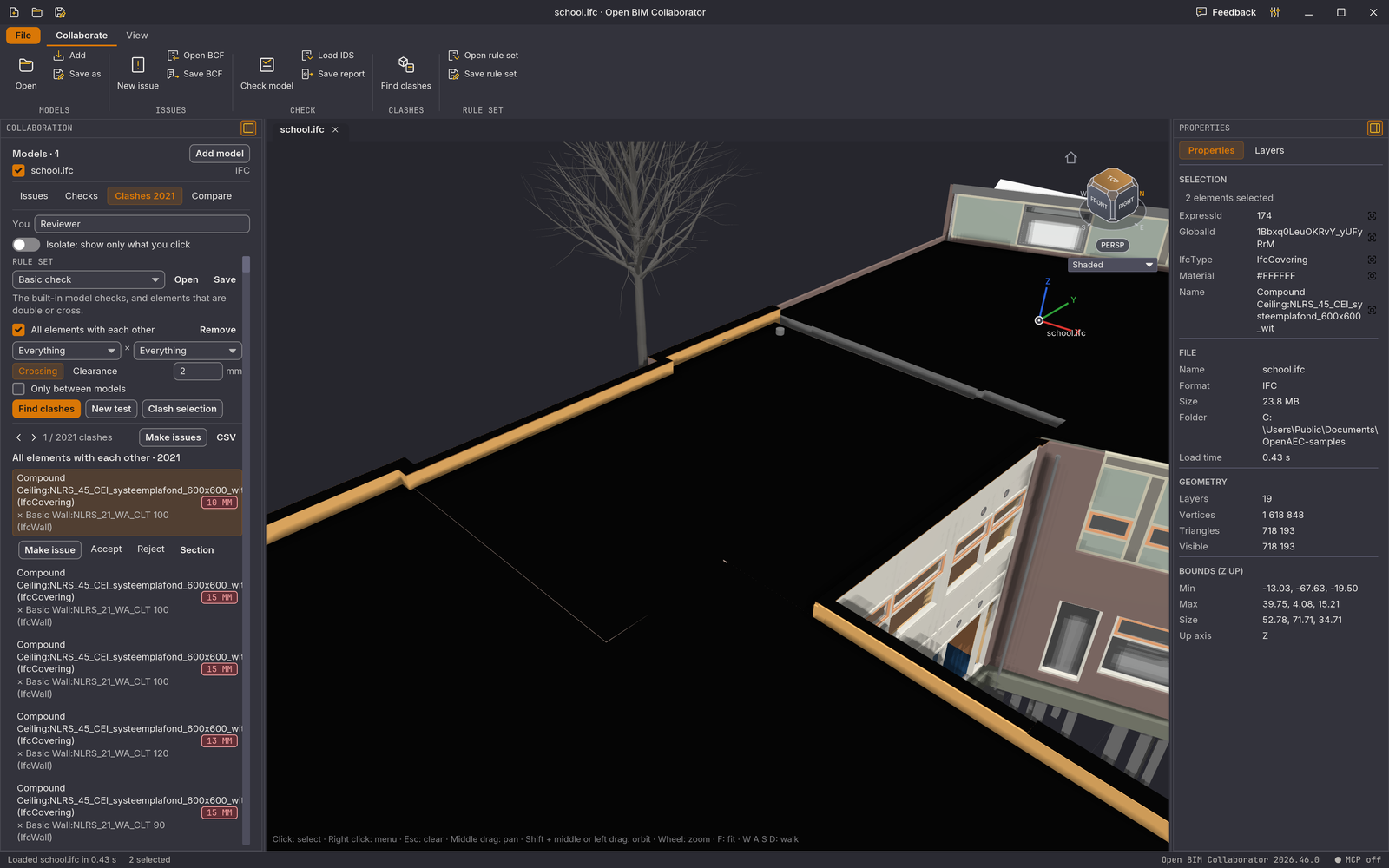
A clash between a suspended ceiling and a wall, zoomed in in 3D, with the list of clashes and their depth on the left
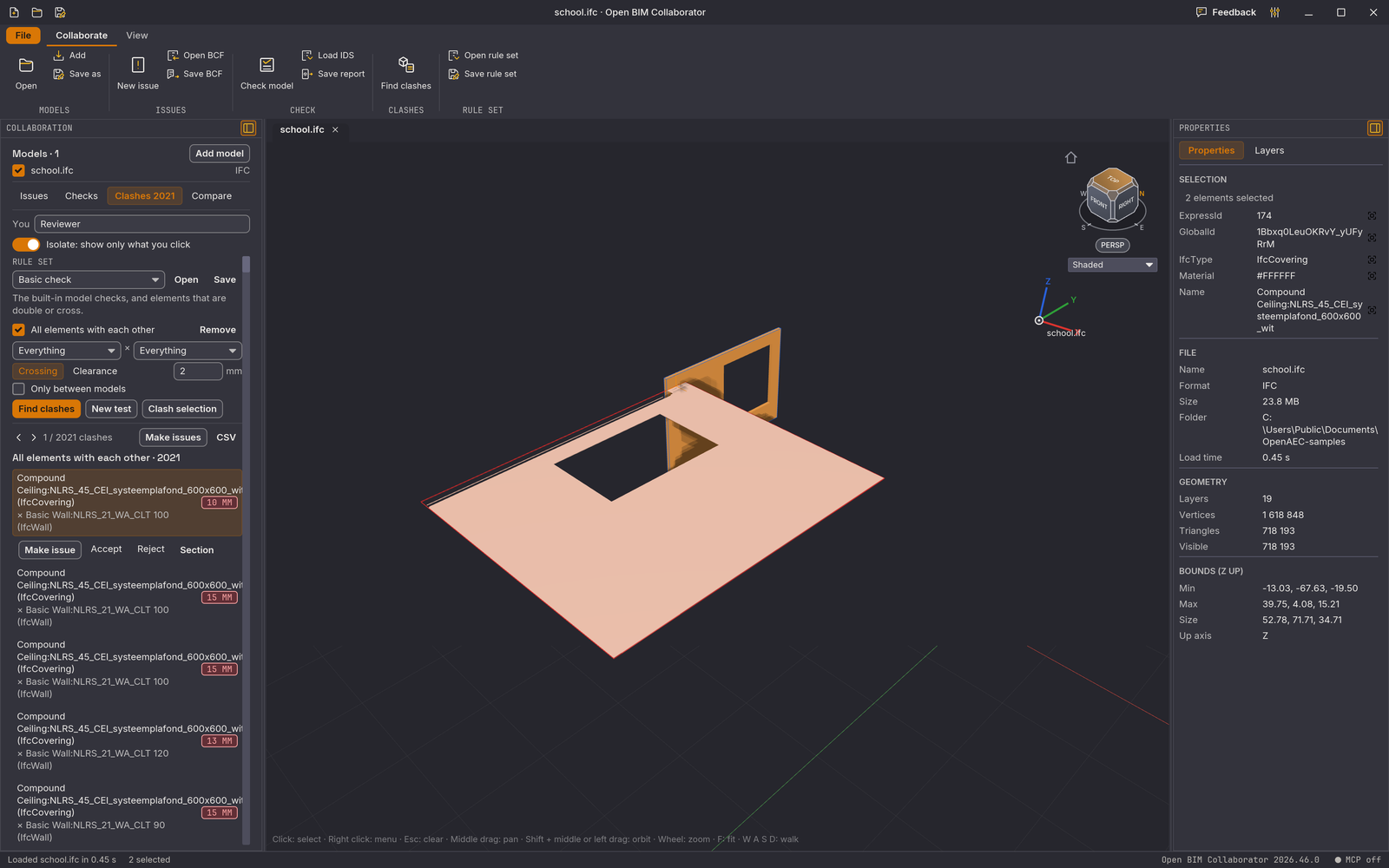
The same clash isolated: only the two elements that touch stay in view

Features

From separate models to agreements

Start with the highlights or pick a topic. This is what the desktop version can do now.

Open BIM Validator with the IFC model of a school building and, on the left, the result of an IDS check against the NL-BIM Basis ILS: what failed, warnings and what passed

01 Checking

Test the model against the requirements

Load an IDS file or pick the bundled NL-BIM Basis ILS or RVB BIM Norm. Per rule you see what failed, what is a warning, what cannot be checked and what passed, with a score from A to E. One click on a finding takes you to the element.

A clash between a suspended ceiling and a wall, zoomed in in 3D, with the list of clashes and their depth on the left

02 Clashes

Find where disciplines collide

Find intersections, too little clearance or a blocked line of sight between structure, services and architecture. The Validator works on the real geometry, groups the clashes and shows what is new and what is resolved since the last run.

The same clash isolated: only the two elements that touch stay in view

03 Review

Look at every clash on its own

Isolate a clash so only the elements involved remain, put a section box around it and accept or reject it with one key. Turn a clash, a group or everything at once into an issue.

A check against the RVB BIM Norm, with the number of elements that pass per specification

04 Rule sets

Save your check and run it again

A rule set keeps your IDS files, clash tests, tolerances, selection sets and earlier decisions in one file. That way you check every new version of the model the same way. Four rule sets come built in.

  • Federate models

    Open the models of the architect, structural engineer and services engineer together in one project, each with its own visibility switch.

  • Any format alongside

    IFC, IFCX, STEP, DWG, DXF, Revit, SketchUp, glTF and point clouds: everything Open BIM Suite opens. The checks work on IFC.

  • IDS checking

    Test a model against any IDS 1.0 file. What the check cannot judge is marked "not checkable", never "passed".

  • NL-BIM Basis ILS

    File name, storey names and heights, NL-SfB, material, load-bearing, external, fire rating and proxies, with your own pattern for storey names.

  • RVB BIM Norm 1.1

    The requirements of the Dutch Central Government Real Estate Agency as a bundled IDS file.

  • Built-in model checks

    Duplicate or crossing elements, missing units, circular references, proxies, elements without material or type, and elements outside a storey.

  • Rooms, doors and escape routes

    Room numbers, clear height, door sizes, thresholds, ramps, turning circles, fire doors and the walking distance to an exit. You set the limits yourself.

  • Score from A to E

    Every run gives a quality score from 0 to 100, so you see whether the model improves.

  • Three kinds of clash test

    Intersection (2 mm by default), clearance (50 mm by default) and line of sight, for instance whether escape route signs are visible.

  • Discipline matrix

    Per test, choose side A and B by model, layer or IFC class, only between models, per storey, and with a tolerance per type pair.

  • Classified and grouped

    Touching, partial, through or duplicate element. Group per element or per location, and see what is new and what is resolved.

  • Accept or reject

    Go through the clashes with keyboard shortcuts, isolate them and put a section box around them. Your decisions are kept.

  • Issue from the view

    An issue keeps the camera, the selection, hidden elements, the section, measurements, notes and an image. One click takes you back to that viewpoint.

  • Everything an issue needs

    Title, description, status, priority, type, assignee, due date, labels and comments. Search the list and hide closed issues.

  • BCF in and out

    Open BCF 2.0, 2.1 and 3.0. Save as BCF 2.1 or 3.0, so other BIM software can read the issues.

  • Issues from findings

    Create an issue per failed rule or per clash in one click, with the wrong elements already selected.

  • Compare versions

    Put two versions side by side and see what was added, removed or changed, in properties and in position or size down to a millimetre.

  • Colour by property

    Colour the model by model, layer, class, type or any property, with a legend. Select a value or save it as a set.

  • Selection sets

    Save a selection and use it to select, isolate or hide, also in clash tests.

  • Quantities

    Filter by class or property, group by two properties and get count, length, area and volume in a table.

  • Rule sets

    Keep IDS files, clash tests, tolerances, sets, quantity schedules, room rules and decisions in one file. Four rule sets come built in.

  • Reports

    Export the results as PDF with images, Excel, HTML, CSV or JSON, and the issues as an HTML or PDF report.

  • Operable by AI

    Through the built-in MCP server an AI assistant can create issues, run checks and clash tests, compare and export. Everything runs locally.

  • On your own computer

    The models and the checks stay on your own computer. Nothing is sent to a server.

Download

Download v2026.45.5

Free and without an account. Install it and check your models right away.

.exe installer for Windows 10 and 11 · 81.5 MB

Already using Open BIM Suite? The Validator is in there too: set the switch at the top right to Validator.

How it works

Check a model, find clashes and record issues in a few minutes.

Available now

Further along than it looks: almost everything already works

The Validator is the third module of Open BIM Suite, next to the Viewer and the Modeller. Download it on its own or use it inside the Suite. This is what it does:

  • IDS and room checks

    IDS 1.0, the NL-BIM Basis ILS, the RVB BIM Norm and checks on rooms, doors and escape routes work in the desktop version.

  • Clashes on the real geometry

    Intersection, clearance and line of sight, with a discipline matrix, groups and a decision per clash.

  • BCF 3.0

    Open issues in BCF 2.0, 2.1 and 3.0 and save them as 2.1 or 3.0.

  • Compare, colours and quantities

    Compare versions by GlobalId, colour the model by property and see quantities in a table.

Frequently asked questions

Can I use Open BIM Validator already?

Yes. Download the Windows installer on this page, or use it in the desktop version of Open BIM Suite with the switch at the top right.

How does it relate to Open BIM Suite?

Open BIM Suite is one program with three modules: the Viewer, the Modeller and the Validator. They share the same project, the same models and the same selection. The Validator can also be downloaded on its own.

What does it cost?

Nothing. The source code is free to use under the LGPL-3.0 licence.

What is IDS?

The Information Delivery Specification is an open buildingSMART standard to record information requirements in a file that software can read. Such a file says, for example, that every wall must have an NL-SfB code and a fire rating.

Does my model meet the standard if everything passes?

Not necessarily. The bundled files for the NL-BIM Basis ILS and the RVB BIM Norm are our own rendering of those standards. Requirements that IDS cannot capture you judge separately. Check an approved escape route on the drawing as well: the check works with straight lines.

Where does my model stay?

On your own computer. The Validator reads, checks and compares everything locally and sends nothing to a server.

Can I share issues with my team?

Through a BCF file, which any package with BCF support can open. Sharing through a shared folder, a BCF server or the OpenAEC SuperCloud is planned.

How does it differ from BIM Validator and BCF Manager Studio?

The Validator brings checking, clashes and issues together in one program and so replaces BIM Validator on the homepage. BCF Manager Studio remains a separate tool to manage BCF issues.

Technology

Part of Open BIM Suite: the same core as the Viewer and the Modeller.

Rust

The whole app, from reading the models to the checks and the clashes, in one fast program.

iced and wgpu

The interface and the 3D view on the graphics card, on Windows, macOS and Linux.

bim-validator-core

The validation core with the model checks, the ILS profile and the room checks.

IFC, IDS and BCF

The open buildingSMART standards for the model, the requirements and the issues.

MCP

A local MCP server with which an AI assistant can operate the Validator.

IFCX

Projects and models can be saved as IFCX, the open format of the OpenAEC ecosystem.

The releases of Open BIM Suite, which contains the Validator.

All releases on GitHub