3D viewer for construction

Open 3D Viewer Studio

Free viewer to open, measure and section building models

Open models from SketchUp, Tekla, Revit and IFC without the program they were made in. Orbit around them, measure, cut the model open and save it as IFC. As a desktop app for Windows, macOS and Linux, or right in the browser.

  • SketchUp · Tekla · Revit · IFC · glTF
  • Save as IFC 4
  • Windows · macOS · Linux · Web
  • Free · LGPL-3.0
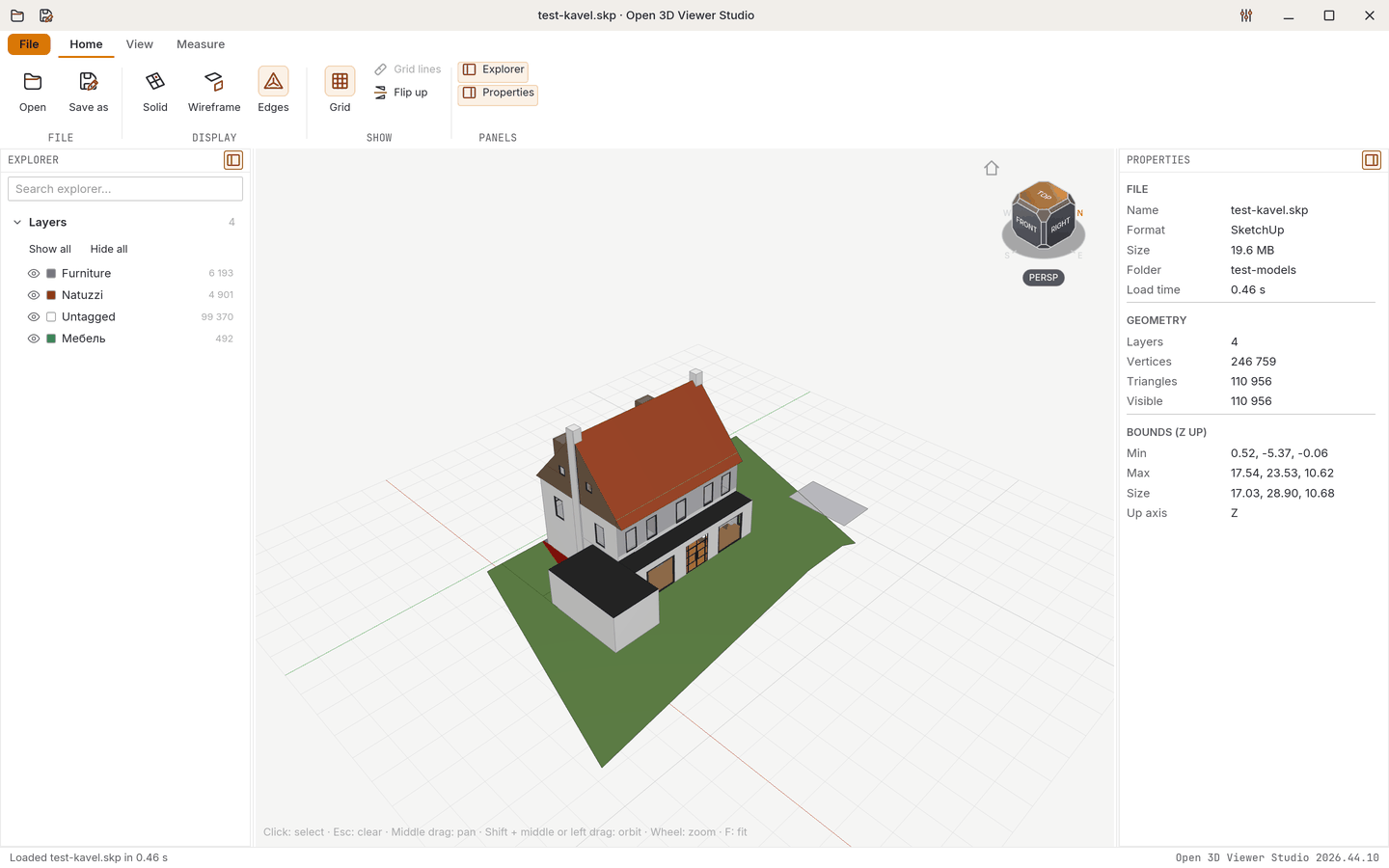
Open 3D Viewer Studio with a SketchUp model of a house on its plot, the layers on the left and the file properties on the right
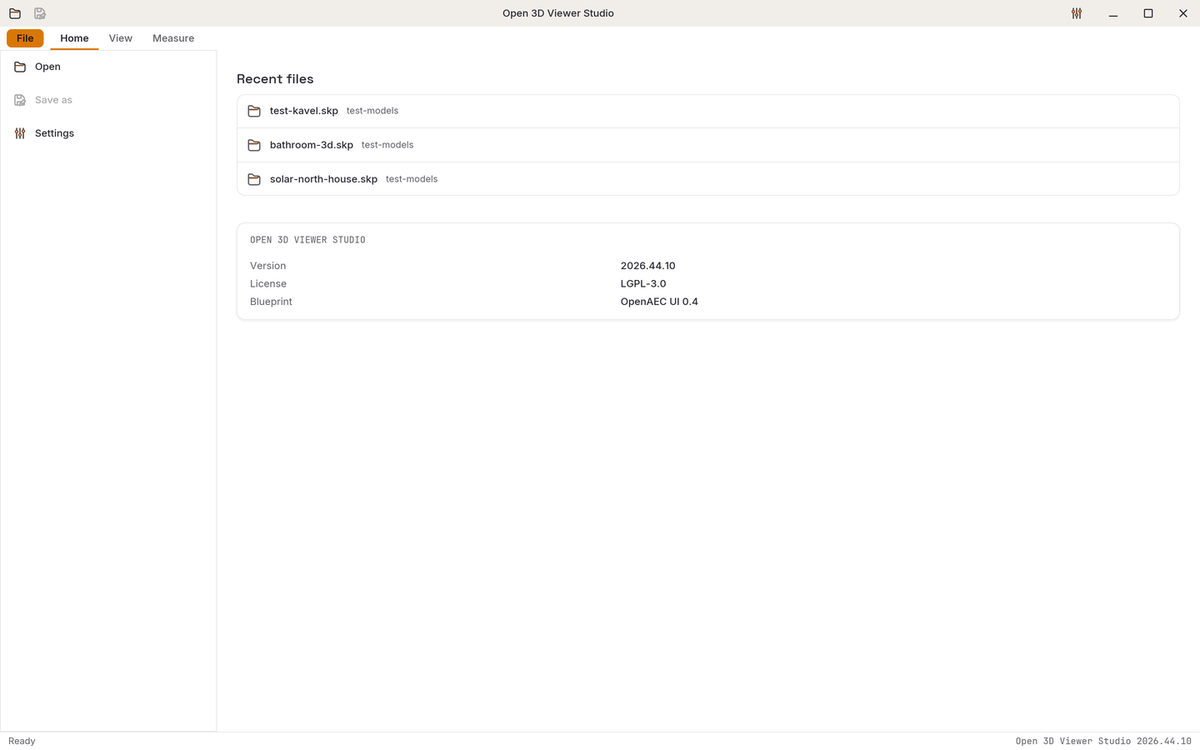
The File page with Open, Save as, Settings and three recently opened SketchUp models
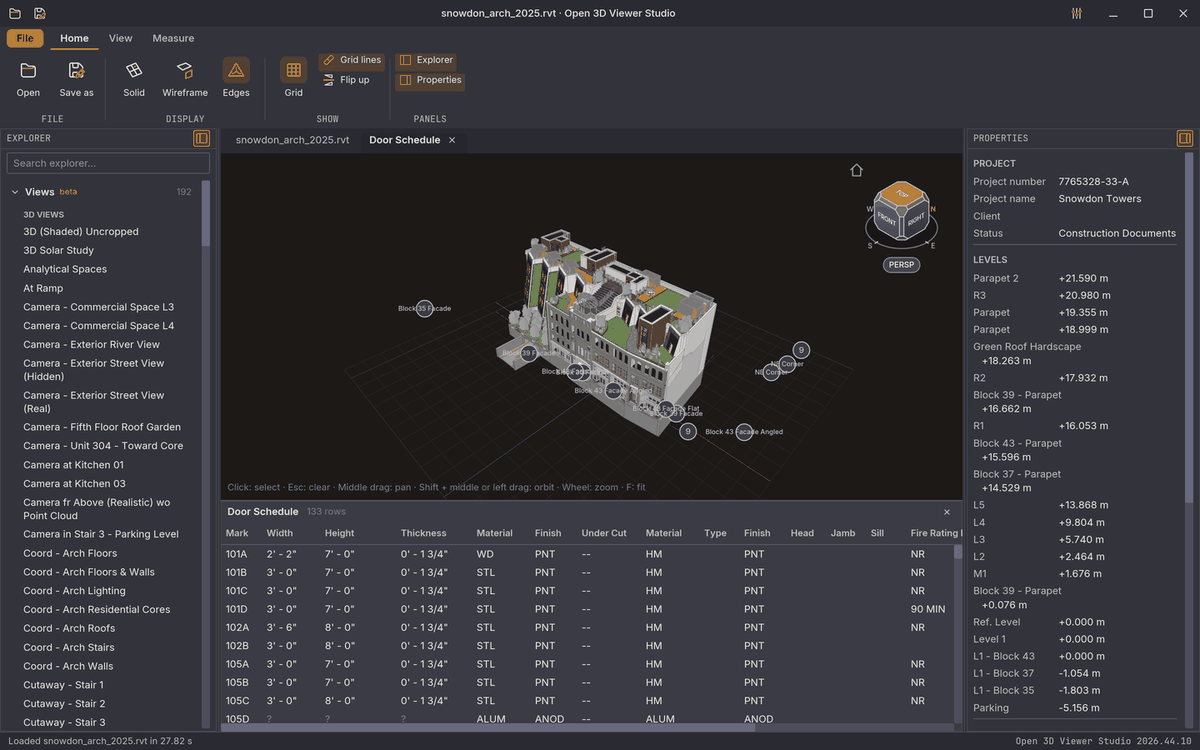
A Revit model with the door schedule as a table below the 3D view, the saved views on the left and the levels on the right
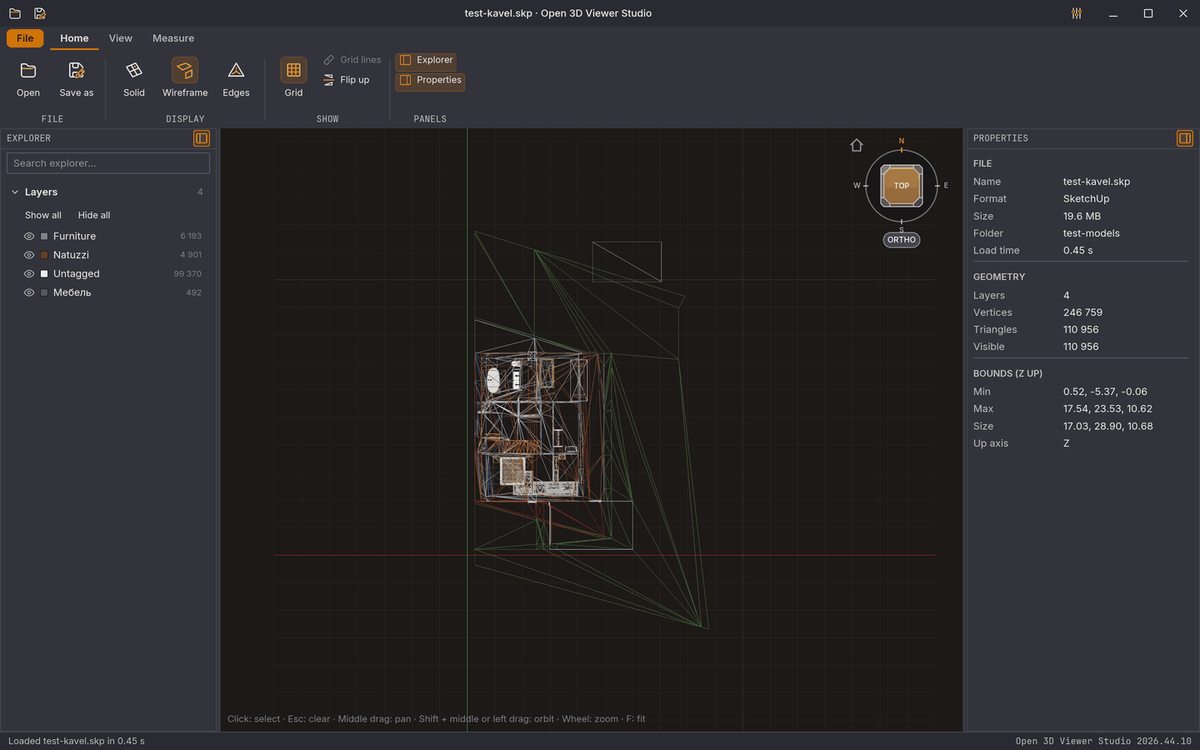
A house on its plot seen straight from above as a wireframe, with an orthographic camera and the dark theme
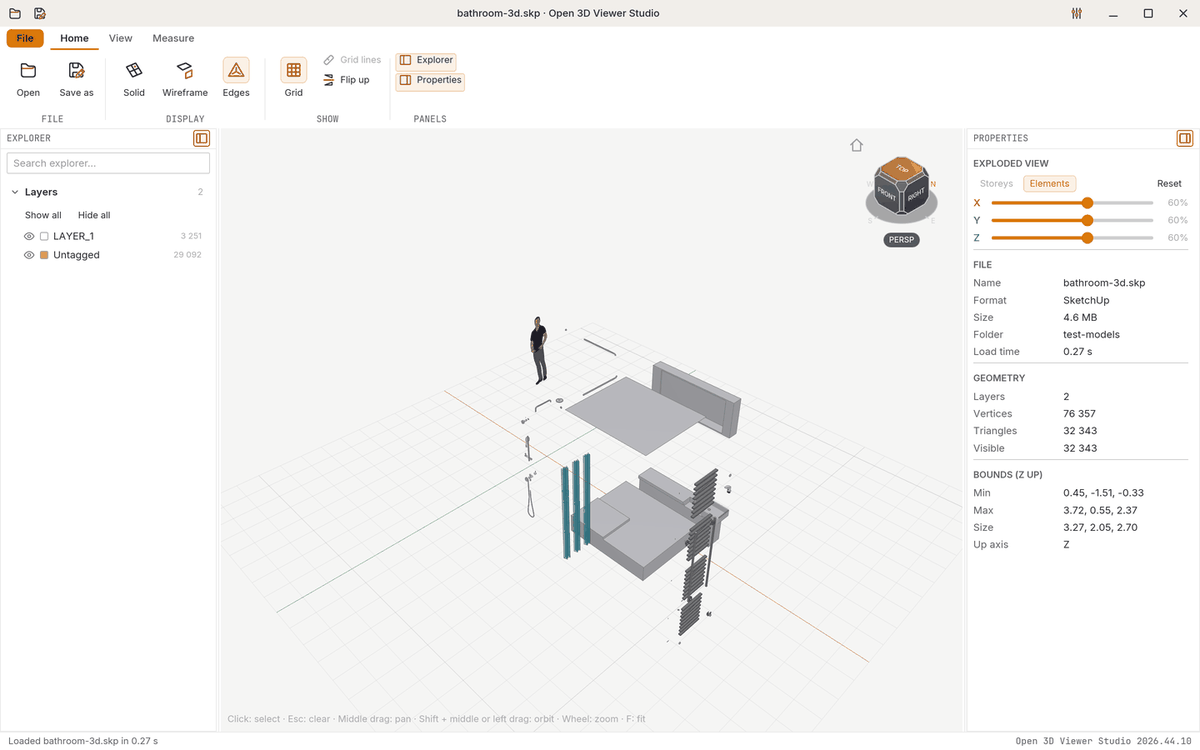
A bathroom model pulled apart per element, with the X, Y and Z sliders in the properties pane
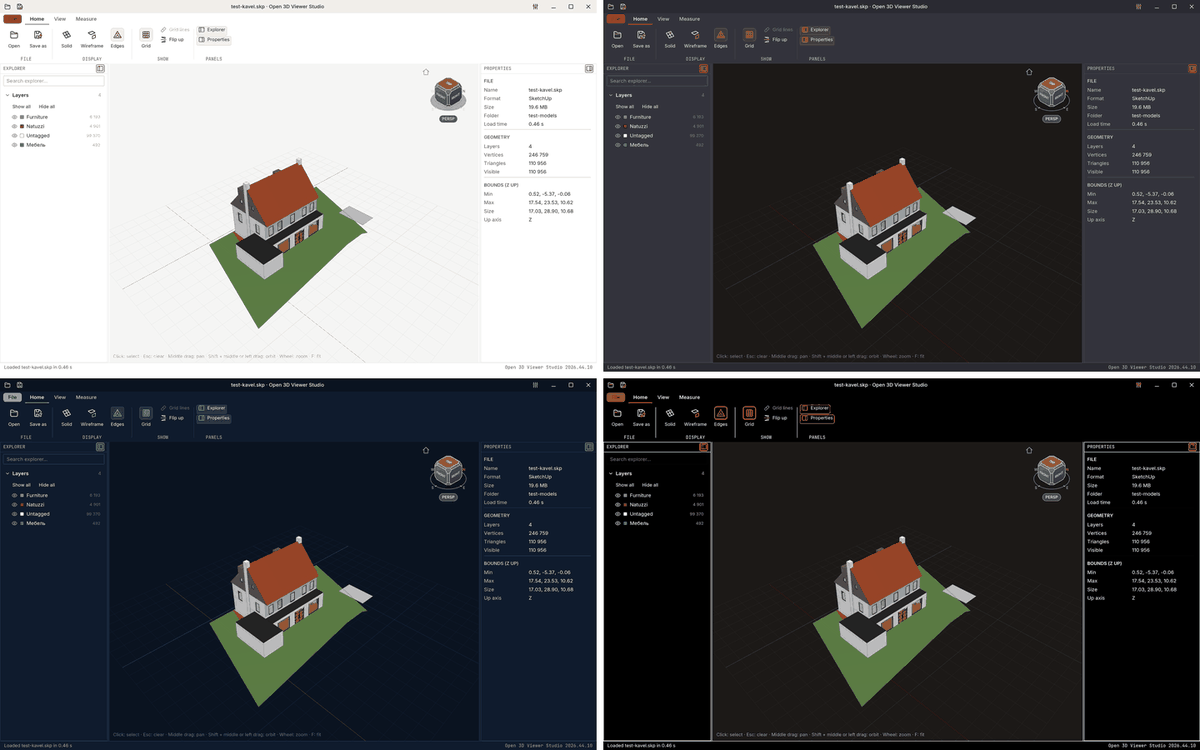
The same house model in four of the five themes: Light, Dark, Blueprint and High contrast dark

Try it right away: open your own model in the browser. The file stays on your own computer and is never uploaded. IFC and Revit open in the desktop app. Open the web version

Features

View, measure and pass on any model

Start with the highlights, or pick a topic.

The File page with Open, Save as, Settings and three recently opened SketchUp models

01 Open

Opens what you are sent

SketchUp, Tekla, Revit, IFC, Allplan, Archicad, MicroStation, STEP, glTF, OBJ, CityJSON, LandXML, DWG or DXF and point clouds, and many more, without the program the model was made in. The File page keeps your recent files at hand, so you can pick up right where you left off.

Learn more
A Revit model with the door schedule as a table below the 3D view, the saved views on the left and the levels on the right

02 Revit and IFC

Revit models with their schedules

The desktop app opens .rvt and .rfa with levels, grids, rooms and saved views, and IFC models with their spaces in a layer of their own. A schedule, such as a door schedule, opens as a table below the model; click a row and its elements are selected.

Learn more
A house on its plot seen straight from above as a wireframe, with an orthographic camera and the dark theme

03 View

See the model the way you want

Switch between solid, wireframe and edges, and between perspective and orthographic. Turn to a side with the view cube or look straight down, and switch layers on or off in the explorer.

Learn more
A bathroom model pulled apart per element, with the X, Y and Z sliders in the properties pane

04 Explode

See how it fits together

Pull the model apart per storey or per element, with a slider per axis. Cut it open with a section box or a section plane with filled cuts, and measure distances, angles, areas and polygons.

Learn more
The same house model in four of the five themes: Light, Dark, Blueprint and High contrast dark

05 Workspace

A workspace you already know

The window follows the OpenAEC Blueprint, like the other OpenAEC apps: a ribbon with every command on one tab, an explorer, properties and a status bar. Choose from five themes, work in English or Dutch and give every command your own shortcut.

Learn more
  • SketchUp

    Open .skp files from version 3 onwards, with the tags as layers.

  • Tekla Structures (beta)

    Open .db1 models, with a layer per class. Profile shapes are approximated.

  • IFC

    Open .ifc in the desktop app. Spaces sit in a layer of their own and start hidden, so you see the building right away.

  • Revit

    Open .rvt and .rfa in the desktop app, with levels, grids, rooms, saved views and schedules.

  • glTF, OBJ, STL and PLY

    The common exchange formats for 3D models, scans and 3D printing, in the browser too.

  • CityJSON and LandXML

    City models from CityJSON and CityJSONSeq, and terrain as a TIN from LandXML.

  • DWG and DXF

    The faces from model space, as 3D geometry. Not a full CAD drawing: solids, text and curves are not included.

  • Several models at once

    Open replaces the model, Add puts another file next to it. Every model has its own toggle to show or hide it.

  • Solid, wireframe or edges

    Change the display with a single key, and switch between perspective and orthographic.

  • View cube and standard views

    Turn to a side with the view cube, or choose iso, top, front or right. Press F to fit the model in view.

  • Explode

    Pull the model apart per storey or per element, with a slider per axis.

  • Explorer and properties

    Switch layers on or off, search the explorer and click an element to read its properties.

  • Revit schedules

    A schedule opens as a table below the model. Click a row and the matching elements are selected.

  • Distances and angles

    Measure by clicking in the model, or between two elements. Measurements stay in view until you clear them.

  • Areas and polygons

    Measure an area or a polygon over several points, such as a floor or a roof face.

  • Section box and section plane

    Cut the model open with a box or a single plane. The cuts are filled, so you can see what is solid.

  • Save as IFC 4

    Save any model you open as IFC 4, with storeys, classes, properties and materials. In the browser too.

  • Driven by AI

    With the open-3d-viewer-mcp MCP server, an AI assistant operates the desktop viewer, locally on your own computer.

  • In the browser too

    The same app runs in the browser on WebGPU. Your file stays on your computer and is not uploaded.

  • Five themes, two languages

    Light, Dark, Blueprint and two high-contrast themes, in English or Dutch.

  • Your own shortcuts

    Give every command your own key in Settings.

  • Recent files

    The File page shows the models you opened last, so you can carry on right away.

  • Signed installers

    For Windows, macOS and Linux, with checksums and a build attestation for every file.

Download

Download v2026.47.1

Free, no account needed. Signed installers for Windows, macOS and Linux.

.exe installer for Windows 10 and 11, no admin rights needed ·

Other platforms

Rather not install anything? The app also runs in the browser, and your file stays on your own computer. IFC and Revit open in the desktop app.

Every file is signed: Windows with Authenticode, macOS with a Developer ID and notarized by Apple, Linux with the OpenAEC OpenPGP key (13F6 D414 ADEE 4ED4 CD09 AC60 601D 86C9 3C50 4D29), and every file has a GitHub build attestation. Want to install and update all your OpenAEC apps in one go? Use the OpenAEC Installer.

New in v2026.45

Many more formats and point clouds

The releases of week 45 added dozens of formats: projects from Allplan, Archicad and Vertex BD, MicroStation drawings, STEP, IFC5 and point clouds. Revit files open twice as fast and now show their sheets too.

  • Allplan and Archicad

    Allplan drawings and, on the desktop, whole project folders. Archicad projects from version 24 to 29, with walls, slabs, columns, beams, roofs, stairs and terrain. Both in beta.

  • Vertex BD and BTL

    Timber frame projects (.vxz) and BTL files for the cutting machine, with the processings cut out and the layers grouped per panel. In the desktop app.

  • MicroStation and STEP

    DGN drawings of version 7 and 8, and STEP files (AP203, AP214, AP242) with CAD, MEP and steel parts.

  • Point clouds

    LAS, LAZ, E57, PTS, PTX, PCD and ASCII XYZ, with a layer per class or per scan.

  • IFC5, USD, FBX and more

    Also IFC5 (IFCX, alpha), zipped IFC, CityGML, GeoJSON, Shapefile, USD, COLLADA, 3MF, AMF, FBX, 3DS, VRML/X3D and OFF.

  • Revit faster, with sheets

    Revit files open twice as fast. Sheets (beta) open in a tab of their own with the placed views.

Frequently asked questions

Which files can I open?

On the desktop and in the browser: SketchUp (.skp, version 3 and later), Tekla Structures (.db1, beta), Allplan (.ndw, beta), Archicad (.pln, .pla, version 24 to 29, beta), DWG and DXF (only the faces from model space, not a full CAD drawing), MicroStation DGN (V7 and V8), STEP, IFC5 (.ifcx, alpha), CityJSON and CityJSONSeq, CityGML, GeoJSON, Shapefile, terrain as a TIN from LandXML, glTF and GLB, USD, COLLADA, 3MF, AMF, FBX, 3DS, VRML/X3D, Wavefront OBJ, OFF, STL and PLY, and point clouds in LAS, LAZ, E57, PTS, PTX, PCD and ASCII XYZ. Only in the desktop app: IFC (.ifc, also zipped), Revit (.rvt, .rfa) with levels, grids, rooms, saved views, schedules and sheets, Vertex BD (.vxz, beta), BTL and whole Allplan project folders.
Do I need to install anything?

No. Open 3D Viewer Studio also runs in the browser, on WebGPU, and your file is not uploaded. For IFC and Revit you need the desktop app, for Windows, macOS or Linux. The OpenAEC Installer installs and updates all your OpenAEC apps in one go.

What does Open 3D Viewer Studio cost?

Nothing. The app is free and open source under the LGPL-3.0-or-later. No subscription, no account and no per-user license fees.

In which file format is my work saved?

Save as creates an IFC 4 file, on the desktop and in the browser. The geometry is saved as triangles (IfcTriangulatedFaceSet), with the storeys, classes, properties and materials of the model. That way you can turn a SketchUp or Tekla model into IFC, for example. The original file stays as it was.

Which systems does it run on?

Windows 10 and 11 (x64), macOS 11 or later (universal: Apple silicon and Intel) and Linux (x86-64, as .deb, .rpm, AppImage or .tar.gz). And in any browser with WebGPU. The window is in English and Dutch.

Does it fit the way construction works?

Yes. It opens the models that architects, engineers and builders exchange, from SketchUp and Tekla to Revit and IFC, as well as city models in CityJSON and terrain from LandXML. Whatever you open, you can save as IFC 4, the open standard for BIM.

What can an AI assistant do with it?

With the MCP server open-3d-viewer-mcp (Model Context Protocol, an open standard), an AI assistant such as Claude Code, Claude Desktop or another MCP client operates the desktop viewer the way you do: opening files, looking around, selecting, reading properties, cutting sections and measuring. You see it happen in your own window. Everything stays on your computer: the viewer only listens on 127.0.0.1, with a token.

Can I view several models at once?

Yes. Open replaces the model you are viewing; Add puts another file next to it, for example the structure next to the architecture. Every model has its own toggle to show or hide it. IFC spaces sit in a layer of their own and start hidden.

What can it not do yet?

IFC and Revit open only in the desktop app. Textures become an average colour. Tekla profiles are approximated; that reader is still in beta. From DWG and DXF only the faces come along, without ACIS solids, text, dimensions and curves. And the browser version does not respond while a large model is loading.

How do I know the download is genuine?

The installers are signed: Windows with Authenticode, macOS with a Developer ID and notarized by Apple, Linux with the OpenAEC OpenPGP key (fingerprint 13F6 D414 ADEE 4ED4 CD09 AC60 601D 86C9 3C50 4D29). Every release includes SHA256SUMS and its signature SHA256SUMS.asc, and every file has a GitHub build attestation.

Technology

For those who want to know how it is built.

Rust

One Rust code base for the desktop app and the browser version.

iced

The interface is built with iced, a GUI library in Rust, without a web view or JavaScript framework.

Own renderer on wgpu

An own 3D pipeline on wgpu with 4x anti-aliasing: native on the desktop, on WebGPU in the browser.

WebAssembly

In the browser the same code runs as WebAssembly. Models are read locally; nothing goes to a server.

OpenAEC Blueprint

Window, design tokens, fonts and icons come from the OpenAEC Blueprint, the standard for all OpenAEC apps.

MCP server

open-3d-viewer-mcp connects an MCP client to the window, only through 127.0.0.1 and with a token.

File formats

What opens where

The desktop app opens every format. In the browser everything opens except IFC and Revit, and saving as IFC 4 works in both.

FormatDesktop appBrowser
SketchUp (.skp, version 3 and later)YesYes
Tekla Structures (.db1, beta)YesYes
IFC (.ifc)YesNo
Revit (.rvt, .rfa)YesNo
glTF, GLBYesYes
Wavefront OBJ, STL, PLYYesYes
CityJSON, CityJSONSeqYesYes
LandXML (terrain as a TIN)YesYes
DWG, DXF (faces from model space)YesYes
Save as IFC 4YesYes

Release notes

v2026.47.5 · 2026-11-19 · The headlines per version. Use More for the full notes.

  1. v2026.47.52026-11-19View on GitHub →
  2. v2026.47.42026-11-18View on GitHub →
  3. v2026.47.32026-11-18View on GitHub →
  4. v2026.47.22026-11-18View on GitHub →
  5. v2026.47.12026-11-17View on GitHub →
  6. v2026.46.52026-11-14View on GitHub →
  7. v2026.46.42026-11-14View on GitHub →
  8. v2026.46.22026-11-14View on GitHub →
  9. v2026.46.12026-11-14View on GitHub →
  10. v2026.46.02026-11-12View on GitHub →
  11. v2026.45.122026-11-06View on GitHub →
  12. v2026.45.112026-11-06View on GitHub →
  13. v2026.45.102026-11-05View on GitHub →
  14. v2026.45.82026-11-03View on GitHub →
  15. v2026.45.72026-11-03View on GitHub →
  16. v2026.45.62026-11-03View on GitHub →
  17. v2026.45.52026-11-03View on GitHub →
  18. v2026.45.42026-11-03View on GitHub →
  19. v2026.45.32026-11-03View on GitHub →
  20. v2026.45.22026-11-03View on GitHub →
  21. v2026.45.12026-11-03View on GitHub →
  22. v2026.45.02026-11-03View on GitHub →
  23. v2026.44.192026-10-31View on GitHub →
  24. v2026.44.182026-10-30View on GitHub →
  25. v2026.44.172026-10-29View on GitHub →
  26. v0.1.0-alpha2026-03-05
    • Custom NSIS template with file association page (Common 3D, CAD/BIM, Scene, Other)
    • Select All/Deselect All toggle, skips page in passive/update mode
    • Registry-based file associations with shell open command
    • Backend CLI arg handler emits open-file event to frontend on launch
    • EXE-only target (no MSI), custom installer icon

View all releases on GitHub →

All releases on GitHub

Open 3D Viewer Studio