GIS straight into your drawing. Choose the project location and bring in aerial photos, maps and the Dutch base registers: BGT, cadastre and KLIC on NLCS layers, with object data and a complete drawing sheet.
Plugin for Open CAD StudioInfrastructure / civilv2026.43 · Rust€ 0
Built for Dutch infrastructure practice, and usable in any country: WMS, WFS, OpenStreetMap and any coordinate system work everywhere.
What is Open Infra Studio?
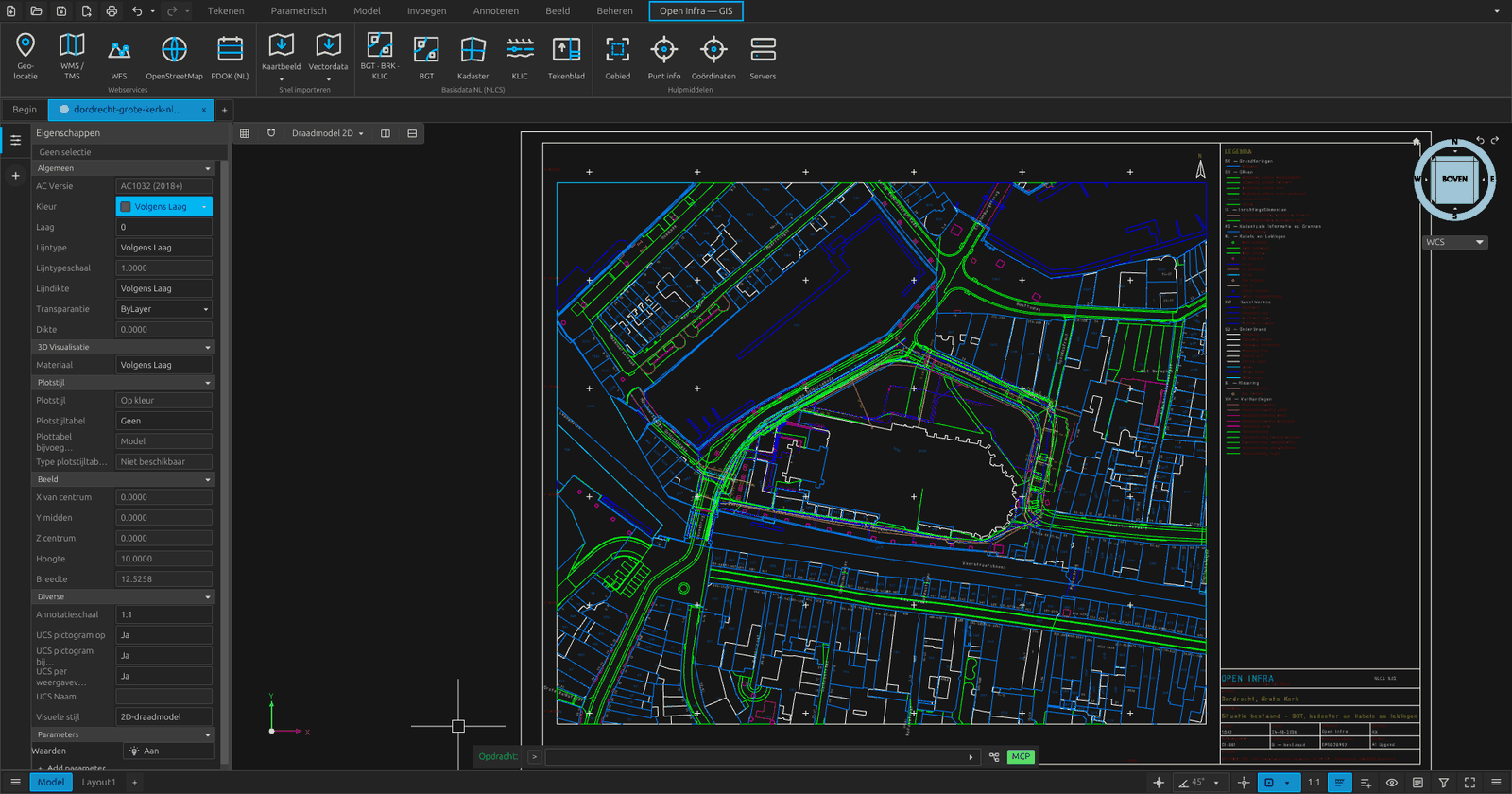
Open Infra Studio is an open-source plugin for Open CAD Studio. A ribbon tab called Open Infra — GIS brings the geographic context of a project straight into the DWG, without separate downloads and without retyping. The workbench window follows the GIS workbench we built for FreeCAD in 2020.
Choose the project location on the map, or by address, parcel or coordinates
BGT, the cadastral map and KLIC deliveries on NLCS layers
Aerial photos, elevation (AHN) and maps as underlays
WMS, WFS and OpenStreetMap, worldwide
An NLCS drawing sheet with title block, legend, north arrow, scale bar and RD crosses
28 GIS commands for the ribbon, scripts and automation
Install
Open Infra Studio is a plugin, so install Open CAD Studio first. The plugin then goes in through the Plugin Manager in a few clicks, and stays up to date there.
1
Install Open CAD Studio Download Open CAD Studio from its product page and start it.
2
Open the Plugin Manager Type PLUGINS or click Plugins on the start screen, choose Add a repository and enter OpenAEC-Foundation/Open-Infra.
3
Install and restart Install the latest release. After a restart the Open Infra — GIS ribbon tab is in your drawing.
Install by hand v2026.43
Download the file for your system and plugin.toml, put both in <config>/OpenCADStudio/plugins/openaec.open-infra/ and restart Open CAD Studio.
Release 2026.43 is built for Open CAD Studio v2026.42. Open CAD Studio only loads a plugin built against its own version; the Plugin Manager picks the right one for you.
GWW · GIS
Why Open Infra Studio?
An infrastructure drawing starts from the existing situation. Usually that means separate downloads from PDOK, a KLIC delivery in another program, putting layers on NLCS by hand and retyping a title block. Open Infra Studio does it in the drawing itself, in one window, with the official NLCS-BGT mapping and the sources credited in the title block automatically.
Free and open source, built on Open CAD Studio. The plugin runs in its own process next to the drawing, so the CAD window stays responsive while map data comes in.
Features
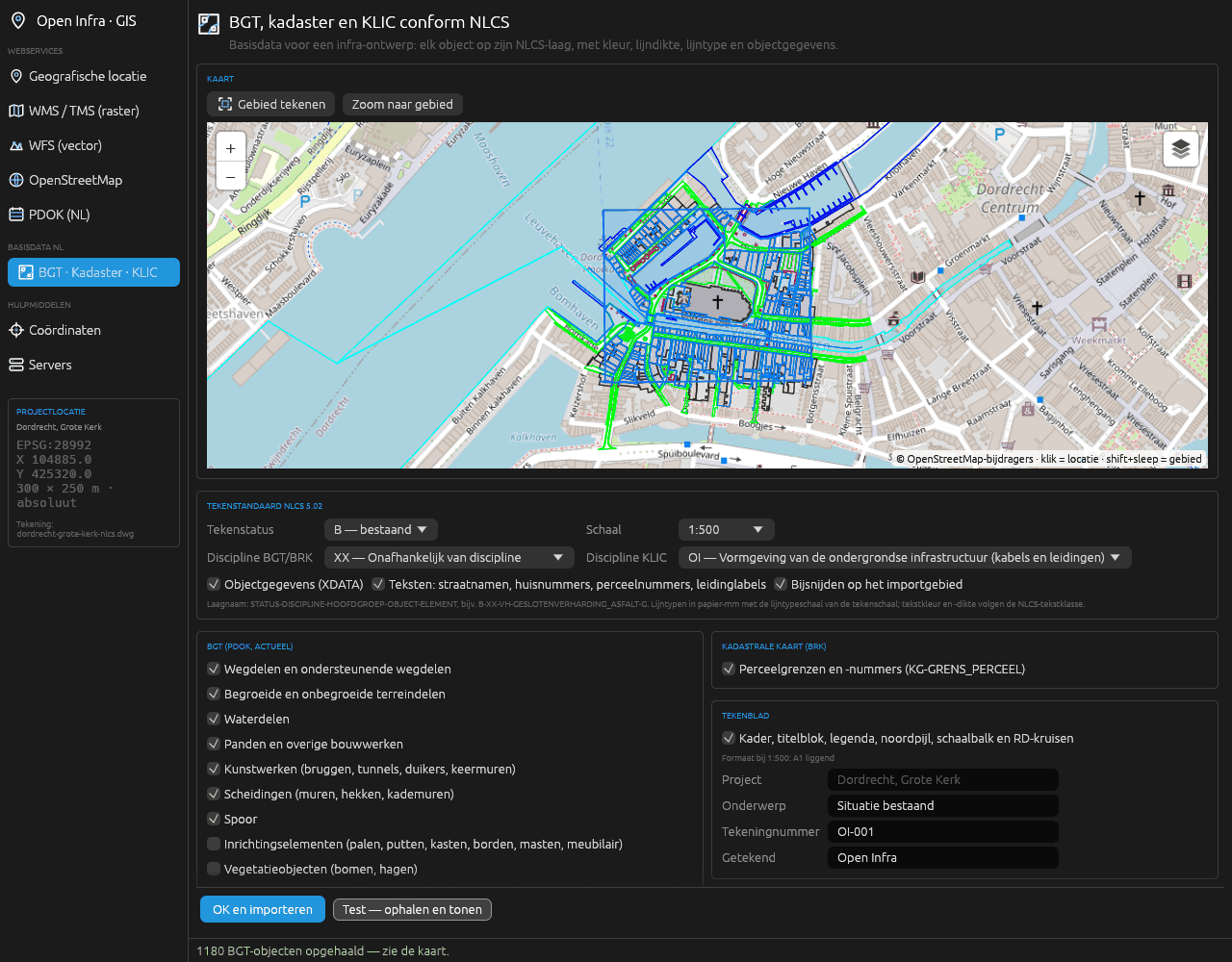
BGT to NLCS
42 PDOK collections in 11 groups, current objects only. Each object goes to the most specific rule of the official NLCS-BGT 5.0 mapping (719 rules); street names and house numbers keep their BGT rotation.
KLIC deliveries
Open the Kadaster's delivery, as a zip or as the area-information XML. 13 IMKL 2.0 themes go on their own layers, and cables and pipes are labelled per network operator with diameter and material.
Cadastral map
Parcel boundaries and parcel numbers from the BRK, the numbers at their BRK rotation, in one click on the NLCS layer for cadastral boundaries.
NLCS 5.02 built in
3,659 objects, 543 linetypes and 256 colours. Each layer gets the NLCS colour, lineweight and linetype of the chosen drawing status; linetypes are in paper millimetres and follow the plot scale.
Drawing sheet
Frame, title block listing the sources of the imports, legend of the NLCS layers used, north arrow, scale bar and RD crosses. The format, A3 to A0 landscape, is chosen automatically.
PDOK in one click
Aerial photo, cadastral map, AHN, BAG, parcels, NWB road sections, hectometre markers, ProRail tracks and waterways, without opening a window, at the saved location.
Project location
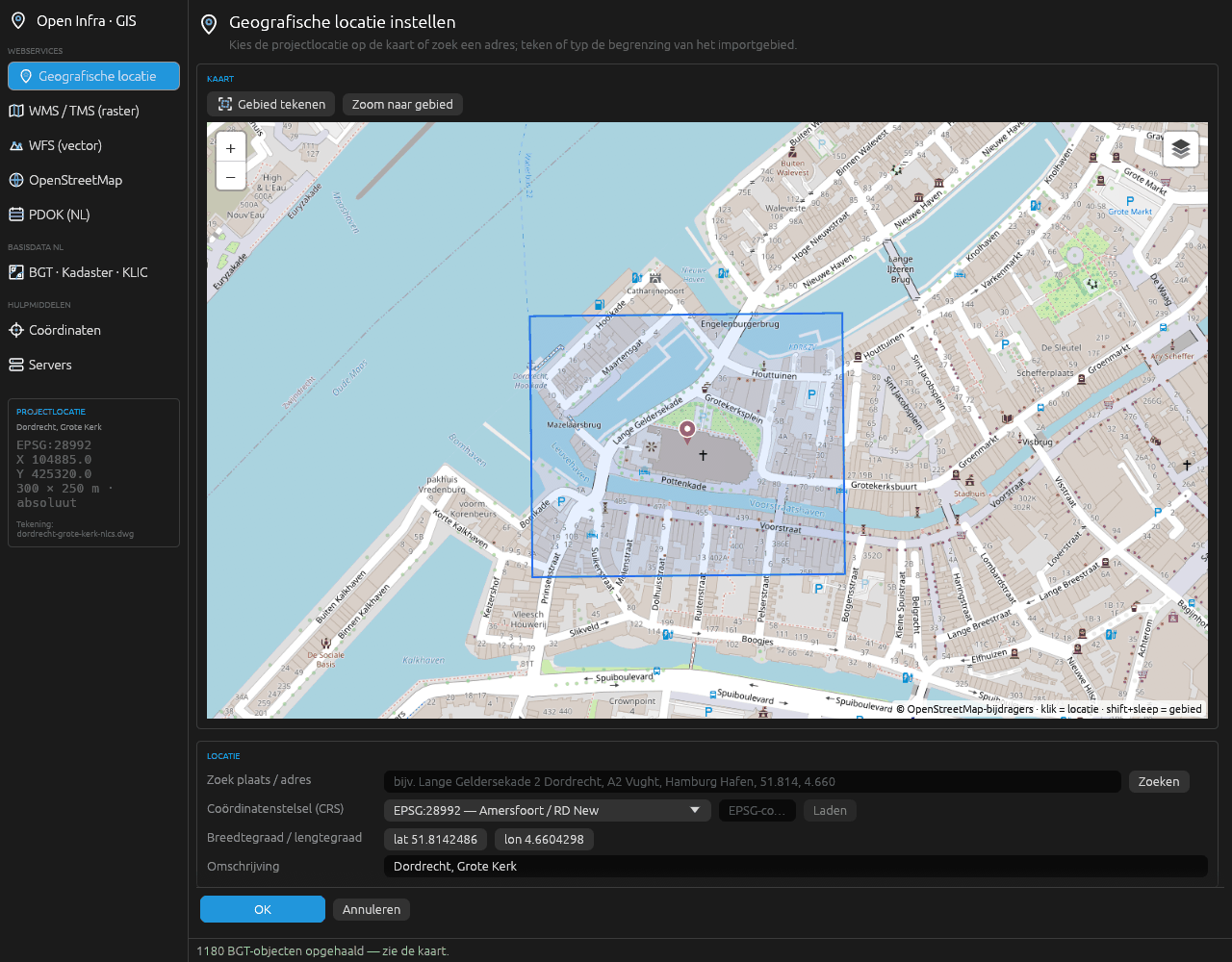
Click the map or search an address, place, parcel or coordinate pair. Choose the coordinate system, draw the import area and choose absolute or relative coordinates. The location is stored in the drawing itself.
Aerial photos and maps
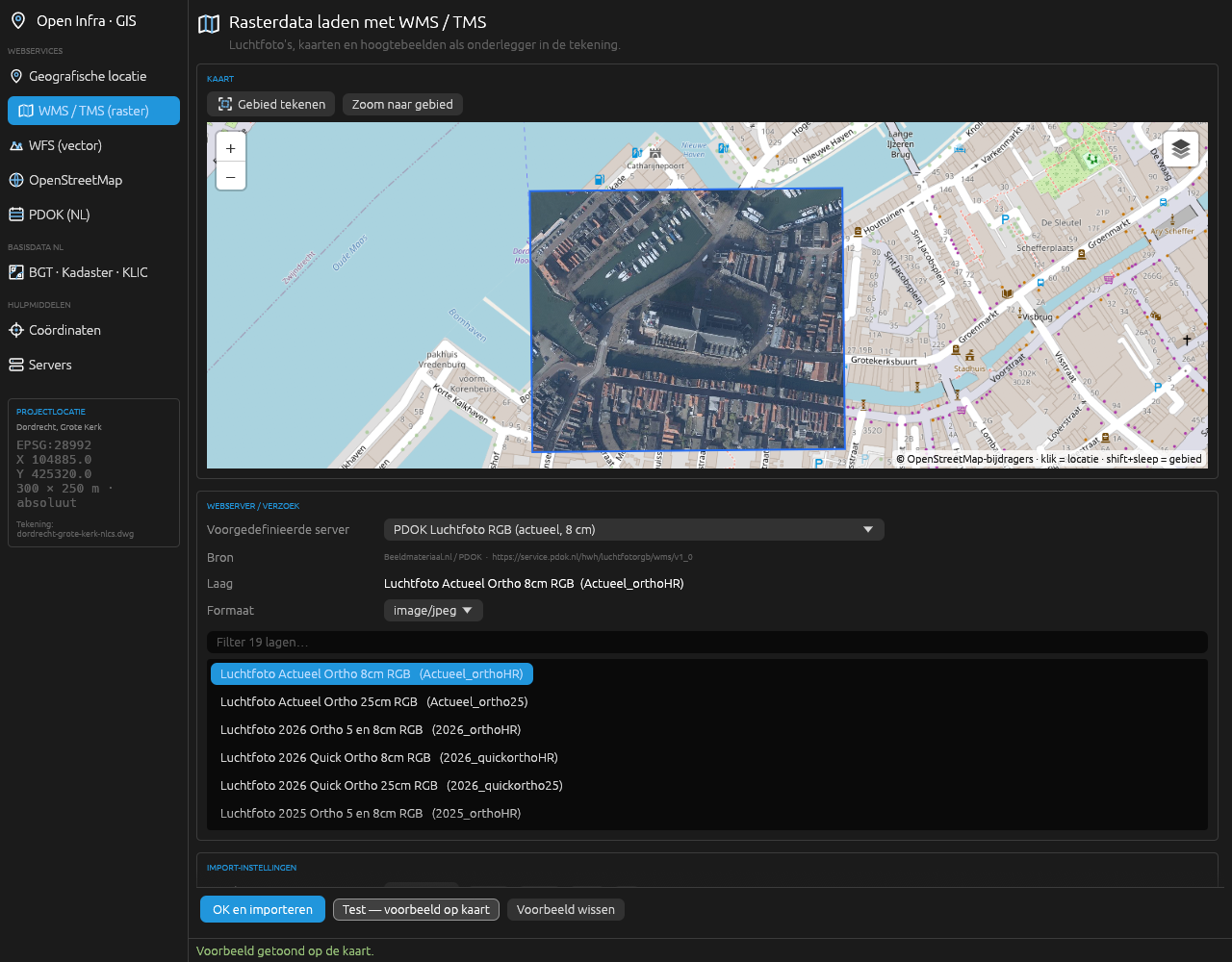
Choose a WMS or TMS server, browse its layers and preview them on the map. The images go behind the drawing as underlays. 19 server presets for the Netherlands, Flanders and the rest of the world, plus your own servers.
WFS vector data
Choose a server and a feature type, test it on the map, then choose the label attribute, the colour and clipping to the import area.
OpenStreetMap, worldwide
Buildings, roads, rail, water, civil structures, land use, cables and pipelines, fences and house numbers, anywhere in the world.
Object data
Every object keeps its source attributes: from the BGT its local id, function and material, from KLIC the network operator, diameter and material.
Any coordinate system
14 built in, including RD New, ETRS89 / UTM, Belgian Lambert, British National Grid and Lambert-93. The right UTM zone automatically anywhere in the world, and any other EPSG code is fetched once and kept with the drawing.
Five commands, one drawing
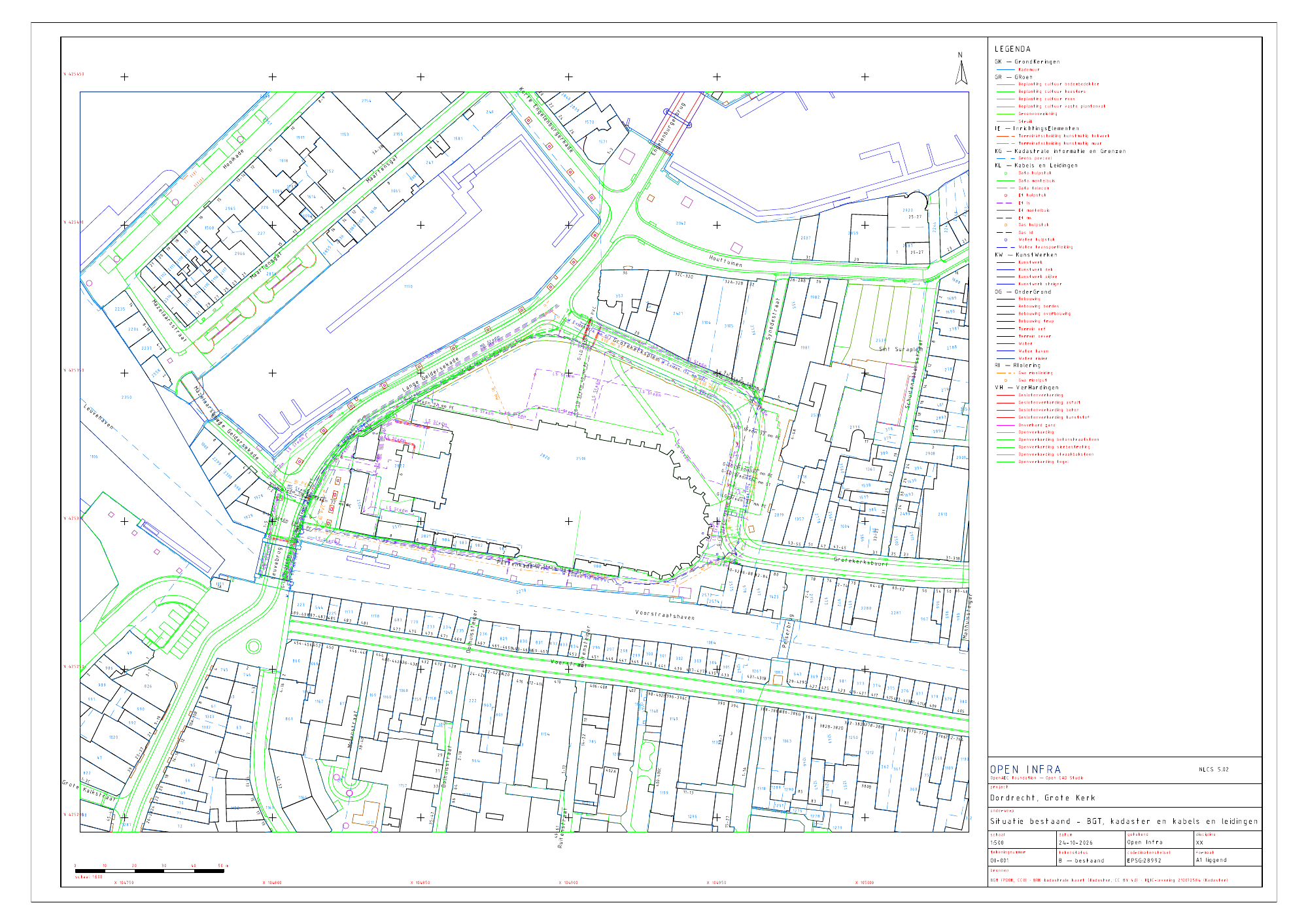
The existing situation around the Grote Kerk in Dordrecht: 300 by 250 metres in RD, on an A1 sheet at scale 1:500. Made in an empty metric drawing with these five commands.
RD accuracy. Conversion to RD uses the 7-parameter transformation, about 0.2 metres from RDNAPTRANS. That is enough for underlays and context. For setting out, use data that is already in RD; PDOK, BGT, BRK and KLIC all supply it that way.
macOS. The ribbon quick buttons and the commands work; the workbench window does not yet.
Open CAD Studio version. A plugin release belongs to one version of Open CAD Studio. When you update Open CAD Studio, update the plugin too.
Sources and licences. Data from PDOK, the Kadaster, Rijkswaterstaat and ProRail is open data; credit the source, which the title block does for the imports. NLCS is CC BY 4.0, OpenStreetMap is ODbL. The Sentinel-2 satellite background is for non-commercial use only.
Technology
Rusteguiproj4rsOGC API FeaturesIMKL 2.0NLCS 5.02GPL-3.0
About 6,900 lines of Rust. A GIS core with no dependency on the CAD host handles coordinates, servers, clipping and parsing; a separate layer turns the result into DWG entities. Builds for Windows, Linux and macOS.